

Oasisfactor
New member
- Local time
- 5:43 AM
- Messages
- 7
Assistance understanding the output of “netstat -b”
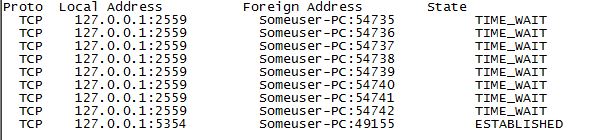
I’m using Windows 7 64-Bit, and ran netstat -b and it outputted the data to a text file. Their are 4 columns “Proto,” “Local Address,” “Foreign Address,” and “State. The “Foreign Address” states my computer name, and a port number. Their are at least 9 others like this, just a different port on the local address and foreign address. See screenshot.
What does it mean, and how can I fix it?
I’m using Windows 7 64-Bit, and ran netstat -b and it outputted the data to a text file. Their are 4 columns “Proto,” “Local Address,” “Foreign Address,” and “State. The “Foreign Address” states my computer name, and a port number. Their are at least 9 others like this, just a different port on the local address and foreign address. See screenshot.
What does it mean, and how can I fix it?
Attachments
My Computer
At a glance
Lubuntu 32 BitNoneNoneNone
- Computer type
- PC/Desktop
- Computer Manufacturer/Model Number
- None
- OS
- Lubuntu 32 Bit
- CPU
- None
- Motherboard
- None
- Memory
- None
- Graphics Card(s)
- None
- Hard Drives
- None
- Antivirus
- None
- Browser
- None


