Assitance with Windows 7 Home Premium

glennc

New member
Power User
VIP
Local time
8:45 PM
Messages
1,024
Hello to all,
I am attempting to help a relative who has Windows 7 Home Premium. I know nothing about the features of that version or how whoever set it up, set it up.
Now it boots directly to explorer. His user account, only one on the machine is username and permission set to "Administrator". I primarily wish him to have a Ctrl-Alt-Delete start to a logon with password. Is there a tutorial or will someone assist me in how to set that up. Secondly I would in the future like to set him up a user account to work from. But first things first. Thanks for any assistance.
glennc
 

My Computer My Computer

Computer type
PC/Desktop
Computer Manufacturer/Model Number
Self-Built
OS
Windows 7 Ultimate
CPU
AMD Phenom-II X4 965
Motherboard
Gigabyte GA-MA785GM-US2H
Memory
8192 MB DDR2-SDRAM
Graphics Card(s)
ATI Radeon HD 4200
Sound Card
ATI Radeon HD 4200 High Definition Audo
Monitor(s) Displays
LG Electronics W1943
Screen Resolution
1360 X 768
Hard Drives
C: 500 GB Caviar Black SATA
E: 500 GB Caviar Black SATA
PSU
Ultra LSP 750
Case
Ultra XBlaster
Cooling
2 Fans, CPU Fan, PS Fan
Keyboard
Acer
Mouse
Logitech
Internet Speed
6 MB
Glennc:

One way to solve this problem is to have them go to the control panel, and add a password to the username.
this way when windows boots it will show their username and ask for a password.
After this, to add a user that is not an administrator go to control panel and add a user making sure that it is not an administrator. Add a password and then when the machine boots, it will have 2 usernames.
Selecting the added user without admin priv's will then ask for password and setup the new users desktop and user files.

I would recommend that anti-virus and other general programs be installed under the first administrator userid and make sure that the programs installed are allowed for all users of the computer.

Is this the kind of info that you wanted?

One thing to remember is to never delete the original adminstrator priv's userid or you will be screwed. :D

Rich
 

My Computer My Computer

Computer type
Laptop
Computer Manufacturer/Model Number
Toshiba Laptop Qosimo X870
OS
Windows 7 Pro x64 SP1
CPU
Intel Core I7
Motherboard
Toshiba Qosmio
Memory
16 Gigs
Graphics Card(s)
NVIDIA GeForce GTX 670M
Monitor(s) Displays
17.7" laptop
Screen Resolution
1600 x 900
Hard Drives
256 Gig SanDisk SSD for C
256 Gig Intel SSD for D
Internet Speed
50/25 FIOS
Antivirus
Vipre (all you can eat for 10 machines)
Browser
IE and FF
Other Info
I have dos 6.22, wfwg 3.11, win98, 2000 and xp VHD's available for testing. MS's Virtual PC works great.
Glennc:

One way to solve this problem is to have them go to the control panel, and add a password to the username.
this way when windows boots it will show their username and ask for a password.
After this, to add a user that is not an administrator go to control panel and add a user making sure that it is not an administrator. Add a password and then when the machine boots, it will have 2 usernames.
Selecting the added user without admin priv's will then ask for password and setup the new users desktop and user files.

I would recommend that anti-virus and other general programs be installed under the first administrator userid and make sure that the programs installed are allowed for all users of the computer.

Is this the kind of info that you wanted?

One thing to remember is to never delete the original adminstrator priv's userid or you will be screwed. :D

Rich

Hello Rich,
Thank you for your knowledge, time and helpfullness. That should pretty well cover it. I found a tutorial that said you needed to go into local policy using secpol.msc and set certain parameters to get the boot Ctrl-Alt-Delete + Login password display. Still overwhelmed with info that is obvious and beginner level for most of the members. Appreciate it!
glennc
 

My Computer My Computer

Computer type
PC/Desktop
Computer Manufacturer/Model Number
Self-Built
OS
Windows 7 Ultimate
CPU
AMD Phenom-II X4 965
Motherboard
Gigabyte GA-MA785GM-US2H
Memory
8192 MB DDR2-SDRAM
Graphics Card(s)
ATI Radeon HD 4200
Sound Card
ATI Radeon HD 4200 High Definition Audo
Monitor(s) Displays
LG Electronics W1943
Screen Resolution
1360 X 768
Hard Drives
C: 500 GB Caviar Black SATA
E: 500 GB Caviar Black SATA
PSU
Ultra LSP 750
Case
Ultra XBlaster
Cooling
2 Fans, CPU Fan, PS Fan
Keyboard
Acer
Mouse
Logitech
Internet Speed
6 MB

My Computer My Computer

Computer Manufacturer/Model Number
* BFK Customs *
OS
W 7 64-bit Ultimate
CPU
Intel Q9550 Yorkfield
Motherboard
ASUS P5Q Pro
Memory
8GB Dominator 8500C5D
Graphics Card(s)
ATI : XFX 5870
Sound Card
Realtek HD Audio 7-1
Monitor(s) Displays
1x 47" LCD HDMI & 3x 26" LCD HDMI
Screen Resolution
1920x1080P & 1920x1200
Hard Drives
1x 80GB Intel X25-M G2 SSD : 1x 500GB & 1x 640GB WD Caviar Black(s)
PSU
Corsair 620HX
Case
Cooler Master RC-690
Cooling
Tuniq Tower 120, 2x 140mm and 3x 120mm case fans
Keyboard
Microsoft 500
Mouse
Razer Diamondback 3G
Internet Speed
14 Mb/s
Other Info
1x Koutech 3Gb/s SATA HDD Hot Swap Rack
Hello glennc.


This tutorial at the link is the best way to add what you want.


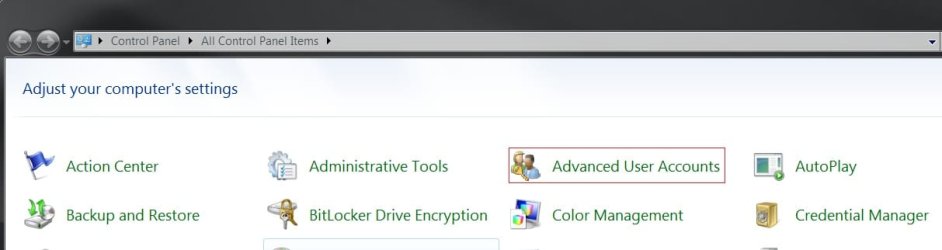
Control Panel - Add Advanced User Accounts

Hello Bare Foot Kid,
Thank you for joining in. But I am especially dense today and require a bit of hand holding if you can assist. I have Windows 7 Ultimate 64-bit and I was looking to follow the directions and understand them prior to assisting the 7 Home Premium user. In my version and I am the only account, there is no Advanced User Account in my control panel. I did notice down at the bottom a link to make a Ctr-Alt-Del startup but I also need to get him a plain user account and set up passwords and privileges. So I am in over my head for the moment. Any as always, assistance is appreciated.
glennc
 

My Computer My Computer

Computer type
PC/Desktop
Computer Manufacturer/Model Number
Self-Built
OS
Windows 7 Ultimate
CPU
AMD Phenom-II X4 965
Motherboard
Gigabyte GA-MA785GM-US2H
Memory
8192 MB DDR2-SDRAM
Graphics Card(s)
ATI Radeon HD 4200
Sound Card
ATI Radeon HD 4200 High Definition Audo
Monitor(s) Displays
LG Electronics W1943
Screen Resolution
1360 X 768
Hard Drives
C: 500 GB Caviar Black SATA
E: 500 GB Caviar Black SATA
PSU
Ultra LSP 750
Case
Ultra XBlaster
Cooling
2 Fans, CPU Fan, PS Fan
Keyboard
Acer
Mouse
Logitech
Internet Speed
6 MB

My Computer My Computer

Computer Manufacturer/Model Number
* BFK Customs *
OS
W 7 64-bit Ultimate
CPU
Intel Q9550 Yorkfield
Motherboard
ASUS P5Q Pro
Memory
8GB Dominator 8500C5D
Graphics Card(s)
ATI : XFX 5870
Sound Card
Realtek HD Audio 7-1
Monitor(s) Displays
1x 47" LCD HDMI & 3x 26" LCD HDMI
Screen Resolution
1920x1080P & 1920x1200
Hard Drives
1x 80GB Intel X25-M G2 SSD : 1x 500GB & 1x 640GB WD Caviar Black(s)
PSU
Corsair 620HX
Case
Cooler Master RC-690
Cooling
Tuniq Tower 120, 2x 140mm and 3x 120mm case fans
Keyboard
Microsoft 500
Mouse
Razer Diamondback 3G
Internet Speed
14 Mb/s
Other Info
1x Koutech 3Gb/s SATA HDD Hot Swap Rack
Start be having a look at this tutorial at the link below.


How to Create, Delete and Modify User Accounts in Windows 7


You have to merge the reg file from the other tutorial to add the advanced user accounts to the control panel.

click to enlarge
View attachment 135885

Hey Bare Foot Kid,
Sorry... I do not know what you just said. I don't have a User and Family Protection setting apparent. None of the shown pages match what I have. So I don't know how to get the Advanced User Setting other than those cryptic (to me)
W7 commands, which I am loath to do without further knowledge or guidance. Several questions have presented themselves. I am the only account so I am Administrator/User. The Home Premium set up shows that he is only the Administrator. In my case I would like to set up an Administrator Account and a separate unprivileged User Account, so I don't know how to do that. I remember that there is a hidden Administrator Account and this confuses what my current status is and what steps that I need to change to the above mentioned setup for my computer.
In reference to the W7 Home Premium, there is no Ctrl-Alt-Del - - Password setting. So do I need to set up a password for the Administrator Account on his computer and then create a unprivileged User Account and then set it to Ctrl-Alt-Del start????? I am very confused. Again I apologize, thanks much for your help.
glennc
 

My Computer My Computer

Computer type
PC/Desktop
Computer Manufacturer/Model Number
Self-Built
OS
Windows 7 Ultimate
CPU
AMD Phenom-II X4 965
Motherboard
Gigabyte GA-MA785GM-US2H
Memory
8192 MB DDR2-SDRAM
Graphics Card(s)
ATI Radeon HD 4200
Sound Card
ATI Radeon HD 4200 High Definition Audo
Monitor(s) Displays
LG Electronics W1943
Screen Resolution
1360 X 768
Hard Drives
C: 500 GB Caviar Black SATA
E: 500 GB Caviar Black SATA
PSU
Ultra LSP 750
Case
Ultra XBlaster
Cooling
2 Fans, CPU Fan, PS Fan
Keyboard
Acer
Mouse
Logitech
Internet Speed
6 MB
Well it appears that no one has taken up the gauntlet to champion a relative newbie in my problem. May I state, that one my computer with W7 Ultimate, I figured out previously how to get the Ctrl-Alt-Del start. And as Administrator/User, I created a user account for myself and my wife. I told her she is not allowed to facebook on this computer:cry:. Since W7 Home Premium doen't have local policy editor I still have been unable as yet to find a way to set that machine up with a secure logon. This is my thoughts on a plan. He is currently Administrator. Have him set a password and Ctrl-Alt-Del to let him on. Once rebooted and on it is easy to set up a User account for him to use. My question is still how. I don't know what the differences are between W7 Ult. and W7 Home Premium. Just hope they are close enough to figure something out.
Still open for any assistance!!
glennc
 

My Computer My Computer

Computer type
PC/Desktop
Computer Manufacturer/Model Number
Self-Built
OS
Windows 7 Ultimate
CPU
AMD Phenom-II X4 965
Motherboard
Gigabyte GA-MA785GM-US2H
Memory
8192 MB DDR2-SDRAM
Graphics Card(s)
ATI Radeon HD 4200
Sound Card
ATI Radeon HD 4200 High Definition Audo
Monitor(s) Displays
LG Electronics W1943
Screen Resolution
1360 X 768
Hard Drives
C: 500 GB Caviar Black SATA
E: 500 GB Caviar Black SATA
PSU
Ultra LSP 750
Case
Ultra XBlaster
Cooling
2 Fans, CPU Fan, PS Fan
Keyboard
Acer
Mouse
Logitech
Internet Speed
6 MB
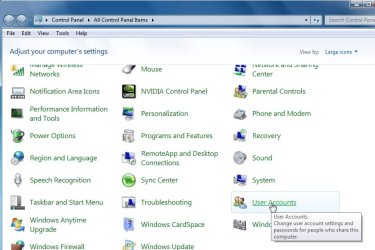
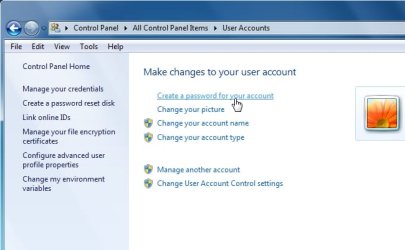
Have you tried going to Control Panel>User Accounts>Manage another account>Create a New account>Standard user account?
 
Not clear what you are saying.

Don't you have this on your machine?

USERACS1.jpg

USERACS2.jpg
 

My Computers My Computers

System One System Two

  • Computer type
    PC/Desktop
    OS
    7 X64
    CPU
    i5 8400
    Motherboard
    gigabyte b365m ds3h
    Memory
    2x8gb 3200mhz
    Hard Drives
    various
    PSU
    pure power 11 400w cm
    Case
    Coolermaster
    Cooling
    cryorig m9i
  • Computer type
    PC/Desktop
    OS
    7x64
    CPU
    g5400
    Motherboard
    ga b365m ds3h
    Memory
    8gb ddr4 2400
    PSU
    xfx pro 450w
Have you tried going to Control Panel>User Accounts>Manage another account>Create a New account>Standard user account?

Hello gregrocker,
Bear with me, the Computer in question is over 3 hours away and the op is much less skilled then I am. If I can't figure it out and then talk him through it, it isn't going to happen. He also has no separate backup. First I want him to get an external and do that. I visited and spent half a day cleaning up the malware and viruses and such. He didn't even remember that the computer wasn't supposed to boot to safe mode/repair/start windows normally page. He is been doing this for months.
I have last night changed my computer. I added two users with passwords, not to hard. Didn't find out by chance that the Administrative account was still a Administrator/User account that is the default. Managed to remove the User from that Account. Now, does that unhide the real Adminstrator account? I have no idea.
So between the screens shown in the tutorials and the snippets posted of the Control Panel on my machine, they do not match. I have no Advanced User Setting, I have no User and Family Protection Setting.
BTW for everyone, I have NOT updated to the SP1 RC. I have been updating automatically so I am as close as you can be, I think.
On the ops computer it now boots to one user with the Administrator priveledge without a Ctrl-Alt-Delete required to show password box. He does not have any password. To make matters even worse. He connects the DSL line to his router and uses the computer completely wireless. He has no idea of his WiFi security settings.
One thing at a time. He is a relative.
I want his computer to require a Ctrl-Alt-Del and a secure Password. I then can set him up a user account, myself I think.
Thanks gregrocker
glennc
 

My Computer My Computer

Computer type
PC/Desktop
Computer Manufacturer/Model Number
Self-Built
OS
Windows 7 Ultimate
CPU
AMD Phenom-II X4 965
Motherboard
Gigabyte GA-MA785GM-US2H
Memory
8192 MB DDR2-SDRAM
Graphics Card(s)
ATI Radeon HD 4200
Sound Card
ATI Radeon HD 4200 High Definition Audo
Monitor(s) Displays
LG Electronics W1943
Screen Resolution
1360 X 768
Hard Drives
C: 500 GB Caviar Black SATA
E: 500 GB Caviar Black SATA
PSU
Ultra LSP 750
Case
Ultra XBlaster
Cooling
2 Fans, CPU Fan, PS Fan
Keyboard
Acer
Mouse
Logitech
Internet Speed
6 MB
Not clear what you are saying.

Don't you have this on your machine?

View attachment 136459

View attachment 136460

Howdy SIW2,
Yes those are the pages I see, not the ones shown above or in the tutorials. The previous response to gregrocker kinda re-sums up the situation and the goal. As you can see from all the previous posts my skill level is limited.
Thanks you kindly.
glennc
 

My Computer My Computer

Computer type
PC/Desktop
Computer Manufacturer/Model Number
Self-Built
OS
Windows 7 Ultimate
CPU
AMD Phenom-II X4 965
Motherboard
Gigabyte GA-MA785GM-US2H
Memory
8192 MB DDR2-SDRAM
Graphics Card(s)
ATI Radeon HD 4200
Sound Card
ATI Radeon HD 4200 High Definition Audo
Monitor(s) Displays
LG Electronics W1943
Screen Resolution
1360 X 768
Hard Drives
C: 500 GB Caviar Black SATA
E: 500 GB Caviar Black SATA
PSU
Ultra LSP 750
Case
Ultra XBlaster
Cooling
2 Fans, CPU Fan, PS Fan
Keyboard
Acer
Mouse
Logitech
Internet Speed
6 MB
ok - Set a password for the account in question - using the two pages above.

If the account already has a password - skip that bit.

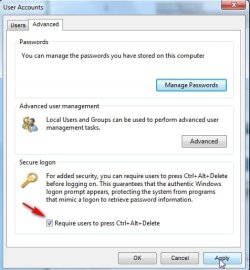
To require ctrl alt del:

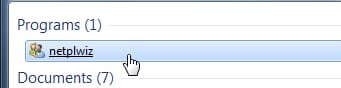
type NETPLWIZ in start search box

click it when it pops up.

USERACS3.jpg

click the Advanced tab.

Tick require ctrl alt del, Apply, OK.

USERACS4.jpg
 

My Computers My Computers

System One System Two

  • Computer type
    PC/Desktop
    OS
    7 X64
    CPU
    i5 8400
    Motherboard
    gigabyte b365m ds3h
    Memory
    2x8gb 3200mhz
    Hard Drives
    various
    PSU
    pure power 11 400w cm
    Case
    Coolermaster
    Cooling
    cryorig m9i
  • Computer type
    PC/Desktop
    OS
    7x64
    CPU
    g5400
    Motherboard
    ga b365m ds3h
    Memory
    8gb ddr4 2400
    PSU
    xfx pro 450w
ok - Set a password for the account in question - using the two pages above.

If the account already has a password - skip that bit.

To require ctrl alt del:

type NETPLWIZ in start search box

click it when it pops up.

View attachment 136466

click the Advanced tab.

Tick require ctrl alt del, Apply, OK.

View attachment 136467

Howdy SIW2,
Shoot, it can't be that easy can it? You're kinding. I know the others have been trying to tell me, and I couldn't grasp the obvious. Thanks you very muck Sir!
glennc
 

My Computer My Computer

Computer type
PC/Desktop
Computer Manufacturer/Model Number
Self-Built
OS
Windows 7 Ultimate
CPU
AMD Phenom-II X4 965
Motherboard
Gigabyte GA-MA785GM-US2H
Memory
8192 MB DDR2-SDRAM
Graphics Card(s)
ATI Radeon HD 4200
Sound Card
ATI Radeon HD 4200 High Definition Audo
Monitor(s) Displays
LG Electronics W1943
Screen Resolution
1360 X 768
Hard Drives
C: 500 GB Caviar Black SATA
E: 500 GB Caviar Black SATA
PSU
Ultra LSP 750
Case
Ultra XBlaster
Cooling
2 Fans, CPU Fan, PS Fan
Keyboard
Acer
Mouse
Logitech
Internet Speed
6 MB
Hey SIW2,
Well my cousin managed, thankfully to get the password setup. I am going to try to walk him through the Ctrl-Alt-Del setting to turn it on. Thanks again.
BTW as he won't know how it happened, I am curious if the Home Premium version offers the Administrator/User account and his store tech changed it or if it just automatically sets the first account to Administrator?
Twist
 

My Computer My Computer

Computer type
PC/Desktop
Computer Manufacturer/Model Number
Self-Built
OS
Windows 7 Ultimate
CPU
AMD Phenom-II X4 965
Motherboard
Gigabyte GA-MA785GM-US2H
Memory
8192 MB DDR2-SDRAM
Graphics Card(s)
ATI Radeon HD 4200
Sound Card
ATI Radeon HD 4200 High Definition Audo
Monitor(s) Displays
LG Electronics W1943
Screen Resolution
1360 X 768
Hard Drives
C: 500 GB Caviar Black SATA
E: 500 GB Caviar Black SATA
PSU
Ultra LSP 750
Case
Ultra XBlaster
Cooling
2 Fans, CPU Fan, PS Fan
Keyboard
Acer
Mouse
Logitech
Internet Speed
6 MB
Great - progress. :D

Yes, it's normal for that admin account to be there. You can set up passwords and user accounts , or whatever you want to do.

For example, I only have that admin account on my pc - I wouldn't recommend everyone do that.

Keep us updated as to how your cousin gets on.
 

My Computers My Computers

System One System Two

  • Computer type
    PC/Desktop
    OS
    7 X64
    CPU
    i5 8400
    Motherboard
    gigabyte b365m ds3h
    Memory
    2x8gb 3200mhz
    Hard Drives
    various
    PSU
    pure power 11 400w cm
    Case
    Coolermaster
    Cooling
    cryorig m9i
  • Computer type
    PC/Desktop
    OS
    7x64
    CPU
    g5400
    Motherboard
    ga b365m ds3h
    Memory
    8gb ddr4 2400
    PSU
    xfx pro 450w
Great - progress. :D

Yes, it's normal for that admin account to be there. You can set up passwords and user accounts , or whatever you want to do.

For example, I only have that admin account on my pc - I wouldn't recommend everyone do that.

Keep us updated as to how your cousin gets on.

Thanks SIW2,
Will do!
glennc
 

My Computer My Computer

Computer type
PC/Desktop
Computer Manufacturer/Model Number
Self-Built
OS
Windows 7 Ultimate
CPU
AMD Phenom-II X4 965
Motherboard
Gigabyte GA-MA785GM-US2H
Memory
8192 MB DDR2-SDRAM
Graphics Card(s)
ATI Radeon HD 4200
Sound Card
ATI Radeon HD 4200 High Definition Audo
Monitor(s) Displays
LG Electronics W1943
Screen Resolution
1360 X 768
Hard Drives
C: 500 GB Caviar Black SATA
E: 500 GB Caviar Black SATA
PSU
Ultra LSP 750
Case
Ultra XBlaster
Cooling
2 Fans, CPU Fan, PS Fan
Keyboard
Acer
Mouse
Logitech
Internet Speed
6 MB
Back
Top