Associate different default program with ext for command line only

djeyewater

New member
Local time
4:35 PM
Messages
28
In Windows I have Scite (a text editor) set as the default program to open .pl files. That's fine when using explorer. But on the command line I would like to have a different program open .pl files. So basically, different defaults for explorer and cmd. How would I do this?
 

My Computer My Computer

At a glance

Windows 7 Pro x64
Computer type
PC/Desktop
OS
Windows 7 Pro x64
When using command line, can you use:
path to different app [space] path to pl file
 

My Computer My Computer

At a glance

W7 Pro SP1 64biti78GBIntel HD Graphics
Computer type
Laptop
Computer Manufacturer/Model Number
Employer provided Dell Latitude
OS
W7 Pro SP1 64bit
CPU
i7
Memory
8GB
Graphics Card(s)
Intel HD Graphics
Hard Drives
crappy SSD
Antivirus
Employer mandated Symantec Endpoint Protection
Browser
Pale Moon 64bit, IE11 64bit & Chrome 64bit
Well, you can do that, but my question is about setting a default program for the file extension.
 

My Computer My Computer

At a glance

Windows 7 Pro x64
Computer type
PC/Desktop
OS
Windows 7 Pro x64

My Computer My Computer

At a glance

W7 Pro SP1 64biti78GBIntel HD Graphics
Computer type
Laptop
Computer Manufacturer/Model Number
Employer provided Dell Latitude
OS
W7 Pro SP1 64bit
CPU
i7
Memory
8GB
Graphics Card(s)
Intel HD Graphics
Hard Drives
crappy SSD
Antivirus
Employer mandated Symantec Endpoint Protection
Browser
Pale Moon 64bit, IE11 64bit & Chrome 64bit
Unfortunately that didn't work for me:
Code:
C:\Users\Djeyewater>ASSOC | grep '^^.pl='
.pl=Perl

C:\Users\Djeyewater>FTYPE | grep 'Perl'
Perl="C:\Perl64\bin\perl.exe" "%1" %*
PerlScriptFile=C:\Windows\System32\WScript.exe "%1" %*

But when I open a .pl file through cmd it still opens in Scite. I've tried restarting as well, but to no effect.

Besides, if you need to set the default program back to what you want for opening the files via explorer when you're done on the command line, then that's not really what I wanted anyway. I think the answer to my question must simply be that it is not possible to have the command line and explorer use different default programs for the same extension.
 

My Computer My Computer

At a glance

Windows 7 Pro x64
Computer type
PC/Desktop
OS
Windows 7 Pro x64
I would not expect Windows to have separate default program association for Explorer and command. Both read thru the same list of file extensions/associations to start stuff. I doubt that you can double click on a pl file within Explorer and have SciTE open the file for editing and have batch files run pl files by default. Maybe some other forum member knows how to do that.

Changing the association (and then changing it back) within each batch file might be a work around until someone else posts to your thread. Or use the method I mentioned in post #2.

It appears that you did not use an elevated command prompt or maybe you changed the directory before making a copy of the info that you posted. Normally, the directory would be: C:\Windows\system32> for an an elevated command prompt.

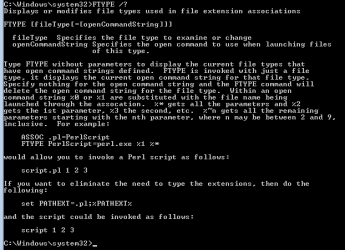
If you look at the help offered via FTYPE /?
...you should see that MS used the pl extension on their example:

FTYPE.PNG
 

My Computer My Computer

At a glance

W7 Pro SP1 64biti78GBIntel HD Graphics
Computer type
Laptop
Computer Manufacturer/Model Number
Employer provided Dell Latitude
OS
W7 Pro SP1 64bit
CPU
i7
Memory
8GB
Graphics Card(s)
Intel HD Graphics
Hard Drives
crappy SSD
Antivirus
Employer mandated Symantec Endpoint Protection
Browser
Pale Moon 64bit, IE11 64bit & Chrome 64bit
The reason the directory was different was because I was checking from an unelevated prompt after restarting the computer (which I did after setting from an elevated prompt and finding the changed settings had no effect). As you can see from the output I included in my post, it had registered the type and extension correctly. If it was possible to temporarily set the extension handler by using an unelevated command line, that would be a nice hack to achieve what I'm looking for. But sadly not.
 

My Computer My Computer

At a glance

Windows 7 Pro x64
Computer type
PC/Desktop
OS
Windows 7 Pro x64
Back
Top