Associate file type to xp mode application?

deskareas

New member
Member
Local time
3:20 AM
Messages
43
i have this seen before installing acrobat on my seven,
while successful testing to use an old scanner and other hardware in the virtual xp, i had to install acrobat reader 5.

suddenly all my pdf files, formerly with unknown icon had the old
acrobat 5 icon and on double click the xp mode acrobat reader started.

now i try to reproduce this without luck.

my idea was to open old .hlp files in xp mode.

i am happy for all input.:geek:
 

My Computer

OS
7
i have this seen before installing acrobat on my seven,
while successful testing to use an old scanner and other hardware in the virtual xp, i had to install acrobat reader 5.

suddenly all my pdf files, formerly with unknown icon had the old
acrobat 5 icon and on double click the xp mode acrobat reader started.

now i try to reproduce this without luck.

my idea was to open old .hlp files in xp mode.

i am happy for all input.:geek:

Hi Deskareas,

XP-Mode is separated from your Windows 7 desktop configuration and applications, You cant associate a filetype on your Windows 7 desktop with the applications you have installed in XP-Mode.

Steven
 
have you read my message?
i had exactly this when no file handler was assigned on my windows 7.
after installing acrobat in the virtual xp pdf files opened in xp mode acrobat 5 reader.
 

My Computer

OS
7
Hi Deskareas,

XP-Mode is separated from your Windows 7 desktop configuration and applications, You cant associate a filetype on your Windows 7 desktop with the applications you have installed in XP-Mode.

Steven

That's not true. Applications in XP mode will take over associations on win7.

I have no idea how to change said associations, but they are associated. I think maybe it will only take over unassociated extentions.
 

My Computer

OS
7264x64/7260x86
That's not true. Applications in XP mode will take over associations on win7.

I have no idea how to change said associations, but they are associated. I think maybe it will only take over unassociated extentions.

do you know a decent tool for dealing with file associations?
 

My Computer

OS
7
That's not true. Applications in XP mode will take over associations on win7.

I have no idea how to change said associations, but they are associated. I think maybe it will only take over unassociated extentions.

Your right, I installed VLC media player in Xp-Mode and it shows up on context menus in Windows 7 :o

do you know a decent tool for dealing with file associations?

You wont find a tool thats going to help you with this... The problem is that each VM uses a unique ID and its nearly impossible to generate the correct registry strings required to make your host machine launch the right application :(

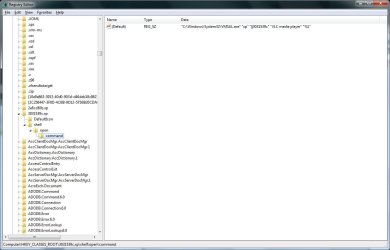
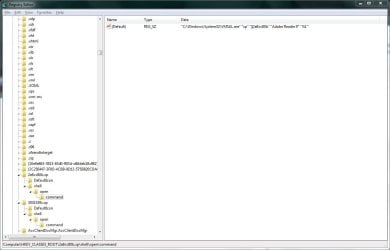
FileType associations are stored in two locations, They use the format %AppID%\\Shell\\Open\\Command\\ and it seems they use this format: VMSAL path | Your VM Name | UniqueApp ID | AppName | AppCommandline Paramaters

VLC Media Player:

vmsal.JPG

Adobe Reader:

smsal.JPG

You can remove the associations from your Windows 7 machine but you cant create them without knowing the exact Application ID your XP-Mode has created for each installed application.

The best answer would be associating .hlp files with an application in your XP-VM and letting XP-Mode create the association on your Windows 7 machine ;)

Steven
 
Seems to be a common theme...

My Windows 7 machine picked up a file association from a VM that I installed an app on and I couldn't change it. I had wanted to run it from the XP Mode machine.

I think this "Auto Publish" setting is a little TOO automatic. Why can't I change it like I would any other file association?
 

My Computer

OS
Windows 7
Yes, you have to be careful with Auto Publish when installing apps in your VXP. The seemless integration will get you if you're not careful. Personally, I never publsih any apps I install on my VXP. But I think the default is Auto Publish.
 

My Computer

OS
W7RC1
Back
Top