Asus K53E Laptop with 0x00000124 BSOD

Mike7143

New member
Local time
4:43 PM
Messages
28
My brother has had this laptop for maybe 2 or 3 years, not exactly sure. Anyway, he said it stopped working one day. He bought a new laptop and I'm trying to see if this Asus K53E is fixable. Started with his install of Win7, original install from Best Buy a few years back. Battery in, no AC charger plugged in, boot up Windows in regular mode, the laptop freezes at various times before the login screen with a BSOD 0x00000124 error. Try booting with battery in and AC plugged in, I just get a flashing cursor on black screen after Asus BIOS page, nothing. at. all. Same result with battery out and running on AC only, just flashing cursor. If I boot in safe mode with networking without AC power, laptop runs fine until battery dies. If I plug in AC charger while booted in safe mode, it's fine and no freeze. Unplug AC and it's still all good in safe mode. But plug AC in again and bam, laptop freezes up. I tried booting without the driver signature verification option, no luck, BSOD again. Interestingly, if I just boot into BIOS on the battery, all is well and dandy. Plug in AC power while in BIOS and the BIOS freezes! Tried restoring with the ASUS recovery disks my brother burned, BSOD. Then I did a clean install of Windows 7 64bit, erased recovery partition, made one giant partition from whole drive, and was able to fully install Windows, no lock ups or BSODs somehow. Problems still exist with a virgin Windows 7 64bit install, BSOD 0x124 with regular boot but will run till battery is dead in safe mode. Updated BIOS with the easyflash tool in BIOS from 216 to 217, 218, and then 219. 221 looks like just a Windows 8 fix, haven't flashed it. Still no luck, BIOS page freezes when I plug in AC still. Research says 0x124 is hardware failure but I don't understand how it works fine in safe mode but not on regular boots? I've read that in safe mode it doesn't load all the drivers, but even with a virgin 7 install it still will hang when trying to boot regularly. The AC charger isn't the problem, all symptoms still exist with another charger (same voltage, slightly lower amperage, same tip size). I've removed RAM and cleaned it, removed the HDD, nothing is working. I read the post about what to do before posting a BSOD thread and decided for s&g I'd again do a completely virgin clean install of Windows 7, boot regular and let it BSOD, reboot into safe mode, and use the SF Diagnostic tool. However this time... when I went to do a clean W7 install just like earlier, I get the same 124 BSOD. So now I've formatted the drive, it copied W7 files, and started expanding and then I got the 124 BSOD. Luckily, I did save the minidump files from before I started dicking with everything, but it sounds like minidump files of 124 are kind of useless. I've zipped the 3 last minidump files and are attached.

Any ideas? Thanks!

EDIT* Also, I've read the thread by H2SO4 about the Stop 0x124, I've done 1,2,3,4,5, and 7. Regarding step 6, I have memtest86 on disc I could try running, and I've heard about something called Prime95 but I think that runs in Windows? Currently downloading the ultimate boot cd ISO, supposedly it has Prime95 and memtest86 on it.

Regarding steps 8 and 9, I suppose I could start ripping into the laptop? Brother said he was almost always using laptop on a hard surface so I don't think anything got cooked. He didn't play games, just mostly about a million browser tabs open, youtube, facebook. And step 9, I don't really know what I can do there. I'm wondering if it's got something to do with the charging circuit or perhaps the battery.
 

My Computer My Computer

At a glance

Winds 7 Home Premium 64bitIntel i34GBOnboard
Computer type
Laptop
Computer Manufacturer/Model Number
Asus K53E
OS
Winds 7 Home Premium 64bit
CPU
Intel i3
Motherboard
Asus
Memory
4GB
Graphics Card(s)
Onboard
Hard Drives
600GB 5400rpm
Antivirus
AVG
Browser
Firefox
Okay, so I ran a live CD and ran a CPU stress program for about 10 minutes. Fans kicked up and were spitting out tons of hot air, but the computer never locked up, still responsive, and says 0 errors. Also ran a memory test off the live cd, no lock ups or errors either. So I'm guessing my 0x124 isn't the memory or processor. And I don't think it's the HDD as I've had that removed completely and still have the BSOD. Again, interestingly, the live CD I'm running with all these tools; once booted up it remains responsive. The exact second I plug in the AC power, the laptop locks up dead in its tracks. I feel like there's got to be something wrong with power. How does plugging in AC power lock up the most basic interface, the BIOS? I even tried hitting the ESC key when powering up which brings up the boot from menu. Hitting up/down arrows to cycle between the disc drive, HDD, and BIOS setup; plug in AC power and instantly the screen scrambles and laptop is locked up. Grrr.....
 

My Computer My Computer

At a glance

Winds 7 Home Premium 64bitIntel i34GBOnboard
Computer type
Laptop
Computer Manufacturer/Model Number
Asus K53E
OS
Winds 7 Home Premium 64bit
CPU
Intel i3
Motherboard
Asus
Memory
4GB
Graphics Card(s)
Onboard
Hard Drives
600GB 5400rpm
Antivirus
AVG
Browser
Firefox
Correct name for uploaded BSOD minidump zip.
 

My Computer My Computer

At a glance

Winds 7 Home Premium 64bitIntel i34GBOnboard
Computer type
Laptop
Computer Manufacturer/Model Number
Asus K53E
OS
Winds 7 Home Premium 64bit
CPU
Intel i3
Motherboard
Asus
Memory
4GB
Graphics Card(s)
Onboard
Hard Drives
600GB 5400rpm
Antivirus
AVG
Browser
Firefox
Okay well today I disassembled the laptop. I had called Asus as well as Best Buy where it was purchased. Asus said it needed to be sent in for repair at an estimate of $130 but it could be more or less and I'd need an RMA since it was out of warranty. Best Buy just said it was out of warranty and Geek Squad would charge $65 just to diagnose the problem, then who knows how much.

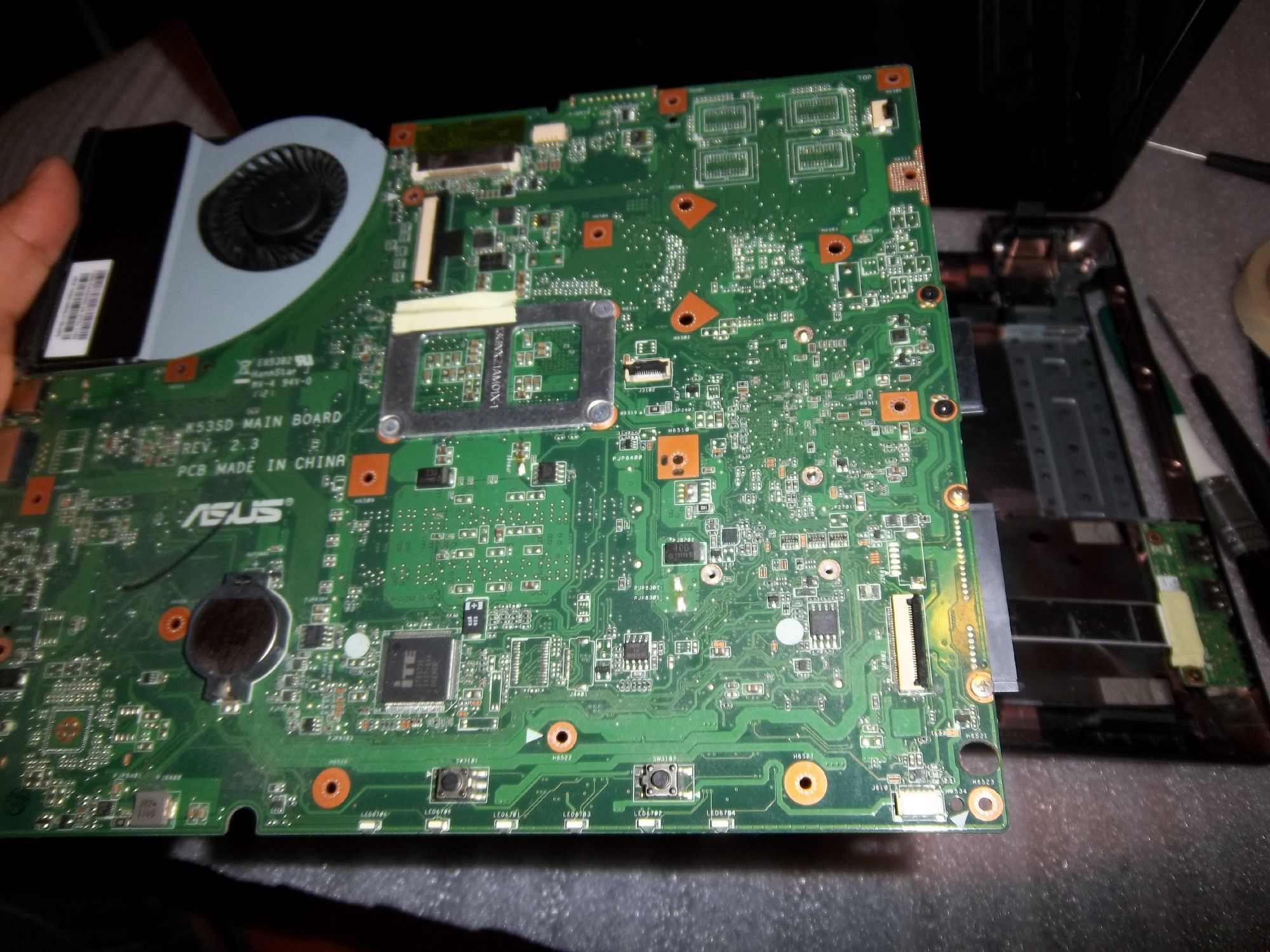
Anyway, opened the laptop up. I was interested in seeing anything to do with the power because it seems like it is power related... I mean the BIOS friggin locks up when I plug in AC power. I've read around that the DC charging port usually takes a dump, but the thing charges. So my next focus was the little power button board, maybe something would be bad on it?

So open it all up and I find this little thing on the desk...
IMG_20131230_172249.jpg

IMG_20131230_172249.jpg


Not sure what it is but it's tiny. P15. There's some metallic layers in it, some solder pads as well.

Here's some places on the motherboard with the same chip:
IMG_20131230_173040.jpg


These are on the top side of the board on the left, near the HDMI and USB ports, but that probably doesn't mean much. I did check the tiny power button board, I can't find any more of these chips on it nor any places that look like this chip used to be on it. So my guess is that the chip came off the motherboard. I guess it could be the culprit, it definitely isn't right to have it not attached and fall out of the case, but seems strange that this piece would prevent Windows from booting up completely but let it all work just fine in Safe Mode.

So... anyone know what this could be? Is it something I could re-solder on if I find where it goes? Assuming it's not from the power button board and evidence of others on the MB, I guess I could probably buy a new MB at about $130... any one think that's my best move from here?

Thanks!
Mike
 

My Computer My Computer

At a glance

Winds 7 Home Premium 64bitIntel i34GBOnboard
Computer type
Laptop
Computer Manufacturer/Model Number
Asus K53E
OS
Winds 7 Home Premium 64bit
CPU
Intel i3
Motherboard
Asus
Memory
4GB
Graphics Card(s)
Onboard
Hard Drives
600GB 5400rpm
Antivirus
AVG
Browser
Firefox
The code 0x124 is a non specific hardware issue so the P15 part could well be the culprit.
There are two white, empty rectangles on the board, could it be from one of those?

I find nothing on a Google image search but it looks like a capacitor.
 

My Computer My Computer

At a glance

Windows 7 Ultimate X64 SP1Intel i5-2550K, Differing ~4.4-4.8GHz No buil...16GB G.Skill Sniper 1866MHz @ 2133MHz 2x8GBASUS GTX650TIB-DC2OC-2GD5, (650TI Boost)
Computer type
PC/Desktop
Computer Manufacturer/Model Number
Home Built Desktop By DataTech
OS
Windows 7 Ultimate X64 SP1
CPU
Intel i5-2550K, Differing ~4.4-4.8GHz No built in GPU
Motherboard
ASUS P8Z68-V PRO/GEN3
Memory
16GB G.Skill Sniper 1866MHz @ 2133MHz 2x8GB
Graphics Card(s)
ASUS GTX650TIB-DC2OC-2GD5, (650TI Boost)
Sound Card
Onboard Realtek 5-1
Monitor(s) Displays
Samsung P2570HD
Screen Resolution
1920x1080
Hard Drives
Samsung 840 Pro 256GB SSD for OS, 500GB Seagate Constellation (Enterprise drive) for Data
PSU
Corsair HX650W
Case
Inwin Dragon Rider
Cooling
Hyper 212 EVO w/two Noctua fans, push-pull, @1300 RPM
Keyboard
E-Z Eyes, bright yellow keys with large characters
Mouse
steelseries SENSEI Laser Pro Gaming
Internet Speed
48-51Mbs Mbs down, 11 Mbs up Xfinity Cable
Antivirus
Norton Internet Security 2013
Browser
IE 10, Opera, Pale Moon if needed
Other Info
4 case fans, LG BluRay-RE, ASUS DVD-RW, Mr. Fusion power supply, 1.21 gigawatts.
I'm scouring the MB for anywhere that has that same size white rectangle outline and two solder points within it AND look like they've been broken off. There are tons of them with just two solder blobs, but they all look like they were dried with nothing attached. Haven't found any yet that look like the pads had something broken off. My guess is I'll never find it and I'll just have to buy a new motherboard. I'm thinking if I'm finding the P15 part on both sides of the MB then it's probably from it and not the power button board or anything else. Grr...
 

My Computer My Computer

At a glance

Winds 7 Home Premium 64bitIntel i34GBOnboard
Computer type
Laptop
Computer Manufacturer/Model Number
Asus K53E
OS
Winds 7 Home Premium 64bit
CPU
Intel i3
Motherboard
Asus
Memory
4GB
Graphics Card(s)
Onboard
Hard Drives
600GB 5400rpm
Antivirus
AVG
Browser
Firefox
I'd take the easy way and let ASUS fix it. I'm not sure the Geek Squad could handle it properly at least, not where I live. They would be horribly expensive too I suspect.

Trying to re-solder it your self could cause even more problems, unless you are trained with that sort of tiny components.
 

My Computer My Computer

At a glance

Windows 7 Ultimate X64 SP1Intel i5-2550K, Differing ~4.4-4.8GHz No buil...16GB G.Skill Sniper 1866MHz @ 2133MHz 2x8GBASUS GTX650TIB-DC2OC-2GD5, (650TI Boost)
Computer type
PC/Desktop
Computer Manufacturer/Model Number
Home Built Desktop By DataTech
OS
Windows 7 Ultimate X64 SP1
CPU
Intel i5-2550K, Differing ~4.4-4.8GHz No built in GPU
Motherboard
ASUS P8Z68-V PRO/GEN3
Memory
16GB G.Skill Sniper 1866MHz @ 2133MHz 2x8GB
Graphics Card(s)
ASUS GTX650TIB-DC2OC-2GD5, (650TI Boost)
Sound Card
Onboard Realtek 5-1
Monitor(s) Displays
Samsung P2570HD
Screen Resolution
1920x1080
Hard Drives
Samsung 840 Pro 256GB SSD for OS, 500GB Seagate Constellation (Enterprise drive) for Data
PSU
Corsair HX650W
Case
Inwin Dragon Rider
Cooling
Hyper 212 EVO w/two Noctua fans, push-pull, @1300 RPM
Keyboard
E-Z Eyes, bright yellow keys with large characters
Mouse
steelseries SENSEI Laser Pro Gaming
Internet Speed
48-51Mbs Mbs down, 11 Mbs up Xfinity Cable
Antivirus
Norton Internet Security 2013
Browser
IE 10, Opera, Pale Moon if needed
Other Info
4 case fans, LG BluRay-RE, ASUS DVD-RW, Mr. Fusion power supply, 1.21 gigawatts.
Yeah, that could be my best option. That or just buy a new one from Asus. The solder looks tiny, not sure how it goes either or if it matters which way it goes... Figures. I'm lucky I found the piece though on the desk and it never fell out or I lost it in the carpet or something.
 

My Computer My Computer

At a glance

Winds 7 Home Premium 64bitIntel i34GBOnboard
Computer type
Laptop
Computer Manufacturer/Model Number
Asus K53E
OS
Winds 7 Home Premium 64bit
CPU
Intel i3
Motherboard
Asus
Memory
4GB
Graphics Card(s)
Onboard
Hard Drives
600GB 5400rpm
Antivirus
AVG
Browser
Firefox
Yes if you can get a new one and are comfortable installing a new board, do that. If you've been able to get to the board shows you have some skills. Be careful of the little ribbon cables, if any, they are delicate like butterfly wings.
 

My Computer My Computer

At a glance

Windows 7 Ultimate X64 SP1Intel i5-2550K, Differing ~4.4-4.8GHz No buil...16GB G.Skill Sniper 1866MHz @ 2133MHz 2x8GBASUS GTX650TIB-DC2OC-2GD5, (650TI Boost)
Computer type
PC/Desktop
Computer Manufacturer/Model Number
Home Built Desktop By DataTech
OS
Windows 7 Ultimate X64 SP1
CPU
Intel i5-2550K, Differing ~4.4-4.8GHz No built in GPU
Motherboard
ASUS P8Z68-V PRO/GEN3
Memory
16GB G.Skill Sniper 1866MHz @ 2133MHz 2x8GB
Graphics Card(s)
ASUS GTX650TIB-DC2OC-2GD5, (650TI Boost)
Sound Card
Onboard Realtek 5-1
Monitor(s) Displays
Samsung P2570HD
Screen Resolution
1920x1080
Hard Drives
Samsung 840 Pro 256GB SSD for OS, 500GB Seagate Constellation (Enterprise drive) for Data
PSU
Corsair HX650W
Case
Inwin Dragon Rider
Cooling
Hyper 212 EVO w/two Noctua fans, push-pull, @1300 RPM
Keyboard
E-Z Eyes, bright yellow keys with large characters
Mouse
steelseries SENSEI Laser Pro Gaming
Internet Speed
48-51Mbs Mbs down, 11 Mbs up Xfinity Cable
Antivirus
Norton Internet Security 2013
Browser
IE 10, Opera, Pale Moon if needed
Other Info
4 case fans, LG BluRay-RE, ASUS DVD-RW, Mr. Fusion power supply, 1.21 gigawatts.
Haha yeah I'm a little more skilled than many. I pulled the HSF and heat pipe off the CPU and pulled it out. Cheapest I can find is on eBay for a like-new tested used board with 14 day warranty. I scoured the internet for high res pictures of the MB in an attempt to play find the difference haha, but can't find much that's high enough resolution. I don't know what else it could be. Like I said, I've tried a different charger with no luck. I'm pretty sure a laptop shouldn't freeze in BIOS if you just plug in the AC power. Hopefully I don't blow the cash on the MB and have it not be the problem. I guess if it's a no-go I just have to return it and pay a 20% restock fee. That or buy it from Asus, but I have no idea where to even start with trying to buy a MB direct from Asus.

EDIT* I guess I could also try asking seller to send me hi-res photos before sale just to make sure it's the same board and then use those to play my find the missing piece game... I may try that first.
 

My Computer My Computer

At a glance

Winds 7 Home Premium 64bitIntel i34GBOnboard
Computer type
Laptop
Computer Manufacturer/Model Number
Asus K53E
OS
Winds 7 Home Premium 64bit
CPU
Intel i3
Motherboard
Asus
Memory
4GB
Graphics Card(s)
Onboard
Hard Drives
600GB 5400rpm
Antivirus
AVG
Browser
Firefox
u64291-0.jpg
 

My Computer My Computer

At a glance

Windows 7 Ultimate X64 SP1Intel i5-2550K, Differing ~4.4-4.8GHz No buil...16GB G.Skill Sniper 1866MHz @ 2133MHz 2x8GBASUS GTX650TIB-DC2OC-2GD5, (650TI Boost)
Computer type
PC/Desktop
Computer Manufacturer/Model Number
Home Built Desktop By DataTech
OS
Windows 7 Ultimate X64 SP1
CPU
Intel i5-2550K, Differing ~4.4-4.8GHz No built in GPU
Motherboard
ASUS P8Z68-V PRO/GEN3
Memory
16GB G.Skill Sniper 1866MHz @ 2133MHz 2x8GB
Graphics Card(s)
ASUS GTX650TIB-DC2OC-2GD5, (650TI Boost)
Sound Card
Onboard Realtek 5-1
Monitor(s) Displays
Samsung P2570HD
Screen Resolution
1920x1080
Hard Drives
Samsung 840 Pro 256GB SSD for OS, 500GB Seagate Constellation (Enterprise drive) for Data
PSU
Corsair HX650W
Case
Inwin Dragon Rider
Cooling
Hyper 212 EVO w/two Noctua fans, push-pull, @1300 RPM
Keyboard
E-Z Eyes, bright yellow keys with large characters
Mouse
steelseries SENSEI Laser Pro Gaming
Internet Speed
48-51Mbs Mbs down, 11 Mbs up Xfinity Cable
Antivirus
Norton Internet Security 2013
Browser
IE 10, Opera, Pale Moon if needed
Other Info
4 case fans, LG BluRay-RE, ASUS DVD-RW, Mr. Fusion power supply, 1.21 gigawatts.
I think that's the wrong side from what you had?
 

My Computer My Computer

At a glance

Windows 7 Ultimate X64 SP1Intel i5-2550K, Differing ~4.4-4.8GHz No buil...16GB G.Skill Sniper 1866MHz @ 2133MHz 2x8GBASUS GTX650TIB-DC2OC-2GD5, (650TI Boost)
Computer type
PC/Desktop
Computer Manufacturer/Model Number
Home Built Desktop By DataTech
OS
Windows 7 Ultimate X64 SP1
CPU
Intel i5-2550K, Differing ~4.4-4.8GHz No built in GPU
Motherboard
ASUS P8Z68-V PRO/GEN3
Memory
16GB G.Skill Sniper 1866MHz @ 2133MHz 2x8GB
Graphics Card(s)
ASUS GTX650TIB-DC2OC-2GD5, (650TI Boost)
Sound Card
Onboard Realtek 5-1
Monitor(s) Displays
Samsung P2570HD
Screen Resolution
1920x1080
Hard Drives
Samsung 840 Pro 256GB SSD for OS, 500GB Seagate Constellation (Enterprise drive) for Data
PSU
Corsair HX650W
Case
Inwin Dragon Rider
Cooling
Hyper 212 EVO w/two Noctua fans, push-pull, @1300 RPM
Keyboard
E-Z Eyes, bright yellow keys with large characters
Mouse
steelseries SENSEI Laser Pro Gaming
Internet Speed
48-51Mbs Mbs down, 11 Mbs up Xfinity Cable
Antivirus
Norton Internet Security 2013
Browser
IE 10, Opera, Pale Moon if needed
Other Info
4 case fans, LG BluRay-RE, ASUS DVD-RW, Mr. Fusion power supply, 1.21 gigawatts.
I'd like to see both sides. However, that's not the same board. That's a 60-N3CMB1500-C07 and mine is a 60-N3CMB1300-D02. I can already spot some differences in some of the chips. Hopefully the seller on eBay can get me some.

That reminds me, iFixIt and those teardown sites have high resolution pictures, maybe I can get some views there...
 

My Computer My Computer

At a glance

Winds 7 Home Premium 64bitIntel i34GBOnboard
Computer type
Laptop
Computer Manufacturer/Model Number
Asus K53E
OS
Winds 7 Home Premium 64bit
CPU
Intel i3
Motherboard
Asus
Memory
4GB
Graphics Card(s)
Onboard
Hard Drives
600GB 5400rpm
Antivirus
AVG
Browser
Firefox
Good idea. I would assume the same model laptop would use 16 different boards. :confused:
 

My Computer My Computer

At a glance

Windows 7 Ultimate X64 SP1Intel i5-2550K, Differing ~4.4-4.8GHz No buil...16GB G.Skill Sniper 1866MHz @ 2133MHz 2x8GBASUS GTX650TIB-DC2OC-2GD5, (650TI Boost)
Computer type
PC/Desktop
Computer Manufacturer/Model Number
Home Built Desktop By DataTech
OS
Windows 7 Ultimate X64 SP1
CPU
Intel i5-2550K, Differing ~4.4-4.8GHz No built in GPU
Motherboard
ASUS P8Z68-V PRO/GEN3
Memory
16GB G.Skill Sniper 1866MHz @ 2133MHz 2x8GB
Graphics Card(s)
ASUS GTX650TIB-DC2OC-2GD5, (650TI Boost)
Sound Card
Onboard Realtek 5-1
Monitor(s) Displays
Samsung P2570HD
Screen Resolution
1920x1080
Hard Drives
Samsung 840 Pro 256GB SSD for OS, 500GB Seagate Constellation (Enterprise drive) for Data
PSU
Corsair HX650W
Case
Inwin Dragon Rider
Cooling
Hyper 212 EVO w/two Noctua fans, push-pull, @1300 RPM
Keyboard
E-Z Eyes, bright yellow keys with large characters
Mouse
steelseries SENSEI Laser Pro Gaming
Internet Speed
48-51Mbs Mbs down, 11 Mbs up Xfinity Cable
Antivirus
Norton Internet Security 2013
Browser
IE 10, Opera, Pale Moon if needed
Other Info
4 case fans, LG BluRay-RE, ASUS DVD-RW, Mr. Fusion power supply, 1.21 gigawatts.
Yeah, they're all over the place. Some use integrated Intel graphics, others have separate, and who knows what else...
 

My Computer My Computer

At a glance

Winds 7 Home Premium 64bitIntel i34GBOnboard
Computer type
Laptop
Computer Manufacturer/Model Number
Asus K53E
OS
Winds 7 Home Premium 64bit
CPU
Intel i3
Motherboard
Asus
Memory
4GB
Graphics Card(s)
Onboard
Hard Drives
600GB 5400rpm
Antivirus
AVG
Browser
Firefox
No luck. This guy on iFixIt had pics and he's got the same board as me. Unless I missed it, then the P15 that is loose must be on the bottom side of the board as all his pictures are of the top. I looked at quite a few he posted and none have any additional P15 chips on the top side that I can see.
p1NtTSg4mEqoZskX


I wonder what the chances are of having one extra loose chip and I'm chasing a ghost?
 

My Computer My Computer

At a glance

Winds 7 Home Premium 64bitIntel i34GBOnboard
Computer type
Laptop
Computer Manufacturer/Model Number
Asus K53E
OS
Winds 7 Home Premium 64bit
CPU
Intel i3
Motherboard
Asus
Memory
4GB
Graphics Card(s)
Onboard
Hard Drives
600GB 5400rpm
Antivirus
AVG
Browser
Firefox
I don't think it's a ghost. If it is indeed a capacitor it may explain why plugging in the AC adapter freezes it, in all scenarios, right? Caps serve to store power and help regulate a steady supply and maybe, maybe, the AC plugging in upsets a balance since the cap is missing.
 

My Computer My Computer

At a glance

Windows 7 Ultimate X64 SP1Intel i5-2550K, Differing ~4.4-4.8GHz No buil...16GB G.Skill Sniper 1866MHz @ 2133MHz 2x8GBASUS GTX650TIB-DC2OC-2GD5, (650TI Boost)
Computer type
PC/Desktop
Computer Manufacturer/Model Number
Home Built Desktop By DataTech
OS
Windows 7 Ultimate X64 SP1
CPU
Intel i5-2550K, Differing ~4.4-4.8GHz No built in GPU
Motherboard
ASUS P8Z68-V PRO/GEN3
Memory
16GB G.Skill Sniper 1866MHz @ 2133MHz 2x8GB
Graphics Card(s)
ASUS GTX650TIB-DC2OC-2GD5, (650TI Boost)
Sound Card
Onboard Realtek 5-1
Monitor(s) Displays
Samsung P2570HD
Screen Resolution
1920x1080
Hard Drives
Samsung 840 Pro 256GB SSD for OS, 500GB Seagate Constellation (Enterprise drive) for Data
PSU
Corsair HX650W
Case
Inwin Dragon Rider
Cooling
Hyper 212 EVO w/two Noctua fans, push-pull, @1300 RPM
Keyboard
E-Z Eyes, bright yellow keys with large characters
Mouse
steelseries SENSEI Laser Pro Gaming
Internet Speed
48-51Mbs Mbs down, 11 Mbs up Xfinity Cable
Antivirus
Norton Internet Security 2013
Browser
IE 10, Opera, Pale Moon if needed
Other Info
4 case fans, LG BluRay-RE, ASUS DVD-RW, Mr. Fusion power supply, 1.21 gigawatts.
I don't think its a capacitor. I have no idea what it is, but I can clearly see "layers" of semiconductor stuff and metal, kinda like copper. Hmm... I'll give it all a few more look overs and then I guess buy a new MB.
 

My Computer My Computer

At a glance

Winds 7 Home Premium 64bitIntel i34GBOnboard
Computer type
Laptop
Computer Manufacturer/Model Number
Asus K53E
OS
Winds 7 Home Premium 64bit
CPU
Intel i3
Motherboard
Asus
Memory
4GB
Graphics Card(s)
Onboard
Hard Drives
600GB 5400rpm
Antivirus
AVG
Browser
Firefox
A cap has layers of some kind of conductor separated by an insulator.
 

My Computer My Computer

At a glance

Windows 7 Ultimate X64 SP1Intel i5-2550K, Differing ~4.4-4.8GHz No buil...16GB G.Skill Sniper 1866MHz @ 2133MHz 2x8GBASUS GTX650TIB-DC2OC-2GD5, (650TI Boost)
Computer type
PC/Desktop
Computer Manufacturer/Model Number
Home Built Desktop By DataTech
OS
Windows 7 Ultimate X64 SP1
CPU
Intel i5-2550K, Differing ~4.4-4.8GHz No built in GPU
Motherboard
ASUS P8Z68-V PRO/GEN3
Memory
16GB G.Skill Sniper 1866MHz @ 2133MHz 2x8GB
Graphics Card(s)
ASUS GTX650TIB-DC2OC-2GD5, (650TI Boost)
Sound Card
Onboard Realtek 5-1
Monitor(s) Displays
Samsung P2570HD
Screen Resolution
1920x1080
Hard Drives
Samsung 840 Pro 256GB SSD for OS, 500GB Seagate Constellation (Enterprise drive) for Data
PSU
Corsair HX650W
Case
Inwin Dragon Rider
Cooling
Hyper 212 EVO w/two Noctua fans, push-pull, @1300 RPM
Keyboard
E-Z Eyes, bright yellow keys with large characters
Mouse
steelseries SENSEI Laser Pro Gaming
Internet Speed
48-51Mbs Mbs down, 11 Mbs up Xfinity Cable
Antivirus
Norton Internet Security 2013
Browser
IE 10, Opera, Pale Moon if needed
Other Info
4 case fans, LG BluRay-RE, ASUS DVD-RW, Mr. Fusion power supply, 1.21 gigawatts.
Haha yeah I guess that's very true... I don't know, perhaps it is, just doesn't look like any cap I've ever seen!
 

My Computer My Computer

At a glance

Winds 7 Home Premium 64bitIntel i34GBOnboard
Computer type
Laptop
Computer Manufacturer/Model Number
Asus K53E
OS
Winds 7 Home Premium 64bit
CPU
Intel i3
Motherboard
Asus
Memory
4GB
Graphics Card(s)
Onboard
Hard Drives
600GB 5400rpm
Antivirus
AVG
Browser
Firefox
Back
Top