Solved Asus Laptop Unexpectedly Shuts Down While Sleeping

Larowyn

New member
Local time
9:10 PM
Messages
9
I have an Asus laptop, i7-3610QM 4-core, 6 GB of RAM, 750 GB hard drive space. When I close the lid to put it to sleep, it shuts off, and gives me the Windows Error Recovery screen upon restart, saying is was shut down unexpectedly.

The power options are all set to sleep when the lid is closed, both on battery and when unplugged. I went through the forums and tried a few suggested solutions (chkdsk, /scannow, updating drivers, etc), and so far nothing has provided a permanent fix.

I have a Wacom tablet, and I saw that other users were having problems with an associated pen/tablet driver causing the shut down, but I downloaded and installed the most recent one on their site, and still no results.

I'll upload the zip file obtained from running the sevenforums tool as well. If you guys could offer any more suggestions, it'd be greatly appreciated.
 

Attachments

My Computer My Computer

Computer type
Laptop
Computer Manufacturer/Model Number
Asus
OS
Windows 7
CPU
Intel i7-3610QM 2.30 GHz
Memory
6 GB
Graphics Card(s)
Intel HD Graphics 4000 and Nvidia Geforce GT 630M 2GB
Antivirus
Avast
Browser
Firefox
Do you have the Asus Power4Gear application installed? If so I would check the setting there also. I've had a few minor problems with my G74Sx and 2 of them were connected to that application.

Welcome to Sevenforums!
 

My Computer My Computer

Computer type
Laptop
Computer Manufacturer/Model Number
MSI GE72VR Apache Pro-416
OS
Windows 10x64 Build 1709
CPU
Intel i7 7700HQ Kaby Lake
Motherboard
Micro-Star Intl. MS-179B (U3C1)
Memory
16 GB DDR4 @2400
Graphics Card(s)
Nvidia Geforce GTX 1060
Screen Resolution
1920x1080 120Hz
Hard Drives
256 GB Nvme M.2 SSD

1TB HDD@7200
Cooling
Cooler Blast 4
Keyboard
Steel Series
Antivirus
Bit Defender Free
Browser
Edge
Thanks. I do have Power4Gear installed. Looked through it, but I didn't really know what to look for, though there is a "Turn Off Hard Disk" option with a time. Though, I've always had this installed (came with the laptop), and this unexpected shutdown problem only started last week. I've had the laptop for about 6 to 8 months right now.

Can I disable this software, or will it hinder performance?
 

My Computer My Computer

Computer type
Laptop
Computer Manufacturer/Model Number
Asus
OS
Windows 7
CPU
Intel i7-3610QM 2.30 GHz
Memory
6 GB
Graphics Card(s)
Intel HD Graphics 4000 and Nvidia Geforce GT 630M 2GB
Antivirus
Avast
Browser
Firefox
After the second problem tied to it I just completely uninstalled it. Thats been about a year ago now, no problems yet. Yes I would at least disable it but thats me. Its just a 3rd party power management tool, mostly aimed at gamers.

You say this only started last week though? Did you install anything new just before this started happening? Have you tried a system restore/image to a point to before it started?
 

My Computer My Computer

Computer type
Laptop
Computer Manufacturer/Model Number
MSI GE72VR Apache Pro-416
OS
Windows 10x64 Build 1709
CPU
Intel i7 7700HQ Kaby Lake
Motherboard
Micro-Star Intl. MS-179B (U3C1)
Memory
16 GB DDR4 @2400
Graphics Card(s)
Nvidia Geforce GTX 1060
Screen Resolution
1920x1080 120Hz
Hard Drives
256 GB Nvme M.2 SSD

1TB HDD@7200
Cooling
Cooler Blast 4
Keyboard
Steel Series
Antivirus
Bit Defender Free
Browser
Edge
Unlocker was the latest program I installed, but I had that on a previous Toshiba laptop and it never caused problems. My last 10 updates other than that were:

Google Talk Plugin
Starcraft II update
4 Nividia updates
Java 7 update
2 WebTablet plugins for Wacom tablet
Wacom Tablet driver


I did just notice that my computer's been set to Power4Gear High Performance instead of regular High Performance, so I'll switch that and see what happens. I have yet to try a system restore, but I probably will if nothing else works.
 

My Computer My Computer

Computer type
Laptop
Computer Manufacturer/Model Number
Asus
OS
Windows 7
CPU
Intel i7-3610QM 2.30 GHz
Memory
6 GB
Graphics Card(s)
Intel HD Graphics 4000 and Nvidia Geforce GT 630M 2GB
Antivirus
Avast
Browser
Firefox
The Power4Gear has a habit of turning itself back on so keep a eye on it. As far as the updates/installs go , I'd say that the Nvidia and Starcraft are probably.... blameless, for want of a better word. You could disable the others one at a time and see if this happens after each until you either narrowed it down to one of them or absolved them. You could also try Asus directly but be aware that their customer service is the worst I've ever seen. Love my G74Sx but Asus could care less about you after they've gotten your money. (Asus troubleshooting) :ASUSTeK Computer Inc. -Support- Knowledge N56VM

You MIGHT have better luck at their Republic of Gamers site, there is at least always a company rep. watching the boards, but he will toe the company line like a laser! :ASUS Republic of Gamers | The Choice of Champions – News, Guides, Overclocking, PC Gaming
 

My Computer My Computer

Computer type
Laptop
Computer Manufacturer/Model Number
MSI GE72VR Apache Pro-416
OS
Windows 10x64 Build 1709
CPU
Intel i7 7700HQ Kaby Lake
Motherboard
Micro-Star Intl. MS-179B (U3C1)
Memory
16 GB DDR4 @2400
Graphics Card(s)
Nvidia Geforce GTX 1060
Screen Resolution
1920x1080 120Hz
Hard Drives
256 GB Nvme M.2 SSD

1TB HDD@7200
Cooling
Cooler Blast 4
Keyboard
Steel Series
Antivirus
Bit Defender Free
Browser
Edge
Cool, thanks for the help. I'll try your advice for a day or two and reply back if anything else happens. If Power4Gear turns itself on I'll just uninstall it. Thanks again.
 

My Computer My Computer

Computer type
Laptop
Computer Manufacturer/Model Number
Asus
OS
Windows 7
CPU
Intel i7-3610QM 2.30 GHz
Memory
6 GB
Graphics Card(s)
Intel HD Graphics 4000 and Nvidia Geforce GT 630M 2GB
Antivirus
Avast
Browser
Firefox
Glad to help. I'll subscribe to this thread so if you have any problems just let us know.
 

My Computer My Computer

Computer type
Laptop
Computer Manufacturer/Model Number
MSI GE72VR Apache Pro-416
OS
Windows 10x64 Build 1709
CPU
Intel i7 7700HQ Kaby Lake
Motherboard
Micro-Star Intl. MS-179B (U3C1)
Memory
16 GB DDR4 @2400
Graphics Card(s)
Nvidia Geforce GTX 1060
Screen Resolution
1920x1080 120Hz
Hard Drives
256 GB Nvme M.2 SSD

1TB HDD@7200
Cooling
Cooler Blast 4
Keyboard
Steel Series
Antivirus
Bit Defender Free
Browser
Edge
Okay, well I uninstalled Power4Gear, and before putting the system to sleep, I manually end the two Wacom tablet processes that I can using the task manager, and it's still shutting off during sleep, with the same error message.

What still perplexes me is that I can leave the laptop plugged in overnight, and 7 hours later it's still in sleep mode, running fine. I can leave it unplugged for an hour, come back, and it's shut down unexpectedly again. Sometimes it goes for 4 hours unplugged before shutting down, sometimes it goes 20 minutes. The sheer randomness of this problem is one of the most confusing things I've encountered in all of the years I've owned a computer.

I unfortunately don't have a restore point available that's further back than a few days ago, so System Restore is out of the question. My only real idea (other than formatting the hard drive) is installing Windows 7 Professional over my current Home Premium. I'm not sure if this would even possibly solve it, but I'm reaching my wit's end.

I also started using the error logging function from the boot menu, and found my system is having consistent trouble loading these drivers:

\SystemRoot\System32\DRIVERS\srv.sys
\SystemRoot\System32\Drivers\NDProxy.SYS
\SystemRoot\System32\drivers\dxgkrnl.sys
\SystemRoot\System32\drivers\vga.sys

Still looking for a foolproof fix for this, or even a cause, as I read on other forums it could be anything from a driver issue to a hardware problem. Any more suggestions?
 

My Computer My Computer

Computer type
Laptop
Computer Manufacturer/Model Number
Asus
OS
Windows 7
CPU
Intel i7-3610QM 2.30 GHz
Memory
6 GB
Graphics Card(s)
Intel HD Graphics 4000 and Nvidia Geforce GT 630M 2GB
Antivirus
Avast
Browser
Firefox

My Computer My Computer

Computer type
Laptop
Computer Manufacturer/Model Number
MSI GE72VR Apache Pro-416
OS
Windows 10x64 Build 1709
CPU
Intel i7 7700HQ Kaby Lake
Motherboard
Micro-Star Intl. MS-179B (U3C1)
Memory
16 GB DDR4 @2400
Graphics Card(s)
Nvidia Geforce GTX 1060
Screen Resolution
1920x1080 120Hz
Hard Drives
256 GB Nvme M.2 SSD

1TB HDD@7200
Cooling
Cooler Blast 4
Keyboard
Steel Series
Antivirus
Bit Defender Free
Browser
Edge
Yeah, I tried that. I didn't find anything. I also have a program called SpinRite that corrects corrupted or damaged sections of hard drives, but I have yet to try that.
 

My Computer My Computer

Computer type
Laptop
Computer Manufacturer/Model Number
Asus
OS
Windows 7
CPU
Intel i7-3610QM 2.30 GHz
Memory
6 GB
Graphics Card(s)
Intel HD Graphics 4000 and Nvidia Geforce GT 630M 2GB
Antivirus
Avast
Browser
Firefox
Sorry wasn't paying attention..... I edited my last message, did you see that? I'd actually hold off on the SpinRite for now.... not sure thats the problem. At minimun I would run a chkdsk first. But what do the advanced settings for your power say?
 

My Computer My Computer

Computer type
Laptop
Computer Manufacturer/Model Number
MSI GE72VR Apache Pro-416
OS
Windows 10x64 Build 1709
CPU
Intel i7 7700HQ Kaby Lake
Motherboard
Micro-Star Intl. MS-179B (U3C1)
Memory
16 GB DDR4 @2400
Graphics Card(s)
Nvidia Geforce GTX 1060
Screen Resolution
1920x1080 120Hz
Hard Drives
256 GB Nvme M.2 SSD

1TB HDD@7200
Cooling
Cooler Blast 4
Keyboard
Steel Series
Antivirus
Bit Defender Free
Browser
Edge
Oh, okay, I didn't see. Sorry.

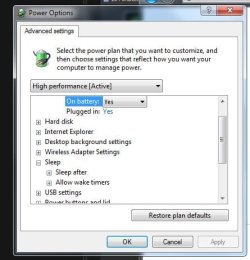
As of right now, these are my sleep settings, for both high performance and balanced mode.

btnVv7s.jpg


I check the settings and such whenever it recovers from a shutdown, just to see if they changed, and so far they've remained the same. I hadn't changed any of these prior to the errors.
 

My Computer My Computer

Computer type
Laptop
Computer Manufacturer/Model Number
Asus
OS
Windows 7
CPU
Intel i7-3610QM 2.30 GHz
Memory
6 GB
Graphics Card(s)
Intel HD Graphics 4000 and Nvidia Geforce GT 630M 2GB
Antivirus
Avast
Browser
Firefox
Wait! May have just found something,thought something didn't look right. Be right back. I'll be editing this so ..... give me a couple of minutes.

O.K. This seems to be one of those good thing/bad thing things :rolleyes: (Hey not a grammatical kind of guy) Anyway, been looking around and the driver that seemed to be having problems for you "dxgkrnl.sys" is either a malware left over or a corrupted DirectX file. Having doubts about the "malware" though, but will post a link for you to see. If its DirectX related then a new install MAY be your best bet as its extremely hard to uninstall that. Another couple of "hits" say they have fixed this by tightening a cable from the power to the card.

http://mechiwiki.com/techmed/windows/dxgkrnl-sys-bsod

http://www.spydig.com/file-diagnosis/dxgkrnl-sys.html

I'm starting to think that the clean install might be your best bet. I agree with you whole-heartedly that this is frustrating as its so intermittent. JUST IN CASE its a malware leftover I'd go ahead and run all your malware programs again. Malwarebytes/SuperAntiSpyware at least. Couldn't hurt. But as I said , maybe a fresh install is in store.
 
Last edited:

My Computer My Computer

Computer type
Laptop
Computer Manufacturer/Model Number
MSI GE72VR Apache Pro-416
OS
Windows 10x64 Build 1709
CPU
Intel i7 7700HQ Kaby Lake
Motherboard
Micro-Star Intl. MS-179B (U3C1)
Memory
16 GB DDR4 @2400
Graphics Card(s)
Nvidia Geforce GTX 1060
Screen Resolution
1920x1080 120Hz
Hard Drives
256 GB Nvme M.2 SSD

1TB HDD@7200
Cooling
Cooler Blast 4
Keyboard
Steel Series
Antivirus
Bit Defender Free
Browser
Edge
Okay, I have a feeling as well that it's some system driver or application driver causing this. I've been doing a data backup for a bit now in preparation for a clean install, but I might try to replicate the error in safe mode to see if it is indeed a system file error.

Thanks again for the help, I'll let you know what happens.
 

My Computer My Computer

Computer type
Laptop
Computer Manufacturer/Model Number
Asus
OS
Windows 7
CPU
Intel i7-3610QM 2.30 GHz
Memory
6 GB
Graphics Card(s)
Intel HD Graphics 4000 and Nvidia Geforce GT 630M 2GB
Antivirus
Avast
Browser
Firefox
Cool, keep me informed and I'll keep digging. The off and on nature of this kinda has me spinning in circles.

Maybe try a memtest if you're feeling up to it, have found a couple of places recommending that. Its definitely related to the graphics card/DirectX.

I do keep finding references to malware though. Don't know what to think of that to tell you the truth.
 
Last edited:

My Computer My Computer

Computer type
Laptop
Computer Manufacturer/Model Number
MSI GE72VR Apache Pro-416
OS
Windows 10x64 Build 1709
CPU
Intel i7 7700HQ Kaby Lake
Motherboard
Micro-Star Intl. MS-179B (U3C1)
Memory
16 GB DDR4 @2400
Graphics Card(s)
Nvidia Geforce GTX 1060
Screen Resolution
1920x1080 120Hz
Hard Drives
256 GB Nvme M.2 SSD

1TB HDD@7200
Cooling
Cooler Blast 4
Keyboard
Steel Series
Antivirus
Bit Defender Free
Browser
Edge
I'd use Balanced Mode with Sleep set to 30 and Hibernate set to 45-60, allowing Hybrid Sleep. This config seems to work best.

if not check out these Sleep Mode Problems - Vista Forums.

The issue is almost always the Display Drivers so check Windows Updates and then the PC or Display Device's Support downloads webpage for latest. If that fails try rolling back the current one in Dev Mgr. Driver Install - Device Manager

I would also check over the PC good using these Troubleshooting Steps for Windows 7. If this is the factory preinstall it is a corrupt install larded with bloatware so I'd do what most tech enthusiasts do and get a perfect Clean Reinstall - Factory OEM Windows 7. At minimum I'd Clean Up Factory Bloatware
 
Alright, well it's been a week since I wiped my hard drive and restored my files. So far, no problems!

It must have been a system32 driver issue, because I have Direct X and all of my old drivers installed again and have yet to see the problem repeat. Thanks for all the help!
 

My Computer My Computer

Computer type
Laptop
Computer Manufacturer/Model Number
Asus
OS
Windows 7
CPU
Intel i7-3610QM 2.30 GHz
Memory
6 GB
Graphics Card(s)
Intel HD Graphics 4000 and Nvidia Geforce GT 630M 2GB
Antivirus
Avast
Browser
Firefox
Back
Top