frijole007
New member
- Local time
- 3:52 PM
- Messages
- 7
Hi, please forgive me if I don't explain much very well, I'm not a very tech savvy person but this problem has driven me mad. I have tried to search around for help but I can't get the right answers, it's always for a different model of ASUS or some different sound device for Windows 7 - I just don't know how to solve this issue.
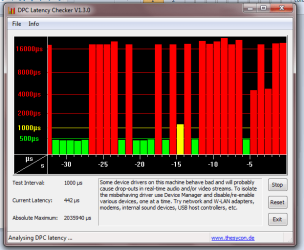
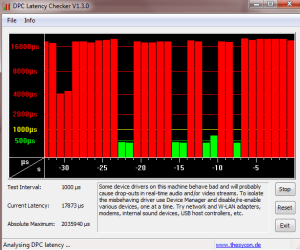
About a month or so ago, my laptop started producing these very annoying, screeching sounds in one side of my headphones. I thought nothing of it but then later, when I would play a song or a video, whether it was internet based or from my computer, I would hear crackling/popping sounds from my headphones while it played, increasing in intensity as I put the volume up. Even if the volume was done, the popping would be very loud and wouldn't go away unless I muted the speakers. The problem is NOT my headphones because I tried listening with different sets and all had the same problem.
It's not just the jack either I think because when I take the headphones out, the problem persists and the audio is laggy and distorted. Sometimes, the audio will lag so badly I can't make it out and pop so much and sometime it even just goes berserk, sounds like a bad television hum but much louder and like an annoying buzz until it goes back to popping and crackling.
The nasty problem occurs with both speakers and headphones and it's just very annoying. I can't listen to music without hearing this annoying popping, crackling, screeching, buzz noises. And it's not just when I play music either. It's when I do -anything- on my computer. Eventually, the noise will stop if I don't do ANYTHING. But as soon as I click something, say, I run my internet application, the sounds will reappear. I don't know why this is.
As I've mentioned, I've tried looking for help but I don't understand anything or the problem does not apply to me / my model of laptop.
I have an ASUS running Microsoft Windows 7 Home Premium
System Manufacturer: ASUSTeK Computer Inc
System Model: K50IJ
System Type: x64-based PC
I don't know how to check the sound card name or anything like that but under system information, it says the sound device is named VIA High Definition Audio.
The last time I tried to do a driver update for my audio drivers, it said everything was up to date and did not do anything. Disabling, uninstalling, re-enabling, reinstalling drivers did not do anything to help. But what do I know?
I would love any help I can get from someone who can explain this stuff to me so I'm sorry if I test your patience with my limited knowledge of technology...I'm just really sick and tired of this problem.
Thank you to anyone who can help me.
About a month or so ago, my laptop started producing these very annoying, screeching sounds in one side of my headphones. I thought nothing of it but then later, when I would play a song or a video, whether it was internet based or from my computer, I would hear crackling/popping sounds from my headphones while it played, increasing in intensity as I put the volume up. Even if the volume was done, the popping would be very loud and wouldn't go away unless I muted the speakers. The problem is NOT my headphones because I tried listening with different sets and all had the same problem.
It's not just the jack either I think because when I take the headphones out, the problem persists and the audio is laggy and distorted. Sometimes, the audio will lag so badly I can't make it out and pop so much and sometime it even just goes berserk, sounds like a bad television hum but much louder and like an annoying buzz until it goes back to popping and crackling.
The nasty problem occurs with both speakers and headphones and it's just very annoying. I can't listen to music without hearing this annoying popping, crackling, screeching, buzz noises. And it's not just when I play music either. It's when I do -anything- on my computer. Eventually, the noise will stop if I don't do ANYTHING. But as soon as I click something, say, I run my internet application, the sounds will reappear. I don't know why this is.
As I've mentioned, I've tried looking for help but I don't understand anything or the problem does not apply to me / my model of laptop.
I have an ASUS running Microsoft Windows 7 Home Premium
System Manufacturer: ASUSTeK Computer Inc
System Model: K50IJ
System Type: x64-based PC
I don't know how to check the sound card name or anything like that but under system information, it says the sound device is named VIA High Definition Audio.
The last time I tried to do a driver update for my audio drivers, it said everything was up to date and did not do anything. Disabling, uninstalling, re-enabling, reinstalling drivers did not do anything to help. But what do I know?
I would love any help I can get from someone who can explain this stuff to me so I'm sorry if I test your patience with my limited knowledge of technology...I'm just really sick and tired of this problem.
Thank you to anyone who can help me.
My Computer
At a glance
Microsoft Windows Home Premium 64bitMobile Intel(R) 4 Series
- Computer Manufacturer/Model Number
- ASUSTeK Computer Inc.
- OS
- Microsoft Windows Home Premium 64bit
- Graphics Card(s)
- Mobile Intel(R) 4 Series
- Sound Card
- VIA High Definition Audio Express Chipset Family