ASUS N53SV-XV1 suffering frequent BSOD, Win7 x64

st0kEd

New member
Member
Local time
3:07 PM
Messages
34
Location
Denver, CO

I've being having persistent BSODs happening at random for a while now and am finally getting around to figuring out the problem. I've run Memtest and it came back clean and yesterday started updating drivers (not sure we got to all of them) and the BIOS. Since updating drivers I've had two BSODs (screencaps below). Prior to today I've seen BSODs pertaining to 'ndis.sys' and 'DRIVER_STATE_POWER_FAILURE' (among others) if that means anything. I have attached the .zip file as per BSOD Posting Instructions, but whenever I try to run the perfmon /report I get the following error:
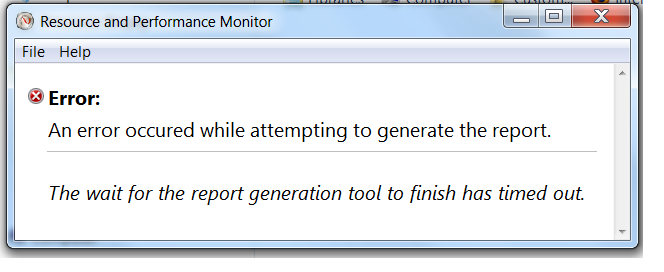
FZ1Kg.png


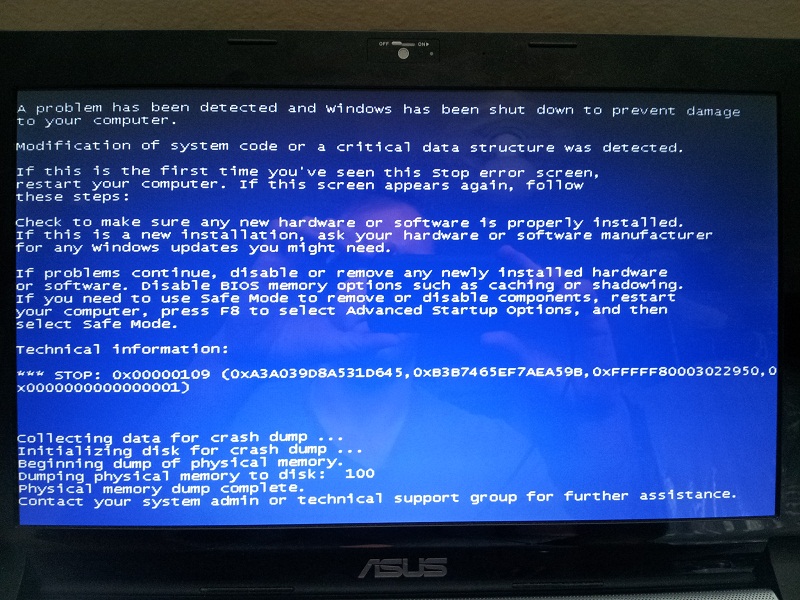
Here are the BSODs I experienced this morning:
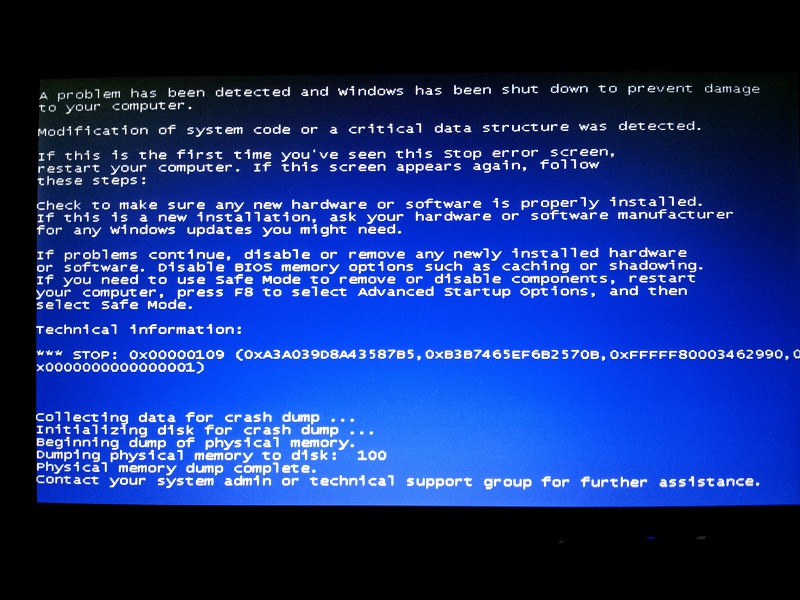
Bi2YS.jpg


7vCDI.jpg


Here's an older BSOD screencap I just found when I got the 'DRIVER STATE POWER FAILURE':
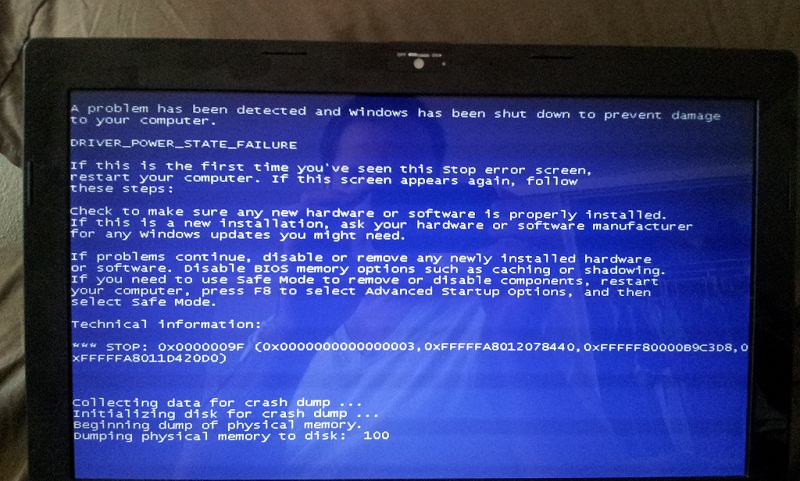
DnH89.jpg


MACHINE SPECS:
Make and Model
ASUS N53SV-XV1

OS
Windows 7 Home Premium 64-bit

Display
15.6-inch LED-backlit Full HD display (1920 x 1080)

Graphics Card
NVIDIA® GeForce® GT 540M with 1GB DDR3 VRAM and NVIDIA Optimus Technology

Processor
Type : 2nd gen Intel® Core™ i7-2630QM
Speed : 2.0 GHz (with Turbo Boost 2.0 up to 2.9 GHz)
Cache : 3 MB L3

Chipset
Intel® HM65

Memory
Corsair 16GB (4x 4GB) 1333mhz PC3-10666 204-pin DDR3 SODIMM
NOTE:[/B]Ran Memtest (SINGLE PASS ONLY) and it came back clean (no errors).
EDIT: Running Memtest86+ again, this time plan to let it run for 7 passes.

Storage
2.5" SATA
500GB 7200rpm

Optical Drive
Super Multi DVD drive

Communication
LAN : 10/100/1000 Mbps Ethernet
WLAN : Integrated 802.11 b/g/n (@2.4GHz)

Bluetooth
Built-in Bluetooth™ 2.1

Audio
Bang & Olufsen ICEpower®
Built-in Speakers And Microphone SonicFocus
(Realtek High Definition Audio)

Interface
1 x USB 3.0 ports
3 x USB 2.0 ports
1 x RJ45 LAN Jack for LAN insert
1 x HDMI
1 x Microphone-in jack
1 x Line-in Jack
1 x VGA port/Mini D-sub 15-pin for external monitor

Power
Output : 19 V DC, 6.3 A, 120 W
Input : 100 -240 V AC, 50/60 Hz universal


Any help is greatly appreciated!
 
Last edited:

My Computer My Computer

At a glance

Windows 7 Home Premium x64 SP1i7-2630QM @ 2.00GHz16.0Gb
Computer Manufacturer/Model Number
ASUS N53SV-XV1
OS
Windows 7 Home Premium x64 SP1
CPU
i7-2630QM @ 2.00GHz
Memory
16.0Gb

My Computer My Computer

At a glance

Windows 7 x64Intel i7 2600kG.skill Ripjaw 16gigs @ 1866Nvidia gtx580 (evga)
Computer Manufacturer/Model Number
Insane hobo technologies. ;-)
OS
Windows 7 x64
CPU
Intel i7 2600k
Motherboard
Asrock z68 extreme 4 gen 3
Memory
G.skill Ripjaw 16gigs @ 1866
Graphics Card(s)
Nvidia gtx580 (evga)
Sound Card
Integrated HD audio + hdmi
Monitor(s) Displays
24" ASUS widescreen + 42" insignia
Screen Resolution
1080p (1920x1080)
Hard Drives
128 Samsung 830
256 Samsung 840
3 x 1tb storage drive (various)
1 western digital 1tb (eSATA)
1 Seagate 1tb (eSATA)
PSU
1 kilowatt SLI/Crossfire rated Silverstone modular
Case
NZXT Phantom + additional 220 fan
Cooling
Zalmann
Keyboard
Microsoft wireless 3000 (v2)
Mouse
MS - wireless 5000 (bluetrack)
Internet Speed
depends on if you ask me or my provider.
Other Info
The above information is provided as is, and the author assumes no responsibility for issues it may cause with your sanity or fanboyism.
I'm not overclocked and I did run memtest recently but I'm happy to do it again. I'll report back with results when I have them.
 

My Computer My Computer

At a glance

Windows 7 Home Premium x64 SP1i7-2630QM @ 2.00GHz16.0Gb
Computer Manufacturer/Model Number
ASUS N53SV-XV1
OS
Windows 7 Home Premium x64 SP1
CPU
i7-2630QM @ 2.00GHz
Memory
16.0Gb
With memtest it's best to let it run overnight, make sure the ram is nice and heated up and everything is active to simulate normal operational usage better.
 

My Computer My Computer

At a glance

Windows 7 x64Intel i7 2600kG.skill Ripjaw 16gigs @ 1866Nvidia gtx580 (evga)
Computer Manufacturer/Model Number
Insane hobo technologies. ;-)
OS
Windows 7 x64
CPU
Intel i7 2600k
Motherboard
Asrock z68 extreme 4 gen 3
Memory
G.skill Ripjaw 16gigs @ 1866
Graphics Card(s)
Nvidia gtx580 (evga)
Sound Card
Integrated HD audio + hdmi
Monitor(s) Displays
24" ASUS widescreen + 42" insignia
Screen Resolution
1080p (1920x1080)
Hard Drives
128 Samsung 830
256 Samsung 840
3 x 1tb storage drive (various)
1 western digital 1tb (eSATA)
1 Seagate 1tb (eSATA)
PSU
1 kilowatt SLI/Crossfire rated Silverstone modular
Case
NZXT Phantom + additional 220 fan
Cooling
Zalmann
Keyboard
Microsoft wireless 3000 (v2)
Mouse
MS - wireless 5000 (bluetrack)
Internet Speed
depends on if you ask me or my provider.
Other Info
The above information is provided as is, and the author assumes no responsibility for issues it may cause with your sanity or fanboyism.
With memtest it's best to let it run overnight, make sure the ram is nice and heated up and everything is active to simulate normal operational usage better.

Okay, will do. Thanks for the help and advice!
 

My Computer My Computer

At a glance

Windows 7 Home Premium x64 SP1i7-2630QM @ 2.00GHz16.0Gb
Computer Manufacturer/Model Number
ASUS N53SV-XV1
OS
Windows 7 Home Premium x64 SP1
CPU
i7-2630QM @ 2.00GHz
Memory
16.0Gb
With memtest it's best to let it run overnight, make sure the ram is nice and heated up and everything is active to simulate normal operational usage better.

Hmm, read this again and want to know what you mean by "everything is active." You mean have programs I normally use open during the test?
 

My Computer My Computer

At a glance

Windows 7 Home Premium x64 SP1i7-2630QM @ 2.00GHz16.0Gb
Computer Manufacturer/Model Number
ASUS N53SV-XV1
OS
Windows 7 Home Premium x64 SP1
CPU
i7-2630QM @ 2.00GHz
Memory
16.0Gb
no just like everything else in your computer the memory heats up under use.
It takes awhile for it to reach what one might call operation temperatures.

Normally this is done by programs and apps running, However in the case of memtest it's done by the reading/writing the test itself actually does.

There's nothing dangerous or crazy here, just basic stuff really.
 

My Computer My Computer

At a glance

Windows 7 x64Intel i7 2600kG.skill Ripjaw 16gigs @ 1866Nvidia gtx580 (evga)
Computer Manufacturer/Model Number
Insane hobo technologies. ;-)
OS
Windows 7 x64
CPU
Intel i7 2600k
Motherboard
Asrock z68 extreme 4 gen 3
Memory
G.skill Ripjaw 16gigs @ 1866
Graphics Card(s)
Nvidia gtx580 (evga)
Sound Card
Integrated HD audio + hdmi
Monitor(s) Displays
24" ASUS widescreen + 42" insignia
Screen Resolution
1080p (1920x1080)
Hard Drives
128 Samsung 830
256 Samsung 840
3 x 1tb storage drive (various)
1 western digital 1tb (eSATA)
1 Seagate 1tb (eSATA)
PSU
1 kilowatt SLI/Crossfire rated Silverstone modular
Case
NZXT Phantom + additional 220 fan
Cooling
Zalmann
Keyboard
Microsoft wireless 3000 (v2)
Mouse
MS - wireless 5000 (bluetrack)
Internet Speed
depends on if you ask me or my provider.
Other Info
The above information is provided as is, and the author assumes no responsibility for issues it may cause with your sanity or fanboyism.
With memtest it's best to let it run overnight, make sure the ram is nice and heated up and everything is active to simulate normal operational usage better.

Memtest has been running for 11+ hours and has completed 3 passes with 0 errors. I'm going continue to let it run until it makes 7 passes per the instructions. Anyone care to comment on the results thus far? What is the likelihood we'll find an error after 3 clean passes?
 

My Computer My Computer

At a glance

Windows 7 Home Premium x64 SP1i7-2630QM @ 2.00GHz16.0Gb
Computer Manufacturer/Model Number
ASUS N53SV-XV1
OS
Windows 7 Home Premium x64 SP1
CPU
i7-2630QM @ 2.00GHz
Memory
16.0Gb
there really is no definitive answer on memtest, you could likely ask 20 of our regs here and get varying answers. 11 hours straight is certainly enough time to warm up.
So we'll start looking more closely at your drivers, though on my first pass over that info I nothing really stuck out.
I unfortunately am not in front of the right computer for that right now.

The first thing I would do though would be to hop over to the motherboard manufacturer's website and see if they've updated anything recently for your model.
 

My Computer My Computer

At a glance

Windows 7 x64Intel i7 2600kG.skill Ripjaw 16gigs @ 1866Nvidia gtx580 (evga)
Computer Manufacturer/Model Number
Insane hobo technologies. ;-)
OS
Windows 7 x64
CPU
Intel i7 2600k
Motherboard
Asrock z68 extreme 4 gen 3
Memory
G.skill Ripjaw 16gigs @ 1866
Graphics Card(s)
Nvidia gtx580 (evga)
Sound Card
Integrated HD audio + hdmi
Monitor(s) Displays
24" ASUS widescreen + 42" insignia
Screen Resolution
1080p (1920x1080)
Hard Drives
128 Samsung 830
256 Samsung 840
3 x 1tb storage drive (various)
1 western digital 1tb (eSATA)
1 Seagate 1tb (eSATA)
PSU
1 kilowatt SLI/Crossfire rated Silverstone modular
Case
NZXT Phantom + additional 220 fan
Cooling
Zalmann
Keyboard
Microsoft wireless 3000 (v2)
Mouse
MS - wireless 5000 (bluetrack)
Internet Speed
depends on if you ask me or my provider.
Other Info
The above information is provided as is, and the author assumes no responsibility for issues it may cause with your sanity or fanboyism.
there really is no definitive answer on memtest, you could likely ask 20 of our regs here and get varying answers. 11 hours straight is certainly enough time to warm up.
So we'll start looking more closely at your drivers, though on my first pass over that info I nothing really stuck out.
I unfortunately am not in front of the right computer for that right now.

The first thing I would do though would be to hop over to the motherboard manufacturer's website and see if they've updated anything recently for your model.

Thanks for the reply. I believe I updated the MB driver the other day but will have to check later when I have access to the machine. I know for sure that the graphics driver (both Intel and NVidia components) have been updated. I'll need to go back and check on everything else.
 

My Computer My Computer

At a glance

Windows 7 Home Premium x64 SP1i7-2630QM @ 2.00GHz16.0Gb
Computer Manufacturer/Model Number
ASUS N53SV-XV1
OS
Windows 7 Home Premium x64 SP1
CPU
i7-2630QM @ 2.00GHz
Memory
16.0Gb
on that note I can tell you from personal experience that the drivers provided by windows update for the intel 3000 are garbage. They almost killed my machine. You have to go direct to intel's download center and track the most recent one there.
Fixed the only problem I had on this entire build.
 

My Computer My Computer

At a glance

Windows 7 x64Intel i7 2600kG.skill Ripjaw 16gigs @ 1866Nvidia gtx580 (evga)
Computer Manufacturer/Model Number
Insane hobo technologies. ;-)
OS
Windows 7 x64
CPU
Intel i7 2600k
Motherboard
Asrock z68 extreme 4 gen 3
Memory
G.skill Ripjaw 16gigs @ 1866
Graphics Card(s)
Nvidia gtx580 (evga)
Sound Card
Integrated HD audio + hdmi
Monitor(s) Displays
24" ASUS widescreen + 42" insignia
Screen Resolution
1080p (1920x1080)
Hard Drives
128 Samsung 830
256 Samsung 840
3 x 1tb storage drive (various)
1 western digital 1tb (eSATA)
1 Seagate 1tb (eSATA)
PSU
1 kilowatt SLI/Crossfire rated Silverstone modular
Case
NZXT Phantom + additional 220 fan
Cooling
Zalmann
Keyboard
Microsoft wireless 3000 (v2)
Mouse
MS - wireless 5000 (bluetrack)
Internet Speed
depends on if you ask me or my provider.
Other Info
The above information is provided as is, and the author assumes no responsibility for issues it may cause with your sanity or fanboyism.
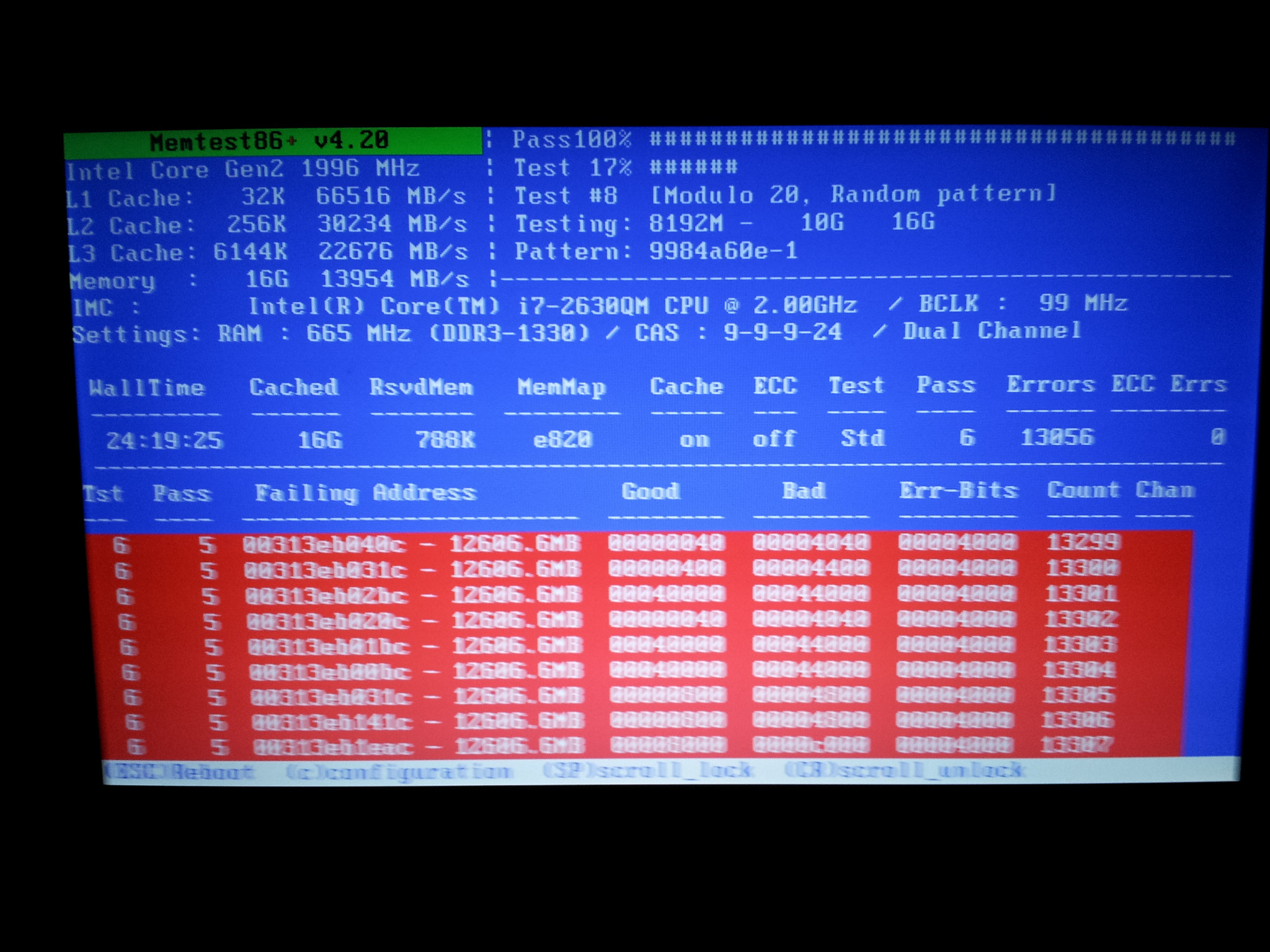
Looks like we've identified the problem! On pass no.4 errors started turning up and here's a screencap with the report from pass no.6:

vfeO0.jpg


on that note I can tell you from personal experience that the drivers provided by windows update for the intel 3000 are garbage. They almost killed my machine. You have to go direct to intel's download center and track the most recent one there.
Fixed the only problem I had on this entire build.

I'm going to follow up on this because the machine was behaving badly BEFORE I installed the RAM that's in there now. Did you happen to look at some of my earlier dump files? I'm specifically wondering about the files from 11/1/2011, 11/26/2011, and 12/10/2011 which happened with the OEM RAM installed. Maybe the OEM RAM was bad as well? I remember back then the problem would be the machine hanging and freezing up with out going BSOD so maybe that was a driver issue that I've since resolved?
 

My Computer My Computer

At a glance

Windows 7 Home Premium x64 SP1i7-2630QM @ 2.00GHz16.0Gb
Computer Manufacturer/Model Number
ASUS N53SV-XV1
OS
Windows 7 Home Premium x64 SP1
CPU
i7-2630QM @ 2.00GHz
Memory
16.0Gb
This could even be a problem with one of the slots on the motherboard itself. A problem that only occurs when the heat reaches a certain level.
That kind of problem is pretty rare though.
Receiving bad ram happens all the time. And if it's warranty or still meets RMA conditions it's generally easy to return for replacement, as the manufacturer and dealers both realize DOA ram is a reality of life.

There could also be a problem with your specific motherboard / ram you chose combination.

There are a lot of reasons for ram to start misbehaving. Personally, if it's new I would just RMA it if you get the same issue from the next set it's time to start considering the motherboard might be to blame.
 

My Computer My Computer

At a glance

Windows 7 x64Intel i7 2600kG.skill Ripjaw 16gigs @ 1866Nvidia gtx580 (evga)
Computer Manufacturer/Model Number
Insane hobo technologies. ;-)
OS
Windows 7 x64
CPU
Intel i7 2600k
Motherboard
Asrock z68 extreme 4 gen 3
Memory
G.skill Ripjaw 16gigs @ 1866
Graphics Card(s)
Nvidia gtx580 (evga)
Sound Card
Integrated HD audio + hdmi
Monitor(s) Displays
24" ASUS widescreen + 42" insignia
Screen Resolution
1080p (1920x1080)
Hard Drives
128 Samsung 830
256 Samsung 840
3 x 1tb storage drive (various)
1 western digital 1tb (eSATA)
1 Seagate 1tb (eSATA)
PSU
1 kilowatt SLI/Crossfire rated Silverstone modular
Case
NZXT Phantom + additional 220 fan
Cooling
Zalmann
Keyboard
Microsoft wireless 3000 (v2)
Mouse
MS - wireless 5000 (bluetrack)
Internet Speed
depends on if you ask me or my provider.
Other Info
The above information is provided as is, and the author assumes no responsibility for issues it may cause with your sanity or fanboyism.
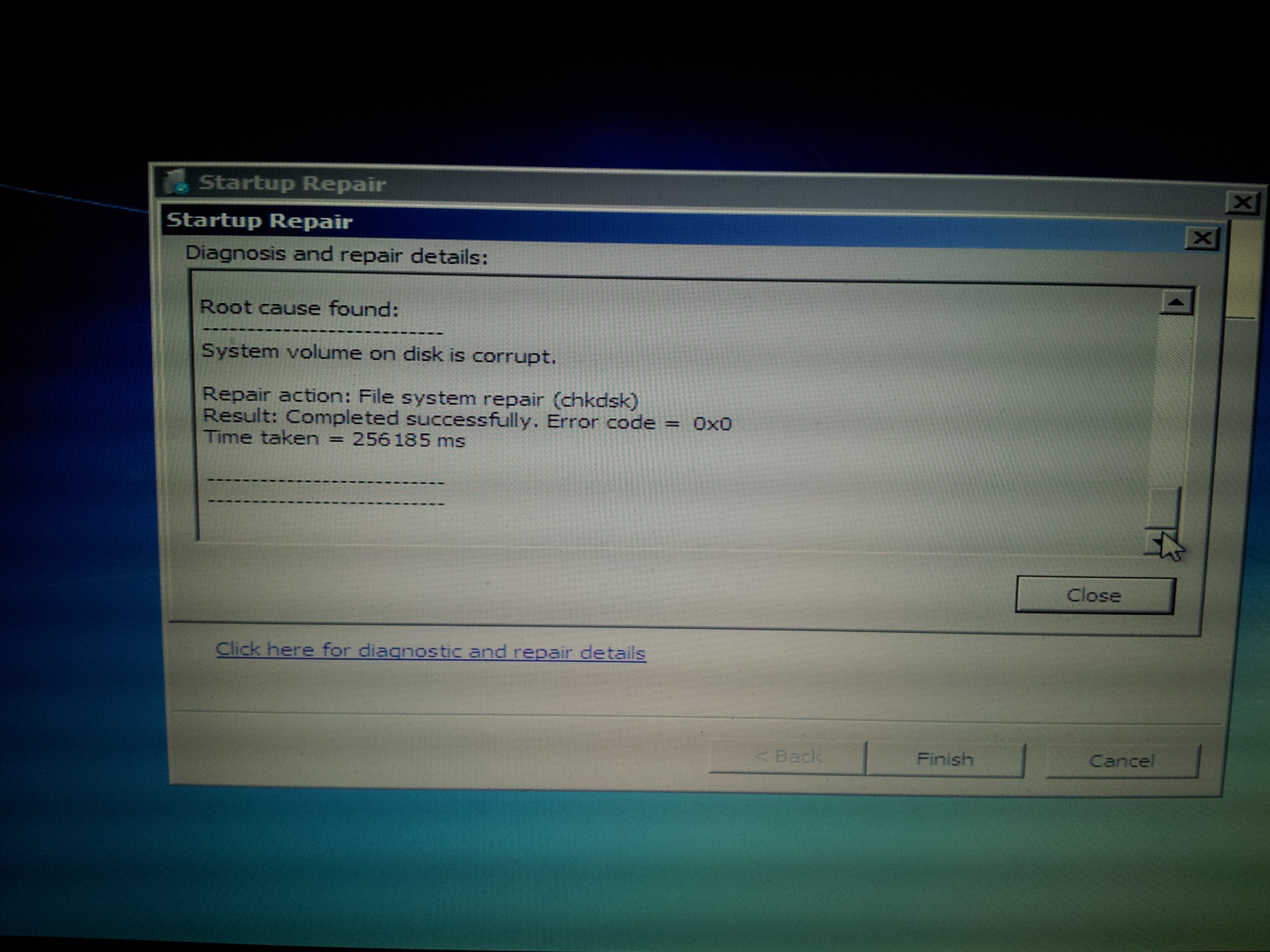
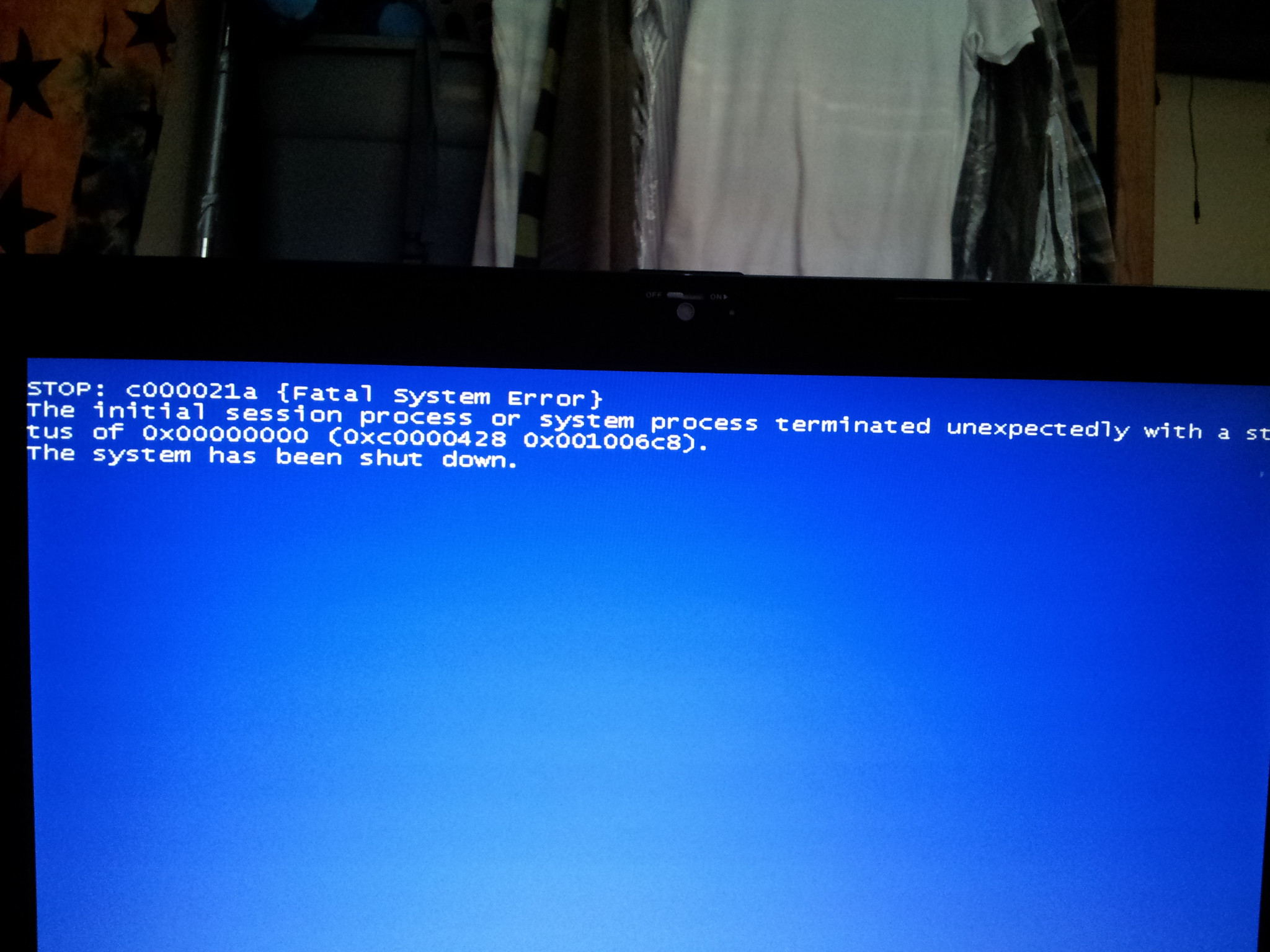
So, the seems the problem might be more than the RAM. The machine hung this morning while I was using the internet and when I powered it on this afternoon it refused to boot and it looks like my hard drive is shot:

PsRHK.jpg


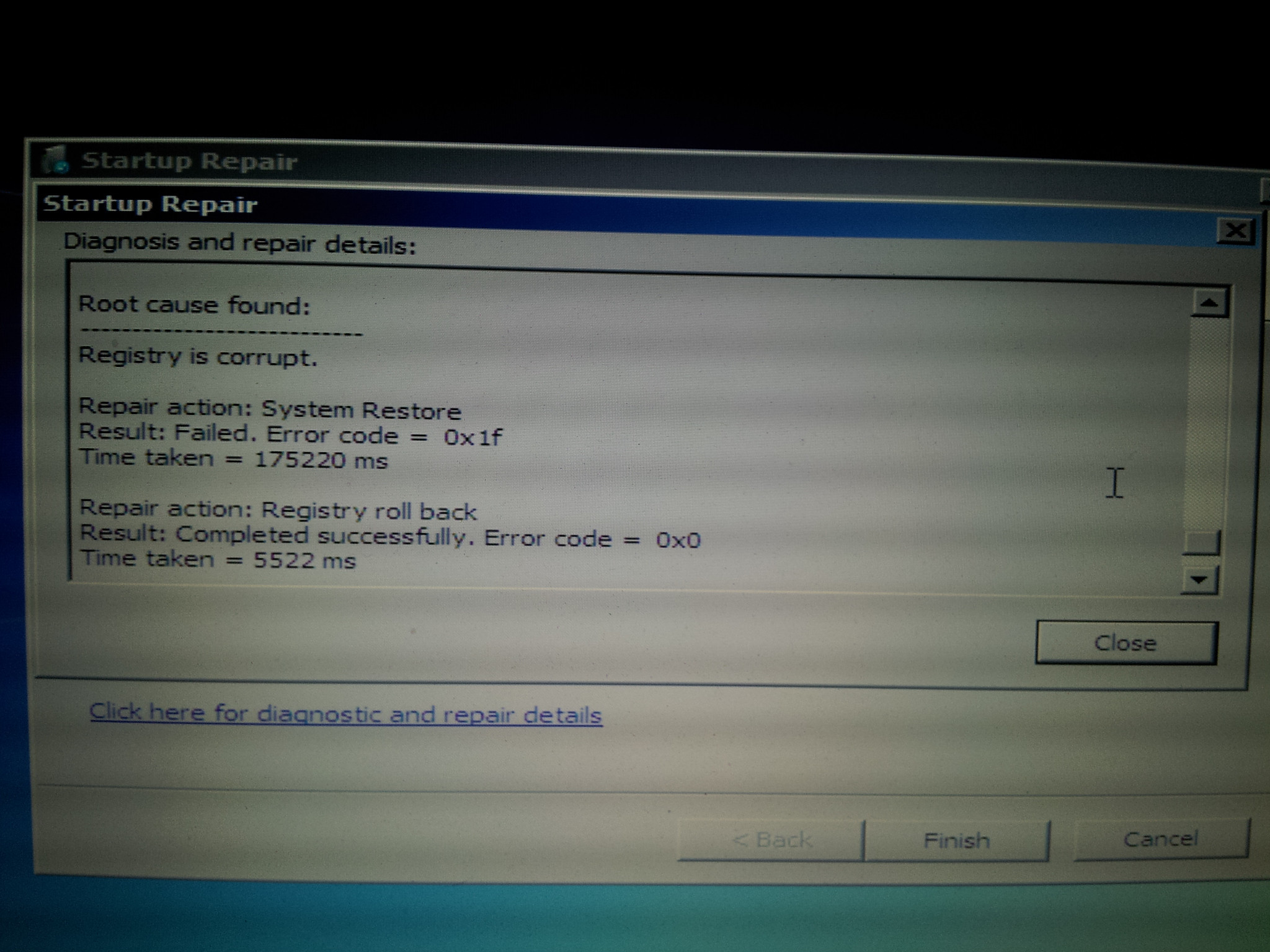
After attempting auto repair and rebooting it refused and a second analysis revealed this:

o8j5e.jpg


Attempted repair again and now I'm getting this when I try to boot:

W01Db.jpg


Thoughts? Is my RAM and (now) hard drive bad? Virus? Any insight is greatly appreciated!
 

My Computer My Computer

At a glance

Windows 7 Home Premium x64 SP1i7-2630QM @ 2.00GHz16.0Gb
Computer Manufacturer/Model Number
ASUS N53SV-XV1
OS
Windows 7 Home Premium x64 SP1
CPU
i7-2630QM @ 2.00GHz
Memory
16.0Gb
Who makes your hard drive?
You could download their utility and use it to check your drive.
A member here made a list of the vendors/sites
here
Hard Drive Diagnostic Procedure

we've already determined one stick was bad for sure. So it could still be to blame or there could actually be something going on with the hard drive you're going to have to check.
 

My Computer My Computer

At a glance

Windows 7 x64Intel i7 2600kG.skill Ripjaw 16gigs @ 1866Nvidia gtx580 (evga)
Computer Manufacturer/Model Number
Insane hobo technologies. ;-)
OS
Windows 7 x64
CPU
Intel i7 2600k
Motherboard
Asrock z68 extreme 4 gen 3
Memory
G.skill Ripjaw 16gigs @ 1866
Graphics Card(s)
Nvidia gtx580 (evga)
Sound Card
Integrated HD audio + hdmi
Monitor(s) Displays
24" ASUS widescreen + 42" insignia
Screen Resolution
1080p (1920x1080)
Hard Drives
128 Samsung 830
256 Samsung 840
3 x 1tb storage drive (various)
1 western digital 1tb (eSATA)
1 Seagate 1tb (eSATA)
PSU
1 kilowatt SLI/Crossfire rated Silverstone modular
Case
NZXT Phantom + additional 220 fan
Cooling
Zalmann
Keyboard
Microsoft wireless 3000 (v2)
Mouse
MS - wireless 5000 (bluetrack)
Internet Speed
depends on if you ask me or my provider.
Other Info
The above information is provided as is, and the author assumes no responsibility for issues it may cause with your sanity or fanboyism.
Who makes your hard drive?
You could download their utility and use it to check your drive.
A member here made a list of the vendors/sites
here
Hard Drive Diagnostic Procedure

we've already determined one stick was bad for sure. So it could still be to blame or there could actually be something going on with the hard drive you're going to have to check.

I opened the machine up this morning and it has a Seagate drive. I'll post diagnostic results when I have them. Have a 240Gb SSD ready to go in if the drive is bad!
 

My Computer My Computer

At a glance

Windows 7 Home Premium x64 SP1i7-2630QM @ 2.00GHz16.0Gb
Computer Manufacturer/Model Number
ASUS N53SV-XV1
OS
Windows 7 Home Premium x64 SP1
CPU
i7-2630QM @ 2.00GHz
Memory
16.0Gb
Don't have a CD at the moment to run the manufacturer diagnostic tool, but I ran chkdsk on the drive (via USB hard drive reader connected to my desktop) and it came back with no errors.
 

My Computer My Computer

At a glance

Windows 7 Home Premium x64 SP1i7-2630QM @ 2.00GHz16.0Gb
Computer Manufacturer/Model Number
ASUS N53SV-XV1
OS
Windows 7 Home Premium x64 SP1
CPU
i7-2630QM @ 2.00GHz
Memory
16.0Gb
Okay, so I tried running Seagate's hard drive tool and it won't recognize the drive. As mentioned above, I did run chkdsk on the drive using my desktop and a USB-Sata reader and it showed no errors.

Also, I pulled the aftermarket RAM and re-installed the OEM 4Gb stick and there is no change. On the first boot up I received another c000021a error. Time for RMA? An IT friend suggested the MB might be shot.
 
Last edited:

My Computer My Computer

At a glance

Windows 7 Home Premium x64 SP1i7-2630QM @ 2.00GHz16.0Gb
Computer Manufacturer/Model Number
ASUS N53SV-XV1
OS
Windows 7 Home Premium x64 SP1
CPU
i7-2630QM @ 2.00GHz
Memory
16.0Gb
Called ASUS tech support and they instructed me to run their recovery module which wipes the OS partition and performs a clean install of Windows. Did this last night and spent this morning installing Windows updates as well as updating drivers. The machine has been well behaved so far and boots up and runs as it should. So for the time being the fresh install seems to have solved the problem, but I'm going to see how things are a week from now before saying case closed. And as happy as I am to have the machine up and running again, I am disappointed that we weren't able to determine the root cause of the issue.

Thanks to those who helped!
 

My Computer My Computer

At a glance

Windows 7 Home Premium x64 SP1i7-2630QM @ 2.00GHz16.0Gb
Computer Manufacturer/Model Number
ASUS N53SV-XV1
OS
Windows 7 Home Premium x64 SP1
CPU
i7-2630QM @ 2.00GHz
Memory
16.0Gb
I would be careful when applying updates, since it is working now, you should probably avoid making any updates of drivers through windows update. I have a feeling win update may have installed a driver your system didn't agree with. Namely chipset or hdd controller related.
 

My Computer My Computer

At a glance

Windows 7 x64Intel i7 2600kG.skill Ripjaw 16gigs @ 1866Nvidia gtx580 (evga)
Computer Manufacturer/Model Number
Insane hobo technologies. ;-)
OS
Windows 7 x64
CPU
Intel i7 2600k
Motherboard
Asrock z68 extreme 4 gen 3
Memory
G.skill Ripjaw 16gigs @ 1866
Graphics Card(s)
Nvidia gtx580 (evga)
Sound Card
Integrated HD audio + hdmi
Monitor(s) Displays
24" ASUS widescreen + 42" insignia
Screen Resolution
1080p (1920x1080)
Hard Drives
128 Samsung 830
256 Samsung 840
3 x 1tb storage drive (various)
1 western digital 1tb (eSATA)
1 Seagate 1tb (eSATA)
PSU
1 kilowatt SLI/Crossfire rated Silverstone modular
Case
NZXT Phantom + additional 220 fan
Cooling
Zalmann
Keyboard
Microsoft wireless 3000 (v2)
Mouse
MS - wireless 5000 (bluetrack)
Internet Speed
depends on if you ask me or my provider.
Other Info
The above information is provided as is, and the author assumes no responsibility for issues it may cause with your sanity or fanboyism.
Back
Top