Asus P5VDC-X Windows 7 X32 Sp1 No Sound!

chubalz

New member
Member
VIP
Local time
10:40 AM
Messages
131
Well this is my 1st thread

http://www.sevenforums.com/drivers/200987-asus-p5vdc-x-will-work-windows-7-sp1.html

I installed Windows Upgrade Advisory and all were compatible on my hardware.

I successfully installed windows 7 on this motherboard but their is no sound.

If you read this person asking from microsoft he cannot play his audio but the device is installed already.

No sound after installing Windows 7 on an Asus P5VDC-X board - Microsoft Answers

No icon for analog speaker - Microsoft Answers

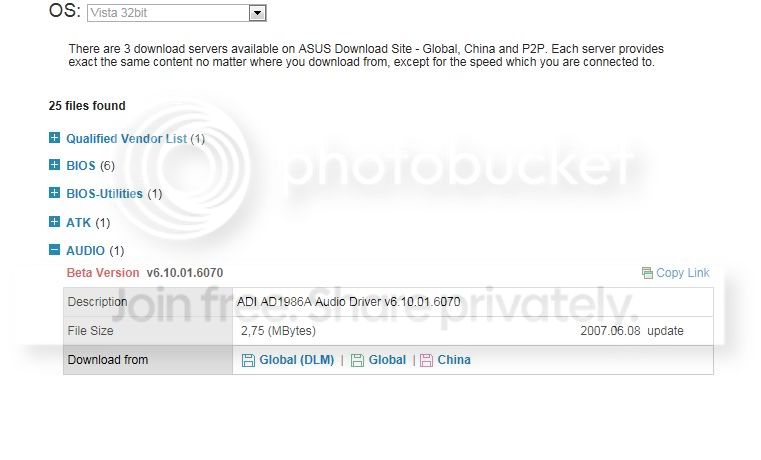
the poster name Bikebrains even even download a driver from Asus site which is vista but no success.


Well this is the same as mine.

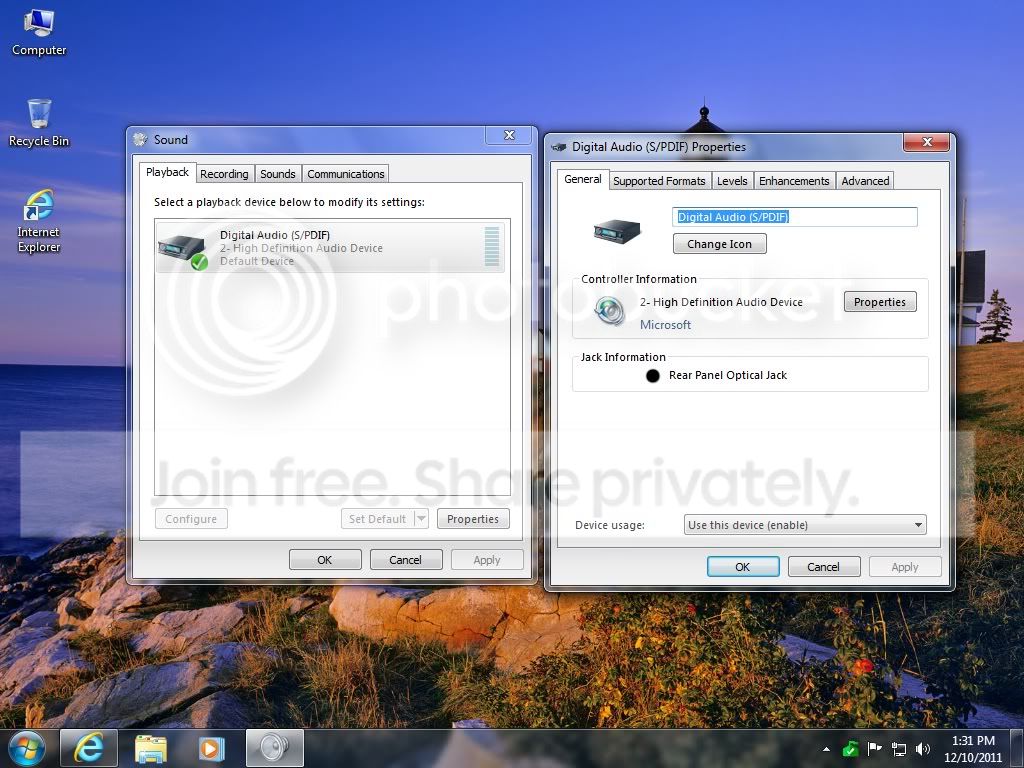
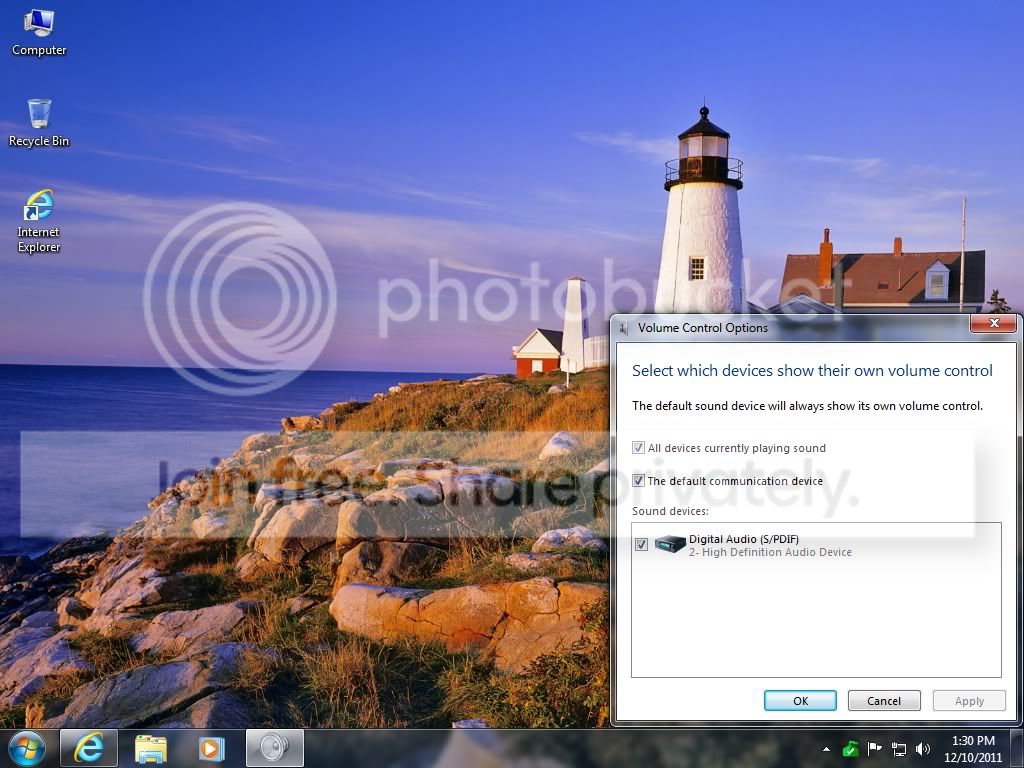
Here are the screenshot of my desktop.
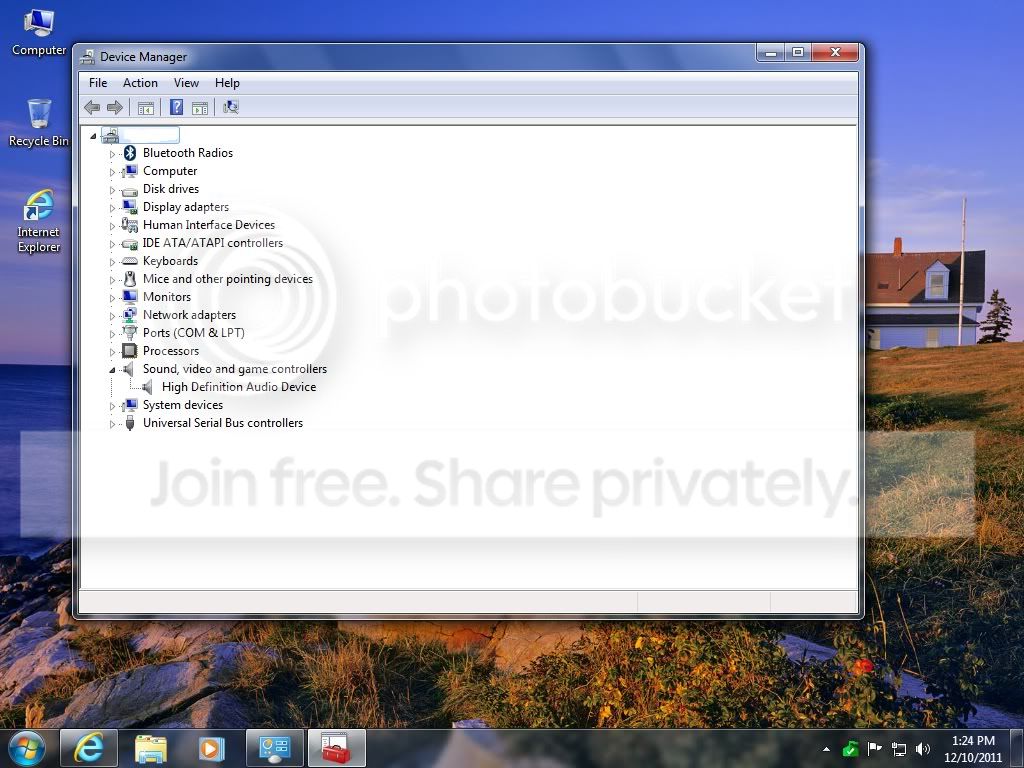
device.jpg


volumecontrol.jpg


soundpdif.jpg


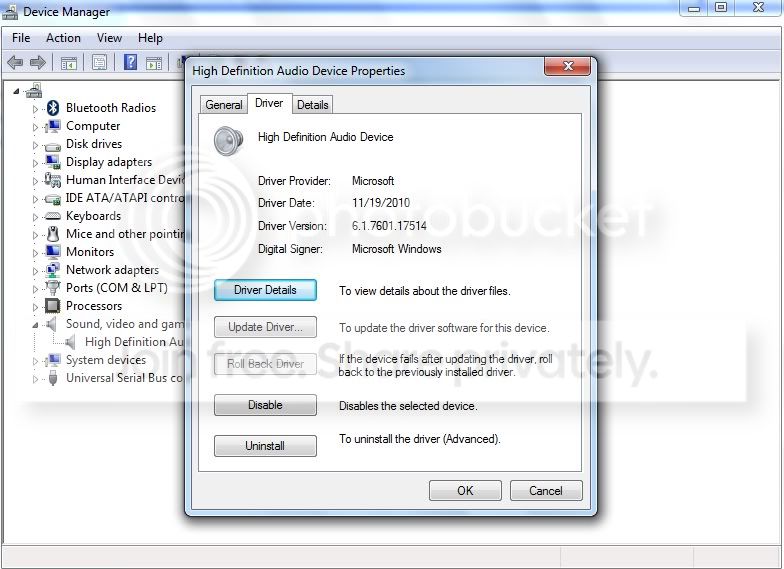
This is the date of drviers which Windows Driver is updated compare to Asus Vista driver.

devicesound.jpg


vistasound.jpg

I have run out of any ideas for over 3 hours of troubleshooting.

This a challenge for me.

I hope someone could help me.

I hope a Geek person can help me.
 

My Computer My Computer

At a glance

Windows 7 Ultimate 64 Bit SP1Pentium Dual Core E6500 2.93 Ghz2 Gig DDR2ATI Radeon HD 4300 Series
OS
Windows 7 Ultimate 64 Bit SP1
CPU
Pentium Dual Core E6500 2.93 Ghz
Memory
2 Gig DDR2
Graphics Card(s)
ATI Radeon HD 4300 Series
Hard Drives
160 Gig
Is the Integrated audio (on the motherboard) enabled in the BIOS?

Usually, Windows 7 installation will detect and install any needed drivers, if the PC or in this case motherboard is fully Vista/Windows 7 compatible. With an older motherboard such as this, maybe it's not fully compatible and the problem?
 

My Computer My Computer

At a glance

Windows 10 64 bitIntel i7 6700K16GB Corsair DominatorIntel CPU Graphics
Computer type
PC/Desktop
Computer Manufacturer/Model Number
My Own Build
OS
Windows 10 64 bit
CPU
Intel i7 6700K
Motherboard
ASUS ROG Maximus VIII Hero
Memory
16GB Corsair Dominator
Graphics Card(s)
Intel CPU Graphics
Sound Card
RealTek
Monitor(s) Displays
27" Dell S2719dgf
Screen Resolution
2560X1440
Hard Drives
1 TB Samsung 850 EVO SSD for Win 10 Pro
500GB Samsung 850 EVO SSD for Win 10 Insider
2 TB drive for backup
PSU
EVGA Supernova 750G2
Case
BeQuiet Silent Base 600
Cooling
Deepcool Captain 120EX
Keyboard
Microsoft Wireless 2000
Mouse
Microsoft wireless
Internet Speed
100 MB/sec (Cable)
Antivirus
Microsoft Defender and Malwarebytes
Browser
Edge/Firefox
Other Info
Cakewalk (Sonar) by BandLab and Studio One 4.1 Pro recording studio software. MOTU 896Mk3 Hybrid recording interface, Frontier Tranzport wireless control unit, Behringer X-Touch Control Surface.
Five USB connected optical drives for CD Audio production using Nero BurningROM
I check the BIOS but i only see SouthBridge Via VT8237A and it was set to Auto.


I try the windows Xp driver came from Asus site and run compatibility mode for Windows Xp Sp3.

It installed but after restarting i got this error.

This error will only appears on 1 restart after installing the driver.


asusxpsp3errorsound.jpg


Restarting again the system no error pop up.

What this really means?

The good thing is that im hearing already a sound.

I will Try Vista driver? but its a Beta release. Is it safe to use it?

vistasound.jpg
 

My Computer My Computer

At a glance

Windows 7 Ultimate 64 Bit SP1Pentium Dual Core E6500 2.93 Ghz2 Gig DDR2ATI Radeon HD 4300 Series
OS
Windows 7 Ultimate 64 Bit SP1
CPU
Pentium Dual Core E6500 2.93 Ghz
Memory
2 Gig DDR2
Graphics Card(s)
ATI Radeon HD 4300 Series
Hard Drives
160 Gig
Yes, try the Vista/Beta version. It should work OK.
 

My Computer My Computer

At a glance

Windows 10 64 bitIntel i7 6700K16GB Corsair DominatorIntel CPU Graphics
Computer type
PC/Desktop
Computer Manufacturer/Model Number
My Own Build
OS
Windows 10 64 bit
CPU
Intel i7 6700K
Motherboard
ASUS ROG Maximus VIII Hero
Memory
16GB Corsair Dominator
Graphics Card(s)
Intel CPU Graphics
Sound Card
RealTek
Monitor(s) Displays
27" Dell S2719dgf
Screen Resolution
2560X1440
Hard Drives
1 TB Samsung 850 EVO SSD for Win 10 Pro
500GB Samsung 850 EVO SSD for Win 10 Insider
2 TB drive for backup
PSU
EVGA Supernova 750G2
Case
BeQuiet Silent Base 600
Cooling
Deepcool Captain 120EX
Keyboard
Microsoft Wireless 2000
Mouse
Microsoft wireless
Internet Speed
100 MB/sec (Cable)
Antivirus
Microsoft Defender and Malwarebytes
Browser
Edge/Firefox
Other Info
Cakewalk (Sonar) by BandLab and Studio One 4.1 Pro recording studio software. MOTU 896Mk3 Hybrid recording interface, Frontier Tranzport wireless control unit, Behringer X-Touch Control Surface.
Five USB connected optical drives for CD Audio production using Nero BurningROM
Thanks for the quick response.

I wanna add question.

Never try the vista yet.

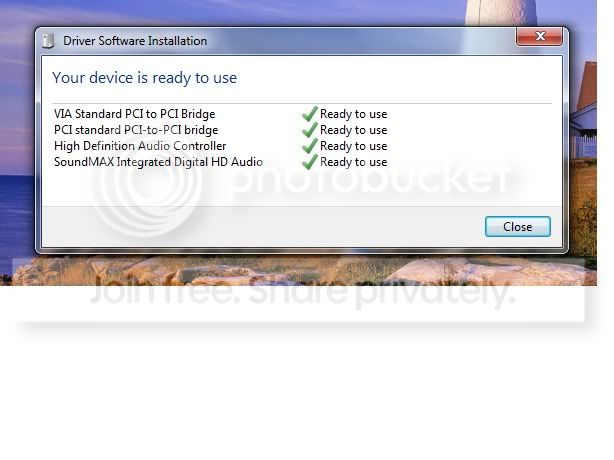
I just noticed that everytime i SHUT DOWN the computer and turning on again the driver is always installing.

VIA standard PCI
PCI standard
High Def Audio
Soundmax HD Audio

This 4 driver is always keeps installing!

shutdown.jpg


Did i mess up something in the settings?

But! if i restart the computer no driver is installing and its running fine.

Only have issues if i shut down the system.
 

My Computer My Computer

At a glance

Windows 7 Ultimate 64 Bit SP1Pentium Dual Core E6500 2.93 Ghz2 Gig DDR2ATI Radeon HD 4300 Series
OS
Windows 7 Ultimate 64 Bit SP1
CPU
Pentium Dual Core E6500 2.93 Ghz
Memory
2 Gig DDR2
Graphics Card(s)
ATI Radeon HD 4300 Series
Hard Drives
160 Gig
I try the vista 32 bit beta driver and run vista sp2 compatibility mode.

I think its running fine.

The Soundmax icon disappear, no error pop up but it has a sound.


Edit.

OMG!

I try shutting down 2 times and turn on the computer the 4 driver is still installing!

shutdown.jpg


Did i mess something?
 

My Computer My Computer

At a glance

Windows 7 Ultimate 64 Bit SP1Pentium Dual Core E6500 2.93 Ghz2 Gig DDR2ATI Radeon HD 4300 Series
OS
Windows 7 Ultimate 64 Bit SP1
CPU
Pentium Dual Core E6500 2.93 Ghz
Memory
2 Gig DDR2
Graphics Card(s)
ATI Radeon HD 4300 Series
Hard Drives
160 Gig
There would appear to be either a hardware problem on the motherboard or a chipset driver missing. I didn't see any chipset drivers on the web site (which is strange). Maybe something in the BIOS??

Maybe it's not compatible. In your other post about the motherboard, there were questions on whether it would work but to give it a try and see. You've given it a try and there appears to be some issues with this motherboard and Windows 7.
 

My Computer My Computer

At a glance

Windows 10 64 bitIntel i7 6700K16GB Corsair DominatorIntel CPU Graphics
Computer type
PC/Desktop
Computer Manufacturer/Model Number
My Own Build
OS
Windows 10 64 bit
CPU
Intel i7 6700K
Motherboard
ASUS ROG Maximus VIII Hero
Memory
16GB Corsair Dominator
Graphics Card(s)
Intel CPU Graphics
Sound Card
RealTek
Monitor(s) Displays
27" Dell S2719dgf
Screen Resolution
2560X1440
Hard Drives
1 TB Samsung 850 EVO SSD for Win 10 Pro
500GB Samsung 850 EVO SSD for Win 10 Insider
2 TB drive for backup
PSU
EVGA Supernova 750G2
Case
BeQuiet Silent Base 600
Cooling
Deepcool Captain 120EX
Keyboard
Microsoft Wireless 2000
Mouse
Microsoft wireless
Internet Speed
100 MB/sec (Cable)
Antivirus
Microsoft Defender and Malwarebytes
Browser
Edge/Firefox
Other Info
Cakewalk (Sonar) by BandLab and Studio One 4.1 Pro recording studio software. MOTU 896Mk3 Hybrid recording interface, Frontier Tranzport wireless control unit, Behringer X-Touch Control Surface.
Five USB connected optical drives for CD Audio production using Nero BurningROM
Well this is my 1st thread

http://www.sevenforums.com/drivers/200987-asus-p5vdc-x-will-work-windows-7-sp1.html

I installed Windows Upgrade Advisory and all were compatible on my hardware.

I successfully installed windows 7 on this motherboard but their is no sound.

If you read this person asking from microsoft he cannot play his audio but the device is installed already.

No sound after installing Windows 7 on an Asus P5VDC-X board - Microsoft Answers

No icon for analog speaker - Microsoft Answers

the poster name Bikebrains even even download a driver from Asus site which is vista but no success.


Well this is the same as mine.

Here are the screenshot of my desktop.
device.jpg


volumecontrol.jpg


soundpdif.jpg


This is the date of drviers which Windows Driver is updated compare to Asus Vista driver.
devicesound.jpg


vistasound.jpg

I have run out of any ideas for over 3 hours of troubleshooting.

This a challenge for me.

I hope someone could help me.

I hope a Geek person can help me.
The screenshots you show here have your computer using the SPDIF jack. What speakers do you have and what jack(s) is the system connected to. Are you connecting to an external receiver or does your speaker system use the SPDIF jack?

Edit: Reading the link at Microsoft answers you provide I see your problem more clearly, that the SPDIF is the only option you're getting in the software.
 

My Computer My Computer

At a glance

Windows 10 Pro 64 bitCore i7 6700K Skylake 4.0GHzCorsair Vengeance LPX DDR4 32GB 3000MHzAsus Radeon RX480 Strix 8GB
Computer type
PC/Desktop
Computer Manufacturer/Model Number
Wordsworth 5000
OS
Windows 10 Pro 64 bit
CPU
Core i7 6700K Skylake 4.0GHz
Motherboard
Asus Z170 Pro
Memory
Corsair Vengeance LPX DDR4 32GB 3000MHz
Graphics Card(s)
Asus Radeon RX480 Strix 8GB
Sound Card
Asus Xonar DSX
Monitor(s) Displays
HP 2709m
Screen Resolution
1920x1080
Hard Drives
Intel 600p M.2 PCIe NVMe SSD 512GB; Intel 335 SSD 240GB ;Western Digital Caviar Black 1TB
PSU
Thermaltake Toughpower Grand Platinum 850W
Case
Lian Li PC-B70
Cooling
CPU-Noctua NH D15, GPU-Stock, Case-Noctua 2x140, 2x120
Keyboard
Microsoft Natural Ergo 4000
Mouse
Microsoft Wireless Optical 1000
Internet Speed
Cable
Other Info
HP bd 340,
HP bd 240,
Klipsch Promedia 5.1 THX
After looking further concerning this board, probably the only way to resolve the problem if you want to keep the Windows 7 installation is to buy a sound card and disable the onboard sound in the BIOS.
 

My Computer My Computer

At a glance

Windows 10 Pro 64 bitCore i7 6700K Skylake 4.0GHzCorsair Vengeance LPX DDR4 32GB 3000MHzAsus Radeon RX480 Strix 8GB
Computer type
PC/Desktop
Computer Manufacturer/Model Number
Wordsworth 5000
OS
Windows 10 Pro 64 bit
CPU
Core i7 6700K Skylake 4.0GHz
Motherboard
Asus Z170 Pro
Memory
Corsair Vengeance LPX DDR4 32GB 3000MHz
Graphics Card(s)
Asus Radeon RX480 Strix 8GB
Sound Card
Asus Xonar DSX
Monitor(s) Displays
HP 2709m
Screen Resolution
1920x1080
Hard Drives
Intel 600p M.2 PCIe NVMe SSD 512GB; Intel 335 SSD 240GB ;Western Digital Caviar Black 1TB
PSU
Thermaltake Toughpower Grand Platinum 850W
Case
Lian Li PC-B70
Cooling
CPU-Noctua NH D15, GPU-Stock, Case-Noctua 2x140, 2x120
Keyboard
Microsoft Natural Ergo 4000
Mouse
Microsoft Wireless Optical 1000
Internet Speed
Cable
Other Info
HP bd 340,
HP bd 240,
Klipsch Promedia 5.1 THX
One thing you can try for the chipset is the reference Via chipset driver for Vista,

VIA Drivers Download - VIA Technologies, Inc.

Work your way through the dropdowns and select the Hyperion Pro for 32 bit Vista. Via never made a chipset driver for that chipset (PT880 Ultra) for windows 7. Not sure what if anything they included in Windows 7, or if that chipset is just supposed to work off the default Windows driver.
 

My Computer My Computer

At a glance

Win 7 Ultimate x64FX-8350 @ 4.6 GHz so farADATA XPG V1 Series Black 8GB DDR3 1600Sapphire R9 270x Dual-X
Computer type
PC/Desktop
Computer Manufacturer/Model Number
Me
OS
Win 7 Ultimate x64
CPU
FX-8350 @ 4.6 GHz so far
Motherboard
Asus M5A97 EVO
Memory
ADATA XPG V1 Series Black 8GB DDR3 1600
Graphics Card(s)
Sapphire R9 270x Dual-X
Sound Card
Xonar DGX w/ Corsair Vengence 1300
Monitor(s) Displays
Acer S232HL Abid
Screen Resolution
1920x1080
Hard Drives
120 GB OCZ Vertex 3
500 GB Seagate 7200.12
PSU
Antec Earthwatts 650W Green
Case
Antec Three Hundred
Cooling
Cooler Master 212 EVO
Keyboard
Logitech G510
Mouse
Logitech G500s
Internet Speed
35000/3000
Ok thanks for the time and helping me.

This motherboard has no problems in Windows XP Sp3.

I wanna make it clear.

The 4 driver

VIA standard PCI
PCI standard
High Def Audio
Soundmax HD Audio

which Windows keeps installing this only happens after i install the Windows Xp Driver and Windows Vista Driver.

Earlier before i install the XP and Vista this 4 driver has no problem.


@fireberd,

The bios has a Chipset which is North Bridge Via PT880 Ultra and South bridge via VT8237A.

This are the options for North Bridge Via PT880 Ultra
-Dram clock Timing
-AGP and P2P Bridge
-V-Link Data

This are the options for South bridge via VT8237A
-Onboard Lan
-Onboard Lan Boot Rom
-High Definition Audio (Auto)
-PCI Delay Transaction (Disabled)

If i remember only PCI Delay Transaction is disabled.


@Wordsworth,

I have USB power and a Green jack for the audio Acer Spearker Brand.

The microsoft only gives me a SPDIF jack.

After i install the vista driver i have this.


This has a sound but windows keeps installing the 4 driver.

speakericon.jpg


@stormy13,

Ok i will try that.
 

My Computer My Computer

At a glance

Windows 7 Ultimate 64 Bit SP1Pentium Dual Core E6500 2.93 Ghz2 Gig DDR2ATI Radeon HD 4300 Series
OS
Windows 7 Ultimate 64 Bit SP1
CPU
Pentium Dual Core E6500 2.93 Ghz
Memory
2 Gig DDR2
Graphics Card(s)
ATI Radeon HD 4300 Series
Hard Drives
160 Gig
@stormy13,

I downloaded Via version 5.24A for vista 32 bit.


I restart the system 2 times.

A very sad result .

Windows 7 keeps installing again the 4 driver

VIA standard PCI
PCI standard
High Def Audio
Soundmax HD Audio


:cry::cry::cry:
 

My Computer My Computer

At a glance

Windows 7 Ultimate 64 Bit SP1Pentium Dual Core E6500 2.93 Ghz2 Gig DDR2ATI Radeon HD 4300 Series
OS
Windows 7 Ultimate 64 Bit SP1
CPU
Pentium Dual Core E6500 2.93 Ghz
Memory
2 Gig DDR2
Graphics Card(s)
ATI Radeon HD 4300 Series
Hard Drives
160 Gig
From what I gather, you now have sound coming from your speaker system (so you can play cds, etc.) but you still have the drivers installing on start-up problem.

Since you've already installed these with compatibility mode, I don't see any other options. One person I found online solved Windows 7 re-installing drivers with a BIOS update. You can look into that but from what I see at Asus' site, the last BIOS update for your motherboard was in November 2006. You can check to see what revision you have running but I wouldn't hold out much hope that an update would solve this.

You have the problem I had until I built new which is the hardware is getting old, so it's hard to find driver updates that will work.

Again, the only other option I see is to buy a sound card and disable onboard sound in the BIOS. They aren't too expensive although I don't know where you live and what's available to you. This should work although it's not a guarantee either using a newer sound card with an older board. But the drivers for it will be for Windows 7 if the card is new enough.
 

My Computer My Computer

At a glance

Windows 10 Pro 64 bitCore i7 6700K Skylake 4.0GHzCorsair Vengeance LPX DDR4 32GB 3000MHzAsus Radeon RX480 Strix 8GB
Computer type
PC/Desktop
Computer Manufacturer/Model Number
Wordsworth 5000
OS
Windows 10 Pro 64 bit
CPU
Core i7 6700K Skylake 4.0GHz
Motherboard
Asus Z170 Pro
Memory
Corsair Vengeance LPX DDR4 32GB 3000MHz
Graphics Card(s)
Asus Radeon RX480 Strix 8GB
Sound Card
Asus Xonar DSX
Monitor(s) Displays
HP 2709m
Screen Resolution
1920x1080
Hard Drives
Intel 600p M.2 PCIe NVMe SSD 512GB; Intel 335 SSD 240GB ;Western Digital Caviar Black 1TB
PSU
Thermaltake Toughpower Grand Platinum 850W
Case
Lian Li PC-B70
Cooling
CPU-Noctua NH D15, GPU-Stock, Case-Noctua 2x140, 2x120
Keyboard
Microsoft Natural Ergo 4000
Mouse
Microsoft Wireless Optical 1000
Internet Speed
Cable
Other Info
HP bd 340,
HP bd 240,
Klipsch Promedia 5.1 THX
So this is hopeless?:(

I thought Windows 7 Will work my MOBO.

Well its works! but but their is a problem that cannot be solve only the sound.:mad:

Im thinking a computer guru or a geek can make a way to solve this problem.:rolleyes:

The only solution is buying a soundcard.:cry:
 

My Computer My Computer

At a glance

Windows 7 Ultimate 64 Bit SP1Pentium Dual Core E6500 2.93 Ghz2 Gig DDR2ATI Radeon HD 4300 Series
OS
Windows 7 Ultimate 64 Bit SP1
CPU
Pentium Dual Core E6500 2.93 Ghz
Memory
2 Gig DDR2
Graphics Card(s)
ATI Radeon HD 4300 Series
Hard Drives
160 Gig
Installing a Win 7 compatible sound card is something many others with older PC's or motherboards have done.

Many Dell's are in that category as the Integrated audio on many will only work or work correctly with a Dell supplied driver. There are many XP machines that Dell does not support (no drivers) due to the "old" hardware for Vista/Win 7 and in those the ONLY option is a separate sound card.

Here is a $9.98 PCI 5.1 sound card. Can't get much cheaper than that.
http://www.amazon.com/Sabrent-SBT-SP6C-6-Channel-Surround-Sound/dp/B0006I09OS
 

My Computer My Computer

At a glance

Windows 10 64 bitIntel i7 6700K16GB Corsair DominatorIntel CPU Graphics
Computer type
PC/Desktop
Computer Manufacturer/Model Number
My Own Build
OS
Windows 10 64 bit
CPU
Intel i7 6700K
Motherboard
ASUS ROG Maximus VIII Hero
Memory
16GB Corsair Dominator
Graphics Card(s)
Intel CPU Graphics
Sound Card
RealTek
Monitor(s) Displays
27" Dell S2719dgf
Screen Resolution
2560X1440
Hard Drives
1 TB Samsung 850 EVO SSD for Win 10 Pro
500GB Samsung 850 EVO SSD for Win 10 Insider
2 TB drive for backup
PSU
EVGA Supernova 750G2
Case
BeQuiet Silent Base 600
Cooling
Deepcool Captain 120EX
Keyboard
Microsoft Wireless 2000
Mouse
Microsoft wireless
Internet Speed
100 MB/sec (Cable)
Antivirus
Microsoft Defender and Malwarebytes
Browser
Edge/Firefox
Other Info
Cakewalk (Sonar) by BandLab and Studio One 4.1 Pro recording studio software. MOTU 896Mk3 Hybrid recording interface, Frontier Tranzport wireless control unit, Behringer X-Touch Control Surface.
Five USB connected optical drives for CD Audio production using Nero BurningROM
I have no knowledge for soundcard.

Can you help me what type of soundcard does my mobo works?

or

How to know if my PCI slot will works on the soundcard?

How about this?

Example only:

PC Gilmore Computer Center

Will the CMI8738 soundcard works on my Mobo?

This is the cheapest Soundcard on their list about 6$ only.


I can gumble this kind of amount for a testing =)
 

My Computer My Computer

At a glance

Windows 7 Ultimate 64 Bit SP1Pentium Dual Core E6500 2.93 Ghz2 Gig DDR2ATI Radeon HD 4300 Series
OS
Windows 7 Ultimate 64 Bit SP1
CPU
Pentium Dual Core E6500 2.93 Ghz
Memory
2 Gig DDR2
Graphics Card(s)
ATI Radeon HD 4300 Series
Hard Drives
160 Gig
No, it will not work as it does not support Vista or Windows 7. Look at the listed "System Requirements Operating System" list.
 

My Computer My Computer

At a glance

Windows 10 64 bitIntel i7 6700K16GB Corsair DominatorIntel CPU Graphics
Computer type
PC/Desktop
Computer Manufacturer/Model Number
My Own Build
OS
Windows 10 64 bit
CPU
Intel i7 6700K
Motherboard
ASUS ROG Maximus VIII Hero
Memory
16GB Corsair Dominator
Graphics Card(s)
Intel CPU Graphics
Sound Card
RealTek
Monitor(s) Displays
27" Dell S2719dgf
Screen Resolution
2560X1440
Hard Drives
1 TB Samsung 850 EVO SSD for Win 10 Pro
500GB Samsung 850 EVO SSD for Win 10 Insider
2 TB drive for backup
PSU
EVGA Supernova 750G2
Case
BeQuiet Silent Base 600
Cooling
Deepcool Captain 120EX
Keyboard
Microsoft Wireless 2000
Mouse
Microsoft wireless
Internet Speed
100 MB/sec (Cable)
Antivirus
Microsoft Defender and Malwarebytes
Browser
Edge/Firefox
Other Info
Cakewalk (Sonar) by BandLab and Studio One 4.1 Pro recording studio software. MOTU 896Mk3 Hybrid recording interface, Frontier Tranzport wireless control unit, Behringer X-Touch Control Surface.
Five USB connected optical drives for CD Audio production using Nero BurningROM
I agree with Fireberd chubalz, that sound card is too old; that's why in my previous post I said, "But the drivers for it will be for Windows 7 if the card is new enough."

If you buy a sound card, make certain it's compatible with Windows 7 (that is it has Windows 7 drivers) or you'll still be in the same situation you're in now.

I can't find another card at the site you link to, it seems as though the other links don't work. If you can find another site you might buy from maybe we can help you further.
 

My Computer My Computer

At a glance

Windows 10 Pro 64 bitCore i7 6700K Skylake 4.0GHzCorsair Vengeance LPX DDR4 32GB 3000MHzAsus Radeon RX480 Strix 8GB
Computer type
PC/Desktop
Computer Manufacturer/Model Number
Wordsworth 5000
OS
Windows 10 Pro 64 bit
CPU
Core i7 6700K Skylake 4.0GHz
Motherboard
Asus Z170 Pro
Memory
Corsair Vengeance LPX DDR4 32GB 3000MHz
Graphics Card(s)
Asus Radeon RX480 Strix 8GB
Sound Card
Asus Xonar DSX
Monitor(s) Displays
HP 2709m
Screen Resolution
1920x1080
Hard Drives
Intel 600p M.2 PCIe NVMe SSD 512GB; Intel 335 SSD 240GB ;Western Digital Caviar Black 1TB
PSU
Thermaltake Toughpower Grand Platinum 850W
Case
Lian Li PC-B70
Cooling
CPU-Noctua NH D15, GPU-Stock, Case-Noctua 2x140, 2x120
Keyboard
Microsoft Natural Ergo 4000
Mouse
Microsoft Wireless Optical 1000
Internet Speed
Cable
Other Info
HP bd 340,
HP bd 240,
Klipsch Promedia 5.1 THX

My Computer My Computer

At a glance

Windows 7 Ultimate 64 Bit SP1Pentium Dual Core E6500 2.93 Ghz2 Gig DDR2ATI Radeon HD 4300 Series
OS
Windows 7 Ultimate 64 Bit SP1
CPU
Pentium Dual Core E6500 2.93 Ghz
Memory
2 Gig DDR2
Graphics Card(s)
ATI Radeon HD 4300 Series
Hard Drives
160 Gig
Im very stupid! and innocent.

I went to computer store and try their soundcard.

It installed but i noticed that every boot windows keep installing

VIA standard PCI
PCI standard
High Def Audio


Well i went home and didnt buy it because of this.


Upon thinking i remember that the pop up driver is not from the external soundcard because the pop up came from the driver of XP and Vista.

Device manager didint remove it.

The VIA driver of XP and Vista has still remnants on device manager :mad:


So my question?

I disable the High Def Audio in chipset.

So what about the device manager? does windows automatically remove all the remnants on the build in soundcard driver?

I forgot to remove on installed program VIA software.
 

My Computer My Computer

At a glance

Windows 7 Ultimate 64 Bit SP1Pentium Dual Core E6500 2.93 Ghz2 Gig DDR2ATI Radeon HD 4300 Series
OS
Windows 7 Ultimate 64 Bit SP1
CPU
Pentium Dual Core E6500 2.93 Ghz
Memory
2 Gig DDR2
Graphics Card(s)
ATI Radeon HD 4300 Series
Hard Drives
160 Gig
Back
Top