Asus P8Z77 V LK Intel USB ports weren't working due to bad drivers.

gavros777

New member
Local time
7:30 AM
Messages
8
After a lot of research i finally got them to work by uninstalling from device manager
Intel 7 series c216 chipset family 1e2d(but not the 1e26 out of fear of more chances to disable my mouse lol)
and Intel usb 3.0 usb extensible host controller.

Then installed the newer intel usb 3.0 drivers not found on asus website and now those ports are working fine.
Couldn't make them work even with the newer drivers before i manually uninstalled the above 2 things.

Now i get a message from windows flag on bottom right corner that my asmedia usb 3.0 driver controller is not installed and it provides a link to those drivers to download them and install. When i download them i can't install those, but when i go to reinstall the asmedia drivers from asus website it says repair or modify. So i did a repair and i still get the message from the windows flag. I told it that this problem doesn't apply to me and it doesn't show anymore.

Can you guys tell me if i did something wrong or if there's anything i should worry about?
So far all usb ports work no problem :)
 

My Computer My Computer

At a glance

Windows 7 Home Premium 32bit
OS
Windows 7 Home Premium 32bit
Do you still need assistance with this issue?
 

My Computer My Computer

At a glance

Microsoft Windows 7 Ultimate 64-bit 7601 Mult...Intel(R) Core(TM) i7 CPU 950 @ 3.07GHz16.0GB Dual-Channel DDR3 @ 534MHz (8-8-8-20)1023MB NVIDIA GeForce GTX 650 (EVGA)
Computer type
PC/Desktop
Computer Manufacturer/Model Number
Custome Built
OS
Microsoft Windows 7 Ultimate 64-bit 7601 Multiprocessor Free Service Pack 1
CPU
Intel(R) Core(TM) i7 CPU 950 @ 3.07GHz
Motherboard
ASUSTeK Computer INC. SABERTOOTH X58 (LGA1366)
Memory
16.0GB Dual-Channel DDR3 @ 534MHz (8-8-8-20)
Graphics Card(s)
1023MB NVIDIA GeForce GTX 650 (EVGA)
Sound Card
(1) NVIDIA High Definition Audio (2) High Definition Audio
Monitor(s) Displays
HP W2072a LED Backlit
Screen Resolution
1920x1080@60Hz
Hard Drives
(1) SAMSUNG MMCRE28G5MXP-0VB SCSI Disk Device
(2) ST1000DM 003-1CH162 SCSI Disk Device
(3) WDC WD10EURX-73FH1Y0 SCSI Disk Device
PSU
XION XON-1000P14F
Cooling
Fans
Antivirus
Windows Security Essentials
Browser
Mozilla Firefox
Other Info
BIOS Version/Date
American Megatrends Inc. 1402, 8/9/2012
SMBIOS Version 2.5
Now i get a message from windows flag on bottom right corner that my asmedia usb 3.0 driver controller is not installed and it provides a link to those drivers to download them and install. When i download them i can't install those, but when i go to reinstall the asmedia drivers from asus website it says repair or modify. So i did a repair and i still get the message from the windows flag. I told it that this problem doesn't apply to me and it doesn't show anymore.
Your P8Z77-V LK board has BOTH (a) Intel Z77 chipset drivers for USB 3.0 (four ports) as well as (b) Asmedia drivers for USB 3.0 (two ports). Total of six USB 3.0 ports. This is the same as with my P8Z77-V Pro board.

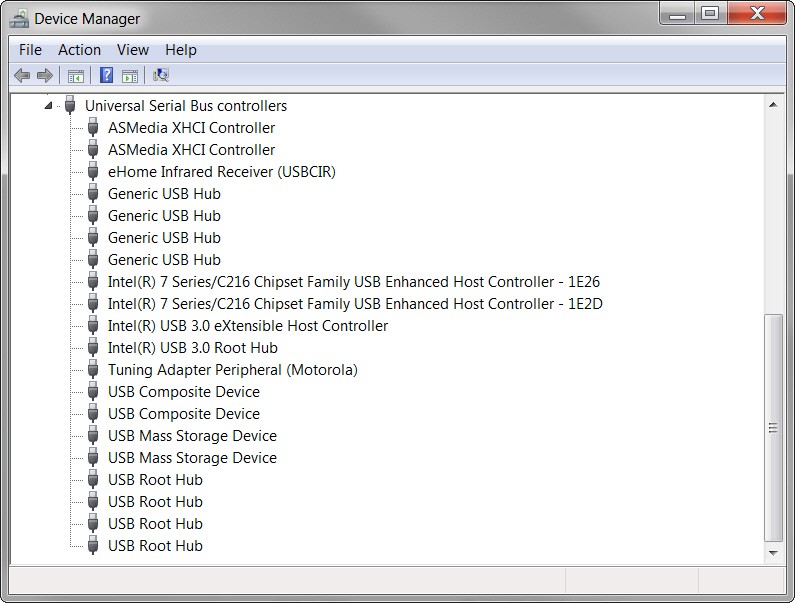
If you look at Device Manager for USB, do you see something like the following, showing both Asmedia XHCI USB 3.0 and Intel USB 3.0?

fbis.jpg
 

My Computer My Computer

At a glance

Windows 7 Pro x64 (1), Win7 Pro X64 (2)i5-3350p 3.1Ghz/6MB-cache (1); E8400 3.0Ghz/6...8GB PC3-12800 DDR3 (1); 4GB PC3-10600 DDR3 (2)ATI HD7750 (1), (see TV cards); ATI R7 250 (2)
Computer type
PC/Desktop
Computer Manufacturer/Model Number
Home-built, two systems (1) and (2)
OS
Windows 7 Pro x64 (1), Win7 Pro X64 (2)
CPU
i5-3350p 3.1Ghz/6MB-cache (1); E8400 3.0Ghz/6MB-cache (2)
Motherboard
ASUS P8Z77-V Pro (1); ASUS P5Q3 (2)
Memory
8GB PC3-12800 DDR3 (1); 4GB PC3-10600 DDR3 (2)
Graphics Card(s)
ATI HD7750 (1), (see TV cards); ATI R7 250 (2)
Sound Card
Realtek ALC892 HD Audio (1); Realtek ALC1200 HD Audio (2)
Monitor(s) Displays
Eizo HD2441W LCD, Eizo S2433W (1); Eizo 24" S2433W (2)
Screen Resolution
1920x1200, 1920x1200 (1); 1920x1200 (2)
Hard Drives
(1) 1TB SATA-II (7200RPM), 2x2TB SATA-III (7200RPM), 250GB SATA-III (10000RPM) for OS; 2x2TB external USB 3.0

(2) 320GB SATA-II (7200RPM), 750GB SATA-II (7200RPM), 150GB SATA-II (10000RPM) for OS; 2TB external USB 3.0
PSU
Nesteq ECS-6001 600W (1); Nesteq ECS-5001 500W (2)
Case
Acousti-Case 360 (1) and (2)
Cooling
Noctua NH-U12P SE2 for CPU, 2x120mm case fans (1) and (2)
Keyboard
IBM PS/2 (1) and (2)
Mouse
Logitech MX Revolution wireless (1); Microsoft wired (2)
Internet Speed
100mbps down / 10mbps up
Antivirus
Microsoft Security Essentials; Malwarebyte Anti-Malware Pro
Browser
Firefox
Other Info
Ceton InfiniTV 4-tuner cablecard-enabled TV card as well as Hauppauge HVR-2250 OTA/ATSC 2-tuner TV card in (1), running under Win7 WMC
You should have update normally your Asmedia USB 3.0 drivers with the original Asus CD provided, then in your bios settings disable the asmedia & usb ports that you do not want using. This to prevents the yellow exclamation marks on devices.
 

My Computer My Computer

At a glance

Windows 7 Professional SP1 - x64 [Non-UEFI Boot]Ivy Bridge Core i5 3570K (Delidded)G.Skill "Ares" DDR3 PC3-12800 - 1600MHz (16Gb)Asus Dual-RX480-O4G
Computer type
PC/Desktop
Computer Manufacturer/Model Number
Custom Build
OS
Windows 7 Professional SP1 - x64 [Non-UEFI Boot]
CPU
Ivy Bridge Core i5 3570K (Delidded)
Motherboard
Asus P8Z77-V LE PLUS
Memory
G.Skill "Ares" DDR3 PC3-12800 - 1600MHz (16Gb)
Graphics Card(s)
Asus Dual-RX480-O4G
Sound Card
Creative Sound Blaster Z w/5.1 sound system
Monitor(s) Displays
Asus IPS 23"
Screen Resolution
16/9
Hard Drives
Internal:
500Go Sata 6Gb/s (x2)
500Go Sata 3Gb/s (x2)
SSD 60Go Sata 6Gb/s
PSU
In Win C 900W Series 80+ Platinum
Case
Thermaltake Chaser A71
Cooling
Custom Water Cooling Loop
Keyboard
Cooler Master QuickFire XTi
Mouse
Razer Imperator 2012 (4G)
Antivirus
MSE
Browser
IE 11.0.xxx Rtm
Other Info
"Raid0" with Intel Smart Response Technology (HDD/SSD)
I know this is an old topic, but it still shows up in search engines for those troubleshooting USB 3.0 issues on this motherboard.

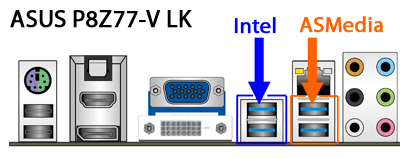
I did my own research, and discovered which USB 3.0 ports in the back are connected to the Intel Z77 chipset, and which are connected to the ASMedia chip. When looking at the back of the motherboard, the two ports to the left are Intel, and the two ports to the right (closer to the audio ports) are ASMedia. Image: https://drive.google.com/uc?id=0B6KKJ-gY8SIJN2hfU1hxTVVoem8

This motherboard has separate drivers to install for each, and the ASMedia ports can be disabled in the BIOS. The ASMedia ports are a little wonky for legacy support, so don't use them for your keyboard and mouse, or to boot USB flash drives.

I hope this helps someone in the future who's searching for this like I did. :-)
 

Attachments

  • ASUS_P8Z77_V-LK_USB_3_Ports.png
    ASUS_P8Z77_V-LK_USB_3_Ports.png
    13.2 KB · Views: 6

My Computer My Computer

At a glance

Windows 7 Ultimate 64-bit RTMIntel Core i7 920 (D0), overclocked @ 3.6GHz ...6GB of OCZ DDR3-1600 triple channel @ 7-7-7-20EVGA GTX 295 Co-Op
Computer Manufacturer/Model Number
custom build
OS
Windows 7 Ultimate 64-bit RTM
CPU
Intel Core i7 920 (D0), overclocked @ 3.6GHz (4.2GHz stable)
Motherboard
EVGA X58 A1
Memory
6GB of OCZ DDR3-1600 triple channel @ 7-7-7-20
Graphics Card(s)
EVGA GTX 295 Co-Op
Sound Card
Auzentech X Meridian 7.1
Monitor(s) Displays
(3x) Samsung 943BX, (1x) Samsung 2333HD, (1x) BenQ FP202W
Screen Resolution
3840x1024 + 1920x1080 + 1680x1050
Hard Drives
(4x) OCZ Vertex 30GB SATA2 SSDs on RAID 0 for 120GB total
(2x) Western Digital Black 1TB SATA2 on RAID 0
(1x) Lite-on DVD Burner and Blu-Ray player
PSU
PC Power & Cooling Super-quiet Silencer 910
Case
(modified) Tagan Black Pearl full tower, WCR edition
Cooling
Scythe Mugen2 CPU cooler, (5x) Scythe SFF21F, Zalaman cntrl.
Keyboard
Logitech G19
Mouse
Logitech G9x
Internet Speed
Comcast Cable, 22Mbps down and 5Mbps up
Other Info
Logitech Z-5500 Digital speaker system
Back
Top