Asus Radeon HD 7770 Driver Update Caused Black Border Around Screen

Adelphius

New member
Local time
6:21 AM
Messages
3
So recently I decided to try to update my display drivers for my Asus Radeon HD 7770 Graphics card in hopes that it would fix some problems I was having. After I finished the update and rebooted there was a black border around my screen.

I have dual monitors, one monitors (the one with the black border) resolution is 1920x1080 and is connected via HTMI and the others is 1680x1050 and is connected via DVI. Only the monitor with the resolution of 1920x1080 has the black border not the second one.

I have also done a lot of research on how to fix this and the most common solution seemed to be to change the overscan settings but I do not have the normal Catalyst Control Center i have something called AMD Vision Engine Control Center and when I open that and go the the display settings the only option is HydraVision which does not seem to have any options to help me.

And one last thing, it seems like the image might be a bit fuzzy or blurry but that might just be a result of the smaller image.

If there are any questions just ask and I will answer them to the best of my ability.
Update : Also, I did check my physical monitors settings and it is set to full and not overscan.
Update 2: - OS is Windows 7 64-Bit
Update 3: I woul rather not roll back the drivers as they were starting to cause problems too.
 

My Computer My Computer

At a glance

Windows Ultimate x646gb ddr2Asus Radeon HD 7770
Computer type
PC/Desktop
OS
Windows Ultimate x64
Memory
6gb ddr2
Graphics Card(s)
Asus Radeon HD 7770
Hard Drives
Seagate 2TB 7200RPM
Antivirus
AVG
Browser
Chrome
I don't think GPU scaling will fix the over scan issue, can you post a screenshot of your display options in your vision center specifically for the 1080p display?

rvcjew
 

My Computer My Computer

At a glance

10 Pro x64Ryzen 9 3900X64GB(4x16GB) DDR4EVGA 1080ti FTW3
Computer type
PC/Desktop
Computer Manufacturer/Model Number
Custom
OS
10 Pro x64
CPU
Ryzen 9 3900X
Motherboard
Asrock x370 Tachi
Memory
64GB(4x16GB) DDR4
Graphics Card(s)
EVGA 1080ti FTW3
Sound Card
ASUS Xonar Essence STX (V4 Bursons), ODAC rev B, NFB-11, O2
Monitor(s) Displays
3xASUS PB278Q/R, Optoma HD142X
Screen Resolution
3x1440p, 1080p
Hard Drives
512GB 850 EVO(OS, Programs)
4TB (Movies)
3TB (Downloads)
3TB (Programs)
1TB HDD (Games)
2x6TB R1 (videos)
PSU
AX760
Case
Fractal Define R5
Cooling
NH-D15S
Keyboard
Massdrop Ctrl with Box Navy's
Mouse
G903, Alioth XXL Mat
Internet Speed
280/40
Antivirus
MBAM, ESET
Browser
Canary 64 Bit
Other Info
I also own a Thinkpad P50 Xeon 4K, X220T, X1C5
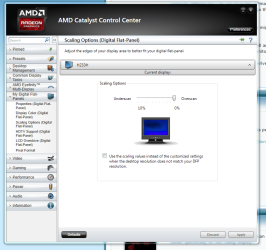
This is the screen you want in Catalyst Control Center:

Capture28.PNG

Set the scaling all the way to overscan, and the black border will go away. Mine does the same thing.
 

My Computer My Computer

At a glance

Win 7 Pro x64/Win 10 Pro x64 dual bootAMD FX 8350 Vishera @ 420016 GB Mushkin Blackline DDR3-2400 @ 1866 (9-1...XFX Radeon R9 280 Double D Black Edition
Computer type
PC/Desktop
Computer Manufacturer/Model Number
Mellon Labs (custom build)
OS
Win 7 Pro x64/Win 10 Pro x64 dual boot
CPU
AMD FX 8350 Vishera @ 4200
Motherboard
ASUS M5A97 R2.0
Memory
16 GB Mushkin Blackline DDR3-2400 @ 1866 (9-10-10-10-31)
Graphics Card(s)
XFX Radeon R9 280 Double D Black Edition
Sound Card
Realtek HD Audio on MB. Sounds great.
Monitor(s) Displays
Acer 24", Acer 22"
Screen Resolution
3840 x 1080
Hard Drives
1 x Mushkin Chronos 120 GB SSD (Win 10)
1 x Samsung 850 EVO 250 GB SSD (Win 7)
1 x WD 1TB SATA Blue
1 x WD 1TB SATA Green
PSU
Corsair TX-750
Case
CoolerMaster HAF 912+
Cooling
Coolermaster Seidon 240M Liquid AIO. 6 case fans
Keyboard
Logitech G710+
Mouse
Logitech G500s
Internet Speed
Much better since I got fiber, but still way overpriced.
Antivirus
MSE, Malware Bytes for scanning
Browser
Firefox
Other Info
Corsair VOID USB headphones.

A Mellon Labs X-1 - LCD Smartie driven system status display.

Brought to you by the letter E
Did none of you hear the guy tell you that he has an ASUS hd7770? Everyone that's responded so far needs to learn to listen rather that just babbling some half-baked nonsense just to be heard. Hiowever, you are correct, even if it's by accident. He does need to adjust the amd catalyst. The problem is that Asus hardware doesn't come bundled with AMD software. An Asus card has an Asus control center, which is complete crap (and for good reason, as I'll explain)

I had the same problem. Get rid of the crap asus version and go to AMD and download their driver check java app. It'll tell you which version of the AMD catalyst works with your gpu-

http://www2.ati.com/drivers/auto/amddriverdownloader.exe

Install the correct AMD version then click the tab down the left hand side of the page that says-my digital flat panels> scaling options> then adjust the over-scale slider to zero%. I've got a samsung sa350 monitor on win7 64bit with i7 4770, and I've got a stick of ram in every slot (I've heard a lot of idiots telling people that using the two ram slots nearest the cpu cause the problem. stupid). My card is an asus hd7770 2gd5, and this is what worked for me-

AMD Catalyst Control Center Version 2014.0915.1813.30937

The thing is, it's a good for you that Asus has such a crappy control center. Asus just lets AMD invest in the development the full version with all the features,and that leaves ASUS free to invest their money in all their overclocking software. If Asus owners want the full version of catalyst, they can just get it for free from AMD. Asus put all their bells and whistles into their tweak gpu program, so you lose nothing by switching, you only gain functionality.
 
Last edited:

My Computer My Computer

At a glance

none of your ****ing business.sdrhgjkdhkdhjkdjhkdfjhkdghhk
Computer type
PC/Desktop
Computer Manufacturer/Model Number
dfhjkdhk
OS
none of your ****ing business.
CPU
sdrhgjkdhk
Motherboard
dghkdgjk
Memory
dhjkdjhk
Graphics Card(s)
dfjhkdghhk
Hard Drives
dgjhkdgjk
Just a update for those that come across this thread as I did. Searching for a solution. when you have a version with no scaling option available.

Xfx r770 overscan using HDMI on a Panasonic TV.
In the amd software create a custom resolution and add it. Then drop back to Windows "control panel-settings" display and change to the new resolution.

I could only see 1/4 of the windows tool bar. Doing the custom profile got me a perfect fit.

Windows 10
Amd xfx r7770 HDMI
 

My Computer My Computer

At a glance

Windows 7 - 64 & 10 - 64
Computer type
PC/Desktop
OS
Windows 7 - 64 & 10 - 64
Back
Top