
Zertonshfits
New member
- Local time
- 1:29 PM
- Messages
- 1
Hey, first post!
I just got the netbook mentioned above
Asus Eee PC 1101HA Seashell Specs (black) - Laptops - CNET Reviews
that ^ but with only a 82GB HD. Its XP Home of course, and I have a copy of 7 Pro here (replacement copy from the Supplemental Parts dept) that I was looking to install on it. I have the USB drive ready to go (did the proper preps through cmd and all that) but I ran the WinUpgrade advisor just to see if i had all that I needed.
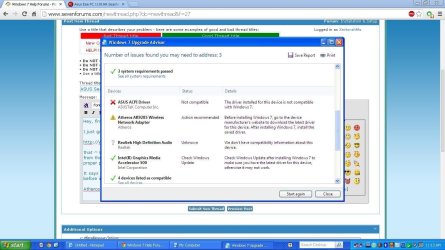
It says that my ASUStek ACPI driver is not Win7 compatible and that my wireless adapter needs attention before installing.
I cant find the updated driver for my Atheros AR9285 wireless network adapter for one, but the ACPI... I understand that is just for some quick key functions right?
This netbook has the Fn keys with blue suboptions on some keys (hold FN+Space to overclock, FN+7,8,9,u,i,o,j,k,l,m for full numpad, media keys on my f10-12) So if this is the case and these arent supported in 7, do I really have anything to worry about? Should I go ahead with the install anyway? Would I run into any issues due to this?
Any help appreciated!
I just got the netbook mentioned above
Asus Eee PC 1101HA Seashell Specs (black) - Laptops - CNET Reviews
that ^ but with only a 82GB HD. Its XP Home of course, and I have a copy of 7 Pro here (replacement copy from the Supplemental Parts dept) that I was looking to install on it. I have the USB drive ready to go (did the proper preps through cmd and all that) but I ran the WinUpgrade advisor just to see if i had all that I needed.
It says that my ASUStek ACPI driver is not Win7 compatible and that my wireless adapter needs attention before installing.
I cant find the updated driver for my Atheros AR9285 wireless network adapter for one, but the ACPI... I understand that is just for some quick key functions right?
This netbook has the Fn keys with blue suboptions on some keys (hold FN+Space to overclock, FN+7,8,9,u,i,o,j,k,l,m for full numpad, media keys on my f10-12) So if this is the case and these arent supported in 7, do I really have anything to worry about? Should I go ahead with the install anyway? Would I run into any issues due to this?
Any help appreciated!
Attachments
My Computer
At a glance
Windows 7 Pro 32 bit, Windows 7 Home 64 bitIntel Atom, AMD
- Computer type
- PC/Desktop
- Computer Manufacturer/Model Number
- Asus, Toshiba
- OS
- Windows 7 Pro 32 bit, Windows 7 Home 64 bit
- CPU
- Intel Atom, AMD
