Asus Xonar D2X

BIGGRIMTIM

New member
Member
Local time
8:08 PM
Messages
27
Anyone have any Luck with this card. Just looking to get some feedback before I try out the new RC. Thanks.
 

My Computer

Computer Manufacturer/Model Number
Too many to list
OS
Windows 7 Ultimate X64
I'am running the Xonar D2 not the Dx2. The drivers aren't made for Windows 7 yet but still they work pretty well considering. The sound works fine and I now have all the mixer functions working as well.
 
Last edited:

My Computer

Computer type
PC/Desktop
Computer Manufacturer/Model Number
Home built
OS
Windows 7 Ult, Windows 8.1 Pro,
CPU
Q9650-4.275GHz, E8600 4.5GHz, E6750-3.8GHz
Motherboard
Evga 780i FTW
Memory
G.Skill PC2 9600 1200Mhz 5 5 5 15 2T
Graphics Card(s)
GTX480
Sound Card
Asus Xonar D2
Monitor(s) Displays
HannsG
Screen Resolution
1680X1050
Hard Drives
GSkill Phoenix Pro 120GB SSD
PSU
ThermalTake Toughpower 1000Watt modular
Case
ThermalTake XaserV
Cooling
Xigmatek S1283
Keyboard
Logitech G15
Mouse
Logitech G9
Internet Speed
T1
I just got the card today and have not installed it yet. I am currently using Vista X64 and it has been less than stable. I just sent Back my Creative X-FI Titanium Fatal1ty because of static. Also what drivers are you using for the Xonar?
 

My Computer

Computer Manufacturer/Model Number
Too many to list
OS
Windows 7 Ultimate X64
I'am using the latest 1764's which looks to be the same one showing for the Xonar DX2 and the Xonar D2 which is Beta Version 6.12.8.1764. This worked best for me with Windows 7.

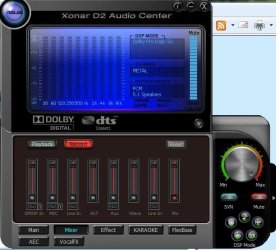
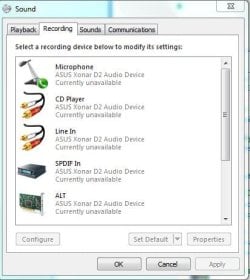
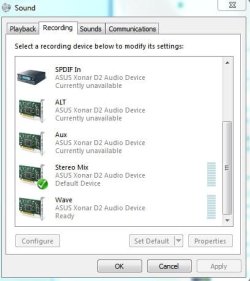
But to get all the mixer functions to show up in the Asus recording mixer I had to go into the Windows sound control panel and then to recording options then set it to show disabled devices and show disconnected devices before all the sound mixing options would show up in the Asus recording mixer UI.

You don't need to mess with the speaker test in Windows, just leave that one set to stereo, otherwise the surround won't work right.

Here is how the mixer panel will look with all mixing enabled.
And the next one shows the settings for using the 5.1 analog for standard computer speakers.

I can also tell you which ones to plug into if you have standard logitech computer speakers. The colors don't match up at all.:confused:

For digital out through the spdif you just use the dolby digital setting instead of PCM.

I included snips of the windows sound panel showing how it looks when you get all mixing functions enabled so they show up in the Asus panel.
 

Attachments

  • Asus showing all mixers.JPG
    Asus showing all mixers.JPG
    54.4 KB · Views: 518
  • Asus showing surround settings.JPG
    Asus showing surround settings.JPG
    62.6 KB · Views: 704
  • windows panel1.JPG
    windows panel1.JPG
    35.5 KB · Views: 336
  • windows panel2.JPG
    windows panel2.JPG
    32.7 KB · Views: 261
Last edited:

My Computer

Computer type
PC/Desktop
Computer Manufacturer/Model Number
Home built
OS
Windows 7 Ult, Windows 8.1 Pro,
CPU
Q9650-4.275GHz, E8600 4.5GHz, E6750-3.8GHz
Motherboard
Evga 780i FTW
Memory
G.Skill PC2 9600 1200Mhz 5 5 5 15 2T
Graphics Card(s)
GTX480
Sound Card
Asus Xonar D2
Monitor(s) Displays
HannsG
Screen Resolution
1680X1050
Hard Drives
GSkill Phoenix Pro 120GB SSD
PSU
ThermalTake Toughpower 1000Watt modular
Case
ThermalTake XaserV
Cooling
Xigmatek S1283
Keyboard
Logitech G15
Mouse
Logitech G9
Internet Speed
T1
Thanks for the update. I installed those drivers last night. I set the audio channel to 6 and the analog out to 5.1 for my Logitech Z-5450 speakers. I noticed the colors are no where close. It took a little tinkering to get it to work. I am not sure if the sound is working correctly it got too late and I needed some sleep. Will be testing more tonight. Also I had a weird little thing. The boot screen looks like the old Vista boot screen. I did a little investigation and have not been able to fix the problem. Thanks for the help.
 

My Computer

Computer Manufacturer/Model Number
Too many to list
OS
Windows 7 Ultimate X64
It's tricky to get the speakers plugged in correctly. Starting from the spdif's which are the ones that stick out from the back of the card, you skip the first one which is an orange light then plug in the orange plug then black then green, skip one, then the pink for the mic goes in the last one. It won't work right plugged in any other way.

Also the 6 channel setting is for movies but the surround won't work right unless you use the 2 channel setting. That is the only one that gets you surround. It took me quite awhile to figure all this out because there are no directions for this anywhere. Not even the Asus forum. :rolleyes:
 

My Computer

Computer type
PC/Desktop
Computer Manufacturer/Model Number
Home built
OS
Windows 7 Ult, Windows 8.1 Pro,
CPU
Q9650-4.275GHz, E8600 4.5GHz, E6750-3.8GHz
Motherboard
Evga 780i FTW
Memory
G.Skill PC2 9600 1200Mhz 5 5 5 15 2T
Graphics Card(s)
GTX480
Sound Card
Asus Xonar D2
Monitor(s) Displays
HannsG
Screen Resolution
1680X1050
Hard Drives
GSkill Phoenix Pro 120GB SSD
PSU
ThermalTake Toughpower 1000Watt modular
Case
ThermalTake XaserV
Cooling
Xigmatek S1283
Keyboard
Logitech G15
Mouse
Logitech G9
Internet Speed
T1
What do you mean by for movies. I ran the speaker setup in media center and the channels tested correctly. Are you talking about the television playback? I did get the speakers plugged in correctly. So far seems like a nice card. Happy to get rid of the static from my X-FI.
 

My Computer

Computer Manufacturer/Model Number
Too many to list
OS
Windows 7 Ultimate X64
If you click on the ? next too where you set the channels you will see what the other channel settings are for. For me, the only setting that gets surround working right is with the 2 channel setting. I havn't messed with media center so I'am not sure how it works. There is also a speaker test in the Asus console. If you click on the speaker icon next to where you set it to 5.1 you can use the Asus speaker test.

The only setting in Windows that got me 5.1 was using stereo 2 speaker in the Windows speaker set up. Good luck.
 

My Computer

Computer type
PC/Desktop
Computer Manufacturer/Model Number
Home built
OS
Windows 7 Ult, Windows 8.1 Pro,
CPU
Q9650-4.275GHz, E8600 4.5GHz, E6750-3.8GHz
Motherboard
Evga 780i FTW
Memory
G.Skill PC2 9600 1200Mhz 5 5 5 15 2T
Graphics Card(s)
GTX480
Sound Card
Asus Xonar D2
Monitor(s) Displays
HannsG
Screen Resolution
1680X1050
Hard Drives
GSkill Phoenix Pro 120GB SSD
PSU
ThermalTake Toughpower 1000Watt modular
Case
ThermalTake XaserV
Cooling
Xigmatek S1283
Keyboard
Logitech G15
Mouse
Logitech G9
Internet Speed
T1
Alright I'll give it a try. Thanks again.
 

My Computer

Computer Manufacturer/Model Number
Too many to list
OS
Windows 7 Ultimate X64
There's an odd quirk with their 5.1 speaker setup - rear speakers must be connected to 'side' output, not 'rear'.
I automatically plugged rear speakers into rear output, then wondered why I had no surround sound.
Reading the manual (last resort - hehe) showed my error. Now, everything's fine.
Sounds great thru Creative Inspire T7700 (7.1) kit. (Only using 5.1 due to lack of space).

Update:-
My D2X has been working fine with 5.12.1.8 driver but when I updated to 7.12.8.1777 driver, I had BSOD - forcing reboot & rollback.

Also - I have seen Soundfont compatibility mentioned but I can't find out how to install sf2 files, or even if it can actually be done with this card.
The GM sounds are rubbish, compared to my last 2 soundcards. Would be good if soundfont update is possible.
 
Last edited:

My Computer

Computer Manufacturer/Model Number
PCSpecialist.co.uk (custom build)
OS
Win7 (7600) Home Prem 64 bit
CPU
Intel Core i5-750
Motherboard
Asus P7H57D-EVO
Memory
8gb Corsair DDR3 1300MHz CMV4GX3M2A1333C9
Graphics Card(s)
Asus Nvidia GTX275
Sound Card
Asus Xonar D2X / Creative Inspire T7700 speakers
Monitor(s) Displays
Sharp Aquos 42" HDTV (via hdmi)
Screen Resolution
1920x1080
Hard Drives
Samsung SATA 1.5TB HD1541UI
PSU
Corsair TX850
Case
Antec 900
Cooling
Titan TTC-NK34TZ on CPU, 3x 120mm & 1x 200mm fans in case
Keyboard
Logitech Media Keyboard 600
Mouse
Logitech LX6 wireless
Internet Speed
4Mb/s landline, 7.2Mb/s mobile broadband (both Orange)
Other Info
Don't be fooled by the 'Junior' thing. I just don't post a lot.
I've been building/configuring/fault-finding PC's since Win3.11 and DOS6.2.2
I learned machine code on an 8086 & BASIC on a Commodore Pet, so I've been there from Early Days!
There's not much about PC's I'm unfamiliar with. I'm just here to find solutions to the problems Win7 presents. Not because I'm dumb or clueless.
Back
Top