AT&T (Starbucks) WiFi certificate errors

Victek

New member
Guru
Local time
5:40 PM
Messages
587
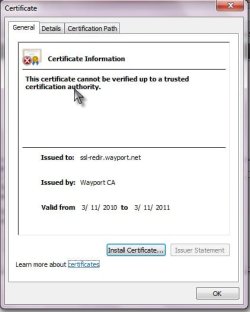
When I log into the AT&T wifi at Starbucks I consistently get a certificate error. It doesn't matter whether I use IE or Firefox and it doesn't matter what store I'm in. It seems to be system wide. Firefox offers the option to view and install the certificate, but this doesn't solve the problem and the pop-ups persist. It may be that only AT&T can solve this, but I'd like to workaround it if possible. Is there some way I can explain to the browser that the wayport is safe? LOL
 

My Computer

Computer type
PC/Desktop
OS
Windows 7 x64
CPU
Intel Core2 Extreme Q6850 3.00GHz
Motherboard
EVGA 132-CK-NF79
Memory
8 GB
Graphics Card(s)
Radeon R7 260X
Sound Card
Xonar DS
Hard Drives
Hitachi Deskstar 1 tb
Yes there's a way to tell firefox to ignore certificate errors. Hopefully this will help:

Tools > Options > Advanced > Encryption Tab > View Certificates

The AT&T certificate is probably in the servers tab. You should be able to add an exception for it in there.
 

My Computer

Computer Manufacturer/Model Number
Apple Macbook Pro (April 2009)
OS
W7 Ult. x64 | OS X
CPU
Intel Mobile Core 2 Duo 2.93Ghz [T9800 Penryn]
Motherboard
NVIDIA nForce 730i Rev. B1 [Mac-F2268EC8 (U2E1)]
Memory
4096MB Samsung DDR3 Dual Channel [PC3-8500F 1066Mhz]
Graphics Card(s)
NVIDIA GeForce 9600M GT 512MB [G96M Rev. C1]
Sound Card
SB X-Fi Surround 5.1 USB | Onboard Realtek (Disabled)
Monitor(s) Displays
Acer x223wbd 22" | Apple Anti-Glare 17" (Disabled)
Screen Resolution
{Current} 1440x900 {Acer} 1680x1050 {Apple} 1920x1200
Hard Drives
{Internal}
Seagate Momentus 320GB 2.5" 7200RPM [ST9320421AS]

{Externals}
LaCie 320GB USB 2.0 HDD [301284UR]
LaCie 750GB USB 2.0 FW400 eSATA HDD [301314U]
LaCie 1TB USB 2.0 HDD [301304UR]
PSU
Magsafe
Case
Aluminum/Unibody (MBP52)
Cooling
2 x 6000 RPM Fans
Keyboard
Logitech G-15v2 [PN 920-000379]
Mouse
Logitech G-9 [PN 910-000338]
Internet Speed
12Mbps/2.5Mbps w/ 24Mbps Speed Boost [Comcast]
Other Info
Logitech X-540 Speakers [PN 970223-0122]
Sennheiser PC-151 Headset
Yes there's a way to tell firefox to ignore certificate errors. Hopefully this will help:

Tools > Options > Advanced > Encryption Tab > View Certificates

The AT&T certificate is probably in the servers tab. You should be able to add an exception for it in there.
.
I checked and the cert that I thought I was installing is not there. I will try this again tomorrow and see what I can figure out.

Edit...

Here are some screenshots which may help clarify what's going on. I tried installing the cert, but it doesn't show up in any of the categories afterward:
 

Attachments

  • ScreenShot00002.jpg
    ScreenShot00002.jpg
    13.6 KB · Views: 5
  • ScreenShot00004.jpg
    ScreenShot00004.jpg
    23.6 KB · Views: 4
Last edited:

My Computer

Computer type
PC/Desktop
OS
Windows 7 x64
CPU
Intel Core2 Extreme Q6850 3.00GHz
Motherboard
EVGA 132-CK-NF79
Memory
8 GB
Graphics Card(s)
Radeon R7 260X
Sound Card
Xonar DS
Hard Drives
Hitachi Deskstar 1 tb
Back
Top