
Atheros AR5004G driver?

emerald08

New member
Local time
8:48 PM
Messages
55
Location
The Great SouthWest, Arizona
I need a driver for an Atheros AR5004G card. If anyone can help I'd appreciate it!

Thanks.
 

My Computer

Computer Manufacturer/Model Number
Dell Latitude e6510
OS
W7 Professional X64
CPU
Core i5-520
Memory
4gb
Graphics Card(s)
NVIDIA NVS3100M
Monitor(s) Displays
23" Samsung
Screen Resolution
1920X1080
Hard Drives
Intel X-25M 80gb

My Computer

Computer Manufacturer/Model Number
Custom made
OS
Window 7 build 7600, Xp pro(VM)
CPU
Amd Athlon 2000 xp+
Motherboard
Asus x series
Memory
kingstone(1gb+256MB)
Graphics Card(s)
Nvdia 6200(256 mb+255mb(shared))
Sound Card
soundmax
Monitor(s) Displays
Lg Flatron w1943
Screen Resolution
1360x768
Hard Drives
segate 80GB
Case
i-ball
Keyboard
i-ball
Mouse
i-ball
Internet Speed
256kbps up and 256 kbps down

My Computer

Computer Manufacturer/Model Number
Custom made
OS
Windows 7 Professional x64 PL
CPU
AMD Athlon 4450e
Motherboard
Giga-Byte GA-MA69G-S3H
Memory
GoodRam DDR2 2x2048MB (FSB 800MHz)
Graphics Card(s)
nVidia GeForce 9600GT (G94-300) 1024 MB
Monitor(s) Displays
SAMSUNG SyncMaster HS2P301688
Hard Drives
Seagate ST3750330AS 750GB
PSU
Corsair 550W
Cooling
AeroCool ExtremeEngine 3T
:confused:

Whoops.

Forgot to mention that the build this is on is W7 7100.
 

My Computer

Computer Manufacturer/Model Number
Dell Latitude e6510
OS
W7 Professional X64
CPU
Core i5-520
Memory
4gb
Graphics Card(s)
NVIDIA NVS3100M
Monitor(s) Displays
23" Samsung
Screen Resolution
1920X1080
Hard Drives
Intel X-25M 80gb
There is no still special drivers for Windows 7 neverless drivers for Vista should work under 7 without any problem.Here you have:ATHEROS Wireless LAN 2.4/5GHz - Download Driver AR5004G
That's what I've been reading. This is for a family member who has a Toshiba lappy. He's mentioned that he's running the XP driver and from my experience that doesn't always work.

I had the same problem with my drivers from Lenovo. I had to use HP drivers to get my Intel 2200 to work :)

Okay I'll let him know to give that driver a go.

Thanks!
 

My Computer

Computer Manufacturer/Model Number
Dell Latitude e6510
OS
W7 Professional X64
CPU
Core i5-520
Memory
4gb
Graphics Card(s)
NVIDIA NVS3100M
Monitor(s) Displays
23" Samsung
Screen Resolution
1920X1080
Hard Drives
Intel X-25M 80gb

My Computer

Computer Manufacturer/Model Number
Custom made
OS
Windows 7 Professional x64 PL
CPU
AMD Athlon 4450e
Motherboard
Giga-Byte GA-MA69G-S3H
Memory
GoodRam DDR2 2x2048MB (FSB 800MHz)
Graphics Card(s)
nVidia GeForce 9600GT (G94-300) 1024 MB
Monitor(s) Displays
SAMSUNG SyncMaster HS2P301688
Hard Drives
Seagate ST3750330AS 750GB
PSU
Corsair 550W
Cooling
AeroCool ExtremeEngine 3T
Okay. I downloaded the Vista driver. Do I extract the files and manually install the folders??? I'm not sure what to do with the zip file I downloaded?
 

My Computer

Computer Manufacturer/Model Number
Dell Latitude e6510
OS
W7 Professional X64
CPU
Core i5-520
Memory
4gb
Graphics Card(s)
NVIDIA NVS3100M
Monitor(s) Displays
23" Samsung
Screen Resolution
1920X1080
Hard Drives
Intel X-25M 80gb
Extract it first then if it is an exe install it and if it is an inf file then install it manually form device manager.
 

My Computer

Computer Manufacturer/Model Number
Custom made
OS
Window 7 build 7600, Xp pro(VM)
CPU
Amd Athlon 2000 xp+
Motherboard
Asus x series
Memory
kingstone(1gb+256MB)
Graphics Card(s)
Nvdia 6200(256 mb+255mb(shared))
Sound Card
soundmax
Monitor(s) Displays
Lg Flatron w1943
Screen Resolution
1360x768
Hard Drives
segate 80GB
Case
i-ball
Keyboard
i-ball
Mouse
i-ball
Internet Speed
256kbps up and 256 kbps down
:o

Haven't the foggiest idea how to do that! I'm guessing I manually move each file to the current Atheros folder?

They are sys, cat, and inf files.
 

My Computer

Computer Manufacturer/Model Number
Dell Latitude e6510
OS
W7 Professional X64
CPU
Core i5-520
Memory
4gb
Graphics Card(s)
NVIDIA NVS3100M
Monitor(s) Displays
23" Samsung
Screen Resolution
1920X1080
Hard Drives
Intel X-25M 80gb
:o

Haven't the foggiest idea how to do that! I'm guessing I manually move each file to the current Atheros folder?

They are sys, cat, and inf files.
:sleepy: Open device manager,right click on Atheros>>Properties and (images)
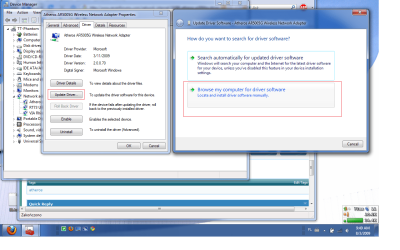
Select folder where you have *.inf
 

Attachments

  • Updatedrv.png
    Updatedrv.png
    93.2 KB · Views: 649

My Computer

Computer Manufacturer/Model Number
Custom made
OS
Windows 7 Professional x64 PL
CPU
AMD Athlon 4450e
Motherboard
Giga-Byte GA-MA69G-S3H
Memory
GoodRam DDR2 2x2048MB (FSB 800MHz)
Graphics Card(s)
nVidia GeForce 9600GT (G94-300) 1024 MB
Monitor(s) Displays
SAMSUNG SyncMaster HS2P301688
Hard Drives
Seagate ST3750330AS 750GB
PSU
Corsair 550W
Cooling
AeroCool ExtremeEngine 3T
Okay I got it.

Thanks!
 

My Computer

Computer Manufacturer/Model Number
Dell Latitude e6510
OS
W7 Professional X64
CPU
Core i5-520
Memory
4gb
Graphics Card(s)
NVIDIA NVS3100M
Monitor(s) Displays
23" Samsung
Screen Resolution
1920X1080
Hard Drives
Intel X-25M 80gb
Back
Top