Atheros Ethernet Controller drivers won't/can't install

4js

New member
Local time
12:26 PM
Messages
4
Hi all
I am having wireless connection issues and hoping someone here can help me
After resent issues I had with my Gateway laptop (ID59C) I reformated and reinstalled windows. All has gone well all drivers and windows updates have been completed

When I tried to get my wireless internet connection going I was not able to connect to the Internet. I have done all of the following
Fn-F2
Uninstalled the device and restarted lapatop and let windows do its thing
I downloaded and installed the drivers for the ethernet controller and was prompted to restart my computer, which I done, this didnt help at all

I ran the Hardware + Device troubleshooter and I got the following message
The driver for the network controller is not installed. Install the latest drivers for this device
It also found these problems
Network Controller doesnt have a driver
Hardware changes might not have been detected

I thought I had installed the drivers as I went through the whole install proccess prior to these errors occuring

I have no idea what to do or how to fix it
Im trying to install the drivers for atheros AR8131 PCI-E Gigabit ethernet controller

Is it possible to force it to accept the drivers or manually install them as windows doesnt seem to be able to do it
I can connect with ethernet and with my mobile broadband stick. Would my internal wireless card need to be replaced?

Should I reformat and reinstall the windows 7 again?

sorry for all the questions :)

Any help will be appreciated, thanks so much :)
 

My Computer

Computer Manufacturer/Model Number
Gateway ID59C Laptop
OS
Windows 7 Basic x64
CPU
2.67 gig Intel Core i7 M620
Graphics Card(s)
NVIDIA GeForce GT 330M
Screen Resolution
1366 x 768

My Computer

Computer type
PC/Desktop
Computer Manufacturer/Model Number
Custom Built
OS
Windows 10 Pro x64, Windows 8.1 Pro x64, Windows 7 Ultimate x64 SP1,
CPU
INTEL i9-7920X LGA 2066
Motherboard
Gigabyte X299-WU8 F3
Memory
64 GB (4 X 16 GB) G-Skill V Series DDR4 3200 Quad Channel
Graphics Card(s)
EVGA GTX 1060 SC 3 GB
Sound Card
Realtek Onboard ALC1220
Monitor(s) Displays
2 x Samsung S27E310
Screen Resolution
1920x1080
Hard Drives
Samsung 2 x 970 EVO Plus 500 GB NVMe
1 x 6TB WD 6003FZBX SATA
1 x 6TB WD 60EFRX SATA
12 x 3TB WD 30EFRX SATA
PSU
Seasonic X-1050
Case
Thermaltake Armor+
Cooling
Corsair H80i V2 Liquid AOI Cooler
Keyboard
Logitech G510s
Mouse
Logitech MX Master 2S
Internet Speed
200 Mb/s
Antivirus
ESET NOD32 13.1
Browser
EDGE (Dev, Canary, Beta), Chrome
Other Info
ASUS RT-AC68U router
Malwarebytes 4.0.4
Thanks for your reply

Unfortunately that didnt work
Upon entering setup it asks me if I wanted to modify or remove
after clicking modify a popup came up saying "The device may not be present or could have been ejected/unplugged from the sytem. Insert or reinsert now"
I clicked OK and it "successfully" installed

so after restarting for good luck and hoping it would be a success, it failed :)
So next I went though the proccess again but removed it instead then I get another popup (yay for popups) saying
"The driver files you wish to remove will not be removed as the corresponding card is not inserted

So in other words my card would be fried??
 

My Computer

Computer Manufacturer/Model Number
Gateway ID59C Laptop
OS
Windows 7 Basic x64
CPU
2.67 gig Intel Core i7 M620
Graphics Card(s)
NVIDIA GeForce GT 330M
Screen Resolution
1366 x 768
Dear 4js,
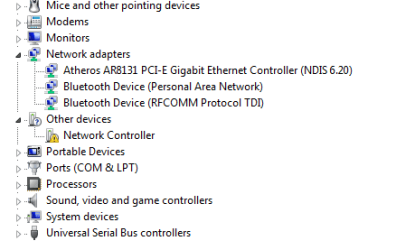
Can you kindly post a snap of your device manager with the "network Adapters" expanded, before we conclude that the internal card is fried to a crisp?

regards,
sreedhav
 

My Computer

Computer Manufacturer/Model Number
Sony Vaio C series VPCCB35FN laptop
OS
MS Windows 7 Home Premium 64-bit SP1
CPU
IntelCore [email protected]; Sandy Bridge 32nm Tech.
Motherboard
Sony Vaio Version:C609NJYJ
Memory
4096Mb RAM; Single ChannelDDR3@665MHz; DRAM Freq:662MHz
Graphics Card(s)
AMD Radeon HD 6630M; GPU:Whistler;BIOS Core&mem Clock:123.36
Sound Card
REALTEK High Definition Audio Device; INTEL Display Card
Monitor(s) Displays
Generic PnP Intel HD;Resolution:1920*1040 Pixels; BPP:32bits
Screen Resolution
Current Resolution:1920*1080 Pixels; Monitor Frequency:60Hz
Hard Drives
Internal HD:TOSHIBA MK5061GSY; Real Size:488 GB;NTFS; 3 Partitions; SATA; HEADS:16

External HDD: WD Elements 1023 PORTABLE; Estimated Size: 1TB; NTFS; 3 Partitions
Cooling
Lateral Exhaust with a Cooling Pad Placed Beneath.
Keyboard
Logitech Bluetooth+ Generic Integrated K-B
Mouse
Logitech Bluetooth
Internet Speed
2MBPS
Other Info
1)Trend Micro Titanium Maximum Security Suite Version:3
2)SAS-PRO

3)MBAM--PRO


4)WATERFOX+IE9 +WOT+LINKEXTEND+ DRWEBCUREIT LINK CHECKER

5)SPYWAREBLASTER

6) WINPATROL PLUS

7) SANDBOXIE and
8) A BIT OF COMMON SENSE.
Thanks for responding :)

as requested snapshot of my network adapters and other devices as my controller is located there

cheers
4js
 

Attachments

  • Untitled.png
    Untitled.png
    17.1 KB · Views: 61

My Computer

Computer Manufacturer/Model Number
Gateway ID59C Laptop
OS
Windows 7 Basic x64
CPU
2.67 gig Intel Core i7 M620
Graphics Card(s)
NVIDIA GeForce GT 330M
Screen Resolution
1366 x 768
Dear 4js,
what i can assume is that the Atheros wireless network adapter is missing in that list.
regards,
sreedhav
 

My Computer

Computer Manufacturer/Model Number
Sony Vaio C series VPCCB35FN laptop
OS
MS Windows 7 Home Premium 64-bit SP1
CPU
IntelCore [email protected]; Sandy Bridge 32nm Tech.
Motherboard
Sony Vaio Version:C609NJYJ
Memory
4096Mb RAM; Single ChannelDDR3@665MHz; DRAM Freq:662MHz
Graphics Card(s)
AMD Radeon HD 6630M; GPU:Whistler;BIOS Core&mem Clock:123.36
Sound Card
REALTEK High Definition Audio Device; INTEL Display Card
Monitor(s) Displays
Generic PnP Intel HD;Resolution:1920*1040 Pixels; BPP:32bits
Screen Resolution
Current Resolution:1920*1080 Pixels; Monitor Frequency:60Hz
Hard Drives
Internal HD:TOSHIBA MK5061GSY; Real Size:488 GB;NTFS; 3 Partitions; SATA; HEADS:16

External HDD: WD Elements 1023 PORTABLE; Estimated Size: 1TB; NTFS; 3 Partitions
Cooling
Lateral Exhaust with a Cooling Pad Placed Beneath.
Keyboard
Logitech Bluetooth+ Generic Integrated K-B
Mouse
Logitech Bluetooth
Internet Speed
2MBPS
Other Info
1)Trend Micro Titanium Maximum Security Suite Version:3
2)SAS-PRO

3)MBAM--PRO


4)WATERFOX+IE9 +WOT+LINKEXTEND+ DRWEBCUREIT LINK CHECKER

5)SPYWAREBLASTER

6) WINPATROL PLUS

7) SANDBOXIE and
8) A BIT OF COMMON SENSE.
So I assume there it would be fried then since my computer can not pick it up as being there
 

My Computer

Computer Manufacturer/Model Number
Gateway ID59C Laptop
OS
Windows 7 Basic x64
CPU
2.67 gig Intel Core i7 M620
Graphics Card(s)
NVIDIA GeForce GT 330M
Screen Resolution
1366 x 768
So I assume there it would be fried then since my computer can not pick it up as being there

Dear 4js,
Guess so!:huh:
regards,
sreedhav
 

My Computer

Computer Manufacturer/Model Number
Sony Vaio C series VPCCB35FN laptop
OS
MS Windows 7 Home Premium 64-bit SP1
CPU
IntelCore [email protected]; Sandy Bridge 32nm Tech.
Motherboard
Sony Vaio Version:C609NJYJ
Memory
4096Mb RAM; Single ChannelDDR3@665MHz; DRAM Freq:662MHz
Graphics Card(s)
AMD Radeon HD 6630M; GPU:Whistler;BIOS Core&mem Clock:123.36
Sound Card
REALTEK High Definition Audio Device; INTEL Display Card
Monitor(s) Displays
Generic PnP Intel HD;Resolution:1920*1040 Pixels; BPP:32bits
Screen Resolution
Current Resolution:1920*1080 Pixels; Monitor Frequency:60Hz
Hard Drives
Internal HD:TOSHIBA MK5061GSY; Real Size:488 GB;NTFS; 3 Partitions; SATA; HEADS:16

External HDD: WD Elements 1023 PORTABLE; Estimated Size: 1TB; NTFS; 3 Partitions
Cooling
Lateral Exhaust with a Cooling Pad Placed Beneath.
Keyboard
Logitech Bluetooth+ Generic Integrated K-B
Mouse
Logitech Bluetooth
Internet Speed
2MBPS
Other Info
1)Trend Micro Titanium Maximum Security Suite Version:3
2)SAS-PRO

3)MBAM--PRO


4)WATERFOX+IE9 +WOT+LINKEXTEND+ DRWEBCUREIT LINK CHECKER

5)SPYWAREBLASTER

6) WINPATROL PLUS

7) SANDBOXIE and
8) A BIT OF COMMON SENSE.
I also had a lot of trouble getting the bluetooth to work but on an HP dv7 Envy
MODEL: dv7T-7300 Quad Edition Notebook PC series
Product: C2Y65AV
OS: Windows 8
Purchased through Costco: 16 gig ram and 1TB hard drive

I tried two different Railink wireless network cards and finally got an Atheros to work.

Atheros 9485GN 802.11b/g/n 1×1 WiFi and 3012 Bluetooth 4.0 Combo Adapter

Of course I downloaded several batches of drivers finally settling on the latest network card drivers and the latest bluetooth drivers. sp60642.exe and sp60480.exe

The wireless card drivers worked fine and installed easily.
Microsoft tried to download generic bluetooth drivers dated 2006 which did not work. Uninstalling and re-installing did not work.
The error I got was "The devive may not be present or could have been ejected/unplugged from the system" and no devices showed up under wireless.

What finally did work was as follows.
1) Uninstalled the generic bluetooth drivers dated 2006
2) Shutdown
3) Removed battery and powercord.
4) Held down power button for 30 seconds (a hard reset - clears CMOS etc.)
5) Plugged in ONLY the power cord.
6) Re-started
7) Installed the new bluetooth drivers which did not give an error and launched an Atheros installation message box that was much different than the standard installation message boxes you usually see.
It all now works.
Perhaps the problem all along was not doing a hard reset.
Hopefully this will save someone else the ten+ hours it took me to get this feature working.
 

My Computer

Computer Manufacturer/Model Number
HP XW4600
OS
Windows 7
CPU
2.6
Memory
4 gig
Hard Drives
1 750 gig Hitachi for main boot drive
3 1.5 TB Raid 5 WD Caviar Green drives via onboard Intel RAID
Back
Top