
ati 4870 ?uestions

Gilly

New member
Power User
Local time
9:55 AM
Messages
412
Location
manchester ,England
just got a replaced xfx 4870 after a faulty fan on it ,and guess what ive got another problem with the replaced on,
the problem its loud at lowest possible speed in ccc ,but the fan seems to be running at a high rpm a guestimate would be about 1500rpm
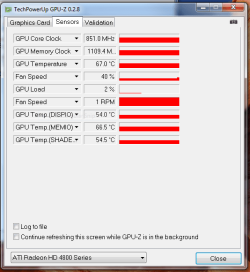
so i look to see how fast the speed of the fan was going at in everest ,but doesnt show so i tried hw moniter and that doesnt show fan speeds neither so i try gpu-z
and it shows this
ffffffffffffffffffffffffffffffffffffffffffffffffffffffffff.PNG
1rpm it shows fan speed and it clearly shows fan running at 40%


im going to try and get another rma tomoz but whats the problem here
you reckon guys and is something faulty whats making it loud even when lower everything

p.s its a open 4870 not a closed one even though they advertised it as identical to my last one on there website:rolleyes:
 

My Computer

OS
7 RTM 64bit
CPU
AMD Phenom 965 B3
Motherboard
ASUS M3A79-T DELUXE
Memory
Corsair 4GB (2x2GB) DDR2 800MHz/PC2-6400 XMS2 Memory Kit CL5
Graphics Card(s)
PowerColour HD 5770 CF 16x-16x
Monitor(s) Displays
32"
Screen Resolution
1920-1080
Hard Drives
Hitachi

1tb 7200rpm
PSU
Be Quiet Straight Power 650wat
Case
Asus TA-M series
Cooling
CoolIT Eco ALC Water Cooling System
Keyboard
Microsoft wireless Keyboard
Mouse
Microsoft wireless mouse
You can use ATI Tray Tools to set a static fan speed or it can also raise the fan speed(s) by any amount you want for any temperature(s).
 

My Computer

Computer Manufacturer/Model Number
self built
OS
7600.20510 x86
CPU
P4 550 3.4 GHz HT running at 3.5 GHz
Motherboard
MSI PM8M3-V (MS-7211 v1.x) Micro-ATX mainboard
Memory
OCZ 2 GB(2x1GB) DDR400mHz running @ 414 mHz
Graphics Card(s)
HIS Radeon HD 3850 IceQ 3 Turbo HDMI Dual DL-DVI AGP
Sound Card
MOTU Traveler firewire studio interface 192 kHz 24 bit
Monitor(s) Displays
22" widescreen Acer X223W LCD, 17" Compaq P75 CRT
Screen Resolution
1680x1050 and 1280x1024
Hard Drives
SATA I x2 WD, 400 GB and 120 GB, SATA 2 WD Caviar Black 1 TB
PSU
350W generic
Case
Cybertronpc, it glows blue
Cooling
stock cpu fan, Ice-Q 3 gpu and system, many case fans
Keyboard
Logitch Classical Keyboard 200
Mouse
Logitech Mediaplay cordless
Internet Speed
1792/448 kbits/sec
Other Info
SATA II PCI fake RAID adapter, 1 GB Readyboost, original ATI Remote Wonder (even works with WMC perfectly), Logitech Rumblepad 2 game controller x2
I wouldn't be concerned about GPU-Z reporting the fan speed at 1 rpm. The reading is incorrect. My 4850's used to show 1 rpm as well and there was nothing wrong with the fans.

If that 4870 is anything like my xfx 4890's noise wise, the fan dosen't become 'quiet' until it's 30% and below (which is useless for load cooling)

As Torrentg suggested you can use ATI tray tools to manually control the fan or simply use the CCC ATI overdrive section to manually set your fans speed.
 

My Computer

Computer type
PC/Desktop
Computer Manufacturer/Model Number
Systems by SmartEyeball
OS
8 Pro x64
CPU
i7 3770K 4.6GHz
Motherboard
ASUS P8Z77 WS
Memory
16GB G.Skill Trident X 2666mhz
Graphics Card(s)
x2 EVGA 780 Ti Superclocked SLI
Sound Card
SB X-FI Surround 5.1 PRO USB / ATH-AD900 Headphones
Monitor(s) Displays
x3 Dell U2410 / 58" Samsung
Screen Resolution
5760*1200/ 1920*1200
Hard Drives
2x Intel 520 240GB (RAID 0) * 2x WD Caviar Blacks 2TB (RAID 0) * 2TB WD Caviar Black * Sony Optirac DVD
PSU
Silverstone Strider Evolution 1200W
Case
Thermaltake Level 10 GT Snow Edition
Cooling
Noctua NH-D14
Keyboard
Topre Realforce // Ducky Shine MX Black // Filco Ninja TKL
Mouse
Thermaltake Theron (Highly Recommended) + Razer Imperator
Antivirus
MSE
Browser
IE, FF, WaterFox
Other Info
GT Extreme V2 Sim Racing Cockpit + 40" LCD and K/B Mouse stand ▼
Fanatec CSR Elite Wheel + Clubsport V1 Pedals + CSR shifter/7G-H ▼Saitek X52 Pro ▼ TrackIR 5 Pro
Buttkicker v2 Seat Rumbler with Dedicated 5.1 and Sub Woofer attached to frame ▼
=
Bloody Big Grin
Just like the 4870 I have installed, it wont be quiet until you hit about 30% fan speed.
As posted above, that is absolutely useless when gaming. When gaming, up it to at least 40%.

As for your initial noise issue, drop the fan speed to 30% and see how that does for you.
I run mine at 34% and the RPM is just under 2500.
 

My Computer

Computer Manufacturer/Model Number
Custom Built
OS
Windows 7 Ultimate x86 OEM
CPU
AMD Phenom 9950 2.6GHz
Motherboard
ASUS M3A32-MVP Deluxe w/WiFi
Memory
2x Crucial Ballistix 1GB PC2-8500
Graphics Card(s)
ATI Radeon HD 4870 1GB GDDR5
Sound Card
Creative SoundBlaster Audigy 4
Monitor(s) Displays
ASUS VW246H 24" Widescreen Full HD
Screen Resolution
1920 * 1080
Hard Drives
Seagate 160GB
Seagate 300GB
Seagate 500GB
Western Digital 250GB
PSU
OCZ GameXStream 850W
Case
Thermaltake Element S
Cooling
CPU: Noctua NH-U12P
Keyboard
Razer Lycosa Mirror Finish
Mouse
Razer DeathAdder 3.5g 3500DPI
Internet Speed
1.0+MB/s Down, 128KB/s Up
Other Info
D-Link DIR-655 Extreme Wireless N Router
Just like the 4870 I have installed, it wont be quiet until you hit about 30% fan speed.
As posted above, that is absolutely useless when gaming. When gaming, up it to at least 40%.

As for your initial noise issue, drop the fan speed to 30% and see how that does for you.
I run mine at 34% and the RPM is just under 2500.

even if i set the fan to the lowest possible speed its still very loud using ccc or what i usually use ati tray tools . and its strange not one program can detect the fan speed.. i returned my last 4870 for loud fan speed at 40% and it was still much quiter than this one
 

My Computer

OS
7 RTM 64bit
CPU
AMD Phenom 965 B3
Motherboard
ASUS M3A79-T DELUXE
Memory
Corsair 4GB (2x2GB) DDR2 800MHz/PC2-6400 XMS2 Memory Kit CL5
Graphics Card(s)
PowerColour HD 5770 CF 16x-16x
Monitor(s) Displays
32"
Screen Resolution
1920-1080
Hard Drives
Hitachi

1tb 7200rpm
PSU
Be Quiet Straight Power 650wat
Case
Asus TA-M series
Cooling
CoolIT Eco ALC Water Cooling System
Keyboard
Microsoft wireless Keyboard
Mouse
Microsoft wireless mouse
I wouldn't be concerned about GPU-Z reporting the fan speed at 1 rpm. The reading is incorrect. My 4850's used to show 1 rpm as well and there was nothing wrong with the fans.

If that 4870 is anything like my xfx 4890's noise wise, the fan dosen't become 'quiet' until it's 30% and below (which is useless for load cooling)

As Torrentg suggested you can use ATI tray tools to manually control the fan or simply use the CCC ATI overdrive section to manually set your fans speed.

im not just concerned about gpu z reading because the fan is still spinning ,id say about 55% even when i lower the fan speed as much as possible

thats why im posting it theres know quiet setting for it and was wondering if the problem was linked with the fan speed not being able to be read
 

My Computer

OS
7 RTM 64bit
CPU
AMD Phenom 965 B3
Motherboard
ASUS M3A79-T DELUXE
Memory
Corsair 4GB (2x2GB) DDR2 800MHz/PC2-6400 XMS2 Memory Kit CL5
Graphics Card(s)
PowerColour HD 5770 CF 16x-16x
Monitor(s) Displays
32"
Screen Resolution
1920-1080
Hard Drives
Hitachi

1tb 7200rpm
PSU
Be Quiet Straight Power 650wat
Case
Asus TA-M series
Cooling
CoolIT Eco ALC Water Cooling System
Keyboard
Microsoft wireless Keyboard
Mouse
Microsoft wireless mouse
CPU-Z Is Indeed Incorrect. I overclocked my nvidia and still says the same speed on CPU-Z
 

My Computer

Computer Manufacturer/Model Number
Dragon Computer Kerkrade
OS
Windows 7 Ultimate 64-bit build 7600
CPU
AMD Athlon(tm) 64 X2 Dual Core Processor 6000+
Memory
4 GB Kingston Memory
Graphics Card(s)
NVIDIA Geforce 9800 GT
Monitor(s) Displays
NEOVA Generic PnP Monitor
Hard Drives
SATA ~279 GB
Back
Top