ATI 4890 HD on Windows 7 Professional 64 bit problem

Maniaknl

New member
Local time
11:21 PM
Messages
34
Alright here is my problem i recently installed my computer with the Windows 7 Professional 64bit version. (Got it from my MSDN)

I updated all my ATI Drivers and that Catalyst thing
http://game.amd.com/us-en/drivers_catalyst.aspx?p=win7/windows-7-64bit
I Installed all the Windows 7 updates so i got the latest drivers.

System Specs:
Processor Intel Core 2 Quad Q9400 2,66GHZ
Ram 4 GB DDR2 800MHZ
Video: ATI Radeon HD 4890 (the club 3d one)
Power: 650W from Corsair
All other hardware are standard hadware shipped with the HP DC7900
http://h18000.www1.hp.com/products/quickspecs/13029_div/13029_div.HTML
(The convertible Minitower)

The problem is every time i play a game it crashes (The game) after a period of time (between 10-50 minutes) The games i tried and resulted in the samething is Crysis, Assassins Creed and Soldier of Fortune Payback (crap game i know just installed it to test this)

The OS is still functioning properly only the game crashes

Now i found somesort of solution on this website.

AMD Game Forums - Issues with Radeon HD 4800 series and Windows 7?

This dude is telling that is works normaly on Vista and that he needed to Lock his GPU(not CPU) with a program called RivaTuner (I have not tried this since i don't really know how that program works and i don't really want to blow up my computer.)

This was needed because some fuction called Powerplay is causing the trouble. I don't know if i have this powerplay thing and i don't know how to controll it or anything.

So how can i fix it ? (I do have a legit Vista Bussiness 64bit key left but i really want to keep using Windows 7 If that is possible)

Thank you all for your time and effort

- Dennis

PS More information will be supplied when needed since i didn't know what information to add
 

My Computer My Computer

At a glance

Windows 7 Professional 64BitIntel Core 2 Quad Q94004096 DDR 800MHZClub3d ATI HD Radeon 4890
Computer Manufacturer/Model Number
HP
OS
Windows 7 Professional 64Bit
CPU
Intel Core 2 Quad Q9400
Memory
4096 DDR 800MHZ
Graphics Card(s)
Club3d ATI HD Radeon 4890
Monitor(s) Displays
HP Compaq LA2205wg, Samsung SyncMaster 225MW
Screen Resolution
2x 1680x1050 (3360x1050)
Hard Drives
1TB, 2x 500GB, 250GB
Case
DC7900 Convertble minitower
Cooling
The ones that come with the DC7900 Convertible minitowr
Keyboard
Some HP Keyboard
Mouse
Some Logitech Lasermouse
Internet Speed
20Mbit (2,5MB)
Install the driver from ATIs site.

This is the cause of your issue:

"I Installed all the Windows 7 updates so i got the latest drivers."

Don't ever allow WU to update your graphics driver. Do it yourself always. It's also a good idea to monitor your GPU temp using ATI Tray Tools. That app has great overclocking abilities too should you choose to use that once your system stabilizes and issue is fixed.
 

My Computer My Computer

At a glance

7600.20510 x86P4 550 3.4 GHz HT running at 3.5 GHzOCZ 2 GB(2x1GB) DDR400mHz running @ 414 mHzHIS Radeon HD 3850 IceQ 3 Turbo HDMI Dual DL-...
Computer Manufacturer/Model Number
self built
OS
7600.20510 x86
CPU
P4 550 3.4 GHz HT running at 3.5 GHz
Motherboard
MSI PM8M3-V (MS-7211 v1.x) Micro-ATX mainboard
Memory
OCZ 2 GB(2x1GB) DDR400mHz running @ 414 mHz
Graphics Card(s)
HIS Radeon HD 3850 IceQ 3 Turbo HDMI Dual DL-DVI AGP
Sound Card
MOTU Traveler firewire studio interface 192 kHz 24 bit
Monitor(s) Displays
22" widescreen Acer X223W LCD, 17" Compaq P75 CRT
Screen Resolution
1680x1050 and 1280x1024
Hard Drives
SATA I x2 WD, 400 GB and 120 GB, SATA 2 WD Caviar Black 1 TB
PSU
350W generic
Case
Cybertronpc, it glows blue
Cooling
stock cpu fan, Ice-Q 3 gpu and system, many case fans
Keyboard
Logitch Classical Keyboard 200
Mouse
Logitech Mediaplay cordless
Internet Speed
1792/448 kbits/sec
Other Info
SATA II PCI fake RAID adapter, 1 GB Readyboost, original ATI Remote Wonder (even works with WMC perfectly), Logitech Rumblepad 2 game controller x2
Install the driver from ATIs site.

This is the cause of your issue:

"I Installed all the Windows 7 updates so i got the latest drivers."

Don't ever allow WU to update your graphics driver. Do it yourself always. It's also a good idea to monitor your GPU temp using ATI Tray Tools. That app has great overclocking abilities too should you choose to use that once your system stabilizes and issue is fixed.

Well i updated the Catalyst thing over(after) the drivers from Windows 7

So how to uninstall the remaining windows 7 update files related to my video card?
 

My Computer My Computer

At a glance

Windows 7 Professional 64BitIntel Core 2 Quad Q94004096 DDR 800MHZClub3d ATI HD Radeon 4890
Computer Manufacturer/Model Number
HP
OS
Windows 7 Professional 64Bit
CPU
Intel Core 2 Quad Q9400
Memory
4096 DDR 800MHZ
Graphics Card(s)
Club3d ATI HD Radeon 4890
Monitor(s) Displays
HP Compaq LA2205wg, Samsung SyncMaster 225MW
Screen Resolution
2x 1680x1050 (3360x1050)
Hard Drives
1TB, 2x 500GB, 250GB
Case
DC7900 Convertble minitower
Cooling
The ones that come with the DC7900 Convertible minitowr
Keyboard
Some HP Keyboard
Mouse
Some Logitech Lasermouse
Internet Speed
20Mbit (2,5MB)
Basically what I'm saying to do is to ensure that the current driver for video card installed is directly from game.amd.com and not the version from Microsoft.

If Microsoft version, redownload from the link and install. I'd do that anyway, to be sure. Then try your games and good luck.

What you could try doing for test purposes is to use ATI Tray Tools to purposesly underclock your video card GPU and memory to see if heat might be causing the issue.

How I actually found the highest limits for my card was by overclocking it really high and lowering it until games wouldn't crash to desktop. So crashing to desktop could be evidence of overheated card as in my overclocking example.
 

My Computer My Computer

At a glance

7600.20510 x86P4 550 3.4 GHz HT running at 3.5 GHzOCZ 2 GB(2x1GB) DDR400mHz running @ 414 mHzHIS Radeon HD 3850 IceQ 3 Turbo HDMI Dual DL-...
Computer Manufacturer/Model Number
self built
OS
7600.20510 x86
CPU
P4 550 3.4 GHz HT running at 3.5 GHz
Motherboard
MSI PM8M3-V (MS-7211 v1.x) Micro-ATX mainboard
Memory
OCZ 2 GB(2x1GB) DDR400mHz running @ 414 mHz
Graphics Card(s)
HIS Radeon HD 3850 IceQ 3 Turbo HDMI Dual DL-DVI AGP
Sound Card
MOTU Traveler firewire studio interface 192 kHz 24 bit
Monitor(s) Displays
22" widescreen Acer X223W LCD, 17" Compaq P75 CRT
Screen Resolution
1680x1050 and 1280x1024
Hard Drives
SATA I x2 WD, 400 GB and 120 GB, SATA 2 WD Caviar Black 1 TB
PSU
350W generic
Case
Cybertronpc, it glows blue
Cooling
stock cpu fan, Ice-Q 3 gpu and system, many case fans
Keyboard
Logitch Classical Keyboard 200
Mouse
Logitech Mediaplay cordless
Internet Speed
1792/448 kbits/sec
Other Info
SATA II PCI fake RAID adapter, 1 GB Readyboost, original ATI Remote Wonder (even works with WMC perfectly), Logitech Rumblepad 2 game controller x2
Ill try that but mines always between 70-75 degrees (when gaming) while my friends have their at 110 degrees with no problems so i think heat isnt a issue

and i already installed tht 9.9 version like 2 hours ago and the windows update was like 2 days ago

EDIT:: i installed that ati tray tools thing should i underclock my vid ?
 

My Computer My Computer

At a glance

Windows 7 Professional 64BitIntel Core 2 Quad Q94004096 DDR 800MHZClub3d ATI HD Radeon 4890
Computer Manufacturer/Model Number
HP
OS
Windows 7 Professional 64Bit
CPU
Intel Core 2 Quad Q9400
Memory
4096 DDR 800MHZ
Graphics Card(s)
Club3d ATI HD Radeon 4890
Monitor(s) Displays
HP Compaq LA2205wg, Samsung SyncMaster 225MW
Screen Resolution
2x 1680x1050 (3360x1050)
Hard Drives
1TB, 2x 500GB, 250GB
Case
DC7900 Convertble minitower
Cooling
The ones that come with the DC7900 Convertible minitowr
Keyboard
Some HP Keyboard
Mouse
Some Logitech Lasermouse
Internet Speed
20Mbit (2,5MB)
If you're meaning degrees Celsius, 110 is extremely way too high and 70-75 is very high. 70-75 could be causing an issue but possibly not also.

Yes, underclock with ATI Tools by 10 percent to start, and then try games for a while. Go to Hardware | Overclock settings, to do so. You can also control your fan speed. Max that out for testing too.
 

My Computer My Computer

At a glance

7600.20510 x86P4 550 3.4 GHz HT running at 3.5 GHzOCZ 2 GB(2x1GB) DDR400mHz running @ 414 mHzHIS Radeon HD 3850 IceQ 3 Turbo HDMI Dual DL-...
Computer Manufacturer/Model Number
self built
OS
7600.20510 x86
CPU
P4 550 3.4 GHz HT running at 3.5 GHz
Motherboard
MSI PM8M3-V (MS-7211 v1.x) Micro-ATX mainboard
Memory
OCZ 2 GB(2x1GB) DDR400mHz running @ 414 mHz
Graphics Card(s)
HIS Radeon HD 3850 IceQ 3 Turbo HDMI Dual DL-DVI AGP
Sound Card
MOTU Traveler firewire studio interface 192 kHz 24 bit
Monitor(s) Displays
22" widescreen Acer X223W LCD, 17" Compaq P75 CRT
Screen Resolution
1680x1050 and 1280x1024
Hard Drives
SATA I x2 WD, 400 GB and 120 GB, SATA 2 WD Caviar Black 1 TB
PSU
350W generic
Case
Cybertronpc, it glows blue
Cooling
stock cpu fan, Ice-Q 3 gpu and system, many case fans
Keyboard
Logitch Classical Keyboard 200
Mouse
Logitech Mediaplay cordless
Internet Speed
1792/448 kbits/sec
Other Info
SATA II PCI fake RAID adapter, 1 GB Readyboost, original ATI Remote Wonder (even works with WMC perfectly), Logitech Rumblepad 2 game controller x2
Ill try that in the morning. Thanks
 

My Computer My Computer

At a glance

Windows 7 Professional 64BitIntel Core 2 Quad Q94004096 DDR 800MHZClub3d ATI HD Radeon 4890
Computer Manufacturer/Model Number
HP
OS
Windows 7 Professional 64Bit
CPU
Intel Core 2 Quad Q9400
Memory
4096 DDR 800MHZ
Graphics Card(s)
Club3d ATI HD Radeon 4890
Monitor(s) Displays
HP Compaq LA2205wg, Samsung SyncMaster 225MW
Screen Resolution
2x 1680x1050 (3360x1050)
Hard Drives
1TB, 2x 500GB, 250GB
Case
DC7900 Convertble minitower
Cooling
The ones that come with the DC7900 Convertible minitowr
Keyboard
Some HP Keyboard
Mouse
Some Logitech Lasermouse
Internet Speed
20Mbit (2,5MB)
Ok i'n trieing it now and something else became to my attention. Every time i play a game does not matter if its a high end game or a low end game. The video card always tries to run at 100% even when i downclocked it. I tried this with the game called Guildwars and it resulted in a 200-300 FPS This is way to much that the eye can handle so the Video card is working when he does not need to work. Is there a FPS limiter tool to tell my video card to stop increasing the FPS when he reached a certain ammount of FPS ? like arround 40

EDIT::: Game still crashing even when i downclocked my video card it went down to 65-68 Degrees celsius showing no improvements in playing time.

I really think this is a software thing
 
Last edited:

My Computer My Computer

At a glance

Windows 7 Professional 64BitIntel Core 2 Quad Q94004096 DDR 800MHZClub3d ATI HD Radeon 4890
Computer Manufacturer/Model Number
HP
OS
Windows 7 Professional 64Bit
CPU
Intel Core 2 Quad Q9400
Memory
4096 DDR 800MHZ
Graphics Card(s)
Club3d ATI HD Radeon 4890
Monitor(s) Displays
HP Compaq LA2205wg, Samsung SyncMaster 225MW
Screen Resolution
2x 1680x1050 (3360x1050)
Hard Drives
1TB, 2x 500GB, 250GB
Case
DC7900 Convertble minitower
Cooling
The ones that come with the DC7900 Convertible minitowr
Keyboard
Some HP Keyboard
Mouse
Some Logitech Lasermouse
Internet Speed
20Mbit (2,5MB)
70-75 degrees is warm, but well within the safe temp range. It's highly unlikely that this is an issue here.

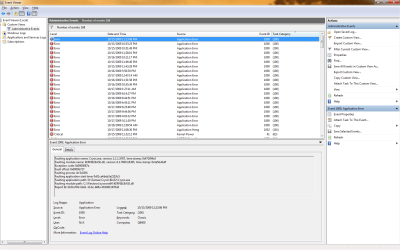
Do any of these games give an app crash error message?

If they do, check your event viewer logs to see if there is a common faulting application or driver. It may be any sort of driver or app (like an A/V) that is conflicting with something.


(Start >type "Event Viewer" Custom views >Administrative Events)

Event viewer.JPG
 

My Computer My Computer

At a glance

8 Pro x64i7 3770K 4.6GHz16GB G.Skill Trident X 2666mhzx2 EVGA 780 Ti Superclocked SLI
Computer type
PC/Desktop
Computer Manufacturer/Model Number
Systems by SmartEyeball
OS
8 Pro x64
CPU
i7 3770K 4.6GHz
Motherboard
ASUS P8Z77 WS
Memory
16GB G.Skill Trident X 2666mhz
Graphics Card(s)
x2 EVGA 780 Ti Superclocked SLI
Sound Card
SB X-FI Surround 5.1 PRO USB / ATH-AD900 Headphones
Monitor(s) Displays
x3 Dell U2410 / 58" Samsung
Screen Resolution
5760*1200/ 1920*1200
Hard Drives
2x Intel 520 240GB (RAID 0) * 2x WD Caviar Blacks 2TB (RAID 0) * 2TB WD Caviar Black * Sony Optirac DVD
PSU
Silverstone Strider Evolution 1200W
Case
Thermaltake Level 10 GT Snow Edition
Cooling
Noctua NH-D14
Keyboard
Topre Realforce // Ducky Shine MX Black // Filco Ninja TKL
Mouse
Thermaltake Theron (Highly Recommended) + Razer Imperator
Antivirus
MSE
Browser
IE, FF, WaterFox
Other Info
GT Extreme V2 Sim Racing Cockpit + 40" LCD and K/B Mouse stand ▼
Fanatec CSR Elite Wheel + Clubsport V1 Pedals + CSR shifter/7G-H ▼Saitek X52 Pro ▼ TrackIR 5 Pro
Buttkicker v2 Seat Rumbler with Dedicated 5.1 and Sub Woofer attached to frame ▼
=
Bloody Big Grin
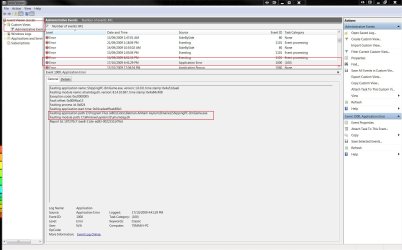
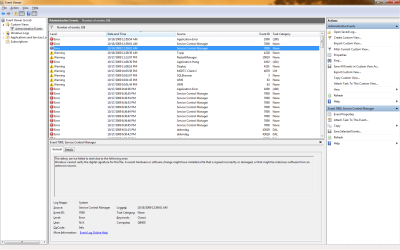
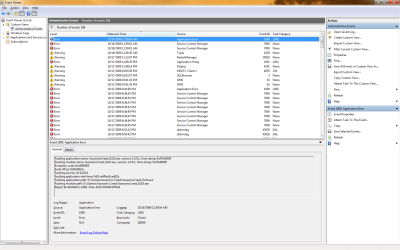
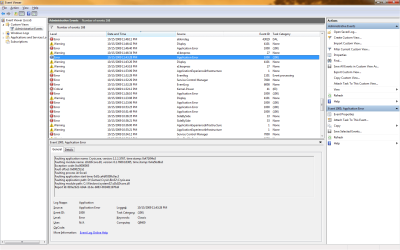
I checked my event viewer and it gave me 3 errors in the same minute so i post them all

EDIT i posted the error Crysis gave me aswell
EDIT 2 It seems that there are more errors that Crysis gives me
 

Attachments

  • Error1.png
    Error1.png
    50 KB · Views: 1,107
  • Error2.png
    Error2.png
    50.3 KB · Views: 89
  • Error3.png
    Error3.png
    51.4 KB · Views: 29
  • ErrorCrysis.png
    ErrorCrysis.png
    56.5 KB · Views: 29
  • ErrorCrysis2.png
    ErrorCrysis2.png
    51 KB · Views: 29
  • ErrorCrysis3.png
    ErrorCrysis3.png
    53.2 KB · Views: 111

My Computer My Computer

At a glance

Windows 7 Professional 64BitIntel Core 2 Quad Q94004096 DDR 800MHZClub3d ATI HD Radeon 4890
Computer Manufacturer/Model Number
HP
OS
Windows 7 Professional 64Bit
CPU
Intel Core 2 Quad Q9400
Memory
4096 DDR 800MHZ
Graphics Card(s)
Club3d ATI HD Radeon 4890
Monitor(s) Displays
HP Compaq LA2205wg, Samsung SyncMaster 225MW
Screen Resolution
2x 1680x1050 (3360x1050)
Hard Drives
1TB, 2x 500GB, 250GB
Case
DC7900 Convertble minitower
Cooling
The ones that come with the DC7900 Convertible minitowr
Keyboard
Some HP Keyboard
Mouse
Some Logitech Lasermouse
Internet Speed
20Mbit (2,5MB)
Are you using ATI tray tools? If you are, disable it and see if that makes a difference.
 

My Computer My Computer

At a glance

8 Pro x64i7 3770K 4.6GHz16GB G.Skill Trident X 2666mhzx2 EVGA 780 Ti Superclocked SLI
Computer type
PC/Desktop
Computer Manufacturer/Model Number
Systems by SmartEyeball
OS
8 Pro x64
CPU
i7 3770K 4.6GHz
Motherboard
ASUS P8Z77 WS
Memory
16GB G.Skill Trident X 2666mhz
Graphics Card(s)
x2 EVGA 780 Ti Superclocked SLI
Sound Card
SB X-FI Surround 5.1 PRO USB / ATH-AD900 Headphones
Monitor(s) Displays
x3 Dell U2410 / 58" Samsung
Screen Resolution
5760*1200/ 1920*1200
Hard Drives
2x Intel 520 240GB (RAID 0) * 2x WD Caviar Blacks 2TB (RAID 0) * 2TB WD Caviar Black * Sony Optirac DVD
PSU
Silverstone Strider Evolution 1200W
Case
Thermaltake Level 10 GT Snow Edition
Cooling
Noctua NH-D14
Keyboard
Topre Realforce // Ducky Shine MX Black // Filco Ninja TKL
Mouse
Thermaltake Theron (Highly Recommended) + Razer Imperator
Antivirus
MSE
Browser
IE, FF, WaterFox
Other Info
GT Extreme V2 Sim Racing Cockpit + 40" LCD and K/B Mouse stand ▼
Fanatec CSR Elite Wheel + Clubsport V1 Pedals + CSR shifter/7G-H ▼Saitek X52 Pro ▼ TrackIR 5 Pro
Buttkicker v2 Seat Rumbler with Dedicated 5.1 and Sub Woofer attached to frame ▼
=
Bloody Big Grin
I don't know how but the problem neems less now.

I now got a new problem when i play GTA IV it lags like hell and when i check my CPU and GPU i see that my GPU is at 0% and my CPU at 100% so for some reason the GPU isn't working in that game.

The only time the GPU does something there is when i enter a interior
 

My Computer My Computer

At a glance

Windows 7 Professional 64BitIntel Core 2 Quad Q94004096 DDR 800MHZClub3d ATI HD Radeon 4890
Computer Manufacturer/Model Number
HP
OS
Windows 7 Professional 64Bit
CPU
Intel Core 2 Quad Q9400
Memory
4096 DDR 800MHZ
Graphics Card(s)
Club3d ATI HD Radeon 4890
Monitor(s) Displays
HP Compaq LA2205wg, Samsung SyncMaster 225MW
Screen Resolution
2x 1680x1050 (3360x1050)
Hard Drives
1TB, 2x 500GB, 250GB
Case
DC7900 Convertble minitower
Cooling
The ones that come with the DC7900 Convertible minitowr
Keyboard
Some HP Keyboard
Mouse
Some Logitech Lasermouse
Internet Speed
20Mbit (2,5MB)
What are you using to monitor CPU and GPU usage?


If you aren't already, use GPU-Z to monitor the card usage. GPU-Z is accurate, so if the GPU is not working outside, then you'll (we'll) know for certain that the card is not being utilised properly.

http://www.techpowerup.com/gpuz/


If you still wish to disable powerplay, here's how to do it manually:
(credit to user F1aw1ess: http://www.sevenforums.com/member.php?u=31050 for the info)

Just in case anyone else has this problem, this is how to disable powerplay (although not tested yet)

For anyone with ATI cards here is how to properly set your card up to not use powerplay which causes stuttering and low performance.
go to the directory,
C:\Documents and Settings\Administrator\Local Settings\Application Data\ATI\ACE
Keep that directory open.
start up catalyst control center
hit the Overdrive tab
hit the paddle lock image to enable the overdrive settings
hit the profiles tab at top of page
select profiles manager from drop down list
name a profile in blank box (Custom Power is my chosen name)
under "this profile includes" section at bottom of page select the dot for "the following settings". In the tree make sure only ATI Overdrive checkbox is selected.
hit the save button
hit the Activate and close button at bottom of page
now go to your open directory
C:\Documents and Settings\Administrator\Local Settings\Application Data\ATI\ACE
You should see 5 new files in there in total.
One file is the same as you named your custom profile, right click it and select edit (my file is called Custom Power.xml)
The file will open in notepad where you can now change settings to nullify powerplay
Here are my new settings for example, I increased the core speed and voltage and applied a slight overclock to the 3dmodes in gpu and memory. I also increased the fan % to 100% from 41%.
Make your changes, close and save changes to the file. Rt click the file choose properties and change the file to read only. You are done.
<Profile>
<Caste name="Graphics">
<Groups>
<Group name="Overdrive5">
<Feature name="CoreClockTarget_0">
<Property name="Want_0" value="77600" />
<Property name="Want_1" value="80000" />
<Property name="Want_2" value="80000" />
</Feature>
<Feature name="MemoryClockTarget_0">
<Property name="Want_0" value="112600" />
<Property name="Want_1" value="120000" />
<Property name="Want_2" value="120000" />
</Feature>
<Feature name="CoreVoltageTarget_0">
<Property name="Want_0" value="1300" />
<Property name="Want_1" value="1300" />
<Property name="Want_2" value="1300" />
</Feature>
<Feature name="MemoryVoltageTarget_0">
<Property name="Want_0" value="0" />
<Property name="Want_1" value="0" />
<Property name="Want_2" value="0" />
</Feature>
<Feature name="FanSpeedProtocol_0">
<Property name="FanSpeedProtocolProperty" value="Percent" />
</Feature>
<Feature name="FanSpeedAlgorithm_0">
<Property name="FanSpeedAlgorithm" value="Automatic" />
</Feature>
<Feature name="FanSpeedRPMTarget_0">
<Property name="Want" value="0" />
</Feature>
<Feature name="FanSpeedPercentTarget_0">
<Property name="Want" value="100" />
</Feature>
<Feature name="CoreClockTarget_1">
<Property name="Want_0" value="77600" />
<Property name="Want_1" value="80000" />
<Property name="Want_2" value="80000" />
</Feature>
<Feature name="MemoryClockTarget_1">
<Property name="Want_0" value="112600" />
<Property name="Want_1" value="120000" />
<Property name="Want_2" value="120000" />
</Feature>
<Feature name="CoreVoltageTarget_1">
<Property name="Want_0" value="1300" />
<Property name="Want_1" value="1300" />
<Property name="Want_2" value="1300" />
</Feature>
<Feature name="MemoryVoltageTarget_1">
<Property name="Want_0" value="0" />
<Property name="Want_1" value="0" />
<Property name="Want_2" value="0" />
</Feature>
<Feature name="FanSpeedProtocol_1">
<Property name="FanSpeedProtocolProperty" value="Percent" />
</Feature>
<Feature name="FanSpeedAlgorithm_1">
<Property name="FanSpeedAlgorithm" value="Automatic" />
</Feature>
<Feature name="FanSpeedRPMTarget_1">
<Property name="Want" value="0" />
</Feature>
<Feature name="FanSpeedPercentTarget_1">
<Property name="Want" value="100" />
</Feature>
</Group>
</Groups>
<Adapter name="PCI_VEN_1002&DEV_9501&SUBSYS_E620174B&REV_00_4&16020E22&0&0008A">
<Aspect name="Overdrive5" />
</Adapter>
</Caste>
</Profile>

If you restart your computer, just make sure to open catalyst and ensure that your profile is activated. Simple once done.
 

My Computer My Computer

At a glance

8 Pro x64i7 3770K 4.6GHz16GB G.Skill Trident X 2666mhzx2 EVGA 780 Ti Superclocked SLI
Computer type
PC/Desktop
Computer Manufacturer/Model Number
Systems by SmartEyeball
OS
8 Pro x64
CPU
i7 3770K 4.6GHz
Motherboard
ASUS P8Z77 WS
Memory
16GB G.Skill Trident X 2666mhz
Graphics Card(s)
x2 EVGA 780 Ti Superclocked SLI
Sound Card
SB X-FI Surround 5.1 PRO USB / ATH-AD900 Headphones
Monitor(s) Displays
x3 Dell U2410 / 58" Samsung
Screen Resolution
5760*1200/ 1920*1200
Hard Drives
2x Intel 520 240GB (RAID 0) * 2x WD Caviar Blacks 2TB (RAID 0) * 2TB WD Caviar Black * Sony Optirac DVD
PSU
Silverstone Strider Evolution 1200W
Case
Thermaltake Level 10 GT Snow Edition
Cooling
Noctua NH-D14
Keyboard
Topre Realforce // Ducky Shine MX Black // Filco Ninja TKL
Mouse
Thermaltake Theron (Highly Recommended) + Razer Imperator
Antivirus
MSE
Browser
IE, FF, WaterFox
Other Info
GT Extreme V2 Sim Racing Cockpit + 40" LCD and K/B Mouse stand ▼
Fanatec CSR Elite Wheel + Clubsport V1 Pedals + CSR shifter/7G-H ▼Saitek X52 Pro ▼ TrackIR 5 Pro
Buttkicker v2 Seat Rumbler with Dedicated 5.1 and Sub Woofer attached to frame ▼
=
Bloody Big Grin
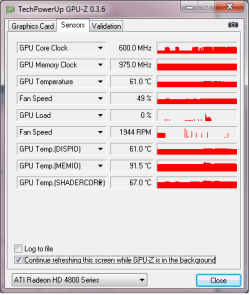
Here are the results

You see some GPU activity but this was during loading times..
When i am actualy ingame the activity drops to 0

PS i used Task manager for the CPU and the CCC for the GPU

I will turn that powerplay off if its actually needed to solfe this issue

Thank you for your help so far i hope we can figuere this out
I already asked this on some GTA 4 Forum (GTAforums.com) and they told me to try different CCC drivers to i tested 9.1-9.9 showing no real differences (Now running 9.9 again)
Now they are telling me that my OS could be screwed up wich i doubt since i just installed it a week ago.

I tried running the game without the ATI update from microsoft and with the ATI update from microsoft both showing no differences in GPU ussage.

Again GPU only active when inside a house(interior)

EDIT tried that turning powerplay thing off and it didnt affected my FPS only clocked my GPU at 800-850MHZ
 

Attachments

  • GPU.png
    GPU.png
    9.1 KB · Views: 128
Last edited:

My Computer My Computer

At a glance

Windows 7 Professional 64BitIntel Core 2 Quad Q94004096 DDR 800MHZClub3d ATI HD Radeon 4890
Computer Manufacturer/Model Number
HP
OS
Windows 7 Professional 64Bit
CPU
Intel Core 2 Quad Q9400
Memory
4096 DDR 800MHZ
Graphics Card(s)
Club3d ATI HD Radeon 4890
Monitor(s) Displays
HP Compaq LA2205wg, Samsung SyncMaster 225MW
Screen Resolution
2x 1680x1050 (3360x1050)
Hard Drives
1TB, 2x 500GB, 250GB
Case
DC7900 Convertble minitower
Cooling
The ones that come with the DC7900 Convertible minitowr
Keyboard
Some HP Keyboard
Mouse
Some Logitech Lasermouse
Internet Speed
20Mbit (2,5MB)
Any word about R* fixing that GPU load thing ?
 

My Computer My Computer

At a glance

Windows 7 Professional 64BitIntel Core 2 Quad Q94004096 DDR 800MHZClub3d ATI HD Radeon 4890
Computer Manufacturer/Model Number
HP
OS
Windows 7 Professional 64Bit
CPU
Intel Core 2 Quad Q9400
Memory
4096 DDR 800MHZ
Graphics Card(s)
Club3d ATI HD Radeon 4890
Monitor(s) Displays
HP Compaq LA2205wg, Samsung SyncMaster 225MW
Screen Resolution
2x 1680x1050 (3360x1050)
Hard Drives
1TB, 2x 500GB, 250GB
Case
DC7900 Convertble minitower
Cooling
The ones that come with the DC7900 Convertible minitowr
Keyboard
Some HP Keyboard
Mouse
Some Logitech Lasermouse
Internet Speed
20Mbit (2,5MB)
I'm sorry to say, that it's not a R* issue, so I doubt there aren't going to be any 'fixes'.

What are your normal 3D clock speeds? In that screenshot, it's at 600/975 which still points to a possible powerplay issue.

Also, it may be worthwhile manually increasing your fan speed using ATI overdrive within CCC
 

My Computer My Computer

At a glance

8 Pro x64i7 3770K 4.6GHz16GB G.Skill Trident X 2666mhzx2 EVGA 780 Ti Superclocked SLI
Computer type
PC/Desktop
Computer Manufacturer/Model Number
Systems by SmartEyeball
OS
8 Pro x64
CPU
i7 3770K 4.6GHz
Motherboard
ASUS P8Z77 WS
Memory
16GB G.Skill Trident X 2666mhz
Graphics Card(s)
x2 EVGA 780 Ti Superclocked SLI
Sound Card
SB X-FI Surround 5.1 PRO USB / ATH-AD900 Headphones
Monitor(s) Displays
x3 Dell U2410 / 58" Samsung
Screen Resolution
5760*1200/ 1920*1200
Hard Drives
2x Intel 520 240GB (RAID 0) * 2x WD Caviar Blacks 2TB (RAID 0) * 2TB WD Caviar Black * Sony Optirac DVD
PSU
Silverstone Strider Evolution 1200W
Case
Thermaltake Level 10 GT Snow Edition
Cooling
Noctua NH-D14
Keyboard
Topre Realforce // Ducky Shine MX Black // Filco Ninja TKL
Mouse
Thermaltake Theron (Highly Recommended) + Razer Imperator
Antivirus
MSE
Browser
IE, FF, WaterFox
Other Info
GT Extreme V2 Sim Racing Cockpit + 40" LCD and K/B Mouse stand ▼
Fanatec CSR Elite Wheel + Clubsport V1 Pedals + CSR shifter/7G-H ▼Saitek X52 Pro ▼ TrackIR 5 Pro
Buttkicker v2 Seat Rumbler with Dedicated 5.1 and Sub Woofer attached to frame ▼
=
Bloody Big Grin
I did that after the picture to like 900mhz but still no GPU activity so it is R* problem for making a game that doesnt use the fully capability's of my video card...

I'ts sad that payed alot of money to get this computer and payed money for a game where the developers doesn't care about us

I always loved GTA but now they are letting me down
 

My Computer My Computer

At a glance

Windows 7 Professional 64BitIntel Core 2 Quad Q94004096 DDR 800MHZClub3d ATI HD Radeon 4890
Computer Manufacturer/Model Number
HP
OS
Windows 7 Professional 64Bit
CPU
Intel Core 2 Quad Q9400
Memory
4096 DDR 800MHZ
Graphics Card(s)
Club3d ATI HD Radeon 4890
Monitor(s) Displays
HP Compaq LA2205wg, Samsung SyncMaster 225MW
Screen Resolution
2x 1680x1050 (3360x1050)
Hard Drives
1TB, 2x 500GB, 250GB
Case
DC7900 Convertble minitower
Cooling
The ones that come with the DC7900 Convertible minitowr
Keyboard
Some HP Keyboard
Mouse
Some Logitech Lasermouse
Internet Speed
20Mbit (2,5MB)
Sapphire HD4890 and Win7 64 problems

Ran win7 beta, win7 rc and finally installed win7 home premium when released-all were 64 bit versions.
With the beta as soon as I added 2 gig of ram to the already installed 2 gig, video problems began. First could no see win7 login screen(all white). Was able to enter login code with out seeing where. Win7 would proceed to run.
With the rc, same problem but other screen were affected when the os ran.
Finally, loaded released win7 home premium 64 bit. Works fine until I load ATI catalyst-tried the latest version yesterday. Down loaded it from ATI. Win7 64 go's to blue screen with error messages "if you've loaded etc.". If I uninstall the ATI suite, video works again. I run winxp pro 32 and don't have any problems. May try the 32 bit version of Win7 to see what happens.
amd 6000+, 4 gig, Sapphire HD4890.

Any suggestions?
 

My Computer My Computer

At a glance

win xp
OS
win xp
Back
Top