ATI 5750 problem

bnoi

New member
Local time
10:37 PM
Messages
8
Hi. I've just recently bought a ati 5750 1 gig. and have been trying to get it work but as soon as I turn on the power, everything starts running but there is only a black screen.

I've tried uninstalling my onboard video, set the primary video to PCI in bios, tested different monitors, haven't upgraded my bios since im having trouble w/ that.

I've searched through google and found otheres w/ the same problem but none of their solutions seem to work for me.

P.S. I have a brand new 600W psu for the card.
 

My Computer

Computer Manufacturer/Model Number
HP Pavilion a6120n
OS
Windows 7
CPU
intel dual core 4400 2.00
Motherboard
P5LP-LE (leonite 2)
Memory
2 Gigs
Graphics Card(s)
Intel 945G Express Chipset
PSU
250W
I would suggest that you take the card out and reseat it and make sure it is in correctly.


Steve
 

My Computer

Computer Manufacturer/Model Number
Over Clockers Ultima Viper 2.80Ghz
OS
Windows 7 Ultimate 64 - OEM Service Pack 1
CPU
Intel Core i7 930 2.80Ghz Bloomfield Socket LGA 1366
Motherboard
Gigabyte GA-X58A-UD3R Intel X58 Socket 1366 DDR3
Memory
Patriot Viper 6GB 3x2GB DDR3 PC3-1200C9 1600Mhz Tri Channel
Graphics Card(s)
Asus ATI Radeon HD 5770 CuCore 1024MB GDDR5 PCI Express
Sound Card
Realtek ALC889 @ Intel 82801JB ICH10 - High Definition Audio
Monitor(s) Displays
Samsung SyncMaster 920N 19"
Screen Resolution
1280*1024
Hard Drives
1 x OCZ Vertex2 Series 120GB 2.5" SATA-II SSD
1 x Seagate Barracuda 7200.12 1TB SATA-II 32MB Cache
1 x Western Digital Caviar Green 2TB SATA-II 64 MB Cache
PSU
Corsair TX 650W ATX SLi
Case
Antec 902 Ultimate Gaming Case Black
Cooling
Prolimatech Megahalems Rev B CPU Cooler Socket 775/1156/1366
Keyboard
Microsoft Comfort Curve Keyboard
Mouse
Microsoft Optical USB
Internet Speed
ADSL24 FTTC 34.2 Mbps Down 7.1Mbps Up
Other Info
OcUK 22x DVDSATA ReWriter Black
Akasa AK-FN058 Apache Black Super Silent 120mm Fan
Printer Epson Stylus Photo R300
Scanner Canon Canoscan 8000F
Well I've been taking it in and out of the case all day yesterday so I don't think thats a problem.

I've read in my searches that my mobo is just old. Does that mean a mobo upgrade or a gpu downgrade will do the trick?
 

My Computer

Computer Manufacturer/Model Number
HP Pavilion a6120n
OS
Windows 7
CPU
intel dual core 4400 2.00
Motherboard
P5LP-LE (leonite 2)
Memory
2 Gigs
Graphics Card(s)
Intel 945G Express Chipset
PSU
250W
Your motherboard is fine. Stupid question time, you remember to connect the monitor to the video card and not the port for the onboard video?
 

My Computer

Computer type
PC/Desktop
Computer Manufacturer/Model Number
Me
OS
Win 7 Ultimate x64
CPU
FX-8350 @ 4.6 GHz so far
Motherboard
Asus M5A97 EVO
Memory
ADATA XPG V1 Series Black 8GB DDR3 1600
Graphics Card(s)
Sapphire R9 270x Dual-X
Sound Card
Xonar DGX w/ Corsair Vengence 1300
Monitor(s) Displays
Acer S232HL Abid
Screen Resolution
1920x1080
Hard Drives
120 GB OCZ Vertex 3
500 GB Seagate 7200.12
PSU
Antec Earthwatts 650W Green
Case
Antec Three Hundred
Cooling
Cooler Master 212 EVO
Keyboard
Logitech G510
Mouse
Logitech G500s
Internet Speed
35000/3000
Yes. If the new card is installed neither the onboard video or the card works, hence all the in and outs I had to do yesterday.

Well I have just found HP has stopped supporting my mobo years ago so a bios update is out of the question.
 

My Computer

Computer Manufacturer/Model Number
HP Pavilion a6120n
OS
Windows 7
CPU
intel dual core 4400 2.00
Motherboard
P5LP-LE (leonite 2)
Memory
2 Gigs
Graphics Card(s)
Intel 945G Express Chipset
PSU
250W
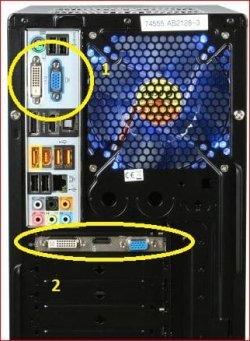
The onboard won't work once a video card is installed, in most cases it gets disabled automatically without having to make any changes in the bios. Back to the original question, the monitor connected in #1 or #2,

H55.JPG
 

My Computer

Computer type
PC/Desktop
Computer Manufacturer/Model Number
Me
OS
Win 7 Ultimate x64
CPU
FX-8350 @ 4.6 GHz so far
Motherboard
Asus M5A97 EVO
Memory
ADATA XPG V1 Series Black 8GB DDR3 1600
Graphics Card(s)
Sapphire R9 270x Dual-X
Sound Card
Xonar DGX w/ Corsair Vengence 1300
Monitor(s) Displays
Acer S232HL Abid
Screen Resolution
1920x1080
Hard Drives
120 GB OCZ Vertex 3
500 GB Seagate 7200.12
PSU
Antec Earthwatts 650W Green
Case
Antec Three Hundred
Cooling
Cooler Master 212 EVO
Keyboard
Logitech G510
Mouse
Logitech G500s
Internet Speed
35000/3000
#2.
Not that hard on my card since it doesn't have the blue port (DVI i think its called)
 

My Computer

Computer Manufacturer/Model Number
HP Pavilion a6120n
OS
Windows 7
CPU
intel dual core 4400 2.00
Motherboard
P5LP-LE (leonite 2)
Memory
2 Gigs
Graphics Card(s)
Intel 945G Express Chipset
PSU
250W
You remember to connect the 6 pin PCI-E power connector to the card?

P.S. Had to ask about where you had the monitor connected, seen too many over the years where they added a video card but left the monitor connected to the onboard ports.
 

My Computer

Computer type
PC/Desktop
Computer Manufacturer/Model Number
Me
OS
Win 7 Ultimate x64
CPU
FX-8350 @ 4.6 GHz so far
Motherboard
Asus M5A97 EVO
Memory
ADATA XPG V1 Series Black 8GB DDR3 1600
Graphics Card(s)
Sapphire R9 270x Dual-X
Sound Card
Xonar DGX w/ Corsair Vengence 1300
Monitor(s) Displays
Acer S232HL Abid
Screen Resolution
1920x1080
Hard Drives
120 GB OCZ Vertex 3
500 GB Seagate 7200.12
PSU
Antec Earthwatts 650W Green
Case
Antec Three Hundred
Cooling
Cooler Master 212 EVO
Keyboard
Logitech G510
Mouse
Logitech G500s
Internet Speed
35000/3000
haha. i understand. Made that mistake a few times yesterday.

And yes I connected the 6 pin power connector.
 

My Computer

Computer Manufacturer/Model Number
HP Pavilion a6120n
OS
Windows 7
CPU
intel dual core 4400 2.00
Motherboard
P5LP-LE (leonite 2)
Memory
2 Gigs
Graphics Card(s)
Intel 945G Express Chipset
PSU
250W
It could be a bios incompatibility (have seen a few boards that it happened on, and depending on age a bios update was issued by the board manufacturer), which if that is what it is with yours being a HP means you are basically SOL unless you can convince them to update it.

It is also possible that you got a DOA card (that happens too). If you can test it in another computer. If not take it back to where you got it and have them test it.
 

My Computer

Computer type
PC/Desktop
Computer Manufacturer/Model Number
Me
OS
Win 7 Ultimate x64
CPU
FX-8350 @ 4.6 GHz so far
Motherboard
Asus M5A97 EVO
Memory
ADATA XPG V1 Series Black 8GB DDR3 1600
Graphics Card(s)
Sapphire R9 270x Dual-X
Sound Card
Xonar DGX w/ Corsair Vengence 1300
Monitor(s) Displays
Acer S232HL Abid
Screen Resolution
1920x1080
Hard Drives
120 GB OCZ Vertex 3
500 GB Seagate 7200.12
PSU
Antec Earthwatts 650W Green
Case
Antec Three Hundred
Cooling
Cooler Master 212 EVO
Keyboard
Logitech G510
Mouse
Logitech G500s
Internet Speed
35000/3000
I'm sorry but what does SOL and DOA mean?

And the computer i'm trying to install it on is the only one that can handle it. If it is SOL then a motherboard upgrade or a gpu downgrade should do it right?
 

My Computer

Computer Manufacturer/Model Number
HP Pavilion a6120n
OS
Windows 7
CPU
intel dual core 4400 2.00
Motherboard
P5LP-LE (leonite 2)
Memory
2 Gigs
Graphics Card(s)
Intel 945G Express Chipset
PSU
250W
SOL - s--- out of luck

DOA - dead on arrival
 

My Computer

Computer type
PC/Desktop
Computer Manufacturer/Model Number
Me
OS
Win 7 Ultimate x64
CPU
FX-8350 @ 4.6 GHz so far
Motherboard
Asus M5A97 EVO
Memory
ADATA XPG V1 Series Black 8GB DDR3 1600
Graphics Card(s)
Sapphire R9 270x Dual-X
Sound Card
Xonar DGX w/ Corsair Vengence 1300
Monitor(s) Displays
Acer S232HL Abid
Screen Resolution
1920x1080
Hard Drives
120 GB OCZ Vertex 3
500 GB Seagate 7200.12
PSU
Antec Earthwatts 650W Green
Case
Antec Three Hundred
Cooling
Cooler Master 212 EVO
Keyboard
Logitech G510
Mouse
Logitech G500s
Internet Speed
35000/3000
I don't think the card is DOA since the fans are all working fine when i power it up. I guess i'll try to downgrade the card.

Thanks for all the help stormy :)
 

My Computer

Computer Manufacturer/Model Number
HP Pavilion a6120n
OS
Windows 7
CPU
intel dual core 4400 2.00
Motherboard
P5LP-LE (leonite 2)
Memory
2 Gigs
Graphics Card(s)
Intel 945G Express Chipset
PSU
250W
I don't know why you wouldn't just RMA the card Return to manufacturer. Or if you have a buddy you can try the card out in to see if it will work in theirs, if it doesn't I would just have it replaced. JMO, Fabe
 

My Computer

Computer Manufacturer/Model Number
Self Built
OS
Windows 7 ultimate 64 bit / XP Home sp3
CPU
intel Core 2 Duo E8400 3.0ghz
Motherboard
Asus P5ND bios 1401
Memory
8 gigs 1066 OCZ Fata1ty
Graphics Card(s)
EVGA GTX 580 Call of Duty Black Ops Edition
Sound Card
Creative Soundblaster Audigy 2zs
Monitor(s) Displays
Asus 24in LCD's 2MS X2
Screen Resolution
1920x1080p @60Hz
Hard Drives
WD Caviar 500 Black/ WD Caviar 200 Blue
PSU
OCZ 700W GameXtreme
Case
NZXT Apollo
Cooling
Corsair H50 CPU/120mm x3 /60mm x2 /Corsair Dominator Ram
Keyboard
Logitech Bluetooth Wireless MX5000
Mouse
Logitech Bluetooth Wireless MX1000
Internet Speed
Download 19.83 Upload 0.97
Other Info
Logitech Z2300 Speakers/ Bose Noise Cancelling Headphones/Avermedia PCI-e Hybrid TV Bravo/Epson NX415 all in one/ 4 Port Powered USB Hub/ LG 10x Bluray Burner /TSST Corp DVDRW External
Yeah that's what I meant by downgrade I'm going to return it and get something from the 4000series

Edit: is there a way to find out if my motherboard can support the 4000 series before I buy it?
 

My Computer

Computer Manufacturer/Model Number
HP Pavilion a6120n
OS
Windows 7
CPU
intel dual core 4400 2.00
Motherboard
P5LP-LE (leonite 2)
Memory
2 Gigs
Graphics Card(s)
Intel 945G Express Chipset
PSU
250W
Back
Top