ATI catalyst problem

slovak21

New member
Local time
2:50 PM
Messages
7
Trying to setup ATI catalyst 9.6, everytime the setup is installing the drivers the screen flickers and then comes back to the background picture and that is the only thing that shows, I know I can logout and in due to the music chime. Tried restarting comp, same thing, just the background picture. Have to go into safe mode and do restore everytime. Anybody have a suggestion? This is on Windows 7 RC x64.

my build, laptop acer 8935G
intel P8700
ATI Mobility Radeon HD 4670
4GB DDR3 memory
 

My Computer

Computer Manufacturer/Model Number
Acer 8935G
OS
Windows 7 RC
CPU
intel P8700
Memory
4GB DDR3
Graphics Card(s)
ATI Radeon 4670
Install 'as admin'?
 

My Computer

Computer type
PC/Desktop
Computer Manufacturer/Model Number
Custom Build/Mod
OS
Windows 7 Home Premium x64
CPU
Intel QX9650 Extreme 4.0 GHz
Motherboard
ASUS Rampage Extreme Rev2
Memory
8GB (4x2) Corsair Dominator DDR3
Graphics Card(s)
2x Radeon R390X [8GB]
Sound Card
SupremeFX X-Fi
Monitor(s) Displays
Dell 2408WFP 26" Panel
Screen Resolution
1920x1200
Hard Drives
4x WD 2TB (8TB+ Total)
2x Crucial SSD 128GB (RAID-0)
1x LG Blu-ray read/write
1x Phillips LightScribe DVD read/write
PSU
Corsair HX1000
Case
CoolerMaster - Cosmos S
Cooling
Custom Liquid - 320mm rad w/ 3x 80mm fans, CPU/NB/SB Blocks
Keyboard
Logitech Illuminater Pro
Mouse
Logitech
Internet Speed
Fractional T1 - 125Mbps
Antivirus
ESET Security Suite / Microsoft Security Essentials
Browser
Cyberfox Intel x64
Other Info
OC'd to 5.0GHz @ 44c under full load

My Computer

Computer type
PC/Desktop
Computer Manufacturer/Model Number
Me
OS
Win 7 Ultimate x64
CPU
FX-8350 @ 4.6 GHz so far
Motherboard
Asus M5A97 EVO
Memory
ADATA XPG V1 Series Black 8GB DDR3 1600
Graphics Card(s)
Sapphire R9 270x Dual-X
Sound Card
Xonar DGX w/ Corsair Vengence 1300
Monitor(s) Displays
Acer S232HL Abid
Screen Resolution
1920x1080
Hard Drives
120 GB OCZ Vertex 3
500 GB Seagate 7200.12
PSU
Antec Earthwatts 650W Green
Case
Antec Three Hundred
Cooling
Cooler Master 212 EVO
Keyboard
Logitech G510
Mouse
Logitech G500s
Internet Speed
35000/3000
yes, tried running as 'admin'

and

yes, I used your posted version of 9.6.

both have same result, still having no luck.
 

My Computer

Computer Manufacturer/Model Number
Acer 8935G
OS
Windows 7 RC
CPU
intel P8700
Memory
4GB DDR3
Graphics Card(s)
ATI Radeon 4670
Some feedback from someone who might have seen this

Trying to setup ATI catalyst 9.6, every time the setup is installing the drivers the screen flickers and then comes back to the background picture and that is the only thing that shows

Belive this has actually happened to me before. I also have the same computer and have experienced something similar when i also tried to go from the pre-installed vista to Win7(rc). Altrough my problem is probably a bit different and maybe more complicated i might cast some light on this issue of yours.

----------

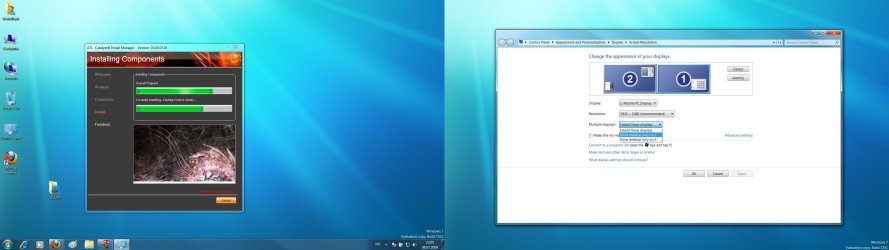
This will only be helpfull right after you have done an install of the ATI drivers. What i belive is happening is the computer choosing the wrong display (i know this sounds weird, but even thought you dont have an external monitor connected the system might still belive there is)

* Right-click on the desktop
* Screen Resolution

* In the new window find the Detect/Identify buttons and press them accordingly (Detect first)

* If theres more then two displays, choose (1. mobile PC display) and choose that as your main display.
(reason why the dropdown list says 1. Mobile PC display is because in my situation the drivers doesnt install correctly so your dropdown meny might be a bit diffirent. Either way #1 on the list should be your main display)


I hope this might help you :)
Anyway, if someone's interested after reading this post and want to know more about my issue I'm now making a post about it: http://www.sevenforums.com/graphic-...sue-windows-7-ati-radeon-mobility-4670-a.html
All help would be much appriciated
 

My Computer

Computer Manufacturer/Model Number
Acer Aspire 8935g
OS
Windows 7 (RC:7201 64-bit)
CPU
Intel Core Due 2.26GHz
Motherboard
Mobile Intel GM45 Express Chipset
Memory
DDR3 4GB 1066 MHz
Graphics Card(s)
ATI Mobility Radeon™ HD 4670
Monitor(s) Displays
18.4" Full HD 1920 x 1080
Hard Drives
Toshiba MT5055GSX (500gb - master)
ST9500325AS (500gb - slave)
PSU
the wall
Case
my desktop board
Cooling
my window
ATIscreenbugafterinstall.jpg

This is what i was talking about ;) Hope its of any help

Belive you might suffer from the same problems as me.
If that's the case, take a look at the link i posted if your
interested :D
 

My Computer

Computer Manufacturer/Model Number
Acer Aspire 8935g
OS
Windows 7 (RC:7201 64-bit)
CPU
Intel Core Due 2.26GHz
Motherboard
Mobile Intel GM45 Express Chipset
Memory
DDR3 4GB 1066 MHz
Graphics Card(s)
ATI Mobility Radeon™ HD 4670
Monitor(s) Displays
18.4" Full HD 1920 x 1080
Hard Drives
Toshiba MT5055GSX (500gb - master)
ST9500325AS (500gb - slave)
PSU
the wall
Case
my desktop board
Cooling
my window
cool, thanks has been a bit useful for other things still having the issue of installing CCC and the newest driver, installed an older driver. My games are running sooo slow right now, unplayable, probably related to my driver issue.
 

My Computer

Computer Manufacturer/Model Number
Acer 8935G
OS
Windows 7 RC
CPU
intel P8700
Memory
4GB DDR3
Graphics Card(s)
ATI Radeon 4670
Trying to setup ATI catalyst 9.6, everytime the setup is installing the drivers the screen flickers and then comes back to the background picture and that is the only thing that shows, I know I can logout and in due to the music chime. Tried restarting comp, same thing, just the background picture. Have to go into safe mode and do restore everytime. Anybody have a suggestion? This is on Windows 7 RC x64.

my build, laptop acer 8935G
intel P8700
ATI Mobility Radeon HD 4670
4GB DDR3 memory

I also have had some problems with ATI drivers in the past with Windows 7. The problem with doing a clean install of drivers is that it requires a reboot but once the computer reboots, the WDDM driver install takes over before I could install any drivers. There were some tutorials out that was supposed to disable this automatic driver installation, but none of them were working for me with a clean installation.

But here is the workaround that I have found to be effective:

   Tip
1. Download and install Driversweeperhttp://downloads.guru3d.com/download.php?det=745 (and make sure you have the video driver that is to be installed downloaded)
2. Go to Device manager Right click my computer /properties/ device manager / and Disable any under display adapters.
3. Reboot into safe mode (usually F8)
4. Run Driversweeper and select your video drivers ATI (or Nvidia if someone else with Nvidia is reading this)
5. Manually delete any ATI folders that may be located at C:\ ATI and Program files (both X64 and X86)\ATI
6. Reboot again into Windows and install the new drivers then reboot once the installation completes.


By disabling the drivers in device manager instead of uninstalling them, it allows you to reboot without the WDDM installation taking over. You also should use Driversweeper and do a clean driver install any time you install Video drivers instead of just updating them, especially when switching between ATI to Nvidia as any leftover driver remnants from one brand will interfere with the other.

Edit this post has been edited to make it more clear to understand.
 
Last edited:

My Computer

OS
Windows 7 Ultimate X64
CPU
Q6600 @3.6
Motherboard
DFI X38-T2R
Memory
2X2 Mushkin
Graphics Card(s)
XFX 4870X2
Monitor(s) Displays
Philips 240PW
Hard Drives
Intel X25-M 80GB
PSU
PCP&C 750W
Case
Antec 900
Cooling
TRUE 120
cool, thanks got my driver finally installed, but the real problem is presenting itself is that the primary display adaptor is intel 45 chipset and when disabled, my screen goes black. When I restarted after the initial driver setup CCC popped up a msg saying that it doesnt recognize the driver and make sure its the right driver for CCC, either way my comp won't use my ATI 4670. Anybody have something that can help out? it's messed up.
 

My Computer

Computer Manufacturer/Model Number
Acer 8935G
OS
Windows 7 RC
CPU
intel P8700
Memory
4GB DDR3
Graphics Card(s)
ATI Radeon 4670
Back
Top