ATI Catalyst - Win7 64 updates

mjm64

New member
Local time
9:37 AM
Messages
28
I don't know where to turn. I built a new machine to do photoshop CS4. I have throughly tested everything that I can and cannot find any hardware errors on the machine.

So my problem is as follows:

If I run any of the windows updates, my system blue screens with Stop 0x50 erros memory page fault errors. When you restart windows, the ATI Catalyst gives errors. It will blue screen in Safe Mode, and many of my programs just won't start. Like photoshop gives an error and crashes. Then it will work for 3-4 days no problem.

If I just do a clean install and load non of the microsoft updates, I have absolutely no issues.


I have tried using the ATI drivers that shipped in the CD with my motherboard. I have tried the drivers downloaded from my Gigabyte (motherboard manufacturer) as well as the latest drivers direct from ATI.

If I install the updates and try to roll back, it still crashes.


Is there something fundamentally wrong with Windows 7 and ATI?


The video card is part of the motherboard, so there is no way to remove it short of buying a new MB. I am beginning to wonder if Windows7 was just another bad Microsoft investment that I have made. Or do I just live with never doing another update as it seems stable right now. I am not looking to debug Microsofts OS as they sure are not paying me.

Matt.
 

My Computer

Computer Manufacturer/Model Number
self assembled but sadly not working
OS
win7 64 home premium
CPU
Intel i5-3750
Motherboard
Asus P8B75M-CPU 602 bios
Memory
8gb Gskill F3-12800CL9D-4GBNQ (2 sets)
Graphics Card(s)
Saphire HD5670
Sound Card
onboard
Monitor(s) Displays
NEC EA231WMi
Screen Resolution
1920x1080
Hard Drives
OCZ Agility 3 128gb
Seagate 7200.12 500gb
Seagate 7200.12 1000gb
PSU
Corsair TX650
Case
Black Aluminum (no name)
Cooling
Scythe Big Shuriken 2 Rev.B (SCBSK-2100) 3 Heat Pipes
Keyboard
USB viewsonic
Mouse
Logitech M505 wireless
Internet Speed
25mb fibe DSL
Is there something fundamentally wrong with Windows 7 and ATI?

In a word, no.

The video card is part of the motherboard, so there is no way to remove it short of buying a new MB. I am beginning to wonder if Windows7 was just another bad Microsoft investment that I have made

If the machine is crashing insafe mode, it's nothing to with ATI drivers as safe mode uses Windows own generic VGA driver.

When you say you have tested your hardware, how and what was tested?
 

My Computer

Computer type
PC/Desktop
Computer Manufacturer/Model Number
Systems by SmartEyeball
OS
8 Pro x64
CPU
i7 3770K 4.6GHz
Motherboard
ASUS P8Z77 WS
Memory
16GB G.Skill Trident X 2666mhz
Graphics Card(s)
x2 EVGA 780 Ti Superclocked SLI
Sound Card
SB X-FI Surround 5.1 PRO USB / ATH-AD900 Headphones
Monitor(s) Displays
x3 Dell U2410 / 58" Samsung
Screen Resolution
5760*1200/ 1920*1200
Hard Drives
2x Intel 520 240GB (RAID 0) * 2x WD Caviar Blacks 2TB (RAID 0) * 2TB WD Caviar Black * Sony Optirac DVD
PSU
Silverstone Strider Evolution 1200W
Case
Thermaltake Level 10 GT Snow Edition
Cooling
Noctua NH-D14
Keyboard
Topre Realforce // Ducky Shine MX Black // Filco Ninja TKL
Mouse
Thermaltake Theron (Highly Recommended) + Razer Imperator
Antivirus
MSE
Browser
IE, FF, WaterFox
Other Info
GT Extreme V2 Sim Racing Cockpit + 40" LCD and K/B Mouse stand ▼
Fanatec CSR Elite Wheel + Clubsport V1 Pedals + CSR shifter/7G-H ▼Saitek X52 Pro ▼ TrackIR 5 Pro
Buttkicker v2 Seat Rumbler with Dedicated 5.1 and Sub Woofer attached to frame ▼
=
Bloody Big Grin
Is there something fundamentally wrong with Windows 7 and ATI?

Aero on onboard HD 4200 with Catalyst 10.2 works like a charm here. so, nope.
 

My Computer

OS
Windows 7 Professional x64 SP1
CPU
AMD Phenom II X6 1100T BE
Motherboard
ASUS M5A99X EVO
Memory
12GB (Kingston 4GB & 8GB DDR3 1333MHz Kits)
Graphics Card(s)
MSI GeForce N560GTX-Ti Twin Frozr II
Sound Card
ALC892, SB Audigy ES
Monitor(s) Displays
ViewSonic 24"
Screen Resolution
1920x1080
Hard Drives
OCZ Vertex 3 240GB SATA III, Seagate Barracuda 500GB SATA II, Seagate Barracuda Green 2TB SATA III, Seagate Barracuda LP 2TB SATA II
PSU
Corsair Professional Series Gold AX850
Case
Cooler Master HAF 932
Cooling
Zalman CNPS10X Performa, CM 230mm, Titan 140mm PWM
Keyboard
Logitech Illuminated
Mouse
Logitech G400 on SteelSeries 4HD
Other Info
M-Audio Oxygen 25, Xbox 360 Wired Controller
If the machine is crashing insafe mode, it's nothing to with ATI drivers as safe mode uses Windows own generic VGA driver.

When you say you have tested your hardware, how and what was tested?

I don't know if the errors that I get when you boot Windows 7 after it get's into it's tizzy and blue screens have anything to do with what is going wrong.

ATI Catalyst comes up and says that it is not working. I have a dual monitor setup, and you loose the second monitor. And generally it just keeps on crashing every 5-10 minutes.

As for what and how I have tested this.

1. I have run memtest 4 doing a full battery of tests for 24hours. No errors generated.
2. I have run Prime95 inside of Windows 7 HomePrem. with not updates for 24+ hours with zero errors.
3. I have used Seagate's seatools on my hard drive to verify there are no bad sectors or errors on the disk. None
4. I have swapped all the memory to verify that it isn't a bad memory module.
5. I have tried removing memory to make sure there isn't a bad socket on the MB
6. I have checked the CPU for bent pins. Upgraded the Cooling Fan.
7. I have tried 2 different power supplies.

The problem starts when I allow windows 7 to download updates from the Microsoft update server. When the updates are installed, the computer bluescreens. This is even with no other software installed except what comes with the standard Win7 install and the drivers for components required by the MB suck as the ATI drivers.

I have not tried a different Windows 7 install disk as I refuse to repurchase software that may not work especially when you are having problems with a very new system that says it is Win7 compatible.

Matt.
 

My Computer

Computer Manufacturer/Model Number
self assembled but sadly not working
OS
win7 64 home premium
CPU
Intel i5-3750
Motherboard
Asus P8B75M-CPU 602 bios
Memory
8gb Gskill F3-12800CL9D-4GBNQ (2 sets)
Graphics Card(s)
Saphire HD5670
Sound Card
onboard
Monitor(s) Displays
NEC EA231WMi
Screen Resolution
1920x1080
Hard Drives
OCZ Agility 3 128gb
Seagate 7200.12 500gb
Seagate 7200.12 1000gb
PSU
Corsair TX650
Case
Black Aluminum (no name)
Cooling
Scythe Big Shuriken 2 Rev.B (SCBSK-2100) 3 Heat Pipes
Keyboard
USB viewsonic
Mouse
Logitech M505 wireless
Internet Speed
25mb fibe DSL
You've certainly run the full gamut of tests and I can understand your frustration. (know the feeling well :rolleyes: )


When you installed the different ATI driver versions, did you un-install the existing drivers first, or just install over the top of them?

At this stage, it may be worthwhile un-installing ATI Catalyst Install Manger (which will remove both CCC and drivers) via the Control panel > Uninstall Programs , re-booting into safe mode, running driver sweeper to clean/remove all the ATI components, re-booting normally and then re-installing the latest CAT drivers.

Guru3D - Driver Sweeper

However the fact it's fine with zero updates and yet it blue screens even in safe mode after updates, suggests that the problem may lie elsewhere.

CCC errors, loosing the 2nd monitor etc may just be a symptom, and not a cause. As a normal non-updated installation still uses the default ATI WHQL driver, and as I mentioned earlier, safe mode uses the generic VGA driver.

If you are forced to do yet another fresh installation, it may be worthwhile installing the updates individually, instead of installing them all at once automatically.


Also, do you have you any unknown devices / warning symbols showing up in Device manager?
 

My Computer

Computer type
PC/Desktop
Computer Manufacturer/Model Number
Systems by SmartEyeball
OS
8 Pro x64
CPU
i7 3770K 4.6GHz
Motherboard
ASUS P8Z77 WS
Memory
16GB G.Skill Trident X 2666mhz
Graphics Card(s)
x2 EVGA 780 Ti Superclocked SLI
Sound Card
SB X-FI Surround 5.1 PRO USB / ATH-AD900 Headphones
Monitor(s) Displays
x3 Dell U2410 / 58" Samsung
Screen Resolution
5760*1200/ 1920*1200
Hard Drives
2x Intel 520 240GB (RAID 0) * 2x WD Caviar Blacks 2TB (RAID 0) * 2TB WD Caviar Black * Sony Optirac DVD
PSU
Silverstone Strider Evolution 1200W
Case
Thermaltake Level 10 GT Snow Edition
Cooling
Noctua NH-D14
Keyboard
Topre Realforce // Ducky Shine MX Black // Filco Ninja TKL
Mouse
Thermaltake Theron (Highly Recommended) + Razer Imperator
Antivirus
MSE
Browser
IE, FF, WaterFox
Other Info
GT Extreme V2 Sim Racing Cockpit + 40" LCD and K/B Mouse stand ▼
Fanatec CSR Elite Wheel + Clubsport V1 Pedals + CSR shifter/7G-H ▼Saitek X52 Pro ▼ TrackIR 5 Pro
Buttkicker v2 Seat Rumbler with Dedicated 5.1 and Sub Woofer attached to frame ▼
=
Bloody Big Grin
The problem starts when I allow windows 7 to download updates from the Microsoft update server
If any of those are motherboard or video drivers, don't install them. This is one of those things that I don't care how much it is supposed to be improved over previous Windows versions, you do not ever install a driver for a major component from Windows Update.

For your video and motherboard get them from here,

Drivers & Support | GAME.AMD.COM

don't bother getting them from Gigabyte as they are several months and driver releases behind.

One quick question, how are your two monitors connected?
 

My Computer

Computer type
PC/Desktop
Computer Manufacturer/Model Number
Me
OS
Win 7 Ultimate x64
CPU
FX-8350 @ 4.6 GHz so far
Motherboard
Asus M5A97 EVO
Memory
ADATA XPG V1 Series Black 8GB DDR3 1600
Graphics Card(s)
Sapphire R9 270x Dual-X
Sound Card
Xonar DGX w/ Corsair Vengence 1300
Monitor(s) Displays
Acer S232HL Abid
Screen Resolution
1920x1080
Hard Drives
120 GB OCZ Vertex 3
500 GB Seagate 7200.12
PSU
Antec Earthwatts 650W Green
Case
Antec Three Hundred
Cooling
Cooler Master 212 EVO
Keyboard
Logitech G510
Mouse
Logitech G500s
Internet Speed
35000/3000
I have installed windows 7 on this computer about 14 times. Wasted well over a week trying to figure this one out. Part of me says that the machine was purchased to do one thing,.. Photoshop. So I might as well not bother with doing any updates. Not as if I am surfing on the internet with it, or running programs that I have not purchased from a known company.

When you installed the different ATI driver versions, did you un-install the existing drivers first, or just install over the top of them?

No, I installed newer versions with a clean install. I was trying to isolate any potential problems with drivers.

If you are forced to do yet another fresh installation, it may be worthwhile installing the updates individually, instead of installing them all at once automatically.

The only problem is that there are too many updates to do a try every combination test. Also, I bought the machine to use, not debug Microsofts mistakes. It's pretty sad affair if a MS update kills a computer. As you said, in safe mode it is not supposed to be using the 3rd party video drivers... not knowing if they are really causing the problem or getting taken out by something else.

I just lament back to my old XP install that just worked. I however need 64bit OS to do my work. If it wasn't for the AMD I might look into a Hackintosh.. I'm told they are the best thing since sliced bread... or at least thats what the commercial on TV says.

Guess time will tell if they fix the bugs. Will wait for SP2... statistically that is when the bugs get fixed.


Matt.
 

My Computer

Computer Manufacturer/Model Number
self assembled but sadly not working
OS
win7 64 home premium
CPU
Intel i5-3750
Motherboard
Asus P8B75M-CPU 602 bios
Memory
8gb Gskill F3-12800CL9D-4GBNQ (2 sets)
Graphics Card(s)
Saphire HD5670
Sound Card
onboard
Monitor(s) Displays
NEC EA231WMi
Screen Resolution
1920x1080
Hard Drives
OCZ Agility 3 128gb
Seagate 7200.12 500gb
Seagate 7200.12 1000gb
PSU
Corsair TX650
Case
Black Aluminum (no name)
Cooling
Scythe Big Shuriken 2 Rev.B (SCBSK-2100) 3 Heat Pipes
Keyboard
USB viewsonic
Mouse
Logitech M505 wireless
Internet Speed
25mb fibe DSL
Without knowing the exact reason for the failure, it's impossible to know who to actually blame.


If it's a Seven specific update that is causing the problem, then the finger of blame should indeed be rightly pointed at MS.

However, if it's an 'optional / recommended update' which is from a 3rd party that is causing the issue, then it's not actually Microsoft's fault. The onus and blame rests on the manufacturer. Regardless, it's little comfort when all you want to do is 'just use your machine' for work, I know.

A quicker way to eliminate the updates combination would be to install the 'important' MS updates in 'batches' rather than individually. For example if you had 20 updates to install, only install 5 at a time. No Blue Screen, do the next 5 etc Rinse, repeat, swear, sigh.

At the very least, only install the 'important' updates and none of the 'optional / recommended' updates. At least this will potentially and hopefully narrow down the cause to a MS specific update, or a 3rd party one.

Whilst it certainly is possible to use the machine without updates, it's still not a desirable one. Then again, a crashing PC is even less desirable.


When you mentioned it still crashed after 'rolling back' - were you referring to using a restore point or just removing the updates via the control panel?

If / when it crashes again, it may be worthwhile zipping the contents of C:\Windows\minidump and uploading the zip file and creating a new thread in 'Crashes and Debugging' section of the forum where those who analyze Crash dumps may have a better chance of back tracing to the faulting component / module. (Just provide a link to this thread to save a bit of time on repeating yourself)


I might look into a Hackintosh.. I'm told they are the best thing since sliced bread... or at least thats what the commercial on TV says.

If I didn't know you were frustrated before - this confirms it ;)

TV commercials promise me a lot of things too. The same TV will tell me in one ad that sliced bread is fantastic yet the next ad can tell me that sliced bread can kill you... :p

Guess time will tell if they fix the bugs. Will wait for SP2... statistically that is when the bugs get fixed.
Matt.
Which is around the time that your lamented XP started to 'just work' :)

Current company excluded (I've personally seen far more Blue screens in Seven than I did with either XP or Vista), statistically, pre-Service Pack Seven is definitely a lot more stable than any other pre-service pack release of Windows. The majority of problems either stem from incompatible 3rd party drivers or failing / incorrect hardware settings.

(My Blue Screens were always either 3rd party driver or h/ware related. It didn't stop me from cursing at Seven though :o )
 

My Computer

Computer type
PC/Desktop
Computer Manufacturer/Model Number
Systems by SmartEyeball
OS
8 Pro x64
CPU
i7 3770K 4.6GHz
Motherboard
ASUS P8Z77 WS
Memory
16GB G.Skill Trident X 2666mhz
Graphics Card(s)
x2 EVGA 780 Ti Superclocked SLI
Sound Card
SB X-FI Surround 5.1 PRO USB / ATH-AD900 Headphones
Monitor(s) Displays
x3 Dell U2410 / 58" Samsung
Screen Resolution
5760*1200/ 1920*1200
Hard Drives
2x Intel 520 240GB (RAID 0) * 2x WD Caviar Blacks 2TB (RAID 0) * 2TB WD Caviar Black * Sony Optirac DVD
PSU
Silverstone Strider Evolution 1200W
Case
Thermaltake Level 10 GT Snow Edition
Cooling
Noctua NH-D14
Keyboard
Topre Realforce // Ducky Shine MX Black // Filco Ninja TKL
Mouse
Thermaltake Theron (Highly Recommended) + Razer Imperator
Antivirus
MSE
Browser
IE, FF, WaterFox
Other Info
GT Extreme V2 Sim Racing Cockpit + 40" LCD and K/B Mouse stand ▼
Fanatec CSR Elite Wheel + Clubsport V1 Pedals + CSR shifter/7G-H ▼Saitek X52 Pro ▼ TrackIR 5 Pro
Buttkicker v2 Seat Rumbler with Dedicated 5.1 and Sub Woofer attached to frame ▼
=
Bloody Big Grin
Does it do it with only 1 monitor connected to the computer? Could be a issue trying to run dual monitors on onboard video.
 

My Computer

OS
windows 7
CPU
q6600
Motherboard
DFI X48 TR2
Memory
4GB G Skill 800mhz
Graphics Card(s)
Asus 4850
Sound Card
Audigy 2 ZS Plat
Monitor(s) Displays
HW191D Hanns G
Screen Resolution
1440x900
Hard Drives
Seagate 250GB
PSU
Corsair 100w
Case
Armor
Cooling
Ninja B
Keyboard
Logitech
Mouse
Logitech
Internet Speed
10Mb
Without knowing the exact reason for the failure, it's impossible to know who to actually blame. If it's a Seven specific update that is causing the problem, then the finger of blame should indeed be rightly pointed at MS.

You are correct. I think that the only two optional updates that were included were for the display screens. I didn't think that having the settings for a NEC and Dell monitor would do much harm, but I will try the update without them and see what happens.

A quicker way to eliminate the updates combination would be to install the 'important' MS updates in 'batches' rather than individually. For example if you had 20 updates to install, only install 5 at a time. No Blue Screen, do the next 5 etc Rinse, repeat, swear, sigh.

Whilst it certainly is possible to use the machine without updates, it's still not a desirable one. Then again, a crashing PC is even less desirable.

Well, I will give it a try with the Security updates.. Let's se the list. KB971468, KB972270, KB974571, KB975467, KB975560 & KB978251. 6 in total.. we will give it a few weeks to see if this is stable.

When you mentioned it still crashed after 'rolling back' - were you referring to using a restore point or just removing the updates via the control panel?

If / when it crashes again, it may be worthwhile zipping the contents of C:\Windows\minidump and uploading the zip file and creating a new thread in 'Crashes and Debugging' section of the forum where those who analyze Crash dumps may have a better chance of back tracing to the faulting component / module. (Just provide a link to this thread to save a bit of time on repeating yourself)

Uninstall through the Control Panel option for installed service packs. As for the crash dump.. if I run into problems I will definitely link back to this thread and see about how to do that minidump option. Is there anything that I would need to setup on my end so that this dump is automatically generated, or is windows setup to do that automatically?

Thanks for the help.

Matt.
 

My Computer

Computer Manufacturer/Model Number
self assembled but sadly not working
OS
win7 64 home premium
CPU
Intel i5-3750
Motherboard
Asus P8B75M-CPU 602 bios
Memory
8gb Gskill F3-12800CL9D-4GBNQ (2 sets)
Graphics Card(s)
Saphire HD5670
Sound Card
onboard
Monitor(s) Displays
NEC EA231WMi
Screen Resolution
1920x1080
Hard Drives
OCZ Agility 3 128gb
Seagate 7200.12 500gb
Seagate 7200.12 1000gb
PSU
Corsair TX650
Case
Black Aluminum (no name)
Cooling
Scythe Big Shuriken 2 Rev.B (SCBSK-2100) 3 Heat Pipes
Keyboard
USB viewsonic
Mouse
Logitech M505 wireless
Internet Speed
25mb fibe DSL
Last edited:

My Computer

Computer type
PC/Desktop
Computer Manufacturer/Model Number
benchtec, built to personal specs
OS
Windows10 Pro - 64Bit vs.10547
CPU
i7-965 Extreme Edition (8 Cores) at 3.3GHz (no OC)
Motherboard
BloodRageX58 (Socket1366)
Memory
12G Corsair Dominator DDR3 - tripled
Graphics Card(s)
2xAMD SapphireNITRO R9 380(4G) crossfire
Sound Card
Sonar(SB)X-Fi onboard
Monitor(s) Displays
SyncMaster P2050 20"
Screen Resolution
1600x900 (widescreen)
Hard Drives
480G\OCZSolid3SSD, 64G\OCZVertex3SSD,60G\OCZVertex2SSD, 1TB\spinpointF1SATAHDD
PSU
1200w Power Station Gold
Case
ANTEC 900/2 all blue lights, etc..
Cooling
Noctua SE1366 NH-U12P - a tight fit, but a monster cooler!!
Keyboard
Logitech G19 (wired)
Mouse
Logitech G9 Laser (wired)
Internet Speed
150mb unlimited
Browser
IE11(RP)
Other Info
Xbox One, Nokia735 Windows10 mobile, LG HD/DVD/Blu-Ray r/w, CyberlinkPowerDVD15, LogitechZ5500-SS(5.1), LogitechG35Phones-SS(7.1),MSOffice 2007,CorelDrawX7,Painter2016, Wacom Intuos Pro-SE
You are correct. I think that the only two optional updates that were included were for the display screens. I didn't think that having the settings for a NEC and Dell monitor would do much harm, but I will try the update without them and see what happens.

Hmm, no they really shouldn't have this sort of impact you are getting. However it's fine to run without them for the time being.


Well, I will give it a try with the Security updates.. Let's se the list. KB971468, KB972270, KB974571, KB975467, KB975560 & KB978251. 6 in total.. we will give it a few weeks to see if this is stable
.

Fingers crossed ;)


Uninstall through the Control Panel option for installed service packs.

If it does occur again, instead of attempting to uninstall the updates themselves, try using a restore point.

Unlike XP, restore points work a hell of a lot better now. By rights, this should revert your system back to the state it was before installing the updates. It could potentially you save a lot of time by not having to re-install over and over.

Windows creates an automatic restore point by default before installing updates, but these automatic restore points get deleted over time, so it may be more beneficial to manually create a restore point before installing further updates.

The advantage of this method is that you can name the restore point for easier identification and these points are not automatically deleted.

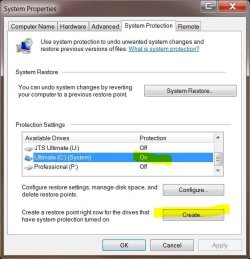
To manually create:

type 'create' in the search bar and select 'Create a Restore Point' and then select Create

Create restore.JPG


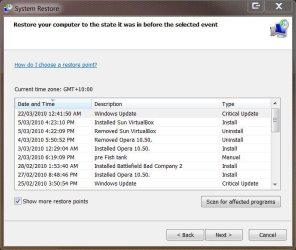
To Restore:

type 'restore' open System Restore, tick 'Show more restore points' to see and select the manually created point and then follow the prompts.

system restore.JPG

You could also create a full system backup image, but restore points are much quicker.


As for the crash dump.. if I run into problems I will definitely link back to this thread and see about how to do that minidump option. Is there anything that I would need to setup on my end so that this dump is automatically generated, or is windows setup to do that automatically?

Thanks for the help.

Matt.

Not a problem Matt, and there's nothing you need to set as Windows automatically generates a full crash dump (all the current contents that were loaded in memory at the time of the crash) in C:\Windows and a 'minidump' in C:\Windows\minidump

Good luck and fingers crossed :)
 

My Computer

Computer type
PC/Desktop
Computer Manufacturer/Model Number
Systems by SmartEyeball
OS
8 Pro x64
CPU
i7 3770K 4.6GHz
Motherboard
ASUS P8Z77 WS
Memory
16GB G.Skill Trident X 2666mhz
Graphics Card(s)
x2 EVGA 780 Ti Superclocked SLI
Sound Card
SB X-FI Surround 5.1 PRO USB / ATH-AD900 Headphones
Monitor(s) Displays
x3 Dell U2410 / 58" Samsung
Screen Resolution
5760*1200/ 1920*1200
Hard Drives
2x Intel 520 240GB (RAID 0) * 2x WD Caviar Blacks 2TB (RAID 0) * 2TB WD Caviar Black * Sony Optirac DVD
PSU
Silverstone Strider Evolution 1200W
Case
Thermaltake Level 10 GT Snow Edition
Cooling
Noctua NH-D14
Keyboard
Topre Realforce // Ducky Shine MX Black // Filco Ninja TKL
Mouse
Thermaltake Theron (Highly Recommended) + Razer Imperator
Antivirus
MSE
Browser
IE, FF, WaterFox
Other Info
GT Extreme V2 Sim Racing Cockpit + 40" LCD and K/B Mouse stand ▼
Fanatec CSR Elite Wheel + Clubsport V1 Pedals + CSR shifter/7G-H ▼Saitek X52 Pro ▼ TrackIR 5 Pro
Buttkicker v2 Seat Rumbler with Dedicated 5.1 and Sub Woofer attached to frame ▼
=
Bloody Big Grin
Back
Top