Ati ccc, empty folder after install

danitaro

New member
Local time
11:46 PM
Messages
8
I've noticed that I'm not the only one having this problem, but nobody really gave a solution or a cause.. thats why I tought a new topic was needed..

hi everybody
I have a little problem, I'm running windows 7 rtm 7600 (64bit) on my hp pavilion with an ati hd4550.
The driver is installed but I can't seem to get the catalyst center to work. I've installed the 9.7 driver and everything seems to go well with the installation, it even says, installation completed, but the catalyst center isn't anywhere to be found. When I go to the folder ..programfiles/ati technologies the folder is just empty. my laptop says the ati install manager is installed but the catalyst control center not. I had the same problem when I was running the windows 7 rc.
I've tried to install the ccc from the extraction folder on c:/ati but still same problem.
Can anybody tell me what's wrong?
Thx
Dani

UPDATE: tried ccc 9.8, same damn problem :s
 
Last edited:

My Computer

Computer Manufacturer/Model Number
hp dv7-2040eb
OS
windows 7
CPU
intel core 2 duo t6400 2gh
Memory
4gb
Graphics Card(s)
ati hd 4500
I've noticed that I'm not the only one having this problem, but nobody really gave a solution or a cause.. thats why I tought a new topic was needed..

hi everybody
I have a little problem, I'm running windows 7 rtm 7600 (64bit) on my hp pavilion with an ati hd4500.
The driver is installed but I can't seem to get the catalyst center to work. I've installed the 9.7 driver and everything seems to go well with the installation, it even says, installation completed, but the catalyst center isn't anywhere to be found. When I go to the folder ..programfiles/ati technologies the folder is just empty. my laptop says the ati install manager is installed but the catalyst control center not. I had the same problem when I was running the windows 7 rc.
I've tried to install the ccc from the extraction folder on c:/ati but still same problem.
Can anybody tell me what's wrong?
Thx
Dani


Dan
did you check the 32 bit program files to see if the installer may have been 32 bit?


Ken
 

My Computer

Computer Manufacturer/Model Number
HP Pavillion dv-7 1005 Tx
OS
Win 8 Release candidate 8400
CPU
[email protected]
Memory
4 gigs
Graphics Card(s)
Nvidia 9600M
Sound Card
HD built-in
Monitor(s) Displays
17" Wxga
Screen Resolution
1440x900
Cooling
none
Internet Speed
45Mb down 5Mb up
yes I did, the ATI folder and the ATI technologies folder are both located in the 64bit folder..

the ati folder contains a folder called CIM and the ati technologies folder is empty..
 

My Computer

Computer Manufacturer/Model Number
hp dv7-2040eb
OS
windows 7
CPU
intel core 2 duo t6400 2gh
Memory
4gb
Graphics Card(s)
ati hd 4500
I am having the same problem as danitaro with my Toshiba L500. I really wish somebody could help us.
 

My Computer

OS
Windows 7
I've noticed that I'm not the only one having this problem, but nobody really gave a solution or a cause.. thats why I tought a new topic was needed..

hi everybody
I have a little problem, I'm running windows 7 rtm 7600 (64bit) on my hp pavilion with an ati hd4500.
The driver is installed but I can't seem to get the catalyst center to work. I've installed the 9.7 driver and everything seems to go well with the installation, it even says, installation completed, but the catalyst center isn't anywhere to be found. When I go to the folder ..programfiles/ati technologies the folder is just empty. my laptop says the ati install manager is installed but the catalyst control center not. I had the same problem when I was running the windows 7 rc.
I've tried to install the ccc from the extraction folder on c:/ati but still same problem.
Can anybody tell me what's wrong?
Thx
Dani

Hi,

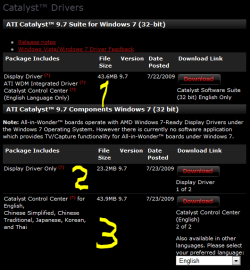
Could it be you downloaded the wrong package?

You can download the complete driver package with Catalyst integrated,

and you can download driver and suite separately.

By the way, I didn't see a HD4500 anywhere, only HD4550.

Greetz

ati.PNG
 

My Computer

OS
Win7 Build 7600 x86
CPU
Pentium II 300MHz
Motherboard
Asus
Memory
32mb EDO RAM
Graphics Card(s)
Diamond Viper
Sound Card
Soundblaster 16
Monitor(s) Displays
14" AOC CRT 16K color
Screen Resolution
800x600
Hard Drives
300mb Quantum fireball
PSU
110 Watts
Cooling
Passive
Keyboard
Trust Ergonomic
Mouse
Generic
Internet Speed
256K u 128K d
Hi,

Could it be you downloaded the wrong package?

You can download the complete driver package with Catalyst integrated,

and you can download driver and suite separately.

By the way, I didn't see a HD4500 anywhere, only HD4550.

Greetz

View attachment 23089


yeah sorry it's HD4550, nope not the wrong package, I've tried all 3 of them.; with no succes! And the worst of all! I just tried with the 9.8 catalyst that was just released and I'm having the same problem! It's really getting on my nerves!
 

My Computer

Computer Manufacturer/Model Number
hp dv7-2040eb
OS
windows 7
CPU
intel core 2 duo t6400 2gh
Memory
4gb
Graphics Card(s)
ati hd 4500
I manged to solve this problem finally with the latest mobility modder. Go here: Mobility Modder - DriverHeaven.net download latest release of Mobility Modder, that is 1.2.1.0, and follow the instructions below on the site.

1. With win 7 you have to disable the UAC (put it in its lower state).
2. Then download the latest drivers for desktop Radeon 4k series (I downloaded for 9.8 for 4800).
3. Extract them and after that finish with the installation
4. Install and use Mobility Modder to modify the drivers in the C:ATI/SUPPORT/
5. after that go to the C:ATI/SUPPORT/ and start the setup.

If you'll follow the instructions you'll 100% manage to solve your problem.
 

My Computer

OS
Windows 7
thank you i just registered to this forum to say thank you for the modder link wow i had not been able to have the catalyst since i got my computer 6 months ago
 

My Computer

OS
vista 64
I manged to solve this problem finally with the latest mobility modder. Go here: Mobility Modder - DriverHeaven.net download latest release of Mobility Modder, that is 1.2.1.0, and follow the instructions below on the site.

1. With win 7 you have to disable the UAC (put it in its lower state).
2. Then download the latest drivers for desktop Radeon 4k series (I downloaded for 9.8 for 4800).
3. Extract them and after that finish with the installation
4. Install and use Mobility Modder to modify the drivers in the C:ATI/SUPPORT/
5. after that go to the C:ATI/SUPPORT/ and start the setup.

If you'll follow the instructions you'll 100% manage to solve your problem.

I registered just to tell everyone that Mobility Modder is genius. I couldnt get CCC to install in Windows 7 with ATI 9.9 drivers. I ran the Mobility Modder, then installed, and a new option was there, CCC! Installed and runs great, thank you so much!!!
 

My Computer

OS
Windows 7 RTM
Back
Top