ATI display driver problems, need help!

ajacob01

New member
Local time
2:34 PM
Messages
4
So im using a Dell Studio 1558 with windows 7 home premium 64 bit OS. i5 processor and 4 gigs of ram. My graphics card, ATI mobility radeon HD 5470. The driver i currently have installed for it is 8.680.0.0, released in november of 2009. My gaming situation has been pretty shitty as of late, so i looked into updating my card. When i let windows do it, it thinks its already at the most recent driver, which cant be right (can it?), its been like a year and a half. Anyways, i went to the ATI site to download the new catalyst suite, selected my hardware, and proceeded to download. During installation though my computer crashed....

I reverted back to my old settings and very lackluster gaming. If anyone has any suggestions, that would be great
 

My Computer

OS
Windows 7 Home Premium 64bit
So im using a Dell Studio 1558 with windows 7 home premium 64 bit OS. i5 processor and 4 gigs of ram. My graphics card, ATI mobility radeon HD 5470. The driver i currently have installed for it is 8.680.0.0, released in november of 2009. My gaming situation has been pretty shitty as of late, so i looked into updating my card. When i let windows do it, it thinks its already at the most recent driver, which cant be right (can it?), its been like a year and a half. Anyways, i went to the ATI site to download the new catalyst suite, selected my hardware, and proceeded to download. During installation though my computer crashed....

I reverted back to my old settings and very lackluster gaming. If anyone has any suggestions, that would be great
Hi. :)
(Always remember DO NOT update your graphic card from windows update)
Well...
First remove the ATI catalyst via Control Panel\All Control Panel Items\Programs and Features.
Restart.
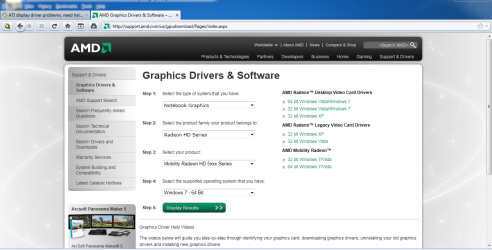
Download and Install catalyst Graphics Drivers & Software
Restart again and you are ready.
------------------------------------------------
Please Post back with any results.
 

Attachments

  • Capture.PNG
    Capture.PNG
    151.8 KB · Views: 38
Last edited:

My Computer

Computer Manufacturer/Model Number
Custom Built by me.
OS
Windows 7 Ultimate 64bit SP1
CPU
Intel Core 2 Quad Q6600
Motherboard
Gigabyte GA-X38-DS4
Memory
2X2GB DDR2 PC6400 800MHZ DUAL CHANNEL
Graphics Card(s)
XFX RADEON HD 6850 1GB GDDR5
Sound Card
2/4/5.1/7.1-channel Realtek High Definition
Monitor(s) Displays
Samsung LE40A656F1 1080p 100Hz LCD HD TV 50,000:1
Screen Resolution
1366x768 in Desktop,1920x1080p in gaming and video
Hard Drives
C:\WD VelociRaptor 150 GB,10,000 RPM
E:\WESTERN DIGITAL WD15EADS 1.5TB CAVIAR GREEN SATA2 F:\WESTERN DIGITAL WD15EADS 1.5TB CAVIAR GREEN SATA2
PSU
THERMALTAKE W0229 TOUGHPOWER XT 750W
Case
A-Case Twin Engine BB
Cooling
3 x thermaltake smart case fan II + 1 arctic cooling fan
Keyboard
Wireless Logitech LX710
Mouse
Logitech Wireless Gaming Mouse G700
Internet Speed
ADSL 12000 plus
Other Info
Mouse Logitech G700,with 13 buttons who needs keyboard in RPG?

D:\Sony high speed sata Dvd Rewriter
Logitech Cordless Rumblepad 2
as panais said never let windows up date your GPU's drivers, always do it your self, but then again you have a mobilty version of that 5470 which has a different bios, also some cards can only handle the drivers that were made for it, Example ( my sapphire 5670 can only use the sapphire ccc that is available from there site. i tried using AMD's and i couldn't get it to stop crashing, so i finaly sucked it up and looked on the sapphire web site and installed it and haven't had a prob since, also your going to have to uninstall your current display drivers via device mgr just run and type in device and you should see the destination. Then once you uninstalled the display driver uninstall the ccc using reg windows programs and features, after that restart then run in safe mode(F8) and then repeat if the drivers are still there you can even get driver sweeper and it will do it all for you but its a dangerous program to use for noobs, you could delete all of your drivers if your not carfull and make windows completley useless not even able to system restore or image restore. moving on after all that try to install the CCC and display drivers again but to them seprate from each other. if your still having probs then its time to get a better card, that card is on par with the 3470 only difference is the shader mod and DX 11 which is nothing to compare to speed of the card. :cool:
 

My Computer

Computer Manufacturer/Model Number
custom
OS
Windows 7 Ultimate x64
CPU
AMD Athalon 7850 black edition 3.2 ghz dual core (quad core)
Motherboard
ASUS M2N68 AM plus
Memory
4 GB DDR2
Graphics Card(s)
ATI Radeon 5670 512MB GDDR5
Sound Card
intergrated realtek
Monitor(s) Displays
HP W19 HD Native res 1080p
Hard Drives
2 Seagate Barracuda 7900 rpm 500GB
PSU
diablotek 550 watt ATX
Case
Thermal take Black widow gaming edition
Cooling
Cooler master double intake
Keyboard
logitech ex100
Mouse
logitech ex100
Internet Speed
256kbs (hughes net) ughhhhhh :(
Other Info
a total of 8 fans in my case. 2-10 inch intakes, 4-6 inch out takes, 1-4 inch intake, and 1- 4 Inch chasis fan with green and red LED.
Back
Top