ATI driver question...

Cr00zng

New member
Pro User
Local time
7:40 PM
Messages
568
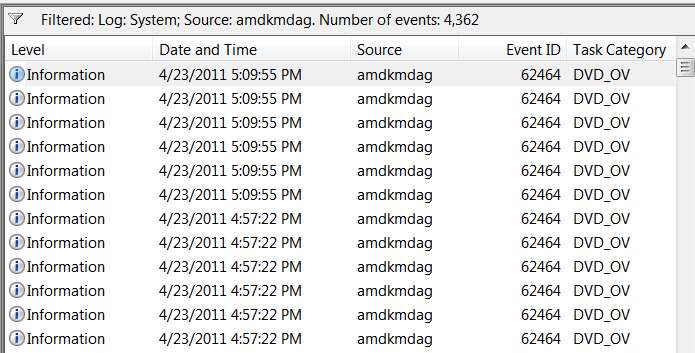
The video card in this system is ATI Radeon HD 5570 and the driver version is 8.8.21. It works just fine; however, the driver is spamming the event log with informational messages like these:
amdkmdag.png

At this forum, this is how these logs explained, quote:

DVD_OV stands for DVD Overlay. OPM stands for Output Protection Mecanism. HFS stands for Hardware Function Scan. This log/error is the cards DVD screen overlay failing it's High-bandwidth Digital Content Protection (HDCP) check over DVI/HDMI.
Disabling AMD External Events Utility service does not get rid of these multiple events per second; however, the link suggested registry fix did.

And again, in my other system with the Asus P7P55 motherboard, with ATI Radeon HD 5850 video card, drive version 8.801.0, there are no event ID 62464 informational messages. I am not certain that the driver version would make that much difference.

The major difference between the two system is the OS. The machine with these event ID messages is Windows 7 64-bit with SP1, while the other is the same without the SP1. I vaguely can recall some discussion about SP1 adding High-bandwidth Digital Content Protection (HDCP), which can contribute to some of the issues I've experienced with this new PC. If the HDCP had been added, is there a way to remove it from the system? Well, short of starting fresh and don't add SP1.
Thanks in advance....
 

My Computer

Computer type
PC/Desktop
Computer Manufacturer/Model Number
Custom built at Home
OS
Windows 7 64-bit, Windows 8.1 64-bit, OSX El Capitan, Windows 10 (VMware)
CPU
Intel i5-3350P 3.1 GHz
Motherboard
Gigabyte GA-Z77X-UP5 TH
Memory
16 GBs GSkill Sniper
Graphics Card(s)
Radeon HD 7850
Sound Card
VIA HD Audio
Monitor(s) Displays
Dell U2410 24"
Screen Resolution
1920x1200
Hard Drives
1 x Intel 520 240 GBs
1 x Seagate 1TBs SATA 2.0,
1 x Seagate 1TBs eSATA 2.0
PSU
Thermaltake 850W
Case
Antec P183
Cooling
Noctua NH-D14 Heatsink 2 x 120mm fans, 4 x 120mm case fans
Keyboard
Dell Multimedia keyboard
Mouse
Logitech Trackball
Internet Speed
28.5 Mb/s
Fascinating!

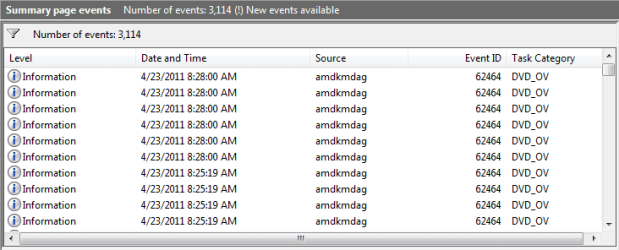
Just looked at my own system, which is Win7 x64 SP1 and has an HD4670 running with Catalyst 11.3 (and an old 4x3 19" IBM P92 CRT monitor connected using VGA), and it's producing the same nonsense in Event Viewer.

amdspam.jpg


I looked at the other forum discussion on this same subject, and it would appear that the suggested Registry fix is apparently the only real way to stop this:

[HKEY_LOCAL_MACHINE\SYSTEM\CurrentControlSet\services\Atierecord]
"eRecordEnable"=dword:00000000

To me (who doesn't know anything about this logging for general use and other situations, much less why AMD is doing this) it does seem that disabling logging universally for ATI (which is what I think this change does) seems a bit extreme. Would seem to be forcing the loss of information for other situations that might be useful.

But I may just be overreacting here. Personally I have NEVER even looked into this particular set of Event Viewer information for anything... and doubt that I ever will again! And it does seem to be only for ATIeRecord... so I'm sure it's fine.

Anyway, it does seem wrong what is happening right now, and the other forum members seem to be pretty knowledgeable. So I will apply that fix on BOTH of my systems (including my other system, also Win7 x64 SP1 with an HD4850 in it and also Catalyst 11.3, with two-monitors 24" 16x9 LCD and 21" 4x3 CRT on extended desktop, both connected with DVI) and what I'm guessing is ALSO logging like crazy).
 

My Computer

Computer type
PC/Desktop
Computer Manufacturer/Model Number
Home-built, two systems (1) and (2)
OS
Windows 7 Pro x64 (1), Win7 Pro X64 (2)
CPU
i5-3350p 3.1Ghz/6MB-cache (1); E8400 3.0Ghz/6MB-cache (2)
Motherboard
ASUS P8Z77-V Pro (1); ASUS P5Q3 (2)
Memory
8GB PC3-12800 DDR3 (1); 4GB PC3-10600 DDR3 (2)
Graphics Card(s)
ATI HD7750 (1), (see TV cards); ATI R7 250 (2)
Sound Card
Realtek ALC892 HD Audio (1); Realtek ALC1200 HD Audio (2)
Monitor(s) Displays
Eizo HD2441W LCD, Eizo S2433W (1); Eizo 24" S2433W (2)
Screen Resolution
1920x1200, 1920x1200 (1); 1920x1200 (2)
Hard Drives
(1) 1TB SATA-II (7200RPM), 2x2TB SATA-III (7200RPM), 250GB SATA-III (10000RPM) for OS; 2x2TB external USB 3.0

(2) 320GB SATA-II (7200RPM), 750GB SATA-II (7200RPM), 150GB SATA-II (10000RPM) for OS; 2TB external USB 3.0
PSU
Nesteq ECS-6001 600W (1); Nesteq ECS-5001 500W (2)
Case
Acousti-Case 360 (1) and (2)
Cooling
Noctua NH-U12P SE2 for CPU, 2x120mm case fans (1) and (2)
Keyboard
IBM PS/2 (1) and (2)
Mouse
Logitech MX Revolution wireless (1); Microsoft wired (2)
Internet Speed
100mbps down / 10mbps up
Antivirus
Microsoft Security Essentials; Malwarebyte Anti-Malware Pro
Browser
Firefox
Other Info
Ceton InfiniTV 4-tuner cablecard-enabled TV card as well as Hauppauge HVR-2250 OTA/ATSC 2-tuner TV card in (1), running under Win7 WMC
Though i don't have any ATI graphics cards, reading the OP's post made me quite curious.
After spending time reading nigh everything posted about the problem, I could not find a fix.
All there appears to be, are the 4 registry fixes, which must really be annoying.:(

Sorry i can't be of more help.:o
 

My Computer

Computer Manufacturer/Model Number
Home build
OS
Win7 Ultimate x64
CPU
3820
Motherboard
Rampage IV formula
Memory
12 GB kit
Graphics Card(s)
XFX nVidia GeForce GTX 560
Sound Card
On board card
Monitor(s) Displays
LG 27" x 2
Screen Resolution
1920 x 1080
Hard Drives
1 x OCZ Vertex 4 , 256Gb
PSU
875W Thermal Take
Case
Antec P160W
Cooling
Noctua
Keyboard
Logitech Wave Pro
Mouse
Logitech
Internet Speed
1.5 Mb
Other Info
Logitech G25 steering wheel, Logitech Extreme 3D Pro joystick.
Logitech surround sound speaker system.
All there appears to be, are the 4 registry fixes
Only the one fix, to "current control set", seems to be needed to get the job done.

I only made that one fix and the logging disappeared.
 

My Computer

Computer type
PC/Desktop
Computer Manufacturer/Model Number
Home-built, two systems (1) and (2)
OS
Windows 7 Pro x64 (1), Win7 Pro X64 (2)
CPU
i5-3350p 3.1Ghz/6MB-cache (1); E8400 3.0Ghz/6MB-cache (2)
Motherboard
ASUS P8Z77-V Pro (1); ASUS P5Q3 (2)
Memory
8GB PC3-12800 DDR3 (1); 4GB PC3-10600 DDR3 (2)
Graphics Card(s)
ATI HD7750 (1), (see TV cards); ATI R7 250 (2)
Sound Card
Realtek ALC892 HD Audio (1); Realtek ALC1200 HD Audio (2)
Monitor(s) Displays
Eizo HD2441W LCD, Eizo S2433W (1); Eizo 24" S2433W (2)
Screen Resolution
1920x1200, 1920x1200 (1); 1920x1200 (2)
Hard Drives
(1) 1TB SATA-II (7200RPM), 2x2TB SATA-III (7200RPM), 250GB SATA-III (10000RPM) for OS; 2x2TB external USB 3.0

(2) 320GB SATA-II (7200RPM), 750GB SATA-II (7200RPM), 150GB SATA-II (10000RPM) for OS; 2TB external USB 3.0
PSU
Nesteq ECS-6001 600W (1); Nesteq ECS-5001 500W (2)
Case
Acousti-Case 360 (1) and (2)
Cooling
Noctua NH-U12P SE2 for CPU, 2x120mm case fans (1) and (2)
Keyboard
IBM PS/2 (1) and (2)
Mouse
Logitech MX Revolution wireless (1); Microsoft wired (2)
Internet Speed
100mbps down / 10mbps up
Antivirus
Microsoft Security Essentials; Malwarebyte Anti-Malware Pro
Browser
Firefox
Other Info
Ceton InfiniTV 4-tuner cablecard-enabled TV card as well as Hauppauge HVR-2250 OTA/ATSC 2-tuner TV card in (1), running under Win7 WMC
You might find this of interest;

Delete all event logs at once in Windows 7 - CNET Windows 7 Forums

The best solution is buried in the comments somewhere, you don't need a huge batch file;

At a command prompt, type ( Or paste!);

Code:
for /f %x in ('wevtutil el') do wevtutil cl "%x"

The only way I have found to clear all the logs at once without saving.

Curious is that the AMDinformational stuff still keeps going even if you try to disable it;


I didn't know about the registry tweak, I will try it and see what happens. I do wish the system would not generate so much rubbish, or at least give you the chance to clean it properly. I can't remember the last time I even bothered looking at these logs for any sensible reason. They may be useful to an extent in a corporate environment, but on the usual standalone PC they are about as much use as a chocolate fireguard.

Regards....Mike Connor
 

My Computer

OS
Several, including Windows 7 x64 Ultimate
I've looked at the logs for two reasons....

The ATI logs are recorded on the "C" drive, which in my case an SSD drive; at least until they were they've been moved to a platter based drive. Having the ATI driver writing these useless, same non-descriptive six entries per seconds is spamming. Not to mention its impact on performance in general and the life of the SSD drive.

The other is the HDCP component that the log entry refers to. Why are these logs showing up on Windows 7 Professional SP1, but not on the system without the SP1? I understand that the High Definition Content Protection is a "must" nowadays; however, it should not negatively impact system performance. Nor should it continuously keep verifying that the content protection is operational for the DVD, much less logging it all the time.
 

My Computer

Computer type
PC/Desktop
Computer Manufacturer/Model Number
Custom built at Home
OS
Windows 7 64-bit, Windows 8.1 64-bit, OSX El Capitan, Windows 10 (VMware)
CPU
Intel i5-3350P 3.1 GHz
Motherboard
Gigabyte GA-Z77X-UP5 TH
Memory
16 GBs GSkill Sniper
Graphics Card(s)
Radeon HD 7850
Sound Card
VIA HD Audio
Monitor(s) Displays
Dell U2410 24"
Screen Resolution
1920x1200
Hard Drives
1 x Intel 520 240 GBs
1 x Seagate 1TBs SATA 2.0,
1 x Seagate 1TBs eSATA 2.0
PSU
Thermaltake 850W
Case
Antec P183
Cooling
Noctua NH-D14 Heatsink 2 x 120mm fans, 4 x 120mm case fans
Keyboard
Dell Multimedia keyboard
Mouse
Logitech Trackball
Internet Speed
28.5 Mb/s
I've looked at the logs for two reasons....

The ATI logs are recorded on the "C" drive, which in my case an SSD drive; at least until they were they've been moved to a platter based drive. Having the ATI driver writing these useless, same non-descriptive six entries per seconds is spamming. Not to mention its impact on performance in general and the life of the SSD drive.

The other is the HDCP component that the log entry refers to. Why are these logs showing up on Windows 7 Professional SP1, but not on the system without the SP1? I understand that the High Definition Content Protection is a "must" nowadays; however, it should not negatively impact system performance. Nor should it continuously keep verifying that the content protection is operational for the DVD, much less logging it all the time.

Indeed, the reasons for some of these things are dubious at best, but in a lot of cases there is absolutely nothing one can do about them. ( Except have a really good moan now and then! :) ).

Regards....Mike Connor
 

My Computer

OS
Several, including Windows 7 x64 Ultimate
Turns out modifying only the "CurrentControlSet" registry entry was NOT sufficient to stop this stuff.

Searching on the AMD Forum, it seems you really do need to modify ALL of those ControlSet versions of ATIerecord (not minding if you don't have all of them, like ControlSet003).

Furthermore, there are additional entries for ATIerecord that need to be set to 0, so you need to do a "find" and "find next" repeatedly, and set each one you find to 0.

=========================================

For Windows 7 Click Start then type regedit
[HKEY_LOCAL_MACHINE\SYSTEM\ControlSet001\Services\Atierecord]

[HKEY_LOCAL_MACHINE\SYSTEM\ControlSet002\Services\Atierecord]

[HKEY_LOCAL_MACHINE\SYSTEM\ControlSet003\Services\Atierecord]

[HKEY_LOCAL_MACHINE\SYSTEM\CurrentControlSet\Services\Atierecord]


Right click on eRecordEnable and modify the value to 0 for all of these, don't worry if you don't have the same amount of keys.

After looking more there's more ATIeRecord entries than these, so you might want to use the search function, Edit at the top of regedit, then Find - type in atierecord (dont forget the e in the middle of ati and record). Then hit F3 to "Find Next" and keep doing that until you find every atierecord key and set it the value to 0.

===================================

This seems to have finally turned off the event logging for me.
 

My Computer

Computer type
PC/Desktop
Computer Manufacturer/Model Number
Home-built, two systems (1) and (2)
OS
Windows 7 Pro x64 (1), Win7 Pro X64 (2)
CPU
i5-3350p 3.1Ghz/6MB-cache (1); E8400 3.0Ghz/6MB-cache (2)
Motherboard
ASUS P8Z77-V Pro (1); ASUS P5Q3 (2)
Memory
8GB PC3-12800 DDR3 (1); 4GB PC3-10600 DDR3 (2)
Graphics Card(s)
ATI HD7750 (1), (see TV cards); ATI R7 250 (2)
Sound Card
Realtek ALC892 HD Audio (1); Realtek ALC1200 HD Audio (2)
Monitor(s) Displays
Eizo HD2441W LCD, Eizo S2433W (1); Eizo 24" S2433W (2)
Screen Resolution
1920x1200, 1920x1200 (1); 1920x1200 (2)
Hard Drives
(1) 1TB SATA-II (7200RPM), 2x2TB SATA-III (7200RPM), 250GB SATA-III (10000RPM) for OS; 2x2TB external USB 3.0

(2) 320GB SATA-II (7200RPM), 750GB SATA-II (7200RPM), 150GB SATA-II (10000RPM) for OS; 2TB external USB 3.0
PSU
Nesteq ECS-6001 600W (1); Nesteq ECS-5001 500W (2)
Case
Acousti-Case 360 (1) and (2)
Cooling
Noctua NH-U12P SE2 for CPU, 2x120mm case fans (1) and (2)
Keyboard
IBM PS/2 (1) and (2)
Mouse
Logitech MX Revolution wireless (1); Microsoft wired (2)
Internet Speed
100mbps down / 10mbps up
Antivirus
Microsoft Security Essentials; Malwarebyte Anti-Malware Pro
Browser
Firefox
Other Info
Ceton InfiniTV 4-tuner cablecard-enabled TV card as well as Hauppauge HVR-2250 OTA/ATSC 2-tuner TV card in (1), running under Win7 WMC
We can agree to disagree about the nature of the reasons...

The fact is that the High Definition Content Protection negatively impacts the performance of the system and in extreme case, it can results crashing some of the systems.

The problem is that the there isn't much information available for the HDCP, both MS and AMD are tight lipped about this service and as such, people look for hardware and/or software failure for systems that have issues. They may spend countless hours for testing the memory, reinstalling their system, running torture test, etc., just to learn that HDCP is the cause of the issue.

I guess that's how MPAA and others prefer to "control" computers; as little information as possible...
 

My Computer

Computer type
PC/Desktop
Computer Manufacturer/Model Number
Custom built at Home
OS
Windows 7 64-bit, Windows 8.1 64-bit, OSX El Capitan, Windows 10 (VMware)
CPU
Intel i5-3350P 3.1 GHz
Motherboard
Gigabyte GA-Z77X-UP5 TH
Memory
16 GBs GSkill Sniper
Graphics Card(s)
Radeon HD 7850
Sound Card
VIA HD Audio
Monitor(s) Displays
Dell U2410 24"
Screen Resolution
1920x1200
Hard Drives
1 x Intel 520 240 GBs
1 x Seagate 1TBs SATA 2.0,
1 x Seagate 1TBs eSATA 2.0
PSU
Thermaltake 850W
Case
Antec P183
Cooling
Noctua NH-D14 Heatsink 2 x 120mm fans, 4 x 120mm case fans
Keyboard
Dell Multimedia keyboard
Mouse
Logitech Trackball
Internet Speed
28.5 Mb/s
We can agree to disagree about the nature of the reasons...


I guess that's how MPAA and others prefer to "control" computers; as little information as possible...

Indeed, it's much the same as hiding recording devices on sound cards etc.

They are banking on the vast majority of people not being able to use them. This of course makes things very much more difficult for legitimate users, and doesn't stop the pirates anyway.

The entertainment industry as a whole has tried to ignore and suppress these things, and they have been buried under an avalanche as a result. They are still attempting to fight rearguard actions all over the place. Terrified as they are of losing yet more revenue.

They would have been better advised to find ways and means of distributing their material sensibly on the web.

Just how it is...........

You know what will happen if anybody ever discovers the secret of eternal youth? ( Or even a reasonable facsimile thereof ). The insurance companies will fight them to the death! :)

Regards....Mike Connor
 

My Computer

OS
Several, including Windows 7 x64 Ultimate
Well, a little grunt doesn't hurt every once in awhile and please don't get me started on the insurance companies ;)

The issue with the log had been resolved when this thread was started; I was hoping that someone has some insight into the inner working of the HDCP with ATI/MS drivers. It seems that this forum may not be the appropriate one to look into this.

On the bright side....

There's this registry key as well, related to AMD/ATI:

[HKEY_LOCAL_MACHINE\SYSTEM\CurrentControlSet\services\amdkmdag]

That's probably where some of the events that generate these logs is controlled. The sort of funny entry is:

[HKEY_LOCAL_MACHINE\SYSTEM\CurrentControlSet\services\amdkmdag\MosquitoNoiseRemoval_NA]

It's currently set to "0"; do you think if I set it to "1", then I won't hear the mosquitoes this summer? :geek:
 

My Computer

Computer type
PC/Desktop
Computer Manufacturer/Model Number
Custom built at Home
OS
Windows 7 64-bit, Windows 8.1 64-bit, OSX El Capitan, Windows 10 (VMware)
CPU
Intel i5-3350P 3.1 GHz
Motherboard
Gigabyte GA-Z77X-UP5 TH
Memory
16 GBs GSkill Sniper
Graphics Card(s)
Radeon HD 7850
Sound Card
VIA HD Audio
Monitor(s) Displays
Dell U2410 24"
Screen Resolution
1920x1200
Hard Drives
1 x Intel 520 240 GBs
1 x Seagate 1TBs SATA 2.0,
1 x Seagate 1TBs eSATA 2.0
PSU
Thermaltake 850W
Case
Antec P183
Cooling
Noctua NH-D14 Heatsink 2 x 120mm fans, 4 x 120mm case fans
Keyboard
Dell Multimedia keyboard
Mouse
Logitech Trackball
Internet Speed
28.5 Mb/s
Well, a little grunt doesn't hurt every once in awhile and please don't get me started on the insurance companies ;)

The issue with the log had been resolved when this thread was started; I was hoping that someone has some insight into the inner working of the HDCP with ATI/MS drivers. It seems that this forum may not be the appropriate one to look into this.

On the bright side....

There's this registry key as well, related to AMD/ATI:

[HKEY_LOCAL_MACHINE\SYSTEM\CurrentControlSet\services\amdkmdag]

That's probably where some of the events that generate these logs is controlled. The sort of funny entry is:

[HKEY_LOCAL_MACHINE\SYSTEM\CurrentControlSet\services\amdkmdag\MosquitoNoiseRemoval_NA]

It's currently set to "0"; do you think if I set it to "1", then I won't hear the mosquitoes this summer? :geek:

You won't here them coming but it won't stop them from biting. :cry:

Jim :geek:
 

My Computer

Computer type
PC/Desktop
Computer Manufacturer/Model Number
Home Built
OS
Windows 8.1 Pro w/Media Center 64bit, Windows 7 HP 64bit
CPU
Phenom II X6 1100T
Motherboard
ASUS M5A99X EVO
Memory
Crucial Balistic 8gb DDR3-1866 CL9
Graphics Card(s)
MSI R6850 Cyclone IGD5 PE
Sound Card
On Board
Monitor(s) Displays
ASUS VE258Q 25" LED with DVI-HDMI-DisplayPort
Screen Resolution
1920 x 1080
Hard Drives
Two WD Cavier Black 2TB Sata III, WD My Book Essential 2TB USB 3.0
PSU
Seasonic X650 80 Plus GOLD Modular
Case
Corsair 400R
Cooling
Antec Kuhler H2O 620, Two 120mm and four 140mm
Keyboard
Logitech K120
Mouse
Logitech Marble Mouse USB, Logitech Precision Game Pad
Internet Speed
15MB
Antivirus
Norton IS 2013, Malwarebytes Pro Beta 2
Browser
IE-11, FF-27
Other Info
APC UPS ES 750, Netgear WNR3500L Gigabit & Wireless N Router with SamKnows Test Program, Motorola SB6120 Gigabit Cable Modem. Brother HL-2170W Laser Printer, Epson V300 Scanner
You won't here them coming but it won't stop them from biting. :cry:

Jim :geek:
See, I knew this was crapware; why would you need a feature that does more harm than good?;)
 

My Computer

Computer type
PC/Desktop
Computer Manufacturer/Model Number
Custom built at Home
OS
Windows 7 64-bit, Windows 8.1 64-bit, OSX El Capitan, Windows 10 (VMware)
CPU
Intel i5-3350P 3.1 GHz
Motherboard
Gigabyte GA-Z77X-UP5 TH
Memory
16 GBs GSkill Sniper
Graphics Card(s)
Radeon HD 7850
Sound Card
VIA HD Audio
Monitor(s) Displays
Dell U2410 24"
Screen Resolution
1920x1200
Hard Drives
1 x Intel 520 240 GBs
1 x Seagate 1TBs SATA 2.0,
1 x Seagate 1TBs eSATA 2.0
PSU
Thermaltake 850W
Case
Antec P183
Cooling
Noctua NH-D14 Heatsink 2 x 120mm fans, 4 x 120mm case fans
Keyboard
Dell Multimedia keyboard
Mouse
Logitech Trackball
Internet Speed
28.5 Mb/s
Turns out modifying only the "CurrentControlSet" registry entry was NOT sufficient to stop this stuff.

Searching on the AMD Forum, it seems you really do need to modify ALL of those ControlSet versions of ATIerecord (not minding if you don't have all of them, like ControlSet003).

Furthermore, there are additional entries for ATIerecord that need to be set to 0, so you need to do a "find" and "find next" repeatedly, and set each one you find to 0.

=========================================

For Windows 7 Click Start then type regedit
[HKEY_LOCAL_MACHINE\SYSTEM\ControlSet001\Services\Atierecord]

[HKEY_LOCAL_MACHINE\SYSTEM\ControlSet002\Services\Atierecord]

[HKEY_LOCAL_MACHINE\SYSTEM\ControlSet003\Services\Atierecord]

[HKEY_LOCAL_MACHINE\SYSTEM\CurrentControlSet\Services\Atierecord]


Right click on eRecordEnable and modify the value to 0 for all of these, don't worry if you don't have the same amount of keys.

After looking more there's more ATIeRecord entries than these, so you might want to use the search function, Edit at the top of regedit, then Find - type in atierecord (dont forget the e in the middle of ati and record). Then hit F3 to "Find Next" and keep doing that until you find every atierecord key and set it the value to 0.

===================================

This seems to have finally turned off the event logging for me.

I changed just the Current Control Set but had to restart for the log to stop.

Jim :geek:
 

My Computer

Computer type
PC/Desktop
Computer Manufacturer/Model Number
Home Built
OS
Windows 8.1 Pro w/Media Center 64bit, Windows 7 HP 64bit
CPU
Phenom II X6 1100T
Motherboard
ASUS M5A99X EVO
Memory
Crucial Balistic 8gb DDR3-1866 CL9
Graphics Card(s)
MSI R6850 Cyclone IGD5 PE
Sound Card
On Board
Monitor(s) Displays
ASUS VE258Q 25" LED with DVI-HDMI-DisplayPort
Screen Resolution
1920 x 1080
Hard Drives
Two WD Cavier Black 2TB Sata III, WD My Book Essential 2TB USB 3.0
PSU
Seasonic X650 80 Plus GOLD Modular
Case
Corsair 400R
Cooling
Antec Kuhler H2O 620, Two 120mm and four 140mm
Keyboard
Logitech K120
Mouse
Logitech Marble Mouse USB, Logitech Precision Game Pad
Internet Speed
15MB
Antivirus
Norton IS 2013, Malwarebytes Pro Beta 2
Browser
IE-11, FF-27
Other Info
APC UPS ES 750, Netgear WNR3500L Gigabit & Wireless N Router with SamKnows Test Program, Motorola SB6120 Gigabit Cable Modem. Brother HL-2170W Laser Printer, Epson V300 Scanner
Back
Top