ATI HDMI stereo only

tiggerdevil

New member
Local time
12:06 AM
Messages
8
I have a gigabyte mobo with onboard Realtek audio AL889A. This machine is used as a Media Center pc connected thru a Yamaha RX-V667. Everything worked great until I had a harddrive crash. Repalced drive and now can only set ATI HDMI audio to stereo. I've seen plenty of threads on this issue but no real solutions. Everything worked great till I installed this harddrive with a clean Windows 7 Ultimate x64. I know this MOBO is capable of 5.1 since that is what I've been using for 3 years. Any help please. THis is driving me CRAZY!!
 

My Computer

OS
Windows 7 Ultimate x64
CPU
AMD Phenom X3 8650 2.3gig
Motherboard
Gigabyte GA-MA78GM-US2H
Memory
4Gb PC6400
Graphics Card(s)
Onboard ATI Radeon HD3200
Sound Card
Realtek ALC889A
Monitor(s) Displays
Vizio 42" LCD
Screen Resolution
1080p
Other Info
Media Center PC
silly question perhaps...but...did you reload all the mobo and realtek drivers?
 

My Computer

Computer Manufacturer/Model Number
SALEON model 2.2b
OS
win7 ultimate 32bit
CPU
core2 Extreme QX6850-OCd to 3.15 GHz
Motherboard
ASUS P5G41-M LE
Memory
4 GB
Graphics Card(s)
NVidia 8600 GT
Monitor(s) Displays
23" acer
Hard Drives
one SATA 250GB partitioned equally in half
one SATA 160GB-internal storage
PSU
500W Thermaltake
Case
mini tower
Yes. First with the latest drivers, then with the drivers from my MOBO cd. I have tried the latest ATI CCC, 11.9, but have reverted back to 9.12 due to hdmi-dvi when turning tv back on. It's as if Windows can't correctly see the audio chipset.
 

My Computer

OS
Windows 7 Ultimate x64
CPU
AMD Phenom X3 8650 2.3gig
Motherboard
Gigabyte GA-MA78GM-US2H
Memory
4Gb PC6400
Graphics Card(s)
Onboard ATI Radeon HD3200
Sound Card
Realtek ALC889A
Monitor(s) Displays
Vizio 42" LCD
Screen Resolution
1080p
Other Info
Media Center PC
what is shown in 'Device Manager' for Sound, video and game controllers?
 

My Computer

Computer Manufacturer/Model Number
SALEON model 2.2b
OS
win7 ultimate 32bit
CPU
core2 Extreme QX6850-OCd to 3.15 GHz
Motherboard
ASUS P5G41-M LE
Memory
4 GB
Graphics Card(s)
NVidia 8600 GT
Monitor(s) Displays
23" acer
Hard Drives
one SATA 250GB partitioned equally in half
one SATA 160GB-internal storage
PSU
500W Thermaltake
Case
mini tower
ATI high definition audio
Realtek high definition audio
ATI is the HDMI controller and the Realtek is SPDIF
 

My Computer

OS
Windows 7 Ultimate x64
CPU
AMD Phenom X3 8650 2.3gig
Motherboard
Gigabyte GA-MA78GM-US2H
Memory
4Gb PC6400
Graphics Card(s)
Onboard ATI Radeon HD3200
Sound Card
Realtek ALC889A
Monitor(s) Displays
Vizio 42" LCD
Screen Resolution
1080p
Other Info
Media Center PC

My Computer

Computer Manufacturer/Model Number
SALEON model 2.2b
OS
win7 ultimate 32bit
CPU
core2 Extreme QX6850-OCd to 3.15 GHz
Motherboard
ASUS P5G41-M LE
Memory
4 GB
Graphics Card(s)
NVidia 8600 GT
Monitor(s) Displays
23" acer
Hard Drives
one SATA 250GB partitioned equally in half
one SATA 160GB-internal storage
PSU
500W Thermaltake
Case
mini tower
I'll try that tonight. Do you happen to know if the EDID transmits audio info? Can't seem to get a straight answer on that. I also wonder if it's just worth spending $20 and put in a PCI audio. If that would fix it, I get it tonight. This just doesn't make sense!
 

My Computer

OS
Windows 7 Ultimate x64
CPU
AMD Phenom X3 8650 2.3gig
Motherboard
Gigabyte GA-MA78GM-US2H
Memory
4Gb PC6400
Graphics Card(s)
Onboard ATI Radeon HD3200
Sound Card
Realtek ALC889A
Monitor(s) Displays
Vizio 42" LCD
Screen Resolution
1080p
Other Info
Media Center PC
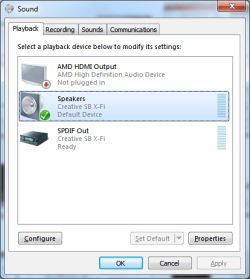
Realtek showing up here?

playback.png
 

My Computer

Computer type
PC/Desktop
Computer Manufacturer/Model Number
Me
OS
Win 7 Ultimate x64
CPU
FX-8350 @ 4.6 GHz so far
Motherboard
Asus M5A97 EVO
Memory
ADATA XPG V1 Series Black 8GB DDR3 1600
Graphics Card(s)
Sapphire R9 270x Dual-X
Sound Card
Xonar DGX w/ Corsair Vengence 1300
Monitor(s) Displays
Acer S232HL Abid
Screen Resolution
1920x1080
Hard Drives
120 GB OCZ Vertex 3
500 GB Seagate 7200.12
PSU
Antec Earthwatts 650W Green
Case
Antec Three Hundred
Cooling
Cooler Master 212 EVO
Keyboard
Logitech G510
Mouse
Logitech G500s
Internet Speed
35000/3000
No, I haven't any speakers connected. I'm using HDMI to my Yamaha.
 

My Computer

OS
Windows 7 Ultimate x64
CPU
AMD Phenom X3 8650 2.3gig
Motherboard
Gigabyte GA-MA78GM-US2H
Memory
4Gb PC6400
Graphics Card(s)
Onboard ATI Radeon HD3200
Sound Card
Realtek ALC889A
Monitor(s) Displays
Vizio 42" LCD
Screen Resolution
1080p
Other Info
Media Center PC
The onboard Realtek has nothing to do with the ATI HDMI connection. Also when using HDMI, is the source stereo or 5.1? The HDMI connection will/should only ply 5.1 if the source is 5.1.
 

My Computer

Computer type
PC/Desktop
Computer Manufacturer/Model Number
Me
OS
Win 7 Ultimate x64
CPU
FX-8350 @ 4.6 GHz so far
Motherboard
Asus M5A97 EVO
Memory
ADATA XPG V1 Series Black 8GB DDR3 1600
Graphics Card(s)
Sapphire R9 270x Dual-X
Sound Card
Xonar DGX w/ Corsair Vengence 1300
Monitor(s) Displays
Acer S232HL Abid
Screen Resolution
1920x1080
Hard Drives
120 GB OCZ Vertex 3
500 GB Seagate 7200.12
PSU
Antec Earthwatts 650W Green
Case
Antec Three Hundred
Cooling
Cooler Master 212 EVO
Keyboard
Logitech G510
Mouse
Logitech G500s
Internet Speed
35000/3000
The source is variable. As I stated, this is a media center pc. I using media center as my tuner/dvr, tuner is actually a network tuner, and play anything from analog tv to 7.1H264 files. Like I stated earlier, everything was great till the new harddrive install. What does the ATI use for the audio? My understanding from ATI is that the video simply passes the aufio from the onboard controller thru it. Is that correct?
 

My Computer

OS
Windows 7 Ultimate x64
CPU
AMD Phenom X3 8650 2.3gig
Motherboard
Gigabyte GA-MA78GM-US2H
Memory
4Gb PC6400
Graphics Card(s)
Onboard ATI Radeon HD3200
Sound Card
Realtek ALC889A
Monitor(s) Displays
Vizio 42" LCD
Screen Resolution
1080p
Other Info
Media Center PC
No the audio on it is built into the onboard video itself, same as on any ATI video card from the HD 2xxx series and up. There is no passthrough as it isn't needed. Also the built in audio is actually a Realtek audio chip, and the driver for it gets installed when you install the ATI driver.

After re-installing Windows, did you happen to remember to install the video driver? If not you can find the latest here,

ATI Radeon

When installing is you select the Custom install option it will show all the drivers and software that can be installed.
 

My Computer

Computer type
PC/Desktop
Computer Manufacturer/Model Number
Me
OS
Win 7 Ultimate x64
CPU
FX-8350 @ 4.6 GHz so far
Motherboard
Asus M5A97 EVO
Memory
ADATA XPG V1 Series Black 8GB DDR3 1600
Graphics Card(s)
Sapphire R9 270x Dual-X
Sound Card
Xonar DGX w/ Corsair Vengence 1300
Monitor(s) Displays
Acer S232HL Abid
Screen Resolution
1920x1080
Hard Drives
120 GB OCZ Vertex 3
500 GB Seagate 7200.12
PSU
Antec Earthwatts 650W Green
Case
Antec Three Hundred
Cooling
Cooler Master 212 EVO
Keyboard
Logitech G510
Mouse
Logitech G500s
Internet Speed
35000/3000
Yes, I have to install ATI CCC in order to changing the underscaling option so the display will fit the tv. I have ATI CCC 9.12 currently installed. This is the same one as on the old harddrive. The newest CCC have an inherent HDMI reverting to DVI when the tv power is cycled. I've tried the MOBO drivers that came with the MOBO and all the current drivers from ATI and Realtek. That's why I'm so confused. This is the 5th media pc I've set up and the only one with this issue. Is the tv or the receiver supposed to show up in the display menu?
 

My Computer

OS
Windows 7 Ultimate x64
CPU
AMD Phenom X3 8650 2.3gig
Motherboard
Gigabyte GA-MA78GM-US2H
Memory
4Gb PC6400
Graphics Card(s)
Onboard ATI Radeon HD3200
Sound Card
Realtek ALC889A
Monitor(s) Displays
Vizio 42" LCD
Screen Resolution
1080p
Other Info
Media Center PC
Did you ever solve this? I have the exact same problem - HDMI output to my Yamaha receiver only "supports" 2 channels. I assume it's because my PC is seeing the Panasonic TV as only two channels. My config is PC -> Receiver -> TV. Suggestions?
 

My Computer

OS
Win 7 Ultimate, Windows Home Server 2011
Yes. Doing a master reset on the reciever got it back. Replaced the video with an HD6570 card. All is well now. 5.1 and DTS work perfectly. I also don't have any issues with no audio on wake up.
 

My Computer

OS
Windows 7 Ultimate x64
CPU
AMD Phenom X3 8650 2.3gig
Motherboard
Gigabyte GA-MA78GM-US2H
Memory
4Gb PC6400
Graphics Card(s)
Onboard ATI Radeon HD3200
Sound Card
Realtek ALC889A
Monitor(s) Displays
Vizio 42" LCD
Screen Resolution
1080p
Other Info
Media Center PC
Thanks

I would have never thought a simple hard reset of my receiver would work.

I am not even sure exactly when my multi-channel output stopped working, but I assumed some rogue codec had taken over.

I have a Radeon 4800 hooked directly to a Denon AVR-2809CI. The pair has been pretty reliable for over four years now so it didn't even cross my mind.
 

My Computer

Computer type
PC/Desktop
OS
Windows 7 Ultimate x64
Back
Top