ATI Mobile Catalyst Not-Installing

TenGen

New member
Local time
3:53 PM
Messages
5
Ok so, I just got my new laptop today.

Immediately switched vista with Win7-64

Tried installing Catalyst drivers for the card, it came with a ATI Radeon Mobility HD 4570.

I tried the latest drivers/software suite from Dell/TweakForce/AMD's website. Tried the mobility drivers and the non-mobility drivers(they don't list my GPU on their mobility list).

The install SEEMS to install, it says it completed successfully. AT least, it installed the install manager successfully. Once it does that first install, nothing else happens. CCC doesn't get installed and Windows uses their standard drivers. I tried updating through device manager, and all I'd get is "This windows version is not supported" or something like that. I tried manually installing all the parts for CCC, and it won't open.

Any help?
 

My Computer

OS
Win7 64-BIT RC
Did you Unblock the setup and run it as an Administrator?
 

My Computer

Computer type
PC/Desktop
Computer Manufacturer/Model Number
Airbot 2.0
OS
Windows 7 Ultimate x64 SP1
CPU
Core i7 920 (D0) @ 4Ghz, *26c idle *65c full load on air
Motherboard
Asus P6X58D Premium - Sata 6Gb/s - USB 3.0
Memory
12GB DDR3 Corsair Dominator -CMD12GX3M6A1600C8 at 1600MHz
Graphics Card(s)
Zotac Geforce GTX 770
Sound Card
ASUS Xonar D2X
Monitor(s) Displays
1 LG 24" Flatron W2453V-PF 1 Samsung 24" P2450H both 2ms RT
Screen Resolution
1920x1080@60hz
Hard Drives
1 Samsung 250GB 840 Evo SSD
1 OCZ Vertex2 180GB SSD
1 TB Samsung Spinpoint F1 7200RPM 32MB cache
2 500GB WD Caviar Blacks 7200RPM 32MB cache (WD5001AALS)

Pioneer DVD Burner DVR-S18M
PSU
Corsair HX1000W
Case
Cooler Master HAF 932
Cooling
Case Fans *3 230mm, *1 140mm/CPU - *Tuniq Tower 120 Extreme
Keyboard
Logitech Wireless MK700
Mouse
Logitech Wireless MK700
Internet Speed
DL 15 Mbps UL 0.98 Mbps
Antivirus
None
Browser
Firefox Nightly
Other Info
Processor-7.7 *RAM- 7.9 *Graphics-7.9 *Gaming Graphics- 7.9 *SSD- 7.8 W.E.I final score= 7.7
*Phone- LG Nexus 5
Ok so, I just got my new laptop today.

Immediately switched vista with Win7-64

Tried installing Catalyst drivers for the card, it came with a ATI Radeon Mobility HD 4570.

I tried the latest drivers/software suite from Dell/TweakForce/AMD's website. Tried the mobility drivers and the non-mobility drivers(they don't list my GPU on their mobility list).

The install SEEMS to install, it says it completed successfully. AT least, it installed the install manager successfully. Once it does that first install, nothing else happens. CCC doesn't get installed and Windows uses their standard drivers. I tried updating through device manager, and all I'd get is "This windows version is not supported" or something like that. I tried manually installing all the parts for CCC, and it won't open.

Any help?
First welcome to sevenforums. the more you tell us abt your system the more we can help you. If you fill out "my system specs" in user cp we could give you much better help. In the mean time what model dell? 32 bit or 64? what wideo card? how much ram? things like that will help us get you fixed.

Waiting for info

Ken
 

My Computer

Computer Manufacturer/Model Number
HP Pavillion dv-7 1005 Tx
OS
Win 8 Release candidate 8400
CPU
[email protected]
Memory
4 gigs
Graphics Card(s)
Nvidia 9600M
Sound Card
HD built-in
Monitor(s) Displays
17" Wxga
Screen Resolution
1440x900
Cooling
none
Internet Speed
45Mb down 5Mb up
Sorry, the computer is a Dell Studio 1555

Core 2 Duo 2.6 ghz proc 1066 fsb
4GB Ram
Radeon Mobility HD 4570

Installed Windows 7 64 Bit edition.

First thing I did when I installed 7 was turned off Windows 7 UAC.

Used the "Run as Admin" and not.

When I get off work, I'll try to use a driversweep program and try again, since I tried several versions (deleted them but mighta missed a few files).

I tried Catalyst 9.1's/9.5's/9.6's from AMD. Used Dell's driver's from their Support Site. Tried Tweakforce's 9.4's and 9.5's.
 

My Computer

OS
Win7 64-BIT RC
dell studio driver

Sorry, the computer is a Dell Studio 1555

Core 2 Duo 2.6 ghz proc 1066 fsb
4GB Ram
Radeon Mobility HD 4570

Installed Windows 7 64 Bit edition.

First thing I did when I installed 7 was turned off Windows 7 UAC.

Used the "Run as Admin" and not.

When I get off work, I'll try to use a driversweep program and try again, since I tried several versions (deleted them but mighta missed a few files).

I tried Catalyst 9.1's/9.5's/9.6's from AMD. Used Dell's driver's from their Support Site. Tried Tweakforce's 9.4's and 9.5's.

No sweat. I would just be a little bit cautious of Dell's drivers. I have a dell and it took me 2 weeks to figure out the dell driver (intel 945gm driver) was the problem and as soon as I got the intel driver to work my problem disappeared.

Let us know if we can do anything

Ken
 

My Computer

Computer Manufacturer/Model Number
HP Pavillion dv-7 1005 Tx
OS
Win 8 Release candidate 8400
CPU
[email protected]
Memory
4 gigs
Graphics Card(s)
Nvidia 9600M
Sound Card
HD built-in
Monitor(s) Displays
17" Wxga
Screen Resolution
1440x900
Cooling
none
Internet Speed
45Mb down 5Mb up
I came here to post this same thing.

I have a new laptop, a Dell Studio 1555 with an ATI Radeon Mobility HD 4570. I run the Catalyst installer, and it does its little detection thing, then only offers to install the VC++ runtime and the Catalyst Installation Manager. Doesn't list Catalyst Control Panel or the display driver. It's almost like it's not detecting the hardware.

I've tried uninstalling the Microsoft-provided driver first. Rebooted. Ran as admin. Etc. Etc.

My specs:

Windows 7 RC x64 Build 7100
Intel Core Duo T6600, 2.2 Ghz
4 GB RAM
 

My Computer

OS
Windows 7 RC
Hi Guys,

you have to unlock the original ATI drivers before installing them. Many Notebook manufacturers don't want the users to install the drivers provided by ATI, they want them to use their own drivers (HP, Dell, Lenovo etc.)

You can unlock the drivers with this little tool:

Mobility Modder - DriverHeaven.net

Works like a charme! A tutorial is also included on this page!

Greetings,
JayDee
 

My Computer

OS
Windows 7
So

I deleted everything, used the driver sweeper. Tried to re-install. No work!

Tried x64 Win7 9.6 Catalysts, x64 Vista-Win7 9.6 Catalysts. Also tried dell's drivers again.

All that it does is install the Catalyst install manager. It doesn't list CCC at all. And manually trying to install the driver says this version of windows is not supported.

Can I manually modify the inf's to include support for win7 and/or my card?

Anyone know the device ID of Radeon Mobility HD 4570 512 mb version?
 

My Computer

OS
Win7 64-BIT RC
Hi Guys,

you have to unlock the original ATI drivers before installing them. Many Notebook manufacturers don't want the users to install the drivers provided by ATI, they want them to use their own drivers (HP, Dell, Lenovo etc.)

You can unlock the drivers with this little tool:

Mobility Modder - DriverHeaven.net

Works like a charme! A tutorial is also included on this page!

Greetings,
JayDee

Thanks for posting. I can testify to this. My Dell ATI Mobility Radeon x1400 will not allow the install of ati's own catalyst drivers. Currently using what windows installed, although the dell vista drivers did work and installed the ccc. I'll have to try this out and see if I can get the ati drivers to install.

So

I deleted everything, used the driver sweeper. Tried to re-install. No work!

Tried x64 Win7 9.6 Catalysts, x64 Vista-Win7 9.6 Catalysts. Also tried dell's drivers again.

All that it does is install the Catalyst install manager. It doesn't list CCC at all. And manually trying to install the driver says this version of windows is not supported.

Can I manually modify the inf's to include support for win7 and/or my card?

Anyone know the device ID of Radeon Mobility HD 4570 512 mb version?

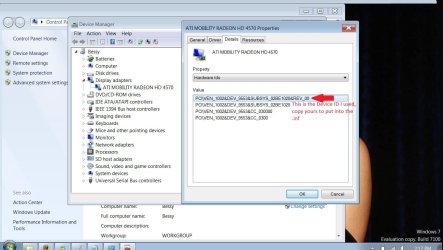
You might be able to find the info you want in the device manager\display adapter\properties\details (tab)

View attachment 15183
 
Last edited:

My Computer

Computer Manufacturer/Model Number
POS
OS
OS3.5
CPU
celery
Motherboard
Good Question ...Unknown
Memory
memory never forgets
Graphics Card(s)
OB
Sound Card
OB
Monitor(s) Displays
HUGE
Screen Resolution
168000000x105000000
Hard Drives
full
PSU
OEM 65watt
Case
N/A
Cooling
OB
Keyboard
OB
Mouse
mouse
Internet Speed
1 Trillion MBps
Other Info
Still An Awesome Forum!
Mobility Modder doesn't support the Mobility Radeon HD 4570. :(

Strangely, Dell's own x64 Vista drivers don't install either. WTF?

Guess I'll just use the drivers built into Windows 7 for now. Sadly, these don't work with my wife's favorite game, Neverwinter Nights, but everything else seems to run fine.
 

My Computer

OS
Windows 7 RC
Mobility Modder doesn't support the Mobility Radeon HD 4570. :(

Strangely, Dell's own x64 Vista drivers don't install either. WTF?

Guess I'll just use the drivers built into Windows 7 for now. Sadly, these don't work with my wife's favorite game, Neverwinter Nights, but everything else seems to run fine.

When you say, "use the drivers built into Windows 7", have you ran windows update to see if there are better video drivers (if any are available)?

Windows update did have better drivers for my card than what came with Seven.

Keep eye out on modder site, maybe soon the'll have something for ya.
Good Luck
 

My Computer

Computer Manufacturer/Model Number
POS
OS
OS3.5
CPU
celery
Motherboard
Good Question ...Unknown
Memory
memory never forgets
Graphics Card(s)
OB
Sound Card
OB
Monitor(s) Displays
HUGE
Screen Resolution
168000000x105000000
Hard Drives
full
PSU
OEM 65watt
Case
N/A
Cooling
OB
Keyboard
OB
Mouse
mouse
Internet Speed
1 Trillion MBps
Other Info
Still An Awesome Forum!
Thats exactly what I just did OEM, it seemed to work.

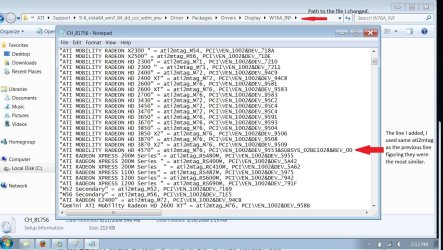
I found my device ID and manually put it into the .inf on the regular 9.6 catalyst drivers (not the mobility drivers). I first tried to do it on the drivers named '9-6_beta_win7_64_dd_CC' but when I tried to install them, they said 'These drivers are incompatible for this version of windows' or something.

So I went to the other set of drivers I downloaded named '9-6_vista64_win7_64_dd_ccc_wdm_enu', which had two versions named 'C7_81756' and 'CH_81756'. I modified both, but the one labeled C7 had the same windows incompatibility error. BUT for some reason, the CH one ran like a charm.

The line I put in was :
"ATI Mobility Radeon HD 4570" = ati2mtag_M76, PCI\VEN_1002&DEV_9553&REV_00

Those Dev/Rev were gotten from the device manager. I just used the at2mtag_M76 since it was the one used by the previous device (mobile radeon hd 3870). It seems to work so idk if it really is the right version or not.

SO drivers installed fine finally, but CCC Still won't install. I click setup, then custom, then it does its Analyze stuff and lists to install : CIM/HDMI Audio/MSEE Encoder or w/e. Doesn't list CCC/Hydravision/Anything else.
 

My Computer

OS
Win7 64-BIT RC
Thats exactly what I just did OEM, it seemed to work.

I found my device ID and manually put it into the .inf on the regular 9.6 catalyst drivers (not the mobility drivers). I first tried to do it on the drivers named '9-6_beta_win7_64_dd_CC' but when I tried to install them, they said 'These drivers are incompatible for this version of windows' or something.

So I went to the other set of drivers I downloaded named '9-6_vista64_win7_64_dd_ccc_wdm_enu', which had two versions named 'C7_81756' and 'CH_81756'. I modified both, but the one labeled C7 had the same windows incompatibility error. BUT for some reason, the CH one ran like a charm.

The line I put in was :
"ATI Mobility Radeon HD 4570" = ati2mtag_M76, PCI\VEN_1002&DEV_9553&REV_00

Those Dev/Rev were gotten from the device manager. I just used the at2mtag_M76 since it was the one used by the previous device (mobile radeon hd 3870). It seems to work so idk if it really is the right version or not.

SO drivers installed fine finally, but CCC Still won't install. I click setup, then custom, then it does its Analyze stuff and lists to install : CIM/HDMI Audio/MSEE Encoder or w/e. Doesn't list CCC/Hydravision/Anything else.

Thats Cool, good work.

At least you got the drivers, thats the main thing imo.
Maybe Cam Soper will come back at see that you got the drivers, cause he has the same card I beleive. Can you post a screen shot for others to see what you modified & how? It might help those who have a similar or same setup.

---

I tried to install using the modder app, but it was a no go. Followed instructions to the tee, and it seemed to install ok, but when it completed, got an error stating a problem with the ati driver. So system restore from the install disk and restored to previous point and so back to where I was. Its not a problem on this lappy, don't use it for games or video editing, really just for regular use like web.
 

My Computer

Computer Manufacturer/Model Number
POS
OS
OS3.5
CPU
celery
Motherboard
Good Question ...Unknown
Memory
memory never forgets
Graphics Card(s)
OB
Sound Card
OB
Monitor(s) Displays
HUGE
Screen Resolution
168000000x105000000
Hard Drives
full
PSU
OEM 65watt
Case
N/A
Cooling
OB
Keyboard
OB
Mouse
mouse
Internet Speed
1 Trillion MBps
Other Info
Still An Awesome Forum!
Sure, here are the screens.

The basic problem is Dell's drivers are 'proprietary' and do not support Windows 7. And dell makes ATI not offer driver support, so the devID's are not listed as compatible. Mobility modder basically just does what I did, put in the dev ID's into the .inf's. What I'm not sure of, does mobility modder also change the msi's somehow to make them compatible? Yeah, drivers now install fine and I can select proper resolutions finally. But when I connect to my TV, it still looks bad, needs some changes in the catalyst suite. Which won't install no matter what I do.
 

Attachments

  • 1.jpg
    1.jpg
    102.8 KB · Views: 173
  • 2.jpg
    2.jpg
    108.3 KB · Views: 188
  • 3.jpg
    3.jpg
    207.5 KB · Views: 204

My Computer

OS
Win7 64-BIT RC
Just an FYI...

I've been lurking on these forums looking for answers to this problem and figured I'd come out of hiding. I have pretty much the same setup (Dell Studio 1555) and I, like TenGen, have been having the hardest time getting the ati drivers and the Catalyst Control Center to work.

I'll try this tonight but if anyone can get the CCC working, they'd be my hero because my external 1920x1080 monitor (BenQ e2400HD) looks like crap when connected through HDMI (1920x1080 leaves black bars on top and bottom and all resolutions have really blurry text).

I hope this driver and CCC settings can fix this!
 

My Computer

Computer Manufacturer/Model Number
Dell Studio 1555
OS
Windows 7 Ultimate Build 7100 (x64)
CPU
Intel P8600 (2.4GHZ) Core 2 Duo
Motherboard
Unknown
Memory
4GB,DDR2,800MHZ,2 DIMM
Graphics Card(s)
ATI Mobility Radeon HD 4570 256mb
Sound Card
Integrated
Monitor(s) Displays
Laptop Display + 24" BenQ e2400HD
Hard Drives
320G, 7200RPM, FFS
PSU
N/A
Case
N/A
Cooling
N/A
Hi, just refreshing this old thread. Jaydee73 made the day giving solution to the problem in which I ran into just now when bought dell 1470 with HD 4300 and win7 32bit.
By the way now these mobility modder supports 4570 as well. What a stupid policy by Dell, and strange the solution/problem is not so common on the internet!

I'm not there at that laptop to do this but I assume it will work!
 

My Computer

OS
windows 7 ultimate 32bit
Back
Top