

Hey everyone,
Been quite a while since ive been around. Sorry for that. I recently have noticed that my fan speed on my graphics card is EXTREMELY loud. I can not have it in class and it is super loud in the library at school, i need to quite it down. Can anyone help me here?
Here is all my info on the card and some reading to make sure everything is working okay.
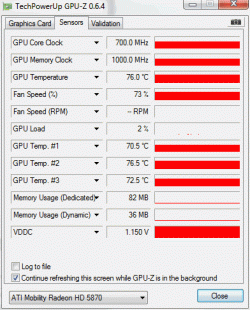
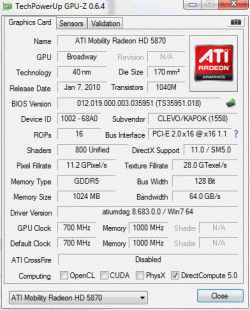
Please let me know if anything you see here is wrong and what i should do about quieting the fan!
Thanks,
Ben
Been quite a while since ive been around. Sorry for that. I recently have noticed that my fan speed on my graphics card is EXTREMELY loud. I can not have it in class and it is super loud in the library at school, i need to quite it down. Can anyone help me here?
Here is all my info on the card and some reading to make sure everything is working okay.
Please let me know if anything you see here is wrong and what i should do about quieting the fan!
Thanks,
Ben
My Computer
At a glance
Windows 7 Ultimate Professional x64Intel Core i7-740QM @ 1.73GHz 4Core2 X 4GB DDR3-SDRAM 667MHzATI Mobility Radeon HD 5870 1GB SDRAM
- Computer type
- Laptop
- Computer Manufacturer/Model Number
- Clevo W870CU
- OS
- Windows 7 Ultimate Professional x64
- CPU
- Intel Core i7-740QM @ 1.73GHz 4Core
- Motherboard
- Intel PM55
- Memory
- 2 X 4GB DDR3-SDRAM 667MHz
- Graphics Card(s)
- ATI Mobility Radeon HD 5870 1GB SDRAM
- Sound Card
- Realtek High Definition Audio
- Monitor(s) Displays
- AUO149D 17.1" HD+/FHD @600Hz
- Screen Resolution
- 1920X1080
- Hard Drives
- Seagate A0D-10F4 - 500 GB @7200RPM
- PSU
- 43290mWh Intel Lithium-Ion Battery
- Case
- Cleveo W870CU
- Cooling
- 2 Fans
- Keyboard
- Microsoft eHome MCIR 109
- Mouse
- Finger Sensing HID-Compliant Mouse Pad
- Internet Speed
- 100 MB/s
- Antivirus
- avast! Antivirus
- Browser
- Google Chrome
- Other Info
- Biometric Enabled
2.0MP Cam
