ATI Mobility Radeon HD 4330 will Not output 1920x1080 over VGA.

blackcat54

New member
Local time
1:17 PM
Messages
8
Computer: Msi Wind Nettop
Video: ATI Mobility Radeon HD 4330 (onboard)
Video Driver Date: 9/18/2009
Video Driver Version: 8.660.0.0
OS: Win 7 SP1
Monitor: 32" Westinghouse 1080P TV

Max resolution available over VGA is 1600x1200.

I want to output 1920x1080 over VGA.

Suggestions?

Thanks
 
Last edited:

My Computer My Computer

At a glance

windows 7 32bit
OS
windows 7 32bit
What kind of monitor or tv are you plugging it into?
That is part of the equation here.
 

My Computer My Computer

At a glance

Windows 7 x64Intel i7 2600kG.skill Ripjaw 16gigs @ 1866Nvidia gtx580 (evga)
Computer Manufacturer/Model Number
Insane hobo technologies. ;-)
OS
Windows 7 x64
CPU
Intel i7 2600k
Motherboard
Asrock z68 extreme 4 gen 3
Memory
G.skill Ripjaw 16gigs @ 1866
Graphics Card(s)
Nvidia gtx580 (evga)
Sound Card
Integrated HD audio + hdmi
Monitor(s) Displays
24" ASUS widescreen + 42" insignia
Screen Resolution
1080p (1920x1080)
Hard Drives
128 Samsung 830
256 Samsung 840
3 x 1tb storage drive (various)
1 western digital 1tb (eSATA)
1 Seagate 1tb (eSATA)
PSU
1 kilowatt SLI/Crossfire rated Silverstone modular
Case
NZXT Phantom + additional 220 fan
Cooling
Zalmann
Keyboard
Microsoft wireless 3000 (v2)
Mouse
MS - wireless 5000 (bluetrack)
Internet Speed
depends on if you ask me or my provider.
Other Info
The above information is provided as is, and the author assumes no responsibility for issues it may cause with your sanity or fanboyism.
Westinghouse 32" 1080P TV.
 

My Computer My Computer

At a glance

windows 7 32bit
OS
windows 7 32bit
Does it show as a generic display in the display properties?
If you are certain the display supports the higher resolution you should be able to over ride the resolution limitation in the catalyst control center.
 

My Computer My Computer

At a glance

Windows 7 x64Intel i7 2600kG.skill Ripjaw 16gigs @ 1866Nvidia gtx580 (evga)
Computer Manufacturer/Model Number
Insane hobo technologies. ;-)
OS
Windows 7 x64
CPU
Intel i7 2600k
Motherboard
Asrock z68 extreme 4 gen 3
Memory
G.skill Ripjaw 16gigs @ 1866
Graphics Card(s)
Nvidia gtx580 (evga)
Sound Card
Integrated HD audio + hdmi
Monitor(s) Displays
24" ASUS widescreen + 42" insignia
Screen Resolution
1080p (1920x1080)
Hard Drives
128 Samsung 830
256 Samsung 840
3 x 1tb storage drive (various)
1 western digital 1tb (eSATA)
1 Seagate 1tb (eSATA)
PSU
1 kilowatt SLI/Crossfire rated Silverstone modular
Case
NZXT Phantom + additional 220 fan
Cooling
Zalmann
Keyboard
Microsoft wireless 3000 (v2)
Mouse
MS - wireless 5000 (bluetrack)
Internet Speed
depends on if you ask me or my provider.
Other Info
The above information is provided as is, and the author assumes no responsibility for issues it may cause with your sanity or fanboyism.
Yes it shows a generic display in the display properties.

I can drive the display successfully from another computer over VGA @ 1920x1080.

Catalyst Control Center only offers a max resolution of 1600x1200 (same as Windows).

Maybe I missed the override feature in CCC?

In CCC, I went to Advanced-Mode-Settings-Desktop area.
 

My Computer My Computer

At a glance

windows 7 32bit
OS
windows 7 32bit
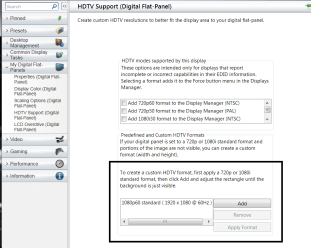
you should be able to force 1080p through the 'my digital flat panels' section of the catalyst control center.

And if not you should still have the ability to add custom setting at the bottom.
 

Attachments

  • Untitled.png
    Untitled.png
    51 KB · Views: 180

My Computer My Computer

At a glance

Windows 7 x64Intel i7 2600kG.skill Ripjaw 16gigs @ 1866Nvidia gtx580 (evga)
Computer Manufacturer/Model Number
Insane hobo technologies. ;-)
OS
Windows 7 x64
CPU
Intel i7 2600k
Motherboard
Asrock z68 extreme 4 gen 3
Memory
G.skill Ripjaw 16gigs @ 1866
Graphics Card(s)
Nvidia gtx580 (evga)
Sound Card
Integrated HD audio + hdmi
Monitor(s) Displays
24" ASUS widescreen + 42" insignia
Screen Resolution
1080p (1920x1080)
Hard Drives
128 Samsung 830
256 Samsung 840
3 x 1tb storage drive (various)
1 western digital 1tb (eSATA)
1 Seagate 1tb (eSATA)
PSU
1 kilowatt SLI/Crossfire rated Silverstone modular
Case
NZXT Phantom + additional 220 fan
Cooling
Zalmann
Keyboard
Microsoft wireless 3000 (v2)
Mouse
MS - wireless 5000 (bluetrack)
Internet Speed
depends on if you ask me or my provider.
Other Info
The above information is provided as is, and the author assumes no responsibility for issues it may cause with your sanity or fanboyism.
I must have a different version of CCC.

Mine looks different with no custom resolution feature.
 

Attachments

  • CCC.jpg
    CCC.jpg
    91.9 KB · Views: 96

My Computer My Computer

At a glance

windows 7 32bit
OS
windows 7 32bit
'my digital flat panels' only shows up when connected via DVI or HDMI, it shows up as a VGA connection/monitor otherwise.
 

My Computer My Computer

At a glance

Win 7 Ultimate x64FX-8350 @ 4.6 GHz so farADATA XPG V1 Series Black 8GB DDR3 1600Sapphire R9 270x Dual-X
Computer type
PC/Desktop
Computer Manufacturer/Model Number
Me
OS
Win 7 Ultimate x64
CPU
FX-8350 @ 4.6 GHz so far
Motherboard
Asus M5A97 EVO
Memory
ADATA XPG V1 Series Black 8GB DDR3 1600
Graphics Card(s)
Sapphire R9 270x Dual-X
Sound Card
Xonar DGX w/ Corsair Vengence 1300
Monitor(s) Displays
Acer S232HL Abid
Screen Resolution
1920x1080
Hard Drives
120 GB OCZ Vertex 3
500 GB Seagate 7200.12
PSU
Antec Earthwatts 650W Green
Case
Antec Three Hundred
Cooling
Cooler Master 212 EVO
Keyboard
Logitech G510
Mouse
Logitech G500s
Internet Speed
35000/3000
Still that's a very old version of CCC though I don't know if the generic mobile driver will work for your mobility card.
It's kind of a hit and miss thing but updating the driver may help you.

You can go here, click the individual downloads tab and see if your system will allow you to install a vastly updated version.
ATI Catalyst
 

My Computer My Computer

At a glance

Windows 7 x64Intel i7 2600kG.skill Ripjaw 16gigs @ 1866Nvidia gtx580 (evga)
Computer Manufacturer/Model Number
Insane hobo technologies. ;-)
OS
Windows 7 x64
CPU
Intel i7 2600k
Motherboard
Asrock z68 extreme 4 gen 3
Memory
G.skill Ripjaw 16gigs @ 1866
Graphics Card(s)
Nvidia gtx580 (evga)
Sound Card
Integrated HD audio + hdmi
Monitor(s) Displays
24" ASUS widescreen + 42" insignia
Screen Resolution
1080p (1920x1080)
Hard Drives
128 Samsung 830
256 Samsung 840
3 x 1tb storage drive (various)
1 western digital 1tb (eSATA)
1 Seagate 1tb (eSATA)
PSU
1 kilowatt SLI/Crossfire rated Silverstone modular
Case
NZXT Phantom + additional 220 fan
Cooling
Zalmann
Keyboard
Microsoft wireless 3000 (v2)
Mouse
MS - wireless 5000 (bluetrack)
Internet Speed
depends on if you ask me or my provider.
Other Info
The above information is provided as is, and the author assumes no responsibility for issues it may cause with your sanity or fanboyism.
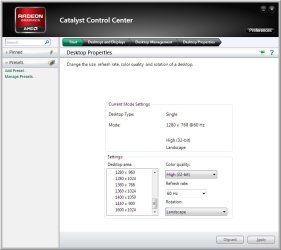
OK......I now have the 2011 version of CCC.

My problem is not having 1920x1080 available through VGA.

CCC only offers resolutions up to 1600x1024 when VGA is in operation.
 

Attachments

  • ccc2.jpg
    ccc2.jpg
    42.9 KB · Views: 50

My Computer My Computer

At a glance

windows 7 32bit
OS
windows 7 32bit
What is the model number of your TV?
 

My Computer My Computer

At a glance

Win 7 Ultimate x64FX-8350 @ 4.6 GHz so farADATA XPG V1 Series Black 8GB DDR3 1600Sapphire R9 270x Dual-X
Computer type
PC/Desktop
Computer Manufacturer/Model Number
Me
OS
Win 7 Ultimate x64
CPU
FX-8350 @ 4.6 GHz so far
Motherboard
Asus M5A97 EVO
Memory
ADATA XPG V1 Series Black 8GB DDR3 1600
Graphics Card(s)
Sapphire R9 270x Dual-X
Sound Card
Xonar DGX w/ Corsair Vengence 1300
Monitor(s) Displays
Acer S232HL Abid
Screen Resolution
1920x1080
Hard Drives
120 GB OCZ Vertex 3
500 GB Seagate 7200.12
PSU
Antec Earthwatts 650W Green
Case
Antec Three Hundred
Cooling
Cooler Master 212 EVO
Keyboard
Logitech G510
Mouse
Logitech G500s
Internet Speed
35000/3000
Westinghouse VR-3225
 

My Computer My Computer

At a glance

windows 7 32bit
OS
windows 7 32bit
Looks like it may be working as it should. From the specs page for that TV,

32″ 1080p LCD HDTV VR-3225 | WD

Compatible Modes


  • TV Tuner Capability*: NTSC/ATSC
  • YPbPr: 480i, 480p, 720p, 1080i, 1080p
  • HDMI: 480i, 480p, 720p, 1080i, 1080p
  • PC: SVGA, XGA, WXGA
  • Optimum Resolution: 1920 x 1080

When connected via VGA it supports up to WXGA, which goes up to 1280x768 according to the spec,

Graphic display resolutions - Wikipedia, the free encyclopedia

to give a proper 16:9 aspect ratio. You laptop have a DVI or HDMI port? I'm guessing the only way you're going to get 1920x1080 to the TV is to use one of those and not VGA.
 

My Computer My Computer

At a glance

Win 7 Ultimate x64FX-8350 @ 4.6 GHz so farADATA XPG V1 Series Black 8GB DDR3 1600Sapphire R9 270x Dual-X
Computer type
PC/Desktop
Computer Manufacturer/Model Number
Me
OS
Win 7 Ultimate x64
CPU
FX-8350 @ 4.6 GHz so far
Motherboard
Asus M5A97 EVO
Memory
ADATA XPG V1 Series Black 8GB DDR3 1600
Graphics Card(s)
Sapphire R9 270x Dual-X
Sound Card
Xonar DGX w/ Corsair Vengence 1300
Monitor(s) Displays
Acer S232HL Abid
Screen Resolution
1920x1080
Hard Drives
120 GB OCZ Vertex 3
500 GB Seagate 7200.12
PSU
Antec Earthwatts 650W Green
Case
Antec Three Hundred
Cooling
Cooler Master 212 EVO
Keyboard
Logitech G510
Mouse
Logitech G500s
Internet Speed
35000/3000
I am getting the TV to work with 1920x1080 from another computer outputting VGA! So the TV does accept 1920x1080 through VGA.

I just want to get the new computer (MSI Wind Nettop) to output 1920x1080 through VGA also.

For some reason 1920x1080 through VGA looks best on this TV.
 

My Computer My Computer

At a glance

windows 7 32bit
OS
windows 7 32bit
Are you saying you've already tried HDMI and didn't like the way it looked?

You might try ATI Tray Tools, which is sort of an advanced replacement for the CCC. Perhaps it'll give you the option to create a 1920x1080 VGA output.

http://downloads.guru3d.com/download.php?det=733
 

My Computer My Computer

At a glance

Windows 7 Professional SP1 32-bitIntel Core 2 Duo E6600 2.4GHz4GB DDR2-667 (4x1GB in dual-channel config)nVidia GeForce 9800 GT
Computer type
PC/Desktop
Computer Manufacturer/Model Number
Custom-built
OS
Windows 7 Professional SP1 32-bit
CPU
Intel Core 2 Duo E6600 2.4GHz
Motherboard
Asus PL5D2
Memory
4GB DDR2-667 (4x1GB in dual-channel config)
Graphics Card(s)
nVidia GeForce 9800 GT
Sound Card
Creative X-Fi XtremeMusic
Monitor(s) Displays
Acer P236H
Screen Resolution
1920x1200 (DVI)
Hard Drives
OCZ SSD Vertex Plus 60GB SATA (Firmware 3.55), 64MB cache
Hitachi HD321KJ SATA, 320GB, 7200rpm, 16MB cache
PSU
Antec TruePower 2.0
Case
Cooler Master Centurion
Cooling
Too many fans
Keyboard
Standard
Mouse
Microsoft wireless optical mouse
Internet Speed
AT&T U-verse (18mbit/sec)
Antivirus
Microsoft Security Essentials
Browser
Firefox
Other Info
Other devices:
Compaq CQ-60 laptop
Google Nexus 7 (2012) tablet
Nvidia SHIELD tablet (US/LTE)
Hardkernel ODROID-XU single-board computer (Samsung Exynos 5420)
Exactly.......

VGA@ 1920x1080 = Crystal clear razor sharp display.

HDMI @ 1920x1080 = Text not quite as sharp.
 

My Computer My Computer

At a glance

windows 7 32bit
OS
windows 7 32bit
Back
Top