
ATI over drive.

Heroxoot

The Hero Guy
Power User
VIP
Local time
1:29 AM
Messages
310
Well, having CCC running causes VPU recover to mess with me, and on W7 there is no option to turn it off in CCC. So I got ati over drive to see what it could do, but it says I do not have a ati chipset. I have a 4850, so is there one for that?
 

My Computer

Computer Manufacturer/Model Number
Me
OS
Windows 7 Pro
CPU
Athlon II x4 620
Motherboard
Gigabyte
Memory
2gb ddr2 800mhz 6-6-6-16
Graphics Card(s)
Radeon HD 4850
Sound Card
Onboard
Monitor(s) Displays
1366 x 768
Hard Drives
WDC Black 500gb
PSU
OCZ ceritified SLI ready 500w
Case
Cool Master Mid tower
Cooling
Stock
I assume you are asking about AMD's overdrive utility - AOD.

The AOD utility only works if you have a specific chipset (The Northbridge and Southbridge chips), or higher. I haven't used it recently, but the version I looked at needed a minimum 750 series Southbridge chipset to work. I think they've relaxed it some, to include the new 710, but it might be worth checking it out on the AOD page.

If you have an SB600 chipset, there's no way it will work. Unfortunately, you didn't list the motherboard model in your specs, so I can't be much more help than that.
 

My Computer

Computer type
PC/Desktop
Computer Manufacturer/Model Number
Mellon Labs (custom build)
OS
Win 7 Pro x64/Win 10 Pro x64 dual boot
CPU
AMD FX 8350 Vishera @ 4200
Motherboard
ASUS M5A97 R2.0
Memory
16 GB Mushkin Blackline DDR3-2400 @ 1866 (9-10-10-10-31)
Graphics Card(s)
XFX Radeon R9 280 Double D Black Edition
Sound Card
Realtek HD Audio on MB. Sounds great.
Monitor(s) Displays
Acer 24", Acer 22"
Screen Resolution
3840 x 1080
Hard Drives
1 x Mushkin Chronos 120 GB SSD (Win 10)
1 x Samsung 850 EVO 250 GB SSD (Win 7)
1 x WD 1TB SATA Blue
1 x WD 1TB SATA Green
PSU
Corsair TX-750
Case
CoolerMaster HAF 912+
Cooling
Coolermaster Seidon 240M Liquid AIO. 6 case fans
Keyboard
Logitech G710+
Mouse
Logitech G500s
Internet Speed
Much better since I got fiber, but still way overpriced.
Antivirus
MSE, Malware Bytes for scanning
Browser
Firefox
Other Info
Corsair VOID USB headphones.

A Mellon Labs X-1 - LCD Smartie driven system status display.

Brought to you by the letter E
Ahh, well forget that, I have a real gfx card for a reason. To keep going, is there a way to set manual fan speed without CCC on, or a way to disable VPU recover in windows? The CCC on W7 lacks vpu control tab ._.?


Oh and my mobo has an Nvidia northbridge/southbridge.
 

My Computer

Computer Manufacturer/Model Number
Me
OS
Windows 7 Pro
CPU
Athlon II x4 620
Motherboard
Gigabyte
Memory
2gb ddr2 800mhz 6-6-6-16
Graphics Card(s)
Radeon HD 4850
Sound Card
Onboard
Monitor(s) Displays
1366 x 768
Hard Drives
WDC Black 500gb
PSU
OCZ ceritified SLI ready 500w
Case
Cool Master Mid tower
Cooling
Stock
Lol, yeah with an Nvidia chipset, you're kinda screwed there. :)

I set my fan speed manually in CCC, but I don't load it on startup. It still works fine that way, or it seems to, and the Anti-Aliasing setup stays put. It must still load as a service, or the driver must load some sort of config file would be my guess. I haven't seen the VPU recover option since Vista, now that you mention it, but that was many versions of CCC ago.
 

My Computer

Computer type
PC/Desktop
Computer Manufacturer/Model Number
Mellon Labs (custom build)
OS
Win 7 Pro x64/Win 10 Pro x64 dual boot
CPU
AMD FX 8350 Vishera @ 4200
Motherboard
ASUS M5A97 R2.0
Memory
16 GB Mushkin Blackline DDR3-2400 @ 1866 (9-10-10-10-31)
Graphics Card(s)
XFX Radeon R9 280 Double D Black Edition
Sound Card
Realtek HD Audio on MB. Sounds great.
Monitor(s) Displays
Acer 24", Acer 22"
Screen Resolution
3840 x 1080
Hard Drives
1 x Mushkin Chronos 120 GB SSD (Win 10)
1 x Samsung 850 EVO 250 GB SSD (Win 7)
1 x WD 1TB SATA Blue
1 x WD 1TB SATA Green
PSU
Corsair TX-750
Case
CoolerMaster HAF 912+
Cooling
Coolermaster Seidon 240M Liquid AIO. 6 case fans
Keyboard
Logitech G710+
Mouse
Logitech G500s
Internet Speed
Much better since I got fiber, but still way overpriced.
Antivirus
MSE, Malware Bytes for scanning
Browser
Firefox
Other Info
Corsair VOID USB headphones.

A Mellon Labs X-1 - LCD Smartie driven system status display.

Brought to you by the letter E
Lol, yeah with an Nvidia chipset, you're kinda screwed there. :)

I set my fan speed manually in CCC, but I don't load it on startup. It still works fine that way, or it seems to, and the Anti-Aliasing setup stays put. It must still load as a service, or the driver must load some sort of config file would be my guess. I haven't seen the VPU recover option since Vista, now that you mention it, but that was many versions of CCC ago.
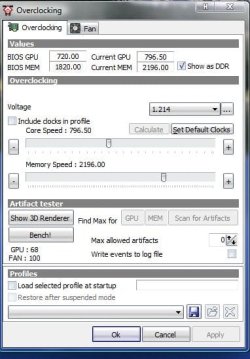
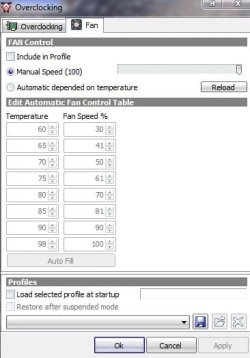
It doesnt work that way. I have a gadget for ATI cards. It reads my gpu temp perfect :D but the fan speed wont go manual unless CCC is started once. I guess I can just turn on CCC, and then turn it off in task manager. Seems to work thus far.
 

My Computer

Computer Manufacturer/Model Number
Me
OS
Windows 7 Pro
CPU
Athlon II x4 620
Motherboard
Gigabyte
Memory
2gb ddr2 800mhz 6-6-6-16
Graphics Card(s)
Radeon HD 4850
Sound Card
Onboard
Monitor(s) Displays
1366 x 768
Hard Drives
WDC Black 500gb
PSU
OCZ ceritified SLI ready 500w
Case
Cool Master Mid tower
Cooling
Stock
Weird. I have a gadget too, but if I put my fan on auto, it stays at 12% unless the GPU is being used heavily, then it goes up. I manually set it to 50 or 60% and it stays that way, and like I said, I don't load CCC at boot up. I only load it to make changes, and then close it again. I wonder why mine works differently? It's gotta be a hardware thing in my machine. I'm baffled.
 

My Computer

Computer type
PC/Desktop
Computer Manufacturer/Model Number
Mellon Labs (custom build)
OS
Win 7 Pro x64/Win 10 Pro x64 dual boot
CPU
AMD FX 8350 Vishera @ 4200
Motherboard
ASUS M5A97 R2.0
Memory
16 GB Mushkin Blackline DDR3-2400 @ 1866 (9-10-10-10-31)
Graphics Card(s)
XFX Radeon R9 280 Double D Black Edition
Sound Card
Realtek HD Audio on MB. Sounds great.
Monitor(s) Displays
Acer 24", Acer 22"
Screen Resolution
3840 x 1080
Hard Drives
1 x Mushkin Chronos 120 GB SSD (Win 10)
1 x Samsung 850 EVO 250 GB SSD (Win 7)
1 x WD 1TB SATA Blue
1 x WD 1TB SATA Green
PSU
Corsair TX-750
Case
CoolerMaster HAF 912+
Cooling
Coolermaster Seidon 240M Liquid AIO. 6 case fans
Keyboard
Logitech G710+
Mouse
Logitech G500s
Internet Speed
Much better since I got fiber, but still way overpriced.
Antivirus
MSE, Malware Bytes for scanning
Browser
Firefox
Other Info
Corsair VOID USB headphones.

A Mellon Labs X-1 - LCD Smartie driven system status display.

Brought to you by the letter E
ATI Tray Tools is excellent for overclocking and/or precise fan control.

Download ATI Tray Tools 1.6.9.1472 Beta / 1.3 Stable - Free tweaker for Radeon cards that provides you with support for ATI Control Center - Softpedia

No CCC needed.

Right click the tray icon, hardware, overclocking settings.
I tried this and it gave me the crash I have been experiencing when leaving an rpg merchanting over night. I now know its not heat related, but I do not think its a physical issue because high load games do not cause it. I think its something to do with VPU, but my pc didnt like the ATT either.
 

My Computer

Computer Manufacturer/Model Number
Me
OS
Windows 7 Pro
CPU
Athlon II x4 620
Motherboard
Gigabyte
Memory
2gb ddr2 800mhz 6-6-6-16
Graphics Card(s)
Radeon HD 4850
Sound Card
Onboard
Monitor(s) Displays
1366 x 768
Hard Drives
WDC Black 500gb
PSU
OCZ ceritified SLI ready 500w
Case
Cool Master Mid tower
Cooling
Stock
AHAHAH YES! Someone on the AMD forum suggested MSI afterburner. Works great and makes my fan speed 60% like I want it at startup. Amazing.
 

My Computer

Computer Manufacturer/Model Number
Me
OS
Windows 7 Pro
CPU
Athlon II x4 620
Motherboard
Gigabyte
Memory
2gb ddr2 800mhz 6-6-6-16
Graphics Card(s)
Radeon HD 4850
Sound Card
Onboard
Monitor(s) Displays
1366 x 768
Hard Drives
WDC Black 500gb
PSU
OCZ ceritified SLI ready 500w
Case
Cool Master Mid tower
Cooling
Stock
AHAHAH YES! Someone on the AMD forum suggested MSI afterburner. Works great and makes my fan speed 60% like I want it at startup. Amazing.
Ah, I just missed it. I was going to suggest that.

MSI AB works fine with my 260 as well.

~Lordbob
 

My Computer

Computer Manufacturer/Model Number
Hera
OS
Windows 7 Ultimate x64, Mint 9
CPU
Intel i5-2500k
Motherboard
ASUS P8P67 Pro
Memory
2x 4Gb Corsair VENGEANCE DDR3-1600
Graphics Card(s)
NVidia GeForce N260GTX Twin Frozr
Sound Card
Realtek HD OnBoard Audio
Monitor(s) Displays
ASUS 24" Monitor
Screen Resolution
1920x1080
Hard Drives
G.SKILL Phoenix Series 60GB SATA II MLC Internal Solid State Drive (SSD)
SAMSUNG Spinpoint F3R 1TB 7200 RPM 32MB Cache SATA II
PSU
Cooler Master Real Power Pro 750W
Case
Cooler Master Haf 932
Cooling
Fans
Keyboard
Razer Tarantula
Mouse
Razer Lachesis
Internet Speed
not fast enough
Yea. I just wish I knew why I get the green screen or grey screen at random. Its odd but it doesn't seem like a hardware issue. Everything I have tried searching said its VPU, so my whole stride was to get VPU to go away, FOREVER. But w7 CCC is all nice looking and does not give an option to turn it off.
 

My Computer

Computer Manufacturer/Model Number
Me
OS
Windows 7 Pro
CPU
Athlon II x4 620
Motherboard
Gigabyte
Memory
2gb ddr2 800mhz 6-6-6-16
Graphics Card(s)
Radeon HD 4850
Sound Card
Onboard
Monitor(s) Displays
1366 x 768
Hard Drives
WDC Black 500gb
PSU
OCZ ceritified SLI ready 500w
Case
Cool Master Mid tower
Cooling
Stock
Ok, wow. I set it back to the 65 its always at, and its not keeping it any cooler than auto. I even stole and old case fan, even its its not that fast, just to help regulate the air inside a little, and it doesnt help either. May as well just leave it auto eh?
 

My Computer

Computer Manufacturer/Model Number
Me
OS
Windows 7 Pro
CPU
Athlon II x4 620
Motherboard
Gigabyte
Memory
2gb ddr2 800mhz 6-6-6-16
Graphics Card(s)
Radeon HD 4850
Sound Card
Onboard
Monitor(s) Displays
1366 x 768
Hard Drives
WDC Black 500gb
PSU
OCZ ceritified SLI ready 500w
Case
Cool Master Mid tower
Cooling
Stock
Back
Top