
Solved ATI Radeon 3100 Problems

jrwilliams27

New member
Local time
12:51 AM
Messages
15
Location
London
I need some help with my ATI card. Let me give a little bit of background as I lay out the situation I'm working on. A couple of months ago I tried updating my driver. Everything installed and it seemed like everything was fine. Then the computer started going into a solid colored screens. It has gone into several colors: black, white, blue, brown, and some screens with vertical lines going down the screen. It started off occasionally, but became more consistent.

I thought it was a Vista issue (long story) and upgraded to 7. To make a longer story short, I have just reformatted my HDD and put 7 on it fresh and new. It seemed like it was going to work but the screen has started the solid colors again. I've called MS support and they are at a loss of what to do, but through their help we were able to see that it is an issue with the ATI video card. If I disable the video card all works fine, but with poor graphics of course.

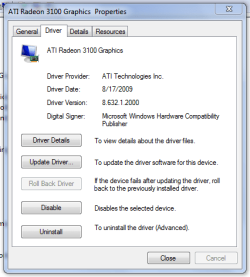
It looks like a possible driver issue, so I've tried updating to the latest driver. The driver won't install though. I've even tried manually installing the driver but windows keep saying that the latest driver is already installed. When looking at the driver properties it clearly looks like a very old driver is running, but I can't get the new version to install at all. The CCC goes through the installation process fine but no change on the driver version even if I try a different version. I've uninstalled the video card, and then tried again, but no success.

Attached is pic of the properties screen I'm getting showing which version is installed.

Here what I have:

Toshiba Satellite laptop
Windows 7 Home Premium 64bit
ATI Radeon 3100
250 GB HDD
AMD Turion™ X2 Ultra Dual-Core Mobile Processor ZM-84
4GB RAM

Any help or thoughts would be greatly appreciated!
 

Attachments
  • Video Card Driver.PNG
    Video Card Driver.PNG
    14.8 KB · Views: 21

My Computer

OS
Windows 7 Home Premium 64bit
CPU
AMD Turion™ X2 Ultra Dual-Core Mobile Processor ZM-80
Memory
4GB
Graphics Card(s)
ATI Radeon 3100
Hard Drives
250GB HDD
Welcome to SevenForums.
Have you tried downloading a driver from this manufacture web site? Just put in your info and see if they have one for you. Good luck to you with your problem.
Graphics Drivers & Software
 

My Computer

Computer Manufacturer/Model Number
Gateway GT5692
OS
Windows 7 Ulti. x64
CPU
AMD Phenom 8450 triple-core 2.10 ghz
Memory
4GB
Graphics Card(s)
ATI Radion HD 3200
Monitor(s) Displays
Gateway FPD1775W
Screen Resolution
1280x720
Hard Drives
465.6613 Gibibytes
Thanks for the welcome.

I've been to ATI's download page many times trying to get a package/driver that would install but none of them update the driver for some reason. That is when I switched to trying the manual driver installation, but that it isn't even working.
 

My Computer

OS
Windows 7 Home Premium 64bit
CPU
AMD Turion™ X2 Ultra Dual-Core Mobile Processor ZM-80
Memory
4GB
Graphics Card(s)
ATI Radeon 3100
Hard Drives
250GB HDD
JR did you visit the web site that I linked you to. They have some instructions on how to uninstall you old driver which is what I thought you was having trouble with?:D
 

My Computer

Computer Manufacturer/Model Number
Gateway GT5692
OS
Windows 7 Ulti. x64
CPU
AMD Phenom 8450 triple-core 2.10 ghz
Memory
4GB
Graphics Card(s)
ATI Radion HD 3200
Monitor(s) Displays
Gateway FPD1775W
Screen Resolution
1280x720
Hard Drives
465.6613 Gibibytes
There is a very good reason that the reference AMD driver won't install on that laptop. This is from the release notes for the latest catalyst 10.12,

The following notebooks are not compatible with this release:

  • Any notebook launched after this driver release
  • Switchable Graphics enabled notebooks using Intel® chipsets.
  • Toshiba® notebooks (please contact the notebook OEM for driver support for these notebooks)
  • Sony® VAIO® notebooks (please contact the notebook OEM for driver support for these notebooks)
  • Panasonic® notebooks (please contact the notebook OEM for driver support for these notebooks)

AMD Catalyst

Basically unless you want to try something like this,

AMD Catalyst

on one of the recent driver versions, you're pretty much stuck with whatever Toshiba has available.

If they don't have a Windows 7 driver for your particular laptop (and for all intents and purposes there is zero reason for them not too), you could try looking up a new model laptop with an AMD video card in it and try the driver for it.
 

My Computer

Computer type
PC/Desktop
Computer Manufacturer/Model Number
Me
OS
Win 7 Ultimate x64
CPU
FX-8350 @ 4.6 GHz so far
Motherboard
Asus M5A97 EVO
Memory
ADATA XPG V1 Series Black 8GB DDR3 1600
Graphics Card(s)
Sapphire R9 270x Dual-X
Sound Card
Xonar DGX w/ Corsair Vengence 1300
Monitor(s) Displays
Acer S232HL Abid
Screen Resolution
1920x1080
Hard Drives
120 GB OCZ Vertex 3
500 GB Seagate 7200.12
PSU
Antec Earthwatts 650W Green
Case
Antec Three Hundred
Cooling
Cooler Master 212 EVO
Keyboard
Logitech G510
Mouse
Logitech G500s
Internet Speed
35000/3000
JR did you visit the web site that I linked you to. They have some instructions on how to uninstall you old driver which is what I thought you was having trouble with?:D

Yes. But the problem is installing not uninstalling.
 

My Computer

OS
Windows 7 Home Premium 64bit
CPU
AMD Turion™ X2 Ultra Dual-Core Mobile Processor ZM-80
Memory
4GB
Graphics Card(s)
ATI Radeon 3100
Hard Drives
250GB HDD
There is a very good reason that the reference AMD driver won't install on that laptop. This is from the release notes for the latest catalyst 10.12,

The following notebooks are not compatible with this release:

  • Any notebook launched after this driver release
  • Switchable Graphics enabled notebooks using Intel® chipsets.
  • Toshiba® notebooks (please contact the notebook OEM for driver support for these notebooks)
  • Sony® VAIO® notebooks (please contact the notebook OEM for driver support for these notebooks)
  • Panasonic® notebooks (please contact the notebook OEM for driver support for these notebooks)
AMD Catalyst

Basically unless you want to try something like this,

AMD Catalyst

on one of the recent driver versions, you're pretty much stuck with whatever Toshiba has available.

If they don't have a Windows 7 driver for your particular laptop (and for all intents and purposes there is zero reason for them not too), you could try looking up a new model laptop with an AMD video card in it and try the driver for it.

Wow! I would've never have thought that would've been a possibility. I'll check Toshiba as I know they have a driver for it. Is this just for the latest driver?
 

My Computer

OS
Windows 7 Home Premium 64bit
CPU
AMD Turion™ X2 Ultra Dual-Core Mobile Processor ZM-80
Memory
4GB
Graphics Card(s)
ATI Radeon 3100
Hard Drives
250GB HDD
Nope. Up until about a year or so ago it applied to pretty much all laptop manufacturers regardless of whether they used ATI or Nvidia graphics, part of some licensing agreement that they would only allow the drivers when provided by them.

With the exception of the three mentioned above or if you have switchable graphics (usually Intel integrated (on the motherboard or more recently in the CPU itself) paired up with either an ATI or Nvidia video card), most of the laptop manufacturers will now allow the reference drivers to support whichever GPU they used. here is what Nvidia had to say about it,

NVIDIA Verde Notebook Drivers

and pretty sure that the same three that still won't allow it from ATI/AMD applies to Nvidia drivers.

One thing that can happen with using the reference drivers is that they may not have the included support for the screen used in the laptop, or whatever power saving features where built into them. As a result while the reference drivers will install and work, they may not fully support all features in the laptop.
 

My Computer

Computer type
PC/Desktop
Computer Manufacturer/Model Number
Me
OS
Win 7 Ultimate x64
CPU
FX-8350 @ 4.6 GHz so far
Motherboard
Asus M5A97 EVO
Memory
ADATA XPG V1 Series Black 8GB DDR3 1600
Graphics Card(s)
Sapphire R9 270x Dual-X
Sound Card
Xonar DGX w/ Corsair Vengence 1300
Monitor(s) Displays
Acer S232HL Abid
Screen Resolution
1920x1080
Hard Drives
120 GB OCZ Vertex 3
500 GB Seagate 7200.12
PSU
Antec Earthwatts 650W Green
Case
Antec Three Hundred
Cooling
Cooler Master 212 EVO
Keyboard
Logitech G510
Mouse
Logitech G500s
Internet Speed
35000/3000
Nope. Up until about a year or so ago it applied to pretty much all laptop manufacturers regardless of whether they used ATI or Nvidia graphics, part of some licensing agreement that they would only allow the drivers when provided by them.

With the exception of the three mentioned above or if you have switchable graphics (usually Intel integrated (on the motherboard or more recently in the CPU itself) paired up with either an ATI or Nvidia video card), most of the laptop manufacturers will now allow the reference drivers to support whichever GPU they used. here is what Nvidia had to say about it,

NVIDIA Verde Notebook Drivers

and pretty sure that the same three that still won't allow it from ATI/AMD applies to Nvidia drivers.

One thing that can happen with using the reference drivers is that they may not have the included support for the screen used in the laptop, or whatever power saving features where built into them. As a result while the reference drivers will install and work, they may not fully support all features in the laptop.

That makes sense in a way. I've successfully installed the Toshiba driver, so we'll see if the crashes are fixed. I'll soon find out.
 

My Computer

OS
Windows 7 Home Premium 64bit
CPU
AMD Turion™ X2 Ultra Dual-Core Mobile Processor ZM-80
Memory
4GB
Graphics Card(s)
ATI Radeon 3100
Hard Drives
250GB HDD
I've downloaded the drivers and everything updated fine. However, the updates have not fixed the issue. The screen is still crashing with solid colored screens. The first time the screen went white with black lines, then it has been mostly blue with light vertical lines, and then the screen has gone all black. Nothing works, the computer locks up, and the only solution is powering down. If I disable the video card in device manager then everything works. Any other ideas?
 

My Computer

OS
Windows 7 Home Premium 64bit
CPU
AMD Turion™ X2 Ultra Dual-Core Mobile Processor ZM-80
Memory
4GB
Graphics Card(s)
ATI Radeon 3100
Hard Drives
250GB HDD
just a question what does you're cpu do when all this occurs i noticed you have a turion processor don't know much about them my point is does the cpu max out while this is going on ? the colors and lines you were saying

heat up in anyway more then normal ?

do you have any type of cooling solution ?

and is the card in question intergrated or installed ?

also if intergrated you try using older drivers


just a few things i would like to ask cause you are talking laptop here
 

My Computer

Computer type
PC/Desktop
Computer Manufacturer/Model Number
CoreI7-6700K MrFingerIII Special Builds
OS
Windows 10 Home Premium 64bit sp1
CPU
Intel I7-6700K @ 4.6 Ghz 1.344 volts everyday OC
Motherboard
Asrock Fatality K6 Z170 Socket 1151
Memory
32GB G-Skill TridentZ 3200mhz 16-18-18-38 DDR4
Graphics Card(s)
Sli Gigabyte Windforce GTX 980 G1
Sound Card
AC97 Creative Rage Tactic 3D Headphones Bluetooth
Monitor(s) Displays
27" Asus ROG Swift PG278Q G-Sync 48" Vizio Smart HD TV
Screen Resolution
2560x1440p 27"- 48" Currently Gaming at 2560x1440p Res 2K
Hard Drives
250GB Samsung Evo840SSD Seagate baracuda 500 GB WD Mybook 500Gb 1TB Seagate Barracuda
PSU
HX1050w Corsair Silver 80plus certified crosfire/sli
Case
Enthod Pro Full Tower
Cooling
Corsair H110i GT 280 mm High Performance WaterBlock
Keyboard
Logitech wireless keyboard
Mouse
Logitech wireless mouse
Internet Speed
Cox Cable 100+ mb
Antivirus
WebRoot Spysweeper with Antivirus
Browser
IE-10, Chrome, Opera
Other Info
My Other Rig is a AMD FX8320E @4.6Ghz 16GB Ballistic Sport Ram
Mobo Asrock Fatality 990FX 120GB OCZ SSD 1TB Seagate Barracuda Corsair H75 Cooling PSU Corsair CX750
GPU GTX Gigabyte 970G1
just a question what does you're cpu do when all this occurs i noticed you have a turion processor don't know much about them my point is does the cpu max out while this is going on ? the colors and lines you were saying

It is too sporadic to tell. Example, there are times when as soon as I login that it crashes. There are times when it will work for days and then suddenly while it is sitting idle it will crash. Of course, when it does crash there is no way to run any diagnostics on it at all.

heat up in anyway more then normal ?

do you have any type of cooling solution ?

I use a cooling pad and the heat of the laptop is really not that hot. When this first started occurring I took the laptop apart, cleaned it very well, and even replaced the fan to be sure that heat wasn't a problem.

and is the card in question intergrated or installed ?

Integrated

also if intergrated you try using older drivers

Yes, I've tried using different drivers, and I just installed the latest driver Toshiba has for this laptop.

Does this sound like a video card that has suddenly decided to go bad? I use this laptop for presentations and really need the video card to work. I know how to replace the MB if needed, but if I can save the cost of a new MB that wouldn't hurt my feelings. :)
 

My Computer

OS
Windows 7 Home Premium 64bit
CPU
AMD Turion™ X2 Ultra Dual-Core Mobile Processor ZM-80
Memory
4GB
Graphics Card(s)
ATI Radeon 3100
Hard Drives
250GB HDD

My Computer

Computer Manufacturer/Model Number
Test Computer
OS
Windows 7 X86 SP1 V.741
CPU
Amd Athlon Xp mobile 2500@3200+ (socket 462)
Motherboard
Asrock K7S8XE+
Memory
1 Gb DDR ( GSKILL F1-3200PHU2-2GBZX )
Graphics Card(s)
Asus AH3650 SILENT/HTDI/512M ( agp )
Sound Card
Onboard
Monitor(s) Displays
Benq FP91GP 19"
Hard Drives
OCZ VerteX 2 - 60GB ( SSD )
PSU
Chieftec GPS-450AA
Case
Chieftec GIGA
Did you updated your lapto bios, thats the starting point off all operation imo.
Could you link your laptop to toshiba products page ?

The "tempro" utility is essential on toshiba laptops, it will info what is need and how to get it.

TEMPRO - Toshiba

Here is the link to the laptop I have:

Toshiba Satellite® M305D-S4830 14.1" widescreen Laptop

I have updated the bios, downloaded and installed all the Windows 7 drivers for the system. Everything works fine except for the video card.
 

My Computer

OS
Windows 7 Home Premium 64bit
CPU
AMD Turion™ X2 Ultra Dual-Core Mobile Processor ZM-80
Memory
4GB
Graphics Card(s)
ATI Radeon 3100
Hard Drives
250GB HDD
I would think the section of the intergrated card is going faulty
 

My Computer

Computer type
PC/Desktop
Computer Manufacturer/Model Number
CoreI7-6700K MrFingerIII Special Builds
OS
Windows 10 Home Premium 64bit sp1
CPU
Intel I7-6700K @ 4.6 Ghz 1.344 volts everyday OC
Motherboard
Asrock Fatality K6 Z170 Socket 1151
Memory
32GB G-Skill TridentZ 3200mhz 16-18-18-38 DDR4
Graphics Card(s)
Sli Gigabyte Windforce GTX 980 G1
Sound Card
AC97 Creative Rage Tactic 3D Headphones Bluetooth
Monitor(s) Displays
27" Asus ROG Swift PG278Q G-Sync 48" Vizio Smart HD TV
Screen Resolution
2560x1440p 27"- 48" Currently Gaming at 2560x1440p Res 2K
Hard Drives
250GB Samsung Evo840SSD Seagate baracuda 500 GB WD Mybook 500Gb 1TB Seagate Barracuda
PSU
HX1050w Corsair Silver 80plus certified crosfire/sli
Case
Enthod Pro Full Tower
Cooling
Corsair H110i GT 280 mm High Performance WaterBlock
Keyboard
Logitech wireless keyboard
Mouse
Logitech wireless mouse
Internet Speed
Cox Cable 100+ mb
Antivirus
WebRoot Spysweeper with Antivirus
Browser
IE-10, Chrome, Opera
Other Info
My Other Rig is a AMD FX8320E @4.6Ghz 16GB Ballistic Sport Ram
Mobo Asrock Fatality 990FX 120GB OCZ SSD 1TB Seagate Barracuda Corsair H75 Cooling PSU Corsair CX750
GPU GTX Gigabyte 970G1
I would think the section of the intergrated card is going faulty

I was afraid one was going to say that. :( Well, I'll order a MB and see if that gets it up going again.
 

My Computer

OS
Windows 7 Home Premium 64bit
CPU
AMD Turion™ X2 Ultra Dual-Core Mobile Processor ZM-80
Memory
4GB
Graphics Card(s)
ATI Radeon 3100
Hard Drives
250GB HDD
let us know what happened
 

My Computer

Computer type
PC/Desktop
Computer Manufacturer/Model Number
CoreI7-6700K MrFingerIII Special Builds
OS
Windows 10 Home Premium 64bit sp1
CPU
Intel I7-6700K @ 4.6 Ghz 1.344 volts everyday OC
Motherboard
Asrock Fatality K6 Z170 Socket 1151
Memory
32GB G-Skill TridentZ 3200mhz 16-18-18-38 DDR4
Graphics Card(s)
Sli Gigabyte Windforce GTX 980 G1
Sound Card
AC97 Creative Rage Tactic 3D Headphones Bluetooth
Monitor(s) Displays
27" Asus ROG Swift PG278Q G-Sync 48" Vizio Smart HD TV
Screen Resolution
2560x1440p 27"- 48" Currently Gaming at 2560x1440p Res 2K
Hard Drives
250GB Samsung Evo840SSD Seagate baracuda 500 GB WD Mybook 500Gb 1TB Seagate Barracuda
PSU
HX1050w Corsair Silver 80plus certified crosfire/sli
Case
Enthod Pro Full Tower
Cooling
Corsair H110i GT 280 mm High Performance WaterBlock
Keyboard
Logitech wireless keyboard
Mouse
Logitech wireless mouse
Internet Speed
Cox Cable 100+ mb
Antivirus
WebRoot Spysweeper with Antivirus
Browser
IE-10, Chrome, Opera
Other Info
My Other Rig is a AMD FX8320E @4.6Ghz 16GB Ballistic Sport Ram
Mobo Asrock Fatality 990FX 120GB OCZ SSD 1TB Seagate Barracuda Corsair H75 Cooling PSU Corsair CX750
GPU GTX Gigabyte 970G1
let us know what happened

I ordered the MB and it should be here today or tomorrow so I post the results when I can.

Thanks everyone for the helpful tips and ideas. I hope this cures the problem! ;)
 

My Computer

OS
Windows 7 Home Premium 64bit
CPU
AMD Turion™ X2 Ultra Dual-Core Mobile Processor ZM-80
Memory
4GB
Graphics Card(s)
ATI Radeon 3100
Hard Drives
250GB HDD
The MB came in today, and I've already replaced it. So far so good. It's been one for about an hour so we'll see what happens.
 

My Computer

OS
Windows 7 Home Premium 64bit
CPU
AMD Turion™ X2 Ultra Dual-Core Mobile Processor ZM-80
Memory
4GB
Graphics Card(s)
ATI Radeon 3100
Hard Drives
250GB HDD
Well, it looks like all is working great! :party: In fact, it looks like it is working even better than before! Apparently there were several issues with the old MB that I was unaware of as everything is now working extremely smoothly and very fast. It's almost like having a new laptop! :cool:

Thanks everyone for your help, ideas, and suggestions. Problem solved! YEAH!
 

My Computer

OS
Windows 7 Home Premium 64bit
CPU
AMD Turion™ X2 Ultra Dual-Core Mobile Processor ZM-80
Memory
4GB
Graphics Card(s)
ATI Radeon 3100
Hard Drives
250GB HDD
Back
Top