
ATI Radeon 9800 Pro Problem

Dre281

New member
Local time
9:04 PM
Messages
5
Hey All,
I'm currently running a Dell Dimension 4600 (old, I know) with Windows 7 Home x32 (SP1). I have the ATI Radeon 9800 Pro from back when I got the computer.
I've recently upgraded from XP to Windows 7.
Everything works well as far as I can tell, but when I try to run World of Warcraft, the loading cinematics stutter and finally freeze, sending me then to the loading screen, which has all sorts of flashing shapes and lines and distortions on it, before WoW crashes at the screen.
I understand that this is probably a driver problem, but Windows is telling me that I've updated to the most recent one (Microsoft Corporation - WDDM)
I've tried fiddling with the Catalyst program from the ATI website, but to no avail.
I've also tried running in XP compatibility mode, and no dice.


DO I have to update my graphics card?

Any help would be great.

Thanks
 
Last edited:

My Computer

Computer Manufacturer/Model Number
Dell Dimension 4600
OS
Windows 7 Home Premium 32 bit (SP1)
My Computer

Computer type
PC/Desktop
Computer Manufacturer/Model Number
Custom built by me.
OS
Windows 10 Pro
CPU
Intel Core i7-4770K (3.5Ghz)
Motherboard
Gigabyte G1 Sniper 5 (F10 Bios)
Memory
32 gig Corsair Dominator Platinum (4x8Gig)
Graphics Card(s)
Sapphire Tri-X R9 Fury
Sound Card
Soundblaster ZXR
Monitor(s) Displays
NEC PA242W 24" LCD Monitor
Screen Resolution
1920 x 1200
Hard Drives
Primary - Samsung 850 Pro (512gig), Samsung 840 Pro (256gig), 2TB WD Caviar Black.
PSU
EVGA Supernova 1000 G2
Case
Cooler Master HAF X
Cooling
Corsair H100i with Corsair Air Series SP120 Quiet Fans
Keyboard
Logitech Wireless Wave
Mouse
Logitech Performance MX
Internet Speed
High Speed Cable
Antivirus
Norton Security
Browser
IE11
Other Info
Memory Timings - 1866MHz @ 9-9-9-27-1T @ 1.5 volts
Assuming you have the resources, the fastest thing you can do is to simply check that your video card is still working correctly. This will require you to connect it to another machine with an AGP slot OR if you can find another spare hard drive to which you can load Windows 7 32bit, and load the correct drivers + WoW. If the test hard drive shows no problems then you know the problem is with your software on your normal hard drive.

If the problem persists, then it's very likely that it's your video card and in need of a replacement, if you can find one.
 

My Computer

Computer Manufacturer/Model Number
Sony / IBM / Apple MB Pro 2011
OS
Windows 7 Ultimate x64 / OS X Snow Leopard 10.6.8
CPU
i7 QM720 - AMD MV40 - i5 2.3Ghz SB
Memory
8GB - 4GB - 8GB
Graphics Card(s)
Nvidia 310M - ATI 3200M - Intel HD3000
Sound Card
Various
Monitor(s) Displays
Sony 17 inch LCD - 12 inch - 13 inch
Hard Drives
OCZ Vertex 2 240Gb
Crucial RealSSD C330 256GB
OWC Mercury Extreme Pro 6G 240GB
Since he has a screen I would assume the video card is working.

As for......
OR if you can find another spare hard drive to which you can load Windows 7 32bit, and load the correct drivers + WoW.

He just needs to find the correct driver for his video card as he already has a 32-bit OS installed.

Anyway the OP can try the 10.2 drivers here..... ATI Catalyst

If that doens't work, look here..... Previous Catalyst

Let us know.
 

My Computer

Computer type
PC/Desktop
Computer Manufacturer/Model Number
Custom built by me.
OS
Windows 10 Pro
CPU
Intel Core i7-4770K (3.5Ghz)
Motherboard
Gigabyte G1 Sniper 5 (F10 Bios)
Memory
32 gig Corsair Dominator Platinum (4x8Gig)
Graphics Card(s)
Sapphire Tri-X R9 Fury
Sound Card
Soundblaster ZXR
Monitor(s) Displays
NEC PA242W 24" LCD Monitor
Screen Resolution
1920 x 1200
Hard Drives
Primary - Samsung 850 Pro (512gig), Samsung 840 Pro (256gig), 2TB WD Caviar Black.
PSU
EVGA Supernova 1000 G2
Case
Cooler Master HAF X
Cooling
Corsair H100i with Corsair Air Series SP120 Quiet Fans
Keyboard
Logitech Wireless Wave
Mouse
Logitech Performance MX
Internet Speed
High Speed Cable
Antivirus
Norton Security
Browser
IE11
Other Info
Memory Timings - 1866MHz @ 9-9-9-27-1T @ 1.5 volts
Since he has a screen I would assume the video card is working.

As for......
OR if you can find another spare hard drive to which you can load Windows 7 32bit, and load the correct drivers + WoW.

He just needs to find the correct driver for his video card as he already has a 32-bit OS installed.

Anyway the OP can try the 10.2 drivers here..... ATI Catalyst

If that doens't work, look here..... Previous Catalyst

Let us know.


just because he can see the desktop and all that is working doesn't mean the card is not faulty. Card could be bad and only shows the symptoms when the card is stressed.
 

My Computer

Computer Manufacturer/Model Number
HAL-9000
OS
Windows 7 Ultimate 64bit
CPU
Intel i7 3770K
Motherboard
Asus Sabertooth Z77
Memory
16GB DDR3 1333 Corsair XMS3
Graphics Card(s)
XFX HD6950 2GB EyeFinity
Sound Card
Logitech G35 & Sennheiser PC135 & VIA HD
Monitor(s) Displays
23" HP 2310e, 23" Samsung B2230, 21.5" Viewsonic
Screen Resolution
5760x1080
Hard Drives
16TB of Storage
128GB & 256GB Crucial M4 SSD's, 2X 1TB WD Black, 3x 2TB WD, 3x 2TB Samsung F4, 1.5TB Seagate, WD 500GB,
PSU
Antec True Power New 650watt
Case
Cooler Master HAF-932
Cooling
Corsair H60 Hydro Cooler, 3x 230mm Fans, 2x120mm Fan
Keyboard
Logitech G15 and G13
Mouse
Logitech G700 Gaming Mouse
Internet Speed
50/10 Mbit
Other Info
Speakers : Alesis M1 Active Mk2 Studio Monitors , APC RS 1200 UPS, HP 4500DN Color Laser, HP P1006 mono Laser, Kodak 8500 Dye-Sub, Epson 1280 inkjet, Epson Worforce 610 MFC
On the other hand it doens't mean it's faulty either.

Let's see what a simple driver updated does first.

Peace :cool:
 

My Computer

Computer type
PC/Desktop
Computer Manufacturer/Model Number
Custom built by me.
OS
Windows 10 Pro
CPU
Intel Core i7-4770K (3.5Ghz)
Motherboard
Gigabyte G1 Sniper 5 (F10 Bios)
Memory
32 gig Corsair Dominator Platinum (4x8Gig)
Graphics Card(s)
Sapphire Tri-X R9 Fury
Sound Card
Soundblaster ZXR
Monitor(s) Displays
NEC PA242W 24" LCD Monitor
Screen Resolution
1920 x 1200
Hard Drives
Primary - Samsung 850 Pro (512gig), Samsung 840 Pro (256gig), 2TB WD Caviar Black.
PSU
EVGA Supernova 1000 G2
Case
Cooler Master HAF X
Cooling
Corsair H100i with Corsair Air Series SP120 Quiet Fans
Keyboard
Logitech Wireless Wave
Mouse
Logitech Performance MX
Internet Speed
High Speed Cable
Antivirus
Norton Security
Browser
IE11
Other Info
Memory Timings - 1866MHz @ 9-9-9-27-1T @ 1.5 volts
Thanks for the advice everyone!
I'm downloading the newest DirectX software now, and if that doesn't work, I'll keep looking for updated drivers.

Will let you know,

Thanks again
 

My Computer

Computer Manufacturer/Model Number
Dell Dimension 4600
OS
Windows 7 Home Premium 32 bit (SP1)
Actually you still need to update the drivers as one (DX) hasn't anything to do with the other (video card drivers).

Good luck.
 

My Computer

Computer type
PC/Desktop
Computer Manufacturer/Model Number
Custom built by me.
OS
Windows 10 Pro
CPU
Intel Core i7-4770K (3.5Ghz)
Motherboard
Gigabyte G1 Sniper 5 (F10 Bios)
Memory
32 gig Corsair Dominator Platinum (4x8Gig)
Graphics Card(s)
Sapphire Tri-X R9 Fury
Sound Card
Soundblaster ZXR
Monitor(s) Displays
NEC PA242W 24" LCD Monitor
Screen Resolution
1920 x 1200
Hard Drives
Primary - Samsung 850 Pro (512gig), Samsung 840 Pro (256gig), 2TB WD Caviar Black.
PSU
EVGA Supernova 1000 G2
Case
Cooler Master HAF X
Cooling
Corsair H100i with Corsair Air Series SP120 Quiet Fans
Keyboard
Logitech Wireless Wave
Mouse
Logitech Performance MX
Internet Speed
High Speed Cable
Antivirus
Norton Security
Browser
IE11
Other Info
Memory Timings - 1866MHz @ 9-9-9-27-1T @ 1.5 volts
Yeah, I figured that out after installing DirectX didn't do anything.

Anyhow, I downloaded a bunch of ATI software, including the ATI Catalyst Install Manager and individual download called:
10-02_legacy_vista32-64_wdm

I was told that the vista x32 driver would work because my old card isn't supported for Windows 7. But even when I try to update my driver, it keeps telling me that:

Windows has determined that the driver software for your device is up to date
Radeon 9800 Pro (Microsoft Corporation -WDDM)

Do I have to somehow play around with compatibility modes? And if so, can someone explain how I can do it?

I've also tried downloading and installing the latest driver I could find:
11-6_VISTA32_WIN7_32_DD

but that didn't work either.
 

My Computer

Computer Manufacturer/Model Number
Dell Dimension 4600
OS
Windows 7 Home Premium 32 bit (SP1)
I'm not sure what you did but you should try the drivers I linked to - the 10.2 drivers.

Also, try removing the old drivers by doing this.....

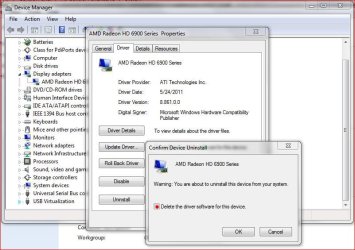
Go to Device manager, click on Display adapers, click your video card, click the Driver tab, click Uninstall, check the "Delete the driver software for this device" box and click OK.

Capture.JPG

Once you do that, the old drivers should be uninstalled. Restart the computer and cancel the driver install if it tries to install, then install the 10.2 drivers. If they don't work, try the 9.3 drivers.

Let me know.
 

My Computer

Computer type
PC/Desktop
Computer Manufacturer/Model Number
Custom built by me.
OS
Windows 10 Pro
CPU
Intel Core i7-4770K (3.5Ghz)
Motherboard
Gigabyte G1 Sniper 5 (F10 Bios)
Memory
32 gig Corsair Dominator Platinum (4x8Gig)
Graphics Card(s)
Sapphire Tri-X R9 Fury
Sound Card
Soundblaster ZXR
Monitor(s) Displays
NEC PA242W 24" LCD Monitor
Screen Resolution
1920 x 1200
Hard Drives
Primary - Samsung 850 Pro (512gig), Samsung 840 Pro (256gig), 2TB WD Caviar Black.
PSU
EVGA Supernova 1000 G2
Case
Cooler Master HAF X
Cooling
Corsair H100i with Corsair Air Series SP120 Quiet Fans
Keyboard
Logitech Wireless Wave
Mouse
Logitech Performance MX
Internet Speed
High Speed Cable
Antivirus
Norton Security
Browser
IE11
Other Info
Memory Timings - 1866MHz @ 9-9-9-27-1T @ 1.5 volts
Since he has a screen I would assume the video card is working.

As for......
OR if you can find another spare hard drive to which you can load Windows 7 32bit, and load the correct drivers + WoW.

He just needs to find the correct driver for his video card as he already has a 32-bit OS installed.

Anyway the OP can try the 10.2 drivers here..... ATI Catalyst

If that doens't work, look here..... Previous Catalyst

Let us know.

If his problem is simply driver-related, I agree however if he has a hardware problem (remember that's a 9800 series video card, it's quite old), no amount of driver tuning will resolve a card that's failing at the hardware level, the most logical step is to make certain that the hardware is not faulty. Driver tuning on a pre-existing operating installation will NOT identify a faulty card.

A compromised Operating System installation can cause problems even when the drivers are installed properly. This is why it's best to test the video card on a separate hard drive with a fresh installation of Windows (32bit to match his real system), load the correct software and drivers and test it out that way. If the video card performs properly then it's very likely that the hardware is in good shape. If it doesn't work properly despite a new OS install, new drivers amongst other things, then it's likely the card is bad.

All in all I hope it's just a matter of him clearing out outdated addons for his WoW game and simply updating to the latest Radeon driver set from AMD/ATI. If that doesn't work however...
 

My Computer

Computer Manufacturer/Model Number
Sony / IBM / Apple MB Pro 2011
OS
Windows 7 Ultimate x64 / OS X Snow Leopard 10.6.8
CPU
i7 QM720 - AMD MV40 - i5 2.3Ghz SB
Memory
8GB - 4GB - 8GB
Graphics Card(s)
Nvidia 310M - ATI 3200M - Intel HD3000
Sound Card
Various
Monitor(s) Displays
Sony 17 inch LCD - 12 inch - 13 inch
Hard Drives
OCZ Vertex 2 240Gb
Crucial RealSSD C330 256GB
OWC Mercury Extreme Pro 6G 240GB
When you say install the drivers, what do you mean? Because when I download the Catalyst Software Suite from the linked website, I click setup, which installs it on my computer. When I try to update the driver by searching through my computer for one (instead of doing automatic update), which file is the actual driver that I should select?

Also, once I uninstall old drivers, windows makes the hardware safely removed sound, but then my screen goes completely dark, anyway around that?

Thanks for the help!!
 

My Computer

Computer Manufacturer/Model Number
Dell Dimension 4600
OS
Windows 7 Home Premium 32 bit (SP1)
Regardless, I've been trying to fix this for about a week or so. At some point I'll probably go out and buy a new video card, since its high time for an upgrade anyway.
 

My Computer

Computer Manufacturer/Model Number
Dell Dimension 4600
OS
Windows 7 Home Premium 32 bit (SP1)
When you say install the drivers, what do you mean? Because when I download the Catalyst Software Suite from the linked website, I click setup, which installs it on my computer. When I try to update the driver by searching through my computer for one (instead of doing automatic update), which file is the actual driver that I should select?

Also, once I uninstall old drivers, windows makes the hardware safely removed sound, but then my screen goes completely dark, anyway around that?

Thanks for the help!!

It's best to let the Catalyst software make that determination automatically. While supporting World of Warcraft is not what we do here, you could try and simply temporarily relocating your addons folder elsewhere and start the game. If the game recently got patched, then it's possible some visuals were affected.

However like I said earlier, we don't know what the problem is, simply saying that it's driver related is a blind guess and if your Windows installation is messed up without your knowing, simple driver fixes won't correct the problem.

The first and foremost question is, is the video card working properly, to answer that you could load Windows onto a diff hard drive, load up all the required drivers for your machine, load WoW then see if that works without issue. If it's all good then we know your video card and drivers are fine. Now we can work on software issues.

When it comes to troubleshooting, you must always confirm the condition of the hardware first before dealing with anything software.
 

My Computer

Computer Manufacturer/Model Number
Sony / IBM / Apple MB Pro 2011
OS
Windows 7 Ultimate x64 / OS X Snow Leopard 10.6.8
CPU
i7 QM720 - AMD MV40 - i5 2.3Ghz SB
Memory
8GB - 4GB - 8GB
Graphics Card(s)
Nvidia 310M - ATI 3200M - Intel HD3000
Sound Card
Various
Monitor(s) Displays
Sony 17 inch LCD - 12 inch - 13 inch
Hard Drives
OCZ Vertex 2 240Gb
Crucial RealSSD C330 256GB
OWC Mercury Extreme Pro 6G 240GB
When you say install the drivers, what do you mean? Because when I download the Catalyst Software Suite from the linked website, I click setup, which installs it on my computer.

If you've installed the Catalyst suite then the drivers installed as well. All is good.

Now that doesn't automatically mean your performance issue will go away, it just means the driver isn't the issue.

In short, if the catalyst suit installed, all is good - there's nothing else to install.

As for the game itself, you might check to make sure you have the latest patch.

Also as noted, that card is quite old. I have an ATI RADEON ALL-IN-WONDER 9800 PRO that I bought in 2003 :shock:
 

My Computer

Computer type
PC/Desktop
Computer Manufacturer/Model Number
Custom built by me.
OS
Windows 10 Pro
CPU
Intel Core i7-4770K (3.5Ghz)
Motherboard
Gigabyte G1 Sniper 5 (F10 Bios)
Memory
32 gig Corsair Dominator Platinum (4x8Gig)
Graphics Card(s)
Sapphire Tri-X R9 Fury
Sound Card
Soundblaster ZXR
Monitor(s) Displays
NEC PA242W 24" LCD Monitor
Screen Resolution
1920 x 1200
Hard Drives
Primary - Samsung 850 Pro (512gig), Samsung 840 Pro (256gig), 2TB WD Caviar Black.
PSU
EVGA Supernova 1000 G2
Case
Cooler Master HAF X
Cooling
Corsair H100i with Corsair Air Series SP120 Quiet Fans
Keyboard
Logitech Wireless Wave
Mouse
Logitech Performance MX
Internet Speed
High Speed Cable
Antivirus
Norton Security
Browser
IE11
Other Info
Memory Timings - 1866MHz @ 9-9-9-27-1T @ 1.5 volts
Back
Top