ATI Radeon 9800 pro won't install!

chillphillyphil

New member
Local time
2:26 AM
Messages
9
Location
Home
:mad:

Using Windows 32bit (x86) and trying to install my ATI Radeon 9800 pro (AGP) card.

This card WAS working just fine before but I cannot remember how to properly install it again.

I AM aware that this card is not supported with it's own windows 7 legacy drivers and must use ATI's catalyst Vista drivers in compatibility mode to install properly.

Here is the process that I am doing:

  1. Download Catalyst drivers from ATI's website.
    (the versions I have downloaded thus far: 7.1 , 9.1, 10.2, 10.5, 10.6)
  2. Uninstall RADEON 9800 PRO (Microsoft Corporation - WDDM) crap driver in device manager.
  3. Click Update Driver Software.
  4. Click Browse my computer for driver software.
  5. Click Let me pick from a list of device drivers on my computer. (As search for driver location in option above only selects windows wddm crap driver as the latest version.)
  6. Select Have disk and found .inf file in directory (for me) G://ATI/Support/10-02_legacy_vista32-64_dd_ccc/packages/drivers/display/LH_INF/CL_95951.inf
  7. Check "show compatible hardware"
  8. Select RADEON 9800 PRO and click next. "Windows has sucessfully updated your driver software - the hardware you installed will not work until your restart your computer."
  9. restart computer.
  10. Windows 7 reloads and the device is not operational and no aero effects are working yadda yadda....
So tell me - what am I doing wrong exactly? I know I've had this card working before - quite brilliantly infact and now I just can't get the thing installed. Io also can't get the card to install with the catalyst software - which I will post the process I perform to do that next.

Any and all help is appreciated - and no I will not buy a newer card!
 

My Computer My Computer

Computer Manufacturer/Model Number
Home Built
OS
Windows 7 Home 32bit (x86)
CPU
Pentium 4 Northwood 2.4ghz 800mhz FSB (stock @ 1.5v)
Motherboard
MSI MS-6728 (i865/PE/i848p chipset)
Memory
2gb (1+1) pc3200 Kingston ram @ 200mhz
Graphics Card(s)
ATI Radeon 9800 pro w/ Zalnec heatsink
Sound Card
Integrated C-Media 5.1
Monitor(s) Displays
Samsung 19inch widescreen HDMI
Hard Drives
1 250gb Western Digital 7200rpm IDE
1 80gb Maxtor 7200rpm IDE
PSU
500 watt generic (p4 compatible)
Case
Antec Silver Mid-Tower
Cooling
Fans
chillphillyphil, welcome to the forums.

It isn't the card that is the problem, it is the totally unsupported chipset that is. Your motherboard has the old Intel 865PE chipset on it and Intel declared it end of life quite a while ago, and as a result there is no real support for it in Windows 7 Or Vista for that matter). One thing you can try is to install the older Intel INF Utility for your board from MSI,

MSI Global – Computer, Laptop, Notebook, Desktop, Mainboard, Graphics and more

and run the install using compatibility mode,

Compatibility Mode - Vista Forums

and hopefully that will get the AGP/GART portion of the driver installed. I would suggest the latest version but Intel has this to say about it,

**Important**
The Intel Chipset Device Software does not install drivers for AGP or USB. DO NOT DOWNLOAD THIS UTILITY IF YOUR DEVICE MANUFACTURER IS RECOMMENDING IT TO CORRECT AN "AGP DRIVER," "AGP GART," OR "USB DRIVER" ISSUE; IT WILL NOT CORRECT YOUR ISSUE.

 INF Update Utility - Primarily for Intel® 5, 4, 3, 900 Series Chipsets

I do know that that card works in Windows 7 if you can get the AGP driver to work as I have it running quite happily in an older system for my kids with an equally old (if not older) SiS 746 based motherboard, and I had to install the last XP AGP driver using compatibility mode to get the ATI driver to install properly and Aero to work.
 

My Computer My Computer

Computer type
PC/Desktop
Computer Manufacturer/Model Number
Me
OS
Win 7 Ultimate x64
CPU
FX-8350 @ 4.6 GHz so far
Motherboard
Asus M5A97 EVO
Memory
ADATA XPG V1 Series Black 8GB DDR3 1600
Graphics Card(s)
Sapphire R9 270x Dual-X
Sound Card
Xonar DGX w/ Corsair Vengence 1300
Monitor(s) Displays
Acer S232HL Abid
Screen Resolution
1920x1080
Hard Drives
120 GB OCZ Vertex 3
500 GB Seagate 7200.12
PSU
Antec Earthwatts 650W Green
Case
Antec Three Hundred
Cooling
Cooler Master 212 EVO
Keyboard
Logitech G510
Mouse
Logitech G500s
Internet Speed
35000/3000
Gay Error Pictures

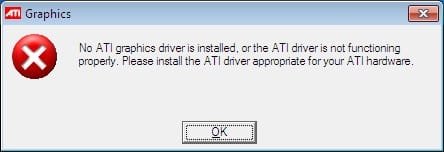
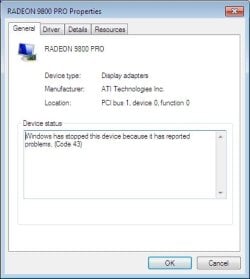
Here are pictures of the error messages that show up after all the processes completed above :mad:
 

Attachments

  • gayerror.jpg
    gayerror.jpg
    10.3 KB · Views: 17
  • gayerror2.jpg
    gayerror2.jpg
    21.2 KB · Views: 13

My Computer My Computer

Computer Manufacturer/Model Number
Home Built
OS
Windows 7 Home 32bit (x86)
CPU
Pentium 4 Northwood 2.4ghz 800mhz FSB (stock @ 1.5v)
Motherboard
MSI MS-6728 (i865/PE/i848p chipset)
Memory
2gb (1+1) pc3200 Kingston ram @ 200mhz
Graphics Card(s)
ATI Radeon 9800 pro w/ Zalnec heatsink
Sound Card
Integrated C-Media 5.1
Monitor(s) Displays
Samsung 19inch widescreen HDMI
Hard Drives
1 250gb Western Digital 7200rpm IDE
1 80gb Maxtor 7200rpm IDE
PSU
500 watt generic (p4 compatible)
Case
Antec Silver Mid-Tower
Cooling
Fans
This is the only driver for that card to use in Windows 7,

http://support.amd.com/us/gpudownlo...ev=10.2&ostype=Windows Vista - 32-Bit Edition

It could also be that due to the unsupported chipset that the AGP port is running in PCI mode. If that is what has happened there are instructions in this thread (it's a long one, and sorry don't remember exactly how far into it it is),

http://www.sevenforums.com/graphic-cards/35299-install-agp-drivers-hd-3850-3650-2400-pro.html

on how to change it with an INF or INI edit.

Till you get the driver to install properly it may not help, but if you haven't you need to run the Windows Experience Index before Aero will work.

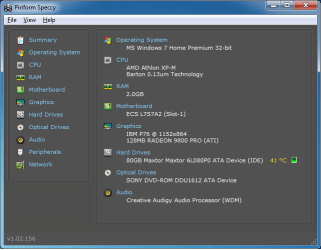
As for when I said the card works,

speccy.png

Unfortunately until all the ducks are lined up, it won't work. Only reason I put Windows 7 on that old girl was I was tired of maintaining XP for the wife and kids (more the kids than wife), and threw it on as an experiment and all things considering it runs better with 7 than it ever did with XP.
 
Last edited:

My Computer My Computer

Computer type
PC/Desktop
Computer Manufacturer/Model Number
Me
OS
Win 7 Ultimate x64
CPU
FX-8350 @ 4.6 GHz so far
Motherboard
Asus M5A97 EVO
Memory
ADATA XPG V1 Series Black 8GB DDR3 1600
Graphics Card(s)
Sapphire R9 270x Dual-X
Sound Card
Xonar DGX w/ Corsair Vengence 1300
Monitor(s) Displays
Acer S232HL Abid
Screen Resolution
1920x1080
Hard Drives
120 GB OCZ Vertex 3
500 GB Seagate 7200.12
PSU
Antec Earthwatts 650W Green
Case
Antec Three Hundred
Cooling
Cooler Master 212 EVO
Keyboard
Logitech G510
Mouse
Logitech G500s
Internet Speed
35000/3000
Stormy is awesome

Well a few things here. First and foremost - thanks for giving me some options here, atleast I'm not at a dead end now and I appreciate the time you've taken.


1. I did install the intel .inf update (windows XP version) in compatibility mode as well as the windows XP 10.2 drivers and this did a few things:
  • A. Found multiple undetected USB devices (not related but releived non the less.)
  • B. Allowed my screen to flicker when installing device driver (this is good), and sucessfully installed the XP drivers.
For some reason when I download the vista driver set - it will NOT allow me to install in compatibility mode - it DID however install the windows XP driver set sucessfully and I now have true 32bit and all the proper resolutions that I did not have before - still no aero effects and I had run the performance assesment with an abysmal 1.0 and 1.4 in the graphics departement. None the less I feel we're making progress here.
I will continue to try and tinker around with different driver sets and maybe I can find a set that will allow me to install in vista compatibility mode (which I beleive is the set I will need for the alpha effects.)

I'll keep everyone updated with my progress.
 

Attachments

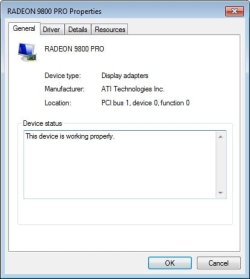
  • sucesserror1.jpg
    sucesserror1.jpg
    19.8 KB · Views: 13

My Computer My Computer

Computer Manufacturer/Model Number
Home Built
OS
Windows 7 Home 32bit (x86)
CPU
Pentium 4 Northwood 2.4ghz 800mhz FSB (stock @ 1.5v)
Motherboard
MSI MS-6728 (i865/PE/i848p chipset)
Memory
2gb (1+1) pc3200 Kingston ram @ 200mhz
Graphics Card(s)
ATI Radeon 9800 pro w/ Zalnec heatsink
Sound Card
Integrated C-Media 5.1
Monitor(s) Displays
Samsung 19inch widescreen HDMI
Hard Drives
1 250gb Western Digital 7200rpm IDE
1 80gb Maxtor 7200rpm IDE
PSU
500 watt generic (p4 compatible)
Case
Antec Silver Mid-Tower
Cooling
Fans
Well at least it is a step in the right direction. Wish I could help with getting the Intel AGP driver to cooperate, but that sort of thing is a bit beyond me. Hopefully someone else will come along with a solution if you don't find one in the mean time.

P.S. Once it is working it should have a WEI somewhere around here for the card,

9800wei.JPG
 

My Computer My Computer

Computer type
PC/Desktop
Computer Manufacturer/Model Number
Me
OS
Win 7 Ultimate x64
CPU
FX-8350 @ 4.6 GHz so far
Motherboard
Asus M5A97 EVO
Memory
ADATA XPG V1 Series Black 8GB DDR3 1600
Graphics Card(s)
Sapphire R9 270x Dual-X
Sound Card
Xonar DGX w/ Corsair Vengence 1300
Monitor(s) Displays
Acer S232HL Abid
Screen Resolution
1920x1080
Hard Drives
120 GB OCZ Vertex 3
500 GB Seagate 7200.12
PSU
Antec Earthwatts 650W Green
Case
Antec Three Hundred
Cooling
Cooler Master 212 EVO
Keyboard
Logitech G510
Mouse
Logitech G500s
Internet Speed
35000/3000
XP drivers are better?

I just wanted to say - as a side note. I've been frustrated for several hours trying to get these vista drivers to work again, so i decided to take a break. My performance index suggests that the card would be slower on all levels with the 10.2 winxp drivers - however - I have gained 15fps average in combat arms at 1440 x 900 with settings on high. Also my video playback is significantly smoother than before - no jaggies, no stutters. This is very odd - I may very well just still with the xp drivers for now until I purchase another cheap AGP card.

This suggests to me that the perfomance index may display improper results just because of the driver information and does not represent actual performance. I do miss the aero effects tho :/. I hate vista so much -

Oh and high-five to stormy13 for the help. :cool:
 

My Computer My Computer

Computer Manufacturer/Model Number
Home Built
OS
Windows 7 Home 32bit (x86)
CPU
Pentium 4 Northwood 2.4ghz 800mhz FSB (stock @ 1.5v)
Motherboard
MSI MS-6728 (i865/PE/i848p chipset)
Memory
2gb (1+1) pc3200 Kingston ram @ 200mhz
Graphics Card(s)
ATI Radeon 9800 pro w/ Zalnec heatsink
Sound Card
Integrated C-Media 5.1
Monitor(s) Displays
Samsung 19inch widescreen HDMI
Hard Drives
1 250gb Western Digital 7200rpm IDE
1 80gb Maxtor 7200rpm IDE
PSU
500 watt generic (p4 compatible)
Case
Antec Silver Mid-Tower
Cooling
Fans
Custom Drivers

So I've attempted to create my own custom drivers by modifying the ATI radeon 9800 mobility drivers. My expectations were low from the start and the driver did not work, however it did allow me to use the CCC properly - which in turn displayed no information for the driverset. :cry:

I've pretty much tried every technique on this forum. My theory is that I will need to install on a fresh windows 7 and make sure that I allow windows update to take care of all the drivers for me - this seems to have worked for other users. It'll most likely be a while before i do that.
 

My Computer My Computer

Computer Manufacturer/Model Number
Home Built
OS
Windows 7 Home 32bit (x86)
CPU
Pentium 4 Northwood 2.4ghz 800mhz FSB (stock @ 1.5v)
Motherboard
MSI MS-6728 (i865/PE/i848p chipset)
Memory
2gb (1+1) pc3200 Kingston ram @ 200mhz
Graphics Card(s)
ATI Radeon 9800 pro w/ Zalnec heatsink
Sound Card
Integrated C-Media 5.1
Monitor(s) Displays
Samsung 19inch widescreen HDMI
Hard Drives
1 250gb Western Digital 7200rpm IDE
1 80gb Maxtor 7200rpm IDE
PSU
500 watt generic (p4 compatible)
Case
Antec Silver Mid-Tower
Cooling
Fans
Windows 7 w/ Ati Radeon 9800 pro now works.

I got it to work :D

The only way I was able to install the fully functional windows 7 with aero effects is to install windows xp with all updated drivers and install windows 7 to another partition while in windows xp.

If only we knew why it worked....
 

My Computer My Computer

Computer Manufacturer/Model Number
Home Built
OS
Windows 7 Home 32bit (x86)
CPU
Pentium 4 Northwood 2.4ghz 800mhz FSB (stock @ 1.5v)
Motherboard
MSI MS-6728 (i865/PE/i848p chipset)
Memory
2gb (1+1) pc3200 Kingston ram @ 200mhz
Graphics Card(s)
ATI Radeon 9800 pro w/ Zalnec heatsink
Sound Card
Integrated C-Media 5.1
Monitor(s) Displays
Samsung 19inch widescreen HDMI
Hard Drives
1 250gb Western Digital 7200rpm IDE
1 80gb Maxtor 7200rpm IDE
PSU
500 watt generic (p4 compatible)
Case
Antec Silver Mid-Tower
Cooling
Fans
Back
Top