ATI Radeon HD 5770 Sound Problem

hostelo

New member
Member
Local time
6:21 PM
Messages
80
Location
Dominican Republic
Decided to make a separate thread just for this even though I posted it in another because its a very annoying problem and I want to see if the gurus her can solve this for me.

Ever since I bought this card i get this weird crackling noise while watching movies and tv shows,etc... from my computer to my tv.

I have the hdmi connected from my card to my Onkyo Surround.

This crackling noise only happens when I'm watching videos on my pc using my TV, not with my PS3,XBOX,etc.... so it's not the Surround that has problems.

It also cant be the videos I have (Mostly 720p HD MKV's) because I find it hard to believe ALL of them have sound problems.

This is the noise, I recorded it while watching Prison Break 720p HD.
I did not know where to upload it or how to upload a sound file to youtube.
So I just uploaded the small (2mb) .m4a file to megaupload.
It can be heard with iTunes or any other music file player.
Here is the link:

MEGAUPLOAD - The leading online storage and file delivery service


The driver I have installed is the most current CCC 10.4

Hope you guys can help me out.
Thanks!
 

My Computer My Computer

OS
Windows 7 Ultimate 64-bit
CPU
Intel Core i5 Processor 2.66 GHz 8 MB LGA1156 CPU I5-750BOX
Motherboard
ASUS P7P55D
Memory
8GB Corsair DDR3
Graphics Card(s)
ATI HD 5770
Sound Card
Graphic Card
Monitor(s) Displays
Dell 22" Monitor and Extended to a 52" Plasma
Hard Drives
1 x 120 GB SSD
1 x 1 TB SATA
1 x 1.5 TB SATA
3 x 2TB SATA
Case
Cooler Master HAF 932
Have you tried a different cord? The crackling could be from a faulty wire in your HDMI.
 

My Computer My Computer

Computer Manufacturer/Model Number
Zen Productions
OS
Windows 7 Ultimate x64
CPU
Intel i7-860
Motherboard
Gigabyte GA-P55A-UD4P
Memory
Corsair Dominator 1600Mhz, 8-8-8-24 1.65v 2x2GB
Graphics Card(s)
ATI Radeon 5770 HD
Sound Card
Intel High Definition Sound
Monitor(s) Displays
Samsung P2570HD
Screen Resolution
1920x1080
Hard Drives
Western Digital Caviar Black 500gb
PSU
Corsair CMPSU-750HX 750W
Case
Antec p183
Cooling
Corsair H50 Water Cooler
Keyboard
Logitech G110
Mouse
Logitech MX Revolution
Internet Speed
768 mb/s
I have a similar problem on an old P4 comp with an intel mainboard with on-board sound.

So I checked your specs to see if your motherboard had on-board sound but you listed the socket type (LGA1156) not the motherboard model #, so I will have to guess that you do.

Also, unless I've been asleep and missed it, video cards do not do sound. (I actually checked the 5770's specs to make sure!)

So if you are channeling video from your computer to your TV by HDMI cable then the video is coming from the 5770, and the sound is coming from your on-board sound chip.

What you are hearing is electrical interference. It could be (and you hope so) from poor wire (as Zen pointed out), poor connections (check the plugs, re-seat your PCIe cards, etc.), or.....

My Intel motherboard is defective. The electrical interference comes from a bad circuit on the board. It was never enough of an issue for me to replace the board. It's a work machine, not for play.

If the problem persists after you have checked to make sure that all of the electrical connections are good, you could try uninstalling and reinstalling the audio drivers - small chance that could be it - just to be sure it's not.

If you have a physical sound card then it could be defective or not seated in the slot properly.

Hope that helps.
 

My Computer My Computer

Computer type
PC/Desktop
Computer Manufacturer/Model Number
Home Built - Jan 2013
OS
Windows 7 64 Bit Home Premium SP1
CPU
i7-3820
Motherboard
Asus P9X79-PRO - Bios 4608
Memory
GSkill F3-14900CL9Q - 16GB
Graphics Card(s)
EVGA GeForce GTX660 - Driver 352.86
Sound Card
On board Realtek ALC898
Monitor(s) Displays
Acer S271HL
Screen Resolution
1920 x 1080
Hard Drives
#1- Samsung 840 Pro Series
#2- Western Digital WD1002FAEX Sata3 Black
#3- Western Digital WD1002FAEX Sata3 Black
PSU
Corsair CMPSU-850TX-V2 - 850 watt (by Seasonic)
Case
Corsair Obsidian 550D
Cooling
Standard 3 120mm case fans, Cooler Master Hyper 212 EVO
Keyboard
MS KC-0405
Mouse
Intellimouse 5-button
Internet Speed
56 Mbits/Sec (on a good day)
Antivirus
Avast & Malwarebytes
Browser
Firefox
Other Info
Asus DVD - DRW-24B1ST 24X
@TVeblen,
I'm afraid you might have been asleep. The Radeon HD series of cards do have an onboard sound chip.

HD5770 Spec

Integrated HD audio controller
  • Output protected high bit rate 7.1 channel surround sound over HDMI with no additional cables required
  • Supports AC-3, AAC, Dolby TrueHD and DTS Master Audio formats
@hostelo,

It's been a commonly reported issue in the ATI forums, crackling and dropouts of sound over HDMI.

AMD Game Forums - Radeon 5770/5850/5870 audio/sound crackling/dropouts/silent over HDMI

Some users report that using the Realtek ATI HDMI 2.42 audio driver instead of the ATI's version resolves this issue.
http://www.filecluster.com/downloads/Realtek-ATI-HDMI-Audio-Device.html Realtek ATI HDMI Audio Driver 2.42

Other users report that by locking the cards GPU & Memory clocks to High Performance/3D clocks or by increasing the cards idle/2d clocks.
 

My Computer My Computer

OS
Windows 7 Home Premium (64-bit) SP1 RTM
CPU
Intel Core2Duo [email protected]
Motherboard
ASUS P5Q (BIOS 2208)
Memory
2x2Gb GEIL DDR2 800 4-4-4-12 @ 1.8v
Graphics Card(s)
ASUS HD4850 512Mb @700/1100
Sound Card
Realtek ALC1200 @ Intel 82801JB ICH10
Monitor(s) Displays
Samsung Syncmaster T220
Screen Resolution
1680x1050x32@60Hz
Hard Drives
Seagate ST3500410AS SATA300 500Gb
Hitachi HDS721032CLA362 SATA300 320Gb
PSU
Antec NeoPower 650W 3.3v@24A/5v@24A/12v@19A/12v@19A/12v@19A
Internet Speed
3Mbps
Hey Rik, thanks for putting me straight. I hope your suggestions will help the OP.

But now I am curious: Is there some kind of switching that goes on to separate the audio output from the motherboard from the audio output on the video card? What happens if you want the audio to come from a dedicated sound card?
 

My Computer My Computer

Computer type
PC/Desktop
Computer Manufacturer/Model Number
Home Built - Jan 2013
OS
Windows 7 64 Bit Home Premium SP1
CPU
i7-3820
Motherboard
Asus P9X79-PRO - Bios 4608
Memory
GSkill F3-14900CL9Q - 16GB
Graphics Card(s)
EVGA GeForce GTX660 - Driver 352.86
Sound Card
On board Realtek ALC898
Monitor(s) Displays
Acer S271HL
Screen Resolution
1920 x 1080
Hard Drives
#1- Samsung 840 Pro Series
#2- Western Digital WD1002FAEX Sata3 Black
#3- Western Digital WD1002FAEX Sata3 Black
PSU
Corsair CMPSU-850TX-V2 - 850 watt (by Seasonic)
Case
Corsair Obsidian 550D
Cooling
Standard 3 120mm case fans, Cooler Master Hyper 212 EVO
Keyboard
MS KC-0405
Mouse
Intellimouse 5-button
Internet Speed
56 Mbits/Sec (on a good day)
Antivirus
Avast & Malwarebytes
Browser
Firefox
Other Info
Asus DVD - DRW-24B1ST 24X
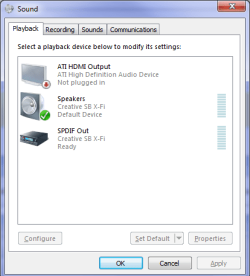
What happens if you want the audio to come from a dedicated sound card?

You set the one you want to use as the default,

atiaudio.png
 

My Computer My Computer

Computer type
PC/Desktop
Computer Manufacturer/Model Number
Me
OS
Win 7 Ultimate x64
CPU
FX-8350 @ 4.6 GHz so far
Motherboard
Asus M5A97 EVO
Memory
ADATA XPG V1 Series Black 8GB DDR3 1600
Graphics Card(s)
Sapphire R9 270x Dual-X
Sound Card
Xonar DGX w/ Corsair Vengence 1300
Monitor(s) Displays
Acer S232HL Abid
Screen Resolution
1920x1080
Hard Drives
120 GB OCZ Vertex 3
500 GB Seagate 7200.12
PSU
Antec Earthwatts 650W Green
Case
Antec Three Hundred
Cooling
Cooler Master 212 EVO
Keyboard
Logitech G510
Mouse
Logitech G500s
Internet Speed
35000/3000
Nice!
My GTX260 does not have HDMI out, so I don't get those settings.
Thanks for the lesson.
 

My Computer My Computer

Computer type
PC/Desktop
Computer Manufacturer/Model Number
Home Built - Jan 2013
OS
Windows 7 64 Bit Home Premium SP1
CPU
i7-3820
Motherboard
Asus P9X79-PRO - Bios 4608
Memory
GSkill F3-14900CL9Q - 16GB
Graphics Card(s)
EVGA GeForce GTX660 - Driver 352.86
Sound Card
On board Realtek ALC898
Monitor(s) Displays
Acer S271HL
Screen Resolution
1920 x 1080
Hard Drives
#1- Samsung 840 Pro Series
#2- Western Digital WD1002FAEX Sata3 Black
#3- Western Digital WD1002FAEX Sata3 Black
PSU
Corsair CMPSU-850TX-V2 - 850 watt (by Seasonic)
Case
Corsair Obsidian 550D
Cooling
Standard 3 120mm case fans, Cooler Master Hyper 212 EVO
Keyboard
MS KC-0405
Mouse
Intellimouse 5-button
Internet Speed
56 Mbits/Sec (on a good day)
Antivirus
Avast & Malwarebytes
Browser
Firefox
Other Info
Asus DVD - DRW-24B1ST 24X

My Computer My Computer

Computer type
PC/Desktop
Computer Manufacturer/Model Number
Me
OS
Win 7 Ultimate x64
CPU
FX-8350 @ 4.6 GHz so far
Motherboard
Asus M5A97 EVO
Memory
ADATA XPG V1 Series Black 8GB DDR3 1600
Graphics Card(s)
Sapphire R9 270x Dual-X
Sound Card
Xonar DGX w/ Corsair Vengence 1300
Monitor(s) Displays
Acer S232HL Abid
Screen Resolution
1920x1080
Hard Drives
120 GB OCZ Vertex 3
500 GB Seagate 7200.12
PSU
Antec Earthwatts 650W Green
Case
Antec Three Hundred
Cooling
Cooler Master 212 EVO
Keyboard
Logitech G510
Mouse
Logitech G500s
Internet Speed
35000/3000
Yes, the ATI cards use their own onboard audio chip while nvidia cards have to use a passthrough cable from the onboard sound to the card. When you connect a HDseries radeon to a HDTV via HDMI. You go to windows playback devices and change the default device from your onboard motherboard/sound card to ATI HDMI/DP High Definition Audio device. So now the sound plays out the HDTV using ATI's sound chip.

The 5xxx series will bitstream ALL of the new BluRay audio codecs inc Dolby TrueHD and DTS-HD MA etc or internally decode it to 8-channel LPCM if you don't have a modern receiver capable of decoding the HD audio itsef.

I think (not sure about this), if you have an HDTV than can take an HDMI signal from the ATI card and a seperate audio signal from the soundcard, you could have the two connections. Although some HDTV's cancel the seperate audio if it detects an audio connection on the HDMI.

The ATI HD Sound chip is actually quite good and there shouldn't be any need to use a dedicated sound card. For best results, use Realteks own ATI drivers and pass the HDMI signal to a 7.1 Decoder AMP then to the HDTV. This will decode the signal to give you the 7.1 channel sound in the different formats (AC-3, AAC, Dolby TrueHD and DTS Master)

(oops, I took a bit too long to type this out)
 

My Computer My Computer

OS
Windows 7 Home Premium (64-bit) SP1 RTM
CPU
Intel Core2Duo [email protected]
Motherboard
ASUS P5Q (BIOS 2208)
Memory
2x2Gb GEIL DDR2 800 4-4-4-12 @ 1.8v
Graphics Card(s)
ASUS HD4850 512Mb @700/1100
Sound Card
Realtek ALC1200 @ Intel 82801JB ICH10
Monitor(s) Displays
Samsung Syncmaster T220
Screen Resolution
1680x1050x32@60Hz
Hard Drives
Seagate ST3500410AS SATA300 500Gb
Hitachi HDS721032CLA362 SATA300 320Gb
PSU
Antec NeoPower 650W 3.3v@24A/5v@24A/12v@19A/12v@19A/12v@19A
Internet Speed
3Mbps
Rik55 has got it right

I will try the suggestions Rik55 gave me and let you know what happens.

But a note: Weird thing is when listening to music via the same hdmi and the same surround i get no crackling or dropouts!!!

Just in Case:
My Motherboard: Asus P7P55D
Processor: Intel Core i5
Mem: 4GB DD3
My Card: ATI Radeon HD 5770
My Surround: Onkyo HT-S7200

Thanks for all the replies guys!!!
 

My Computer My Computer

OS
Windows 7 Ultimate 64-bit
CPU
Intel Core i5 Processor 2.66 GHz 8 MB LGA1156 CPU I5-750BOX
Motherboard
ASUS P7P55D
Memory
8GB Corsair DDR3
Graphics Card(s)
ATI HD 5770
Sound Card
Graphic Card
Monitor(s) Displays
Dell 22" Monitor and Extended to a 52" Plasma
Hard Drives
1 x 120 GB SSD
1 x 1 TB SATA
1 x 1.5 TB SATA
3 x 2TB SATA
Case
Cooler Master HAF 932
after installing Realtek ATI HDMI Audio Driver 2.42 there was a HUUUGEEE improvement.


thanks!!!
 

My Computer My Computer

OS
Windows 7 Ultimate 64-bit
CPU
Intel Core i5 Processor 2.66 GHz 8 MB LGA1156 CPU I5-750BOX
Motherboard
ASUS P7P55D
Memory
8GB Corsair DDR3
Graphics Card(s)
ATI HD 5770
Sound Card
Graphic Card
Monitor(s) Displays
Dell 22" Monitor and Extended to a 52" Plasma
Hard Drives
1 x 120 GB SSD
1 x 1 TB SATA
1 x 1.5 TB SATA
3 x 2TB SATA
Case
Cooler Master HAF 932
Back
Top