Ati Radeon HD4670 Error Code 43

SitoNL

New member
Local time
12:40 AM
Messages
5
Sorry about the double post, but I think a topic would be better.

My new HD 4670 displays a Code 43 at the Device Manager. I installed the latest catalyst version and even the agp hotfix, they don't work. Any suggestions?

Hardware ID's:
PCI\VEN_1002&DEV_9495&SUBSYS_00281787&REV_00
PCI\VEN_1002&DEV_9495&SUBSYS_00281787
PCI\VEN_1002&DEV_9495&CC_030000
PCI\VEN_1002&DEV_9495&CC_0300

Thanks in advance
 

My Computer

OS
Windows 7 Ultimate 64-bit
Doing a google search for error code 43 suggests it's a driver issue. One suggestion is to uninstall the device and drivers, then restart and DO NOT allow Windows to search and install any drivers, then install the latest ATI Catalyst (which includes the drivers).

You can uninstall both the device and the drivers in the Device Manager. RIGHT click on the HD4670 (to highlight it) then LEFT click "Uninstall" and check the box to also uninstall the Drivers. Then restart the PC and install as noted.

(I have an HD4850 installed in my Win 7 64 bit system).
 

My Computer

Computer type
PC/Desktop
Computer Manufacturer/Model Number
My Own Build
OS
Windows 10 64 bit
CPU
Intel i7 6700K
Motherboard
ASUS ROG Maximus VIII Hero
Memory
16GB Corsair Dominator
Graphics Card(s)
Intel CPU Graphics
Sound Card
RealTek
Monitor(s) Displays
27" Dell S2719dgf
Screen Resolution
2560X1440
Hard Drives
1 TB Samsung 850 EVO SSD for Win 10 Pro
500GB Samsung 850 EVO SSD for Win 10 Insider
2 TB drive for backup
PSU
EVGA Supernova 750G2
Case
BeQuiet Silent Base 600
Cooling
Deepcool Captain 120EX
Keyboard
Microsoft Wireless 2000
Mouse
Microsoft wireless
Internet Speed
100 MB/sec (Cable)
Antivirus
Microsoft Defender and Malwarebytes
Browser
Edge/Firefox
Other Info
Cakewalk (Sonar) by BandLab and Studio One 4.1 Pro recording studio software. MOTU 896Mk3 Hybrid recording interface, Frontier Tranzport wireless control unit, Behringer X-Touch Control Surface.
Five USB connected optical drives for CD Audio production using Nero BurningROM
How can I not let Windows search for drivers automatically?
 

My Computer

OS
Windows 7 Ultimate 64-bit
One way is to start into safe mode.
 

My Computer

Computer type
PC/Desktop
Computer Manufacturer/Model Number
Acer M5641
OS
Windows 7 Home Premium 64bit
CPU
Q6600
Motherboard
Nvidia MCP73PV
Memory
4GB.
Graphics Card(s)
Sapphire Vapor-X 5750
Sound Card
XFI Extreem music
Monitor(s) Displays
Acer X223W
Screen Resolution
1680x1050
Hard Drives
WD10 02FAEX
WD64 00AAKS
PSU
stock 450w
Case
acer
Cooling
stock
Keyboard
Microsoft Digital Media Pro.
Mouse
Logitech MX620
Internet Speed
49.51Mbs down 4.98Mbs up 17.6ms ping
Antivirus
MSE
Browser
Waterfox
Other Info
Shaw Cable
Netgear R6200
I did it the way you said, but still Error Code 43.
 

My Computer

OS
Windows 7 Ultimate 64-bit
Here is the correct Catalyst driver is the one you are using? Drivers & Support | GAME.AMD.COM

As I mentioned, everything I found doing a google search suggests a driver conflict issue. But, if it never worked it could be a hardware problem with the Video card.
 

My Computer

Computer type
PC/Desktop
Computer Manufacturer/Model Number
My Own Build
OS
Windows 10 64 bit
CPU
Intel i7 6700K
Motherboard
ASUS ROG Maximus VIII Hero
Memory
16GB Corsair Dominator
Graphics Card(s)
Intel CPU Graphics
Sound Card
RealTek
Monitor(s) Displays
27" Dell S2719dgf
Screen Resolution
2560X1440
Hard Drives
1 TB Samsung 850 EVO SSD for Win 10 Pro
500GB Samsung 850 EVO SSD for Win 10 Insider
2 TB drive for backup
PSU
EVGA Supernova 750G2
Case
BeQuiet Silent Base 600
Cooling
Deepcool Captain 120EX
Keyboard
Microsoft Wireless 2000
Mouse
Microsoft wireless
Internet Speed
100 MB/sec (Cable)
Antivirus
Microsoft Defender and Malwarebytes
Browser
Edge/Firefox
Other Info
Cakewalk (Sonar) by BandLab and Studio One 4.1 Pro recording studio software. MOTU 896Mk3 Hybrid recording interface, Frontier Tranzport wireless control unit, Behringer X-Touch Control Surface.
Five USB connected optical drives for CD Audio production using Nero BurningROM
Yup, that was the driver I used. I already know the problem, AGP+Windows 7+Nforce 3 chipset doesn't match.. so I installed Windows XP last night and everything works like a charm! Many thanks for the help tho ;)
 

My Computer

OS
Windows 7 Ultimate 64-bit
How can I not let Windows search for drivers automatically?
Do a system restore B4 U installed the update.
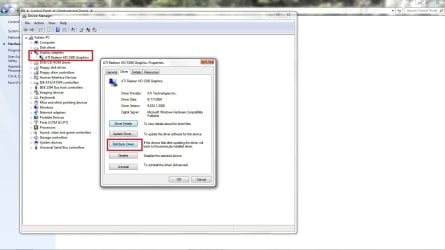
Or you can use device manager and go to your display adapter and roll back to a previous driver. Attached is an image 4U

Regards.
Adrian
 

Attachments

  • roll_back.jpg
    roll_back.jpg
    96.6 KB · Views: 713

My Computer

Computer Manufacturer/Model Number
Custom Build
OS
Windows 7 7600 1 X64
CPU
AMD PHENOM II X 550 PROCESSOR 3.1 ghz
Motherboard
ASUS M4A78-TE
Memory
Corsair 4 gig ddr 3
Graphics Card(s)
ati radeon 3300
Sound Card
ati hd
Monitor(s) Displays
syncmaster 2033sw
Screen Resolution
1600X900 60 hz refresh
Hard Drives
twin_seagates SATA's 1 TB & 500 Gig, hitachi_slimline 160 gig
PSU
antec_550 watt
Case
cooler master GLite
Cooling
stock_heat sink
Internet Speed
20mbs up/ 1.5mbs down
Other Info
favorite child "stewie"
favorite dog "brian"
Back
Top