I don't wish to waste money but am thinking perhaps it's time to change my Video card. At present I have the Radeon HD5570 1GB DDR3 which is quite a few years old, it's still working fine but I have just bought an LG23MP65HQ IPS monitor.
I have connected the monitors VGA to the DVI output on the card, there is no DVI connection on the monitor only VGA and HDMI.
Would it be an improvement to use the HDMI cable connections instead of the DVI/VGA? The manual says that the HDMI is for Digital Video and Audio but it also gives a warning 'that it can cause compatibility problem.'
If you think an upgrade is in order any suggestions? All the manufacturers reckon theirs is best so it's not easy to select one. My budget is around £50-100.
Thanks
Alan.
My Computer
At a glance
Windows 7 Professional 64biti5-2500K 3.30Hz 6MB Cache16GB DDR3ASUSGeforce GTX1050Ti 4GB
Computer type
PC/Desktop
Computer Manufacturer/Model Number
Home Build
OS
Windows 7 Professional 64bit
CPU
i5-2500K 3.30Hz 6MB Cache
Motherboard
ASUS P8P67 Pro B3 Revision
Memory
16GB DDR3
Graphics Card(s)
ASUSGeforce GTX1050Ti 4GB
Sound Card
On-Board
Monitor(s) Displays
LG23MP65HQ-P
Hard Drives
WD Caviar Green 500gb
Maxtor 300gb
WD External USB 120gb
WD My Passport USB 2TB
LUX3 External USB 1TB
Thanks, I use it mostly for data; Excel/Word/Emails, some photo work on posters. I do, when I am in the mood kill a few Aliens or battle away at some gaming, Quake/Halfllife/Bio-Shock/Call of Duty etc.
I will get an HDMI lead and see if it makes an improvement.
IF I decided to upgrade anyway is there a type/range more suited to my requirements you can suggest?
Regards
Alan.
My Computer
At a glance
Windows 7 Professional 64biti5-2500K 3.30Hz 6MB Cache16GB DDR3ASUSGeforce GTX1050Ti 4GB
Computer type
PC/Desktop
Computer Manufacturer/Model Number
Home Build
OS
Windows 7 Professional 64bit
CPU
i5-2500K 3.30Hz 6MB Cache
Motherboard
ASUS P8P67 Pro B3 Revision
Memory
16GB DDR3
Graphics Card(s)
ASUSGeforce GTX1050Ti 4GB
Sound Card
On-Board
Monitor(s) Displays
LG23MP65HQ-P
Hard Drives
WD Caviar Green 500gb
Maxtor 300gb
WD External USB 120gb
WD My Passport USB 2TB
LUX3 External USB 1TB
With the quality of your CPU and PSU it would just be down to how much you wanted to spend really. Let me know a budget and I'll gladly recommend you a card. The 5570 isn't brilliant for gaming if the truth be told.
My Computer
At a glance
W7 Pro x64 SP1 | W10 Pro IP x64 | W8.1 Pro x6...i7-4790k @ 4GHz (4.4GHz Boost)16GB DDR3 Kingston HyperX Fury @ 1600MHz CL 9...EVGA GTX 980 Classified
Computer type
PC/Desktop
Computer Manufacturer/Model Number
Custom Build
OS
W7 Pro x64 SP1 | W10 Pro IP x64 | W8.1 Pro x64 VM | Linux Mint VM
Many thanks for the suggestion, had a quick peek and it looks great but will read up on it tomorrow, the 5570 has done sterling service but I know it is not a great card but was all I could afford at the time.
Regards and thanks again.
Alan.
My Computer
At a glance
Windows 7 Professional 64biti5-2500K 3.30Hz 6MB Cache16GB DDR3ASUSGeforce GTX1050Ti 4GB
Computer type
PC/Desktop
Computer Manufacturer/Model Number
Home Build
OS
Windows 7 Professional 64bit
CPU
i5-2500K 3.30Hz 6MB Cache
Motherboard
ASUS P8P67 Pro B3 Revision
Memory
16GB DDR3
Graphics Card(s)
ASUSGeforce GTX1050Ti 4GB
Sound Card
On-Board
Monitor(s) Displays
LG23MP65HQ-P
Hard Drives
WD Caviar Green 500gb
Maxtor 300gb
WD External USB 120gb
WD My Passport USB 2TB
LUX3 External USB 1TB
You're welcome mate. The 750ti really is a fantastic card for the price, and while I don't doubt for a second that your 5570 has been a loyal servant for you you would certainly notice a huge difference. Plus it's the latest architecture from nVidia so you'd be set for quite a while.
Let us know what you decide.
My Computer
At a glance
W7 Pro x64 SP1 | W10 Pro IP x64 | W8.1 Pro x6...i7-4790k @ 4GHz (4.4GHz Boost)16GB DDR3 Kingston HyperX Fury @ 1600MHz CL 9...EVGA GTX 980 Classified
Computer type
PC/Desktop
Computer Manufacturer/Model Number
Custom Build
OS
W7 Pro x64 SP1 | W10 Pro IP x64 | W8.1 Pro x64 VM | Linux Mint VM
Dusted off my credit card and have ordered the new card as you have recommended . I did a Google search and looked on some websites and they gave some very positive comments, and as you say the price is very good for the specs (Not that I knew what most of them meant! )
Thanks for your input and I will let you know how I get on.
Regards
Alan.
My Computer
At a glance
Windows 7 Professional 64biti5-2500K 3.30Hz 6MB Cache16GB DDR3ASUSGeforce GTX1050Ti 4GB
Computer type
PC/Desktop
Computer Manufacturer/Model Number
Home Build
OS
Windows 7 Professional 64bit
CPU
i5-2500K 3.30Hz 6MB Cache
Motherboard
ASUS P8P67 Pro B3 Revision
Memory
16GB DDR3
Graphics Card(s)
ASUSGeforce GTX1050Ti 4GB
Sound Card
On-Board
Monitor(s) Displays
LG23MP65HQ-P
Hard Drives
WD Caviar Green 500gb
Maxtor 300gb
WD External USB 120gb
WD My Passport USB 2TB
LUX3 External USB 1TB
You're welcome Alan, if you need any help installing the card just give me a shout. Be sure to uninstall your ATI card via Device Manager before you physically remove it, that will remove the drivers for the card so you'll be good to go when you install your 750ti.
My Computer
At a glance
W7 Pro x64 SP1 | W10 Pro IP x64 | W8.1 Pro x6...i7-4790k @ 4GHz (4.4GHz Boost)16GB DDR3 Kingston HyperX Fury @ 1600MHz CL 9...EVGA GTX 980 Classified
Computer type
PC/Desktop
Computer Manufacturer/Model Number
Custom Build
OS
W7 Pro x64 SP1 | W10 Pro IP x64 | W8.1 Pro x64 VM | Linux Mint VM
I checked the framerate of the HD5570 of Halflife/Lost Coast, this was reported as 65.04fps, not sure if that is good or not though. Interesting to see what the new one reports.
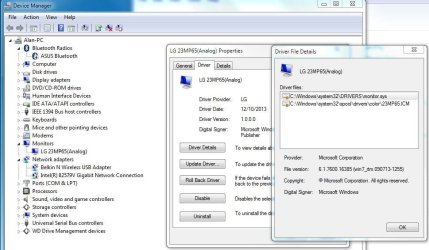
Installing the driver for the new LG monitor was a bit of a nightmare, only found the English instructions buried on pages 32~42 of the 'manual' the first pages were in Chinese! When I did manage to install the driver is reports the driver as being Analog, would there be a Digital version then?
Regards
Alan
My Computer
At a glance
Windows 7 Professional 64biti5-2500K 3.30Hz 6MB Cache16GB DDR3ASUSGeforce GTX1050Ti 4GB
Computer type
PC/Desktop
Computer Manufacturer/Model Number
Home Build
OS
Windows 7 Professional 64bit
CPU
i5-2500K 3.30Hz 6MB Cache
Motherboard
ASUS P8P67 Pro B3 Revision
Memory
16GB DDR3
Graphics Card(s)
ASUSGeforce GTX1050Ti 4GB
Sound Card
On-Board
Monitor(s) Displays
LG23MP65HQ-P
Hard Drives
WD Caviar Green 500gb
Maxtor 300gb
WD External USB 120gb
WD My Passport USB 2TB
LUX3 External USB 1TB
60fps is as good as it gets on a 60Hz 1080p monitor, anything more can (and usually does) cause screen tearing. While you won't get any benefits from the 750ti on that particular game, it's the newer games that are much more graphically demanding where you'll see the real difference; greater frame rates and higher settings with smooth gameplay.
I'm not too sure about the monitor driver, I usually just let Windows detect my monitor and install generic drivers. Did this not happen when you first booted up after plugging it in? If you can give me the model number I'll have a look into it for you mate.
My Computer
At a glance
W7 Pro x64 SP1 | W10 Pro IP x64 | W8.1 Pro x6...i7-4790k @ 4GHz (4.4GHz Boost)16GB DDR3 Kingston HyperX Fury @ 1600MHz CL 9...EVGA GTX 980 Classified
Computer type
PC/Desktop
Computer Manufacturer/Model Number
Custom Build
OS
W7 Pro x64 SP1 | W10 Pro IP x64 | W8.1 Pro x64 VM | Linux Mint VM
Guess that is what you call future proofing and staying ahead of the game .
Below should be the snippit on the LG driver which may help. When I plugged in the monitor it was working fine on generic driver, however I am advised to always use the manufactures driver if available.
Thanks
Alan.
Attachments
LG Capture.JPG
81.6 KB
· Views: 0
My Computer
At a glance
Windows 7 Professional 64biti5-2500K 3.30Hz 6MB Cache16GB DDR3ASUSGeforce GTX1050Ti 4GB
Computer type
PC/Desktop
Computer Manufacturer/Model Number
Home Build
OS
Windows 7 Professional 64bit
CPU
i5-2500K 3.30Hz 6MB Cache
Motherboard
ASUS P8P67 Pro B3 Revision
Memory
16GB DDR3
Graphics Card(s)
ASUSGeforce GTX1050Ti 4GB
Sound Card
On-Board
Monitor(s) Displays
LG23MP65HQ-P
Hard Drives
WD Caviar Green 500gb
Maxtor 300gb
WD External USB 120gb
WD My Passport USB 2TB
LUX3 External USB 1TB
Personally mate I'd uninstall the monitor and let Windows install the generic driver, I would only install the manufacturer's latest driver if I had problems with my monitor or was missing some functionality or features. Of course that's totally up to you.
I'll have a look into your monitor model shortly and see what I can find out.
My Computer
At a glance
W7 Pro x64 SP1 | W10 Pro IP x64 | W8.1 Pro x6...i7-4790k @ 4GHz (4.4GHz Boost)16GB DDR3 Kingston HyperX Fury @ 1600MHz CL 9...EVGA GTX 980 Classified
Computer type
PC/Desktop
Computer Manufacturer/Model Number
Custom Build
OS
W7 Pro x64 SP1 | W10 Pro IP x64 | W8.1 Pro x64 VM | Linux Mint VM



 )
)
 .
.
 .
.