ATi TV wonder pro x64

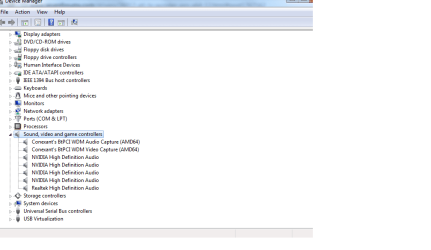
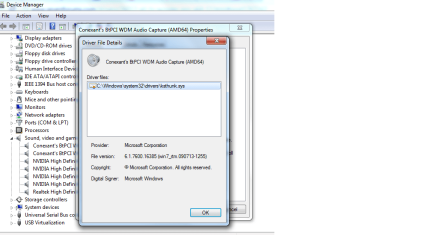
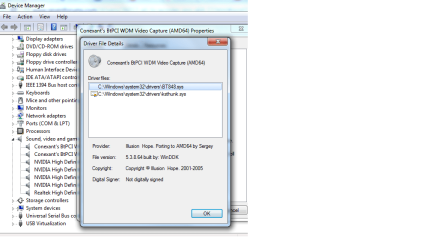
I have attached some screen shots of the driver details also in device manager. One is of the audio capture driver and the other is of the video capture driver. I don't know if my problem I am having is caused by using a bt848.sys driver for a bt878 chip.
 

Attachments

  • conexant driver in device manager.png
    conexant driver in device manager.png
    16.8 KB · Views: 40
  • conexant audio capture driver details.png
    conexant audio capture driver details.png
    37.7 KB · Views: 33
  • conexant video capture driver details.png
    conexant video capture driver details.png
    38.1 KB · Views: 30

My Computer My Computer

At a glance

Windows 7 Premium x64AMD Phenom II 4x8 GB DDR2
Computer Manufacturer/Model Number
Custom build
OS
Windows 7 Premium x64
CPU
AMD Phenom II 4x
Motherboard
ASUS M3A78
Memory
8 GB DDR2
Monitor(s) Displays
HP S2031
You will have to go back to page 12 to see my first post today. I posted again and it started another page.
 

My Computer My Computer

At a glance

Windows 7 Premium x64AMD Phenom II 4x8 GB DDR2
Computer Manufacturer/Model Number
Custom build
OS
Windows 7 Premium x64
CPU
AMD Phenom II 4x
Motherboard
ASUS M3A78
Memory
8 GB DDR2
Monitor(s) Displays
HP S2031
Did you use the automatic installer? If so, it looks like it installed the driver, but you might have to update with the inf you modified earlier in order for it to detect the video sources.
 

My Computer My Computer

At a glance

Windows 10 x64 ProfessionalAMD FX 6300 Black EditionPatriot Viper 8gbx2 DDR3EVGA Nvidia GeForce GTX 680
Computer type
PC/Desktop
Computer Manufacturer/Model Number
Custom
OS
Windows 10 x64 Professional
CPU
AMD FX 6300 Black Edition
Motherboard
MSI 970a SLI Krait Edition
Memory
Patriot Viper 8gbx2 DDR3
Graphics Card(s)
EVGA Nvidia GeForce GTX 680
Sound Card
Realtek onboard
Monitor(s) Displays
LG, Dynex 24" LCD TV
Screen Resolution
2560x1400 1920x1080
Hard Drives
Western Digital Velociraptor 500 GB WD5000HHTZ
PSU
Corsair CX850M
Case
Azza Solano 1000
Cooling
Extra intake antec 120mm blue led fan, thermaltake frio sile
Keyboard
Thermaltake
Mouse
Saitek Desktop Gaming Mouse
Other Info
ATi TV Wonder Pro PCI tv tuner video capture card,
Roxio Game Capture HD Pro
Not quite sure I understand what you mean by updating with the inf. To be honest, had tried so many different options that it all runs together. I don't remember what I did exactly at this point in time to get it to work.

Matt
 

My Computer My Computer

At a glance

Windows 7 Premium x64AMD Phenom II 4x8 GB DDR2
Computer Manufacturer/Model Number
Custom build
OS
Windows 7 Premium x64
CPU
AMD Phenom II 4x
Motherboard
ASUS M3A78
Memory
8 GB DDR2
Monitor(s) Displays
HP S2031
One of the files I attached is an installer (automatic) and the rest were variations of updating driver manually. Not sure which one you chose, but if you can find the installed inf in c:\windows\inf it would be an oem#.inf example. Probably one of the last. Then you could see if the inf matches up with ati tv wonder values in the manually installer.
 

My Computer My Computer

At a glance

Windows 10 x64 ProfessionalAMD FX 6300 Black EditionPatriot Viper 8gbx2 DDR3EVGA Nvidia GeForce GTX 680
Computer type
PC/Desktop
Computer Manufacturer/Model Number
Custom
OS
Windows 10 x64 Professional
CPU
AMD FX 6300 Black Edition
Motherboard
MSI 970a SLI Krait Edition
Memory
Patriot Viper 8gbx2 DDR3
Graphics Card(s)
EVGA Nvidia GeForce GTX 680
Sound Card
Realtek onboard
Monitor(s) Displays
LG, Dynex 24" LCD TV
Screen Resolution
2560x1400 1920x1080
Hard Drives
Western Digital Velociraptor 500 GB WD5000HHTZ
PSU
Corsair CX850M
Case
Azza Solano 1000
Cooling
Extra intake antec 120mm blue led fan, thermaltake frio sile
Keyboard
Thermaltake
Mouse
Saitek Desktop Gaming Mouse
Other Info
ATi TV Wonder Pro PCI tv tuner video capture card,
Roxio Game Capture HD Pro
Do you think it would help if I sent you a copy of the .inf file? I opened it with notepad and it is for a bt848.sys driver. I don't know what to look for to compare to the manual installer or even how to look into the manual installer. Are you talking about comparing it to the directions that were included with the driver?
 

My Computer My Computer

At a glance

Windows 7 Premium x64AMD Phenom II 4x8 GB DDR2
Computer Manufacturer/Model Number
Custom build
OS
Windows 7 Premium x64
CPU
AMD Phenom II 4x
Motherboard
ASUS M3A78
Memory
8 GB DDR2
Monitor(s) Displays
HP S2031
I found a bt848.template.sys file in the zip file of the driver that I installed. Is this the .inf file that I am to compare the oem#.inf file to?
 

My Computer My Computer

At a glance

Windows 7 Premium x64AMD Phenom II 4x8 GB DDR2
Computer Manufacturer/Model Number
Custom build
OS
Windows 7 Premium x64
CPU
AMD Phenom II 4x
Motherboard
ASUS M3A78
Memory
8 GB DDR2
Monitor(s) Displays
HP S2031
Did you try the BT-installer-amd64.zip? Sure you can attach the inf file.
 

My Computer My Computer

At a glance

Windows 10 x64 ProfessionalAMD FX 6300 Black EditionPatriot Viper 8gbx2 DDR3EVGA Nvidia GeForce GTX 680
Computer type
PC/Desktop
Computer Manufacturer/Model Number
Custom
OS
Windows 10 x64 Professional
CPU
AMD FX 6300 Black Edition
Motherboard
MSI 970a SLI Krait Edition
Memory
Patriot Viper 8gbx2 DDR3
Graphics Card(s)
EVGA Nvidia GeForce GTX 680
Sound Card
Realtek onboard
Monitor(s) Displays
LG, Dynex 24" LCD TV
Screen Resolution
2560x1400 1920x1080
Hard Drives
Western Digital Velociraptor 500 GB WD5000HHTZ
PSU
Corsair CX850M
Case
Azza Solano 1000
Cooling
Extra intake antec 120mm blue led fan, thermaltake frio sile
Keyboard
Thermaltake
Mouse
Saitek Desktop Gaming Mouse
Other Info
ATi TV Wonder Pro PCI tv tuner video capture card,
Roxio Game Capture HD Pro
Here are the two inf files.
 

My Computer My Computer

At a glance

Windows 7 Premium x64AMD Phenom II 4x8 GB DDR2
Computer Manufacturer/Model Number
Custom build
OS
Windows 7 Premium x64
CPU
AMD Phenom II 4x
Motherboard
ASUS M3A78
Memory
8 GB DDR2
Monitor(s) Displays
HP S2031
Well. I tried to upload them but the system says they are invalid.
 

My Computer My Computer

At a glance

Windows 7 Premium x64AMD Phenom II 4x8 GB DDR2
Computer Manufacturer/Model Number
Custom build
OS
Windows 7 Premium x64
CPU
AMD Phenom II 4x
Motherboard
ASUS M3A78
Memory
8 GB DDR2
Monitor(s) Displays
HP S2031
I don't know how I can upload picture files but can't upload txt files. I know they aren't txt but you can view them with a txt editor.
 

My Computer My Computer

At a glance

Windows 7 Premium x64AMD Phenom II 4x8 GB DDR2
Computer Manufacturer/Model Number
Custom build
OS
Windows 7 Premium x64
CPU
AMD Phenom II 4x
Motherboard
ASUS M3A78
Memory
8 GB DDR2
Monitor(s) Displays
HP S2031
I will try sending them as txt files now.
 

Attachments

My Computer My Computer

At a glance

Windows 7 Premium x64AMD Phenom II 4x8 GB DDR2
Computer Manufacturer/Model Number
Custom build
OS
Windows 7 Premium x64
CPU
AMD Phenom II 4x
Motherboard
ASUS M3A78
Memory
8 GB DDR2
Monitor(s) Displays
HP S2031
There are a lot of 0xFF I think that means autodetected. However it didn't work so you will probably have to manually update with a new inf file. This is from the first attachment.

"8) Open the hardware configuration manager of windows, choose the
video capture device, and update the driver with this recently created
bt848.inf file. Probably, the Configuration Manager will say that
this driver is not exactly made for your hardware, and that the driver
is not certified (by microsoft). Allow it to continue."

Take the bt848.inf and modify so it matches the values for ati tv wonder in the readme file and try a ntsc philps tuner value like 0x02 or 0x10 or so. I'm not really sure what else to do but that yeah.
 

My Computer My Computer

At a glance

Windows 10 x64 ProfessionalAMD FX 6300 Black EditionPatriot Viper 8gbx2 DDR3EVGA Nvidia GeForce GTX 680
Computer type
PC/Desktop
Computer Manufacturer/Model Number
Custom
OS
Windows 10 x64 Professional
CPU
AMD FX 6300 Black Edition
Motherboard
MSI 970a SLI Krait Edition
Memory
Patriot Viper 8gbx2 DDR3
Graphics Card(s)
EVGA Nvidia GeForce GTX 680
Sound Card
Realtek onboard
Monitor(s) Displays
LG, Dynex 24" LCD TV
Screen Resolution
2560x1400 1920x1080
Hard Drives
Western Digital Velociraptor 500 GB WD5000HHTZ
PSU
Corsair CX850M
Case
Azza Solano 1000
Cooling
Extra intake antec 120mm blue led fan, thermaltake frio sile
Keyboard
Thermaltake
Mouse
Saitek Desktop Gaming Mouse
Other Info
ATi TV Wonder Pro PCI tv tuner video capture card,
Roxio Game Capture HD Pro
When you say "configuration manager", do you mean device manager in windows control panel?
 

My Computer My Computer

At a glance

Windows 7 Premium x64AMD Phenom II 4x8 GB DDR2
Computer Manufacturer/Model Number
Custom build
OS
Windows 7 Premium x64
CPU
AMD Phenom II 4x
Motherboard
ASUS M3A78
Memory
8 GB DDR2
Monitor(s) Displays
HP S2031
Yes that is right.
 

My Computer My Computer

At a glance

Windows 10 x64 ProfessionalAMD FX 6300 Black EditionPatriot Viper 8gbx2 DDR3EVGA Nvidia GeForce GTX 680
Computer type
PC/Desktop
Computer Manufacturer/Model Number
Custom
OS
Windows 10 x64 Professional
CPU
AMD FX 6300 Black Edition
Motherboard
MSI 970a SLI Krait Edition
Memory
Patriot Viper 8gbx2 DDR3
Graphics Card(s)
EVGA Nvidia GeForce GTX 680
Sound Card
Realtek onboard
Monitor(s) Displays
LG, Dynex 24" LCD TV
Screen Resolution
2560x1400 1920x1080
Hard Drives
Western Digital Velociraptor 500 GB WD5000HHTZ
PSU
Corsair CX850M
Case
Azza Solano 1000
Cooling
Extra intake antec 120mm blue led fan, thermaltake frio sile
Keyboard
Thermaltake
Mouse
Saitek Desktop Gaming Mouse
Other Info
ATi TV Wonder Pro PCI tv tuner video capture card,
Roxio Game Capture HD Pro
ok, I'm going to head on to bed but I'll see where I get with that tomorrow. Thanks again for all the help.

Matt
 

My Computer My Computer

At a glance

Windows 7 Premium x64AMD Phenom II 4x8 GB DDR2
Computer Manufacturer/Model Number
Custom build
OS
Windows 7 Premium x64
CPU
AMD Phenom II 4x
Motherboard
ASUS M3A78
Memory
8 GB DDR2
Monitor(s) Displays
HP S2031
Thanks for the oem28.inf, the drivers now installed and I use virtuldad to capture avi, if i choose Microsoft WDM image capture, I can see the video from my VHS player but if I choose Conexant I see nothing. Anyway I can capture the video but no sound.
 

My Computer My Computer

At a glance

Windows 7
OS
Windows 7
I got sound now but only left channel working.
 

My Computer My Computer

At a glance

Windows 7
OS
Windows 7
Hi, what kind of card do you have?
 

My Computer My Computer

At a glance

Windows 10 x64 ProfessionalAMD FX 6300 Black EditionPatriot Viper 8gbx2 DDR3EVGA Nvidia GeForce GTX 680
Computer type
PC/Desktop
Computer Manufacturer/Model Number
Custom
OS
Windows 10 x64 Professional
CPU
AMD FX 6300 Black Edition
Motherboard
MSI 970a SLI Krait Edition
Memory
Patriot Viper 8gbx2 DDR3
Graphics Card(s)
EVGA Nvidia GeForce GTX 680
Sound Card
Realtek onboard
Monitor(s) Displays
LG, Dynex 24" LCD TV
Screen Resolution
2560x1400 1920x1080
Hard Drives
Western Digital Velociraptor 500 GB WD5000HHTZ
PSU
Corsair CX850M
Case
Azza Solano 1000
Cooling
Extra intake antec 120mm blue led fan, thermaltake frio sile
Keyboard
Thermaltake
Mouse
Saitek Desktop Gaming Mouse
Other Info
ATi TV Wonder Pro PCI tv tuner video capture card,
Roxio Game Capture HD Pro
Hi, same as dani9678. I did capture some video off one of my old VHS tape, the avi has sound from both channel. Looks like those drivers works. Thanks for your hard work, otherwise this card will still be in the basement instead of in my box now.

I notice after capturing a 45 minutes clip and watching the avi, the sound would slow down for a second or two and then it pick up fast (like fast forwarding) and then back in sync (only once). All happened within 10 seconds. I use the latest Virtualdub, any settings to avoid that or was it my old VHS playing is acting up?

I recapture the video again to test and it happen on another part of the video.

1st capture, at around 3 minutes into the video.
2nd capture, at around 26 minutes into the video.

So my guess is I haven't have all the setting right with Virtualdud. Is there any other software that is good for VHS video capture? Tia

By the way, if I choose overlay, I would see the video but it still capture all right and if I choose preview, I could watch the video while capturing.

 

My Computer My Computer

At a glance

Windows 7
OS
Windows 7
Back
Top