ATi TV wonder pro x64

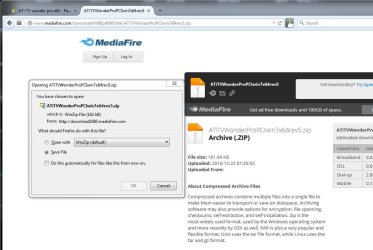
see snip

ati.jpg

seems to be still live
 

My Computer My Computer

At a glance

W10 Pro x64, W7 Pro x64 in VMwarei7 2600K @ 4.4GHz8GB Mushkin @ 1600MHzNvidia GTX 750 Ti
Computer type
PC/Desktop
Computer Manufacturer/Model Number
self build
OS
W10 Pro x64, W7 Pro x64 in VMware
CPU
i7 2600K @ 4.4GHz
Motherboard
MSI Z68A-GD80
Memory
8GB Mushkin @ 1600MHz
Graphics Card(s)
Nvidia GTX 750 Ti
Monitor(s) Displays
27" Benq + 27" LG
Screen Resolution
1080p
Hard Drives
500GB 850 Evo SSD + 3 * 2TB Seagate
PSU
EVGA 650 GS modular
Case
Antec 300
Cooling
Seidon 120V v2
Internet Speed
62/18 Mbps
Antivirus
Defender (W10) + MSE (W7)
Browser
Firefox
Hi SamHouston,

Yes, as in the picture posted by wasnotwas just replace the asterisks with mediafire and .com. The links for the last/latest versions of the driver packages are still valid. Let me know if you need anymore help.
 

My Computer My Computer

At a glance

Windows 10 x64 ProfessionalAMD FX 6300 Black EditionPatriot Viper 8gbx2 DDR3EVGA Nvidia GeForce GTX 680
Computer type
PC/Desktop
Computer Manufacturer/Model Number
Custom
OS
Windows 10 x64 Professional
CPU
AMD FX 6300 Black Edition
Motherboard
MSI 970a SLI Krait Edition
Memory
Patriot Viper 8gbx2 DDR3
Graphics Card(s)
EVGA Nvidia GeForce GTX 680
Sound Card
Realtek onboard
Monitor(s) Displays
LG, Dynex 24" LCD TV
Screen Resolution
2560x1400 1920x1080
Hard Drives
Western Digital Velociraptor 500 GB WD5000HHTZ
PSU
Corsair CX850M
Case
Azza Solano 1000
Cooling
Extra intake antec 120mm blue led fan, thermaltake frio sile
Keyboard
Thermaltake
Mouse
Saitek Desktop Gaming Mouse
Other Info
ATi TV Wonder Pro PCI tv tuner video capture card,
Roxio Game Capture HD Pro
Got it.

Thanks wasnotwas and Milardo. I still had trouble with the link as it was still truncated but was able to get it from the original post of Rev 5. on Page 2 with the mediafire info. Have the file now and will see if Win 8.1 can spark this card back to life. Merci beaucoup. Not sure why video capture cards were given the shaft since Win XP. I have a DV80 Pinnacle USB that Microsoft trashed by their constant OS upgrades. Nothing has really changed in that market. Still have the same old problem of going from tape to digital.
 

My Computer My Computer

At a glance

Win 8
Computer type
PC/Desktop
OS
Win 8
Your welcome. I didn't test it much , but the driver installed fine for me with the tv wonder pro card in win 8.1 x64 pro and it worked in the video capture programs i mention in the readmefirst file in the driver package. When win 10 comes out, I'll be testing my card with win 10 pro x64.:)
 

My Computer My Computer

At a glance

Windows 10 x64 ProfessionalAMD FX 6300 Black EditionPatriot Viper 8gbx2 DDR3EVGA Nvidia GeForce GTX 680
Computer type
PC/Desktop
Computer Manufacturer/Model Number
Custom
OS
Windows 10 x64 Professional
CPU
AMD FX 6300 Black Edition
Motherboard
MSI 970a SLI Krait Edition
Memory
Patriot Viper 8gbx2 DDR3
Graphics Card(s)
EVGA Nvidia GeForce GTX 680
Sound Card
Realtek onboard
Monitor(s) Displays
LG, Dynex 24" LCD TV
Screen Resolution
2560x1400 1920x1080
Hard Drives
Western Digital Velociraptor 500 GB WD5000HHTZ
PSU
Corsair CX850M
Case
Azza Solano 1000
Cooling
Extra intake antec 120mm blue led fan, thermaltake frio sile
Keyboard
Thermaltake
Mouse
Saitek Desktop Gaming Mouse
Other Info
ATi TV Wonder Pro PCI tv tuner video capture card,
Roxio Game Capture HD Pro
Milardo,

I sent this originally as a message just to you but I'm posting here in case it might be helpful to others. Thanks.


Milardo,

Thank you very much for creating the Windows 7 64-bit drivers for the ATI TV Wonder Pro. Have you received any feedback from users about color shifting when using these drivers?

I own this card on a Windows 7 64-bit machine and recently installed these drivers. I am attempting to video capture from a VHS tape using Virtual Dub in order to create a DVD. The capture works fine but every now and then, the color in certain parts of the video will briefly shift to a purple or light brown tint before going back to normal. The image does not distort in any way, only the color shifts.

I attached the VCR directly to the TV and played back the video and did not see these color shifts so I believe the VCR and the VHS tape are fine. If you have any suggestions, I would appreciate your feedback. Thanks!
 

My Computer My Computer

At a glance

Windows 7 Home Premium 64-bit
OS
Windows 7 Home Premium 64-bit
Hi catback,

Got your message. I have not encountered any issues with color shifting i think from use of the card myself or other users reporting that. Which driver version are you using? Is the recording/capture where you have issues with? Or viewing live source. How's your setup? What options in virtualdub are you using, any filters and what encoder? Which input are you using, tuner, composite, svideo? Please send me a sample video recording, so i can have a look. I primarily have used windows media encoder and haven't encountered any major issues with the capture/recording.
 

My Computer My Computer

At a glance

Windows 10 x64 ProfessionalAMD FX 6300 Black EditionPatriot Viper 8gbx2 DDR3EVGA Nvidia GeForce GTX 680
Computer type
PC/Desktop
Computer Manufacturer/Model Number
Custom
OS
Windows 10 x64 Professional
CPU
AMD FX 6300 Black Edition
Motherboard
MSI 970a SLI Krait Edition
Memory
Patriot Viper 8gbx2 DDR3
Graphics Card(s)
EVGA Nvidia GeForce GTX 680
Sound Card
Realtek onboard
Monitor(s) Displays
LG, Dynex 24" LCD TV
Screen Resolution
2560x1400 1920x1080
Hard Drives
Western Digital Velociraptor 500 GB WD5000HHTZ
PSU
Corsair CX850M
Case
Azza Solano 1000
Cooling
Extra intake antec 120mm blue led fan, thermaltake frio sile
Keyboard
Thermaltake
Mouse
Saitek Desktop Gaming Mouse
Other Info
ATi TV Wonder Pro PCI tv tuner video capture card,
Roxio Game Capture HD Pro
Hi Milardo,

I will try to get you a sample of the video capture. It's currently saved as an uncompressed AVI file so I will need to extract a few seconds of video and compress it. To answer your other questions:

I am using your rev5 driver version for the ATI TV Wonder Pro on a Windows 7 64-bit machine. Installation went smoothly using your guide.

The recording/capturing process is the only time where these color changes occur. If I connect the VCR directly to the TV and play the same tape, there are no color changes. I only use the card to capture from a VHS tape. I haven't used it to view a live video feed.

My setup is fairly simple. I have an NTSC VCR whose composite audio and video outputs (not S-video) are connected to the TV Wonder Pro. I'm using VirtualDub version 1.9.9 for capturing. No filters during capture. I capture audio as uncompressed PCM at 48kHz, 16-bit stereo. Video is captured as uncompressed YUY2 at 720x480 resolution. I am not using any compression codecs during capture. I capture to an uncompressed AVI at a rate of about 1.5 GB per minute.

That being said, I have noticed something when going back through the video capture. The color changes often shows up on the faces of people in the video where it will change from a natural skin tone to a purple tint for a few seconds. But this only occurs in the face area. Outside this area, the colors remain correct and does not change which seems odd. If this was a driver issue, I would think it would happen throughout the frame and not limited to just the faces.

The other item I should point out is that I have an ATI Radeon HD 4650 PCI-e card also installed and running at the same time in the same machine which I use as my primary video card to drive the monitor. I've had no issues with any conflicts or any video problems with this setup so I don't know if it could be contributing to the problem with the TV Wonder Pro.

As part of the troubleshooting process, I did attempt to install Windows XP and use the official AMD drivers from their website. I was able to install the drivers for the HD 4650 correctly but for some reason, the official TV Wonder drivers would seem to install properly but the card remained listed as an unknown multimedia controller in the device manager and was not recognized by VirtualDub. If you have any suggestions as to how I can install the XP drivers, that would be helpful.

Thanks for your feedback and suggestions.
 

My Computer My Computer

At a glance

Windows 7 Home Premium 64-bit
OS
Windows 7 Home Premium 64-bit
Does the actual capture when played back still have the colorshift issues? Or is just when viewing and recording? Check the ati control panel to see if you have any video noise reduction or color settings that might be interfering. I forget for windows xp, but i think the drivers i used for that were from the disc not the officlal site. Let me know if you want me to send the disc drivers.
 

My Computer My Computer

At a glance

Windows 10 x64 ProfessionalAMD FX 6300 Black EditionPatriot Viper 8gbx2 DDR3EVGA Nvidia GeForce GTX 680
Computer type
PC/Desktop
Computer Manufacturer/Model Number
Custom
OS
Windows 10 x64 Professional
CPU
AMD FX 6300 Black Edition
Motherboard
MSI 970a SLI Krait Edition
Memory
Patriot Viper 8gbx2 DDR3
Graphics Card(s)
EVGA Nvidia GeForce GTX 680
Sound Card
Realtek onboard
Monitor(s) Displays
LG, Dynex 24" LCD TV
Screen Resolution
2560x1400 1920x1080
Hard Drives
Western Digital Velociraptor 500 GB WD5000HHTZ
PSU
Corsair CX850M
Case
Azza Solano 1000
Cooling
Extra intake antec 120mm blue led fan, thermaltake frio sile
Keyboard
Thermaltake
Mouse
Saitek Desktop Gaming Mouse
Other Info
ATi TV Wonder Pro PCI tv tuner video capture card,
Roxio Game Capture HD Pro
The color shifts are visible during the actual recording and also when playing the file back afterwards. I'll double check the ATI control panel.

If you can provide an ISO image of the original install disc, that would be great. I purchased the card new from an online retailer so I'm sure I have the original disc here somewhere but finding it may be a problem. I'll private message you an email address.
 

My Computer My Computer

At a glance

Windows 7 Home Premium 64-bit
OS
Windows 7 Home Premium 64-bit
Here is the one i believe is from the disc i have. The one from the amd website is older version. Let me know if you have any issues installing it. These are the drivers only, if you want the iso of the disc still, let me know, but it have to wait till the weekend, because I'm not at the location where the disc is till Saturday.
 

Attachments

My Computer My Computer

At a glance

Windows 10 x64 ProfessionalAMD FX 6300 Black EditionPatriot Viper 8gbx2 DDR3EVGA Nvidia GeForce GTX 680
Computer type
PC/Desktop
Computer Manufacturer/Model Number
Custom
OS
Windows 10 x64 Professional
CPU
AMD FX 6300 Black Edition
Motherboard
MSI 970a SLI Krait Edition
Memory
Patriot Viper 8gbx2 DDR3
Graphics Card(s)
EVGA Nvidia GeForce GTX 680
Sound Card
Realtek onboard
Monitor(s) Displays
LG, Dynex 24" LCD TV
Screen Resolution
2560x1400 1920x1080
Hard Drives
Western Digital Velociraptor 500 GB WD5000HHTZ
PSU
Corsair CX850M
Case
Azza Solano 1000
Cooling
Extra intake antec 120mm blue led fan, thermaltake frio sile
Keyboard
Thermaltake
Mouse
Saitek Desktop Gaming Mouse
Other Info
ATi TV Wonder Pro PCI tv tuner video capture card,
Roxio Game Capture HD Pro
I did a clean install of XP and installed the drivers you attached and the shifting colors are still present. So I guess it's safe to say your rev5 drivers have nothing to do with it.

But I think I may have possibly found the culprit. I never paid attention to this but even though the VHS tape is not a commercial movie, it's a video of a seminar that was done professionally and I think there may be macrovision protection on that tape causing the shiftng colors when capturing. If that's the case, I don't see any way around it.
 

My Computer My Computer

At a glance

Windows 7 Home Premium 64-bit
OS
Windows 7 Home Premium 64-bit
To add to my post above about the macrovision, I noticed the shifting colors are not always consistent. Meaning, it will occur at certain parts of the video capture one time but if I go back and capture again, those same points in the tape will capture fine the second time. I'm not sure if this is how macrovision works.

What is consistent is that when it does occur, it's always at the same location in the frame.
 

My Computer My Computer

At a glance

Windows 7 Home Premium 64-bit
OS
Windows 7 Home Premium 64-bit
Do you have a different vhs tape to try? A recording that you made on a vhs tape? Also, when you dont capture it, just preview, does it have the colorshift problem?
 

My Computer My Computer

At a glance

Windows 10 x64 ProfessionalAMD FX 6300 Black EditionPatriot Viper 8gbx2 DDR3EVGA Nvidia GeForce GTX 680
Computer type
PC/Desktop
Computer Manufacturer/Model Number
Custom
OS
Windows 10 x64 Professional
CPU
AMD FX 6300 Black Edition
Motherboard
MSI 970a SLI Krait Edition
Memory
Patriot Viper 8gbx2 DDR3
Graphics Card(s)
EVGA Nvidia GeForce GTX 680
Sound Card
Realtek onboard
Monitor(s) Displays
LG, Dynex 24" LCD TV
Screen Resolution
2560x1400 1920x1080
Hard Drives
Western Digital Velociraptor 500 GB WD5000HHTZ
PSU
Corsair CX850M
Case
Azza Solano 1000
Cooling
Extra intake antec 120mm blue led fan, thermaltake frio sile
Keyboard
Thermaltake
Mouse
Saitek Desktop Gaming Mouse
Other Info
ATi TV Wonder Pro PCI tv tuner video capture card,
Roxio Game Capture HD Pro
Just a quick comment, the card works fine in windows 8, 8.1, and 10 x64 versions.
 

My Computer My Computer

At a glance

Windows 10 x64 ProfessionalAMD FX 6300 Black EditionPatriot Viper 8gbx2 DDR3EVGA Nvidia GeForce GTX 680
Computer type
PC/Desktop
Computer Manufacturer/Model Number
Custom
OS
Windows 10 x64 Professional
CPU
AMD FX 6300 Black Edition
Motherboard
MSI 970a SLI Krait Edition
Memory
Patriot Viper 8gbx2 DDR3
Graphics Card(s)
EVGA Nvidia GeForce GTX 680
Sound Card
Realtek onboard
Monitor(s) Displays
LG, Dynex 24" LCD TV
Screen Resolution
2560x1400 1920x1080
Hard Drives
Western Digital Velociraptor 500 GB WD5000HHTZ
PSU
Corsair CX850M
Case
Azza Solano 1000
Cooling
Extra intake antec 120mm blue led fan, thermaltake frio sile
Keyboard
Thermaltake
Mouse
Saitek Desktop Gaming Mouse
Other Info
ATi TV Wonder Pro PCI tv tuner video capture card,
Roxio Game Capture HD Pro
Love it, But no colour?

I love rev5 of the driver. It WORKS!!!! On windows 8.1 x64 as well. I just can't seem to get any colour out of it. All input is in B&W. Any idea why? It also doesn't capture or find it as an audio device.
 

My Computer My Computer

At a glance

Windows 8.1 Pro x64Xeon8GBAMD FirePro W7000
Computer type
PC/Desktop
Computer Manufacturer/Model Number
HP
OS
Windows 8.1 Pro x64
CPU
Xeon
Motherboard
HP 1589
Memory
8GB
Graphics Card(s)
AMD FirePro W7000
Browser
Chrome
Hi, is your card an ati tv wonder pro pci? Which input are you using, coaxial, svideo, or composite? Let me know. Also post any screenshots of the card settings if you can
 

My Computer My Computer

At a glance

Windows 10 x64 ProfessionalAMD FX 6300 Black EditionPatriot Viper 8gbx2 DDR3EVGA Nvidia GeForce GTX 680
Computer type
PC/Desktop
Computer Manufacturer/Model Number
Custom
OS
Windows 10 x64 Professional
CPU
AMD FX 6300 Black Edition
Motherboard
MSI 970a SLI Krait Edition
Memory
Patriot Viper 8gbx2 DDR3
Graphics Card(s)
EVGA Nvidia GeForce GTX 680
Sound Card
Realtek onboard
Monitor(s) Displays
LG, Dynex 24" LCD TV
Screen Resolution
2560x1400 1920x1080
Hard Drives
Western Digital Velociraptor 500 GB WD5000HHTZ
PSU
Corsair CX850M
Case
Azza Solano 1000
Cooling
Extra intake antec 120mm blue led fan, thermaltake frio sile
Keyboard
Thermaltake
Mouse
Saitek Desktop Gaming Mouse
Other Info
ATi TV Wonder Pro PCI tv tuner video capture card,
Roxio Game Capture HD Pro
Does ATiTVWonderProPCIwin7x64rev5.zip works with Windows 10?
 

My Computer My Computer

At a glance

Windows 7
OS
Windows 7
Hi apvm,

Yes it does. Let me know if you need any help with downloading/installing, etc. I recommend winaero tweaker to make it easier to disable driver signature enforcement as you can set win 10 to have boot options which includes that.
 

My Computer My Computer

At a glance

Windows 10 x64 ProfessionalAMD FX 6300 Black EditionPatriot Viper 8gbx2 DDR3EVGA Nvidia GeForce GTX 680
Computer type
PC/Desktop
Computer Manufacturer/Model Number
Custom
OS
Windows 10 x64 Professional
CPU
AMD FX 6300 Black Edition
Motherboard
MSI 970a SLI Krait Edition
Memory
Patriot Viper 8gbx2 DDR3
Graphics Card(s)
EVGA Nvidia GeForce GTX 680
Sound Card
Realtek onboard
Monitor(s) Displays
LG, Dynex 24" LCD TV
Screen Resolution
2560x1400 1920x1080
Hard Drives
Western Digital Velociraptor 500 GB WD5000HHTZ
PSU
Corsair CX850M
Case
Azza Solano 1000
Cooling
Extra intake antec 120mm blue led fan, thermaltake frio sile
Keyboard
Thermaltake
Mouse
Saitek Desktop Gaming Mouse
Other Info
ATi TV Wonder Pro PCI tv tuner video capture card,
Roxio Game Capture HD Pro
Sorry to necro post, but i've been trying to get an old TV Wonder Pro on my win 10 to stream me programming on a 1980 TRS-80. all i need is coaxial input and the ability to run OBS in the background.
I've tried virtual machines and dual boots, but in the end i need to be able to run this on win 10.

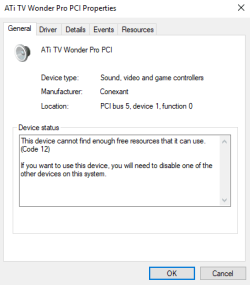
now the driver did install and it is recognized, but i have this annoying problem stopping me dead in my tracks:
ATI.png
It's not conflicting, it just can't get enough resources for some reason.

now something worth noting: a few days ago my graphics driver (Nvidia 970) malfunctioned and didn't boot so the computer booted off the default. I noticed that the TV wonder was listed as a functioning add on, and i was able to get a blue screen in VLC, but as soon as i plugged the coaxial cable into the capture card my computer BSOD'd. after that my graphics driver fixed itself and the TV wonder went back to "Not enough resources"

i really tried everything. i didn't want to necropost. sorry,
 

My Computer My Computer

At a glance

win 7 x64
Computer type
PC/Desktop
OS
win 7 x64
Hi schradieck,

No problem posting here, I check this topic daily. I have some questions to ask, if you can answer them, that would help me to see what the problem might be.

Which version of windows 10 are you using, edition, 32 bit or 64 bit, and version?

Which driver are you using for your card?

Do you have a picture of the card, to make sure you have an ati tv wonder pro pci card.

Is your computer a custom one or prebuilt, you do have the card plugged into pci slot too right? Specs of computer?

Do you happen to know what tv tuner it is, philips 1236 mk3 or 1238 mk5? You can find this on the card itself.

What device are you plugging into coaxial input?

Disable driver signing enforcement before booting into windows?
 

My Computer My Computer

At a glance

Windows 10 x64 ProfessionalAMD FX 6300 Black EditionPatriot Viper 8gbx2 DDR3EVGA Nvidia GeForce GTX 680
Computer type
PC/Desktop
Computer Manufacturer/Model Number
Custom
OS
Windows 10 x64 Professional
CPU
AMD FX 6300 Black Edition
Motherboard
MSI 970a SLI Krait Edition
Memory
Patriot Viper 8gbx2 DDR3
Graphics Card(s)
EVGA Nvidia GeForce GTX 680
Sound Card
Realtek onboard
Monitor(s) Displays
LG, Dynex 24" LCD TV
Screen Resolution
2560x1400 1920x1080
Hard Drives
Western Digital Velociraptor 500 GB WD5000HHTZ
PSU
Corsair CX850M
Case
Azza Solano 1000
Cooling
Extra intake antec 120mm blue led fan, thermaltake frio sile
Keyboard
Thermaltake
Mouse
Saitek Desktop Gaming Mouse
Other Info
ATi TV Wonder Pro PCI tv tuner video capture card,
Roxio Game Capture HD Pro
Back
Top