
Solved Attachments in WLM

5Clint7

New member
Member
Local time
7:33 AM
Messages
97
I can receive, but can't send a 4 meg. .WMV attachment in WLM 2012. The ISP says I have a 25 meg. limit. I have AVG anti virus scanner and Spybot Search and Destroy spy ware scanner. I have looked at the accounts settings, but don't see any thing obvious. Thanks for your help.

Clint
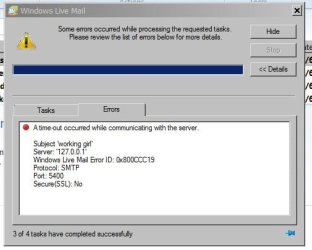

mail.JPG
 
Last edited by a moderator:

My Computer

Computer type
PC/Desktop
Computer Manufacturer/Model Number
Dell XPS 9100
OS
Windows 10 Pro 64-bit
CPU
Intel I7 920 @ 2.67 GHz
Motherboard
Dell
Memory
24 Gig
Graphics Card(s)
ATI 5670
Sound Card
Internal
Monitor(s) Displays
23" Wide Flat LED HDMI
Screen Resolution
1366 X 768
Hard Drives
Samsung 250 GB SSD
WD 1TB internal
Seagate 1TB internal
WD 2TB external USB 3
PSU
550 W
Case
Mid
Cooling
Fan
Keyboard
US USB
Mouse
USB
Internet Speed
3.84 Mbps down .44 Mbps up
Antivirus
MS Defener
Browser
IE 11
Other Info
1 Liteon DVD wrighter
1 Liteon BD drive
I can receive, but can't send a 4 meg. .WMV attachment in WLM 2012. The ISP says I have a 25 meg. limit...I have looked at the accounts settings, but don't see any thing obvious...
Who is the ISP? (The server and port numbers seem odd to me but if they work for other mail without an attachment, that is not the problem.) Since you have WLM, you can also set up a separate mail account in WLM using your liveID "<name>@hotmail.com". Often hotmail or gmail will let you send something that an ordinary local ISP has a problem with. Whatever account you use, the Servers tab and the Advanced must be correct to send any mail at all. (Sometimes the problem can be a hyperlink in the body of the email, unrelated to the attachment. All you can do is test sending different things to yourself from your ISP account to an account you have with hotmail or gmail if you really want to find out what your ISP has a problem with.)
 

My Computer

Computer type
PC/Desktop
Computer Manufacturer/Model Number
OQO 2+
OS
Windows 8 Pro w/MC 32-bit
CPU
Intel Atom 1.86 GHz
Motherboard
OQO 2+
Memory
2 GB
Graphics Card(s)
Intel GMA 500
Sound Card
IDT
Monitor(s) Displays
LCD
Screen Resolution
800 x 480 (portable) 1280 x 1024 (docked)
Hard Drives
64 GB SSD
PSU
9 Ah Battery (portable) or OQO Brick (docked)
Case
Shirt Pocket Sized
Cooling
Tiny Fan
Keyboard
Slide out (portable) DiNovo Edge (docked)
Mouse
Eraser head (portable) Logitech Bluetooth (docked)
Internet Speed
WWAN or 802.11G (portable) T1 (docked)
Browser
IE 10
Other Info
DVD-RW OQO Docking Station
The reason they look odd, is that they go through the AVG mail scanner. It's been working OK like that for about a year. I just noticed it yesterday when I tried to forward an e-mail. The ISP is Chatmosscable. I called them, They said it was Microsoft's problem. I tried disabling the AVG, but then the WLM wouldn't work at all because of the odd port settings. I don't have AVG to scan outgoing mail anyway. Thanks for looking
 

My Computer

Computer type
PC/Desktop
Computer Manufacturer/Model Number
Dell XPS 9100
OS
Windows 10 Pro 64-bit
CPU
Intel I7 920 @ 2.67 GHz
Motherboard
Dell
Memory
24 Gig
Graphics Card(s)
ATI 5670
Sound Card
Internal
Monitor(s) Displays
23" Wide Flat LED HDMI
Screen Resolution
1366 X 768
Hard Drives
Samsung 250 GB SSD
WD 1TB internal
Seagate 1TB internal
WD 2TB external USB 3
PSU
550 W
Case
Mid
Cooling
Fan
Keyboard
US USB
Mouse
USB
Internet Speed
3.84 Mbps down .44 Mbps up
Antivirus
MS Defener
Browser
IE 11
Other Info
1 Liteon DVD wrighter
1 Liteon BD drive
OK, Got it fixed. Under Mail Options, Advanced Tab, change Sever Time Out from 1 minuet to 5 minuets. Happy Camper. :) I don't know why, when it wasn't scanning outgoing????
 

My Computer

Computer type
PC/Desktop
Computer Manufacturer/Model Number
Dell XPS 9100
OS
Windows 10 Pro 64-bit
CPU
Intel I7 920 @ 2.67 GHz
Motherboard
Dell
Memory
24 Gig
Graphics Card(s)
ATI 5670
Sound Card
Internal
Monitor(s) Displays
23" Wide Flat LED HDMI
Screen Resolution
1366 X 768
Hard Drives
Samsung 250 GB SSD
WD 1TB internal
Seagate 1TB internal
WD 2TB external USB 3
PSU
550 W
Case
Mid
Cooling
Fan
Keyboard
US USB
Mouse
USB
Internet Speed
3.84 Mbps down .44 Mbps up
Antivirus
MS Defener
Browser
IE 11
Other Info
1 Liteon DVD wrighter
1 Liteon BD drive
...They said it was Microsoft's problem...
You never made it clear whether you can send mail without attachments, or with a different type or size of attachment. You could eliminate the email program from the equation by using Chatmoss Cable's webmail feature on their home page: http://chatmosscable.com/pages.php?section=index . If that works, uninstall AVG and use the proper server settings in WLM to see if it works then.
 

My Computer

Computer type
PC/Desktop
Computer Manufacturer/Model Number
OQO 2+
OS
Windows 8 Pro w/MC 32-bit
CPU
Intel Atom 1.86 GHz
Motherboard
OQO 2+
Memory
2 GB
Graphics Card(s)
Intel GMA 500
Sound Card
IDT
Monitor(s) Displays
LCD
Screen Resolution
800 x 480 (portable) 1280 x 1024 (docked)
Hard Drives
64 GB SSD
PSU
9 Ah Battery (portable) or OQO Brick (docked)
Case
Shirt Pocket Sized
Cooling
Tiny Fan
Keyboard
Slide out (portable) DiNovo Edge (docked)
Mouse
Eraser head (portable) Logitech Bluetooth (docked)
Internet Speed
WWAN or 802.11G (portable) T1 (docked)
Browser
IE 10
Other Info
DVD-RW OQO Docking Station
You never made it clear whether you can send mail without attachments, or with a different type or size of attachment. You could eliminate the email program from the equation by using Chatmoss Cable's web mail feature on their home page: http://chatmosscable.com/pages.php?section=index . If that works, uninstall AVG and use the proper server settings in WLM to see if it works then.

I could send mail with out attachments and smaller attachments. I could send the attachment with Chatmoss's web mail. I did use proper settings in WLM and that worked, but my email were not being scanned. By changing the time out to 5 minuets, It works now and is getting scanned. Thanks for looking.
 

My Computer

Computer type
PC/Desktop
Computer Manufacturer/Model Number
Dell XPS 9100
OS
Windows 10 Pro 64-bit
CPU
Intel I7 920 @ 2.67 GHz
Motherboard
Dell
Memory
24 Gig
Graphics Card(s)
ATI 5670
Sound Card
Internal
Monitor(s) Displays
23" Wide Flat LED HDMI
Screen Resolution
1366 X 768
Hard Drives
Samsung 250 GB SSD
WD 1TB internal
Seagate 1TB internal
WD 2TB external USB 3
PSU
550 W
Case
Mid
Cooling
Fan
Keyboard
US USB
Mouse
USB
Internet Speed
3.84 Mbps down .44 Mbps up
Antivirus
MS Defener
Browser
IE 11
Other Info
1 Liteon DVD wrighter
1 Liteon BD drive
Back
Top