
Hello all
Am used to have various drivers (1 for OS, 1 for data etc) and I just received the latest Acer S3 yesterday with Windows 7 Home premium edition.
wanted to create a partition (initially only 1 C: drive with 250 Gb on it) but do not have the skills required i guess...
anyway I've been on the web and decided to go for Partition Wizard and create a separate D: driver of 150Gb in addition to a "reduced" C: of 100Gb.
downloaded the Minitool and run that.
so windows 7 shut down and restarted and show a black DOS screen with c. 10 lines describing name of drivers and 'Currently updating, please wait..."
then after 2 hours i thought it was quite long and got worried, decided to take a look at how long it typically takes, and decided (maybe stupid decision) that I'd better stop it now and not try a partition as long as I'm not experienced enough...
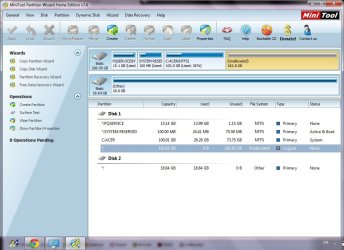
anyway i forced a shutdown, and windows restarted correctly, but as i was expecting my c: is now 100Gb only...
attached what shows up in Partition Wizard
sorry to bother the forum with that.
am conscious it's not quite the way i should have done things so far !
any valuable advice welcome
i'll think about the best way of getting up to speed on these topics...
best
Am used to have various drivers (1 for OS, 1 for data etc) and I just received the latest Acer S3 yesterday with Windows 7 Home premium edition.
wanted to create a partition (initially only 1 C: drive with 250 Gb on it) but do not have the skills required i guess...
anyway I've been on the web and decided to go for Partition Wizard and create a separate D: driver of 150Gb in addition to a "reduced" C: of 100Gb.
downloaded the Minitool and run that.
so windows 7 shut down and restarted and show a black DOS screen with c. 10 lines describing name of drivers and 'Currently updating, please wait..."
then after 2 hours i thought it was quite long and got worried, decided to take a look at how long it typically takes, and decided (maybe stupid decision) that I'd better stop it now and not try a partition as long as I'm not experienced enough...
anyway i forced a shutdown, and windows restarted correctly, but as i was expecting my c: is now 100Gb only...
attached what shows up in Partition Wizard
sorry to bother the forum with that.
am conscious it's not quite the way i should have done things so far !
any valuable advice welcome
i'll think about the best way of getting up to speed on these topics...
best
Attachments
My Computer
At a glance
windows 7 home premium
- OS
- windows 7 home premium


