Attempting to set up two monitors, having difficulties.

CarterM

New member
Local time
10:02 AM
Messages
2
I'm currently trying to set up two monitors to my desktop, having previously only used one. I bought a vga splitter so I can have two VGA cables going into the back of my computer(not sure if the problem), when I try to get the computer to detect both, it treats both of the monitors as one.(again, is this because they're both running through VGA?), I've tried installing drivers, played with all the settings in Screen Resolution, and I'm still at a stand still. Any help on this would be greatly appreciated.
 

My Computer My Computer

At a glance

Windows Seven Home Premium 64bit
Computer type
PC/Desktop
Computer Manufacturer/Model Number
HP
OS
Windows Seven Home Premium 64bit
If you're trying to have an extended desktop with two monitors, using a splitter is not the way to do it.

Can you fill out your system specs completely so that we can see what we're working with, please?

Edit:

What kind of graphics card do you have?
 

My Computer My Computer

At a glance

Win 7 Pro x64/Win 10 Pro x64 dual bootAMD FX 8350 Vishera @ 420016 GB Mushkin Blackline DDR3-2400 @ 1866 (9-1...XFX Radeon R9 280 Double D Black Edition
Computer type
PC/Desktop
Computer Manufacturer/Model Number
Mellon Labs (custom build)
OS
Win 7 Pro x64/Win 10 Pro x64 dual boot
CPU
AMD FX 8350 Vishera @ 4200
Motherboard
ASUS M5A97 R2.0
Memory
16 GB Mushkin Blackline DDR3-2400 @ 1866 (9-10-10-10-31)
Graphics Card(s)
XFX Radeon R9 280 Double D Black Edition
Sound Card
Realtek HD Audio on MB. Sounds great.
Monitor(s) Displays
Acer 24", Acer 22"
Screen Resolution
3840 x 1080
Hard Drives
1 x Mushkin Chronos 120 GB SSD (Win 10)
1 x Samsung 850 EVO 250 GB SSD (Win 7)
1 x WD 1TB SATA Blue
1 x WD 1TB SATA Green
PSU
Corsair TX-750
Case
CoolerMaster HAF 912+
Cooling
Coolermaster Seidon 240M Liquid AIO. 6 case fans
Keyboard
Logitech G710+
Mouse
Logitech G500s
Internet Speed
Much better since I got fiber, but still way overpriced.
Antivirus
MSE, Malware Bytes for scanning
Browser
Firefox
Other Info
Corsair VOID USB headphones.

A Mellon Labs X-1 - LCD Smartie driven system status display.

Brought to you by the letter E
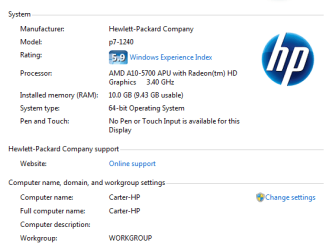
I'm not sure how to check my graphics card, (i'm still using the one that came with the computer) but I have screenshotted my specs. (Thanks for replying so quickly!)
 

Attachments

  • specs.PNG
    specs.PNG
    11.4 KB · Views: 8

My Computer My Computer

At a glance

Windows Seven Home Premium 64bit
Computer type
PC/Desktop
Computer Manufacturer/Model Number
HP
OS
Windows Seven Home Premium 64bit
As mentioned by Mellon head, using a splitter will not work. Actually it will, but as you found you get the same image on both displays; there is no way to use extended mode as the computer will only see one monitor.

Here are the full specs for your computer,

HP Pavilion p7-1240 Desktop PC Product Specifications HP Pavilion p7-1240 Desktop PC | HP® Support

Unless you opted for a video card with it, it is using the onboard graphics which has one of each VGA and DVI-D ports. To use two monitors with it the monitors would have to have either a VGA or DVI port on them, and connect each to both ports on the computer. If both only have VGA ports on them then it won't work as the DVI port on the computer is digital only, so won't work with an adapter.
 

My Computer My Computer

At a glance

Win 7 Ultimate x64FX-8350 @ 4.6 GHz so farADATA XPG V1 Series Black 8GB DDR3 1600Sapphire R9 270x Dual-X
Computer type
PC/Desktop
Computer Manufacturer/Model Number
Me
OS
Win 7 Ultimate x64
CPU
FX-8350 @ 4.6 GHz so far
Motherboard
Asus M5A97 EVO
Memory
ADATA XPG V1 Series Black 8GB DDR3 1600
Graphics Card(s)
Sapphire R9 270x Dual-X
Sound Card
Xonar DGX w/ Corsair Vengence 1300
Monitor(s) Displays
Acer S232HL Abid
Screen Resolution
1920x1080
Hard Drives
120 GB OCZ Vertex 3
500 GB Seagate 7200.12
PSU
Antec Earthwatts 650W Green
Case
Antec Three Hundred
Cooling
Cooler Master 212 EVO
Keyboard
Logitech G510
Mouse
Logitech G500s
Internet Speed
35000/3000
Back
Top