Audacity questions

gogreen

New member
Power User
VIP
Local time
2:49 PM
Messages
544
Location
Florida
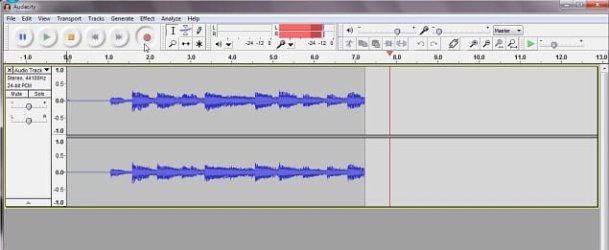
I have a few questions about Audacity. I know these questions might seem elementary to some. But sometimes, we just don't know what we don't know.

In the example I provided:

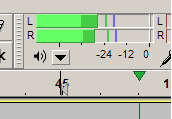
1. Why are the long lines light green and then dark green?

2. What do the separate green bar slices mean?

3. Occasionally, the separate green bar slices are red, yet the overall metering doesn't extend into the right border, and the graphic images below (not shown in png) remain in the borders. What does this mean?

4. What do the separate blue slices mean?


Thanks.
 

Attachments
  • green lines.png
    green lines.png
    1.1 KB · Views: 153

My Computer

Computer type
PC/Desktop
Computer Manufacturer/Model Number
Dell Studio XPS 8100, Dell XPS 15 laptop
OS
Windows 10 Home, 64 bit
CPU
Intel Core i7 860 @ 2.8 GHz
Motherboard
Dell 0T568R (CPU1)
Memory
8.0 GB Dual Channel DDR3 @ 664 MHz (9-9-9-24)
Graphics Card(s)
nVidia GeForce GTS 240
Sound Card
M-Audio Delta Audiophile 2496
Monitor(s) Displays
Dell 2407WFP
Screen Resolution
1920x1200
Hard Drives
977 GB Western Digital WDC WD1001FAES-75W7A0 (SCSI)
Antivirus
Windows Defender, MalwareBytes Anti-Malware, AdwCleaner
Browser
Firefox, occasionally IE and Edge
Other Info
Mozilla Firefox, Mozilla Thunderbird. Western Digital Passport 250 GB external HD, two Mushkin Enhanced Mulholland 32GB USB flash drives, AKG K240 Studio headphones, Asus AC-1900 dual band wireless router.
They are your stereo levels - if you split the track and mute one it will only show one of the bars moving.

I believe the different greens are for your highest and lowest decibels in that section of the song - I'm guessing the red has something to do with clipping
 

My Computer

OS
Windows 7
A quick description of these bars from left to right. Firstly, the light green section represents the current amplitude level. The dark green portion represents the recent highest amplitude level, and the green line represents the peak amplitude in a given period of time. All of these will move dynamically with amplitude level and time. The blue lines represent the maximum permissable amplitude level. Should the amplitude exceed this level, the bar will turn red.
 

My Computer

Computer type
PC/Desktop
Computer Manufacturer/Model Number
Dwarf Dwf/11/2012 r09/2013
OS
Windows 8.1 Pro RTM x64
CPU
Intel Core-i5-3570K 4-core @ 3.4GHz (Ivy Bridge) (OC 4.4GHz)
Motherboard
ASRock Z77 Extreme4-M
Memory
4 x 4GB DDR3-1600 Corsair Vengeance CMZ8GX3M2A1600C9B (16GB)
Graphics Card(s)
MSI GeForce GTX770 Gaming OC 2GB
Sound Card
Realtek High Definition on board solution (ALC 898)
Monitor(s) Displays
ViewSonic VA1912w Widescreen (VGA)
Screen Resolution
1440x900
Hard Drives
OCZ Agility 3 SSD 120GB SATA III x2 (RAID 0)
Samsung HD501LJ 500GB SATA II x2
Hitachi HDS721010CLA332 1TB SATA II
Iomega 1.5TB Ext USB 2.0
WD 2.0TB Ext USB 3.0
PSU
XFX Pro Series 850W Semi-Modular
Case
Gigabyte IF233
Cooling
1 x 120mm Front Inlet 1 x 120mm Rear Exhaust
Keyboard
Microsoft Comfort Curve Keyboard 3000 (USB)
Mouse
Microsoft Comfort Mouse 3000 for Business (USB)
Internet Speed
NetGear DG834Gv3 ADSL Modem/Router (Ethernet) ~4.0 Mb/s (O2)
Antivirus
Avast! 8.0.1497
Browser
IE 11
Other Info
Optical Drive: HL-DT-ST BD-RE BH10LS30 SATA Bluray
Lexmark S305 Printer/Scanner/Copier (USB)
WEI Score: 8.1/8.1/8.5/8.5/8.25
Asus Eee PC 1011PX Netbook (Windows 7 x86 Starter)
The separate slices are called "hold" marks, they remain visible giving reference to the highest (loudest) signal. Eventually, the only hold mark left should be the one on the furthest right, in your pic that would be the blue mark.

In Audacity the Green bars denote playback level, to the right of the green bars are another set of bars that would show "Record" level. L=Left R=Right.

The pic below shows the record meters in action, I'm running a guitar w/preamp into the Line-In.

Ap

Auid.jpg
 

My Computer

Computer Manufacturer/Model Number
Assembled in my workshop
OS
Windows 7 Home Premium
CPU
Intel Core 2 Duo @ 3.00gHz
Motherboard
Gigabyte GA-P35-S3G
Memory
4 GB
Graphics Card(s)
ATI Radeon HD 2600 XT
Sound Card
RME 24/96 Card, Realtek Internal Audio PreSonus FireStudio
Monitor(s) Displays
Acer 1917 (x2)
Screen Resolution
1280 x 1024 on both monitors
Hard Drives
Three 250GB Seagate SATA Barracuda 7200rpm
PSU
Rosewill 500-watt
Case
Rosewill mid-tower
Cooling
Noctua NH-U9B (CPU), PwrSupply fan + single large case Fan
Keyboard
Macally w/2/USB ports.
Mouse
Trackman Wheel
Other Info
Event 20/20 bas studio monitors, Yamaha sub.
Rackmount Korg/Roland/Yamaha synthesizers,
Cubase MIDI/audio recording. Sony Soundforge audio/mastering software. CD Architect Mastering. RME & Presonus audio interfaces.
Thanks, all, for this information--and, I hope, for not laughing too loudly at my questions. I've been using Audacity for years and never quite understood much of what I was looking at and thus what was going on.
 

My Computer

Computer type
PC/Desktop
Computer Manufacturer/Model Number
Dell Studio XPS 8100, Dell XPS 15 laptop
OS
Windows 10 Home, 64 bit
CPU
Intel Core i7 860 @ 2.8 GHz
Motherboard
Dell 0T568R (CPU1)
Memory
8.0 GB Dual Channel DDR3 @ 664 MHz (9-9-9-24)
Graphics Card(s)
nVidia GeForce GTS 240
Sound Card
M-Audio Delta Audiophile 2496
Monitor(s) Displays
Dell 2407WFP
Screen Resolution
1920x1200
Hard Drives
977 GB Western Digital WDC WD1001FAES-75W7A0 (SCSI)
Antivirus
Windows Defender, MalwareBytes Anti-Malware, AdwCleaner
Browser
Firefox, occasionally IE and Edge
Other Info
Mozilla Firefox, Mozilla Thunderbird. Western Digital Passport 250 GB external HD, two Mushkin Enhanced Mulholland 32GB USB flash drives, AKG K240 Studio headphones, Asus AC-1900 dual band wireless router.
Back
Top