Audio Controller and Driver suddenly stopped working and won't install

gsng

New member
Local time
10:34 PM
Messages
3
A few days ago the sound on my computer stopped working. I just woke up one day and went to play a song in itunes and it wouldn't play. I clicked on volume and checked it. Then clicked on playback devices and it said no jack information. No audio controller installed or something. I went to device manager and tried to reinstall or update drivers. The drivers were moved to unknown with a yellow exclamation point. I tried this to no avail. I tried in safe mode. I tried redownloading drivers from motherboard website ASUS. It keeps telling me Access is Denied (Code 28). A couple of times after restarting it said I needed to Reinstall driver, but when i tried it said the latest driver was already installed. Then it went back to Access denied. I don't have any idea what happened. Can someone please help me.
 

My Computer My Computer

At a glance

windows 7 home premium x64
Computer type
PC/Desktop
Computer Manufacturer/Model Number
Gateway GM5446E
OS
windows 7 home premium x64
Motherboard
Asus P5G41-M LX2/GB
Browser
firefox
Do you have a Restore Point dated to before the problem happened?
 

My Computer My Computer

At a glance

W7 Pro x64 SP1 | W10 Pro IP x64 | W8.1 Pro x6...i7-4790k @ 4GHz (4.4GHz Boost)16GB DDR3 Kingston HyperX Fury @ 1600MHz CL 9...EVGA GTX 980 Classified
Computer type
PC/Desktop
Computer Manufacturer/Model Number
Custom Build
OS
W7 Pro x64 SP1 | W10 Pro IP x64 | W8.1 Pro x64 VM | Linux Mint VM
CPU
i7-4790k @ 4GHz (4.4GHz Boost)
Motherboard
ASUS Sabertooth Z87 (BIOS Rev 2004)
Memory
16GB DDR3 Kingston HyperX Fury @ 1600MHz CL 9-9-9-27
Graphics Card(s)
EVGA GTX 980 Classified
Sound Card
Realtek Onboard
Monitor(s) Displays
Samsung S27D390
Screen Resolution
1920 x 1080
Hard Drives
240GB Intel 520 Series SSD |
Samsung 850 EVO 120GB SSD |
2TB WD Caviar Black |
2TB WD Caviar Green
PSU
Corsair HX850-80 Gold Modular
Case
Cooler Master Silencio 650
Cooling
Corsair H80i w/2 x Corsair SP120 | 2 x 120mm Noctua NF-S12B
Keyboard
Microsoft Sidewinder X4
Mouse
Gigabyte M6900 optical
Internet Speed
152mb
Antivirus
F-Secure
Browser
Firefox 38.0
Other Info
Backup Rig: Win 7 Pro 64-bit | AMD A10-5800k | ASUS F2A85-V Pro | 8GB Samsung DDR3 @1600MHz | 120GB Toshiba SDD | 2TB Seagate HDD | Cooler Master Silencio 550
Do you use the onboard sound on your mobo or a sound card or a usb sound device?
Have you got more than one type of sound device (i.e. onboard sound on the mobo and a sound card).
 

My Computer My Computer

At a glance

Windows 7 64bit home premiumI5 3570K4 x 4GB Crucial Ballistix Sport DDR3 1600 MhzGigabyte Geforce 660 TI
Computer Manufacturer/Model Number
Self built
OS
Windows 7 64bit home premium
CPU
I5 3570K
Motherboard
Gigabyte Z77-DS3H
Memory
4 x 4GB Crucial Ballistix Sport DDR3 1600 Mhz
Graphics Card(s)
Gigabyte Geforce 660 TI
Sound Card
creative x-fi
Monitor(s) Displays
Primary CiBox 22" Widescreen LCD ,Secondary Dell 22" Widescr
Screen Resolution
Both 1680 x 1050
Hard Drives
2 x 500G HD (SATA) 1 x 2 TB USB
PSU
Corsair HX 620W ATX2.2 Modular SLI Complient PSU
Case
Antec 900 Ultimate Gaming Case
Cooling
3xfront 1xside 1xrear blue fan, 1 200mm blue top fan 1
Keyboard
Trust ds-3200 Wireless keyboard and mouse
Mouse
Trust ds-3200 Wireless keyboard and mouse
Internet Speed
288 / 4000
Other Info
Creative Inspire 7.1 T7900 Speakers
Trust Graphics Tablet
If the sound device was accidentally disabled in the BIOS this problem can occur.
 

My Computer My Computer

At a glance

Windows 10 64 bitIntel i7 6700K16GB Corsair DominatorIntel CPU Graphics
Computer type
PC/Desktop
Computer Manufacturer/Model Number
My Own Build
OS
Windows 10 64 bit
CPU
Intel i7 6700K
Motherboard
ASUS ROG Maximus VIII Hero
Memory
16GB Corsair Dominator
Graphics Card(s)
Intel CPU Graphics
Sound Card
RealTek
Monitor(s) Displays
27" Dell S2719dgf
Screen Resolution
2560X1440
Hard Drives
1 TB Samsung 850 EVO SSD for Win 10 Pro
500GB Samsung 850 EVO SSD for Win 10 Insider
2 TB drive for backup
PSU
EVGA Supernova 750G2
Case
BeQuiet Silent Base 600
Cooling
Deepcool Captain 120EX
Keyboard
Microsoft Wireless 2000
Mouse
Microsoft wireless
Internet Speed
100 MB/sec (Cable)
Antivirus
Microsoft Defender and Malwarebytes
Browser
Edge/Firefox
Other Info
Cakewalk (Sonar) by BandLab and Studio One 4.1 Pro recording studio software. MOTU 896Mk3 Hybrid recording interface, Frontier Tranzport wireless control unit, Behringer X-Touch Control Surface.
Five USB connected optical drives for CD Audio production using Nero BurningROM
I have checked the bios and everything seems fine. I haven't changed anything there. Also System Restore doesn't fix it. I have tried several restore points and no change. I only have the onboard sound, no additional card.
 

My Computer My Computer

At a glance

windows 7 home premium x64
Computer type
PC/Desktop
Computer Manufacturer/Model Number
Gateway GM5446E
OS
windows 7 home premium x64
Motherboard
Asus P5G41-M LX2/GB
Browser
firefox
If you're running 32-bit Windows, download DevManView

If you're running 64-bit Windows, download DevManView for x64

In the DevManView window
> Click Ctl-A to select all
> Click Ctl-S to Save

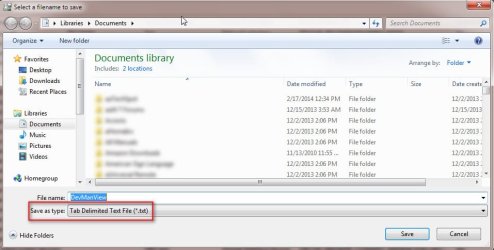
Next, you MUST change the Save as Type to Tab Delimited Text (see below). Save to your Desktop and attach to your next post

/* EDIT */
While you're at it, please give me a Problem Device Report as well

  • Make sure devices are connected and powered on
  • Click Start->Run, type msinfo32 in the box. Click the + sign next to Components to expand it
  • Click Problem Devices. Anything appear?
  • If yes, click on it, Ctrl-A to select all, Ctrl-C to copy it, Ctrl-V to paste into next post
  • On the other hand, if no devices are listed, tell me so
 

Attachments

  • DevManView.jpg
    DevManView.jpg
    54.9 KB · Views: 2
Last edited:

My Computer My Computer

At a glance

Desk 1: Win 7 Pro x32; Desk 2: Windows 10 x64
Computer type
PC/Desktop
Computer Manufacturer/Model Number
Dell Optiplex 360 and Optiplex 755
OS
Desk 1: Win 7 Pro x32; Desk 2: Windows 10 x64
Hard Drives
500GB Crucial SSD in both Desktops
Other Info
Buffalo 6TB NAS, Raid 1
ok for the problems under msinfo32 i have

Not Available HDAUDIO\FUNC_01&VEN_1106&DEV_4397&SUBSYS_104383D4&REV_1000\4&3B38209B&0&0001 Reinstall the drivers for this device.
Not Available HDAUDIO\FUNC_01&VEN_1002&DEV_AA01&SUBSYS_00AA0100&REV_1002\5&123B7191&0&0001 Reinstall the drivers for this device.


and i am attaching the devman file
 

Attachments

My Computer My Computer

At a glance

windows 7 home premium x64
Computer type
PC/Desktop
Computer Manufacturer/Model Number
Gateway GM5446E
OS
windows 7 home premium x64
Motherboard
Asus P5G41-M LX2/GB
Browser
firefox
@gsng

fyi... you DO have two sound cards: One on your motherboard and the other on your Radeon HD 5570. (The sound card on the graphics board supports its HDMI port).

By definition, each HD sound card has its own HD Audio Controller. The HD devices on a sound card connect to the HD controller co-located on the same card. I can see both your HD Audio controllers are detected and driver status OK. Mystery is why the HD devices on each sound card have the same driver error (Reinstall the drivers for this device) :confused:

fyi and helpful to know... By default, DevMgr displays the HD Audio Controllers under System Devices. But to understand how devices connect to each other and understand which are on what card: use DevMgr click View->Devices by Connection then drill down ACPI devices till you see the PCI bus. Then see how devices connect to each other. Here's a snapshot from my machine you can recognize the distinction between my two sound cards and the devices on each
> Notice the Onboard HD controller connects directly to the PCI bus
> While the Offboard HD controller on my graphics card connects through PCI express

Back to your problem, there will be two different sound drivers: one for you m/b and one for your HD Radeon.

Did you look in CtlPnl->Programs and Features and uninstall the audio devices from there? Uninstall from there first, then try reinstalling each of the two drivers. Then re-check msinfo32 Problem Devices to see if any change
 

Attachments

  • DevByConnect - W7 -3.JPG
    DevByConnect - W7 -3.JPG
    75.3 KB · Views: 6
Last edited:

My Computer My Computer

At a glance

Desk 1: Win 7 Pro x32; Desk 2: Windows 10 x64
Computer type
PC/Desktop
Computer Manufacturer/Model Number
Dell Optiplex 360 and Optiplex 755
OS
Desk 1: Win 7 Pro x32; Desk 2: Windows 10 x64
Hard Drives
500GB Crucial SSD in both Desktops
Other Info
Buffalo 6TB NAS, Raid 1
Back
Top