Audio Driver Problem

merelda

New member
Local time
6:26 PM
Messages
21
Hi all,

I have a BENQ Joybook S53, and after I installed W7 last night, the audio stopped working. It says that I have "no audio devices installed"...

It also happened to me last time when I rebooted my XP, but after I downloaded the audio driver everything went well. However, this time, even after I downloaded and installed the audio driver, it still says the same thing!!

I even went back to XP and copied all the files regarding to "drivers" and pasted into WINDOWS (under C drive) and some others under System32... But it still isnt working for me...


I think my audio device is "Conexant AMC 2 Channel Audio" when I checked in XP..

Thank you for your help.
 

My Computer

OS
Laptop: BENQ Joybook S53
Please follow this tutorial Driver selection for your Hardware devices.
If you have any further problems, or can't find a driver, please post back the information found under hardware id's here for all devices with a yellow triangle next to them. Either myself or another member will then see what we can find for you.
 

My Computer

OS
XP Pro/Vista Ultimate (64)/Windows 7 Ultimate Signature Edition(64)
CPU
Core 2 Duo E8500 @ stock
Motherboard
Gigabyte EP45-UD3R
Memory
8Gb (4 X 2Gb) Corsair Dominator 1066Mhz DDR2
Graphics Card(s)
XFX ATI Radeon 4870 1Gb
Sound Card
Onboard 7.1
Monitor(s) Displays
BenQ E2200Hd, Asus VW161D, HP L1506
Screen Resolution
1920 X 1080
Hard Drives
Seagate 7200.12 500Gb
2 X Hitachi 1Tb
PSU
CoolerMaster 650 EPD
Case
Thermaltake
Cooling
2 X Noctua 120mm's, Stock Intel
Keyboard
Logitech
Mouse
Logitech
Hi, thanks for the link,

I followed the tutorial just now, I found the string in the .inf file I extracted from the file I downloaded, but when I tried to run the .exe file it gives me the follwing:

"Error: Cannot locate the delete file list in the Registry. Driver files could not be deleted."

then

"To complete the uninstallation, you need to reboot your computer. If you install a new audio driver before rebooting, you may have problems with your MIDI audio"


But I the thing is, I thought I have no audio device, then why woiuld it say that I am uninstalling rather than installing the driver?

This is the file I downloaded:
Driver information of device - Conexant AC-Link 2 Channel Audio


Thanks for your help.
 

My Computer

OS
Laptop: BENQ Joybook S53
In device manager, under sound, audio and game devices, can you right click your sound card and uninstall it? This should get it back to a clean slate so we can try to re-install the audio drivers. The drivers that you downloaded are for 2000/XP, after uninstallation, post back the information under hardware id's for your device and I'll search for an updated driver for you.
 

My Computer

OS
XP Pro/Vista Ultimate (64)/Windows 7 Ultimate Signature Edition(64)
CPU
Core 2 Duo E8500 @ stock
Motherboard
Gigabyte EP45-UD3R
Memory
8Gb (4 X 2Gb) Corsair Dominator 1066Mhz DDR2
Graphics Card(s)
XFX ATI Radeon 4870 1Gb
Sound Card
Onboard 7.1
Monitor(s) Displays
BenQ E2200Hd, Asus VW161D, HP L1506
Screen Resolution
1920 X 1080
Hard Drives
Seagate 7200.12 500Gb
2 X Hitachi 1Tb
PSU
CoolerMaster 650 EPD
Case
Thermaltake
Cooling
2 X Noctua 120mm's, Stock Intel
Keyboard
Logitech
Mouse
Logitech
Here are the Hardware Id's,

PCI\VEN_8086&DEV_266E&SUBSYS_058B17FF&REV_04
PCI\VEN_8086&DEV_266E&SUBSYS_058B17FF
PCI\VEN_8086&DEV_266E&CC_040100
PCI\VEN_8086&DEV_266E&CC_0401


Thanks so much!
 

My Computer

OS
Laptop: BENQ Joybook S53
Download this zip file: http://www.viaarena.com/Driver/vinyl_v700b.zip
extract it, and make note of where you've extracted to.
Click start orb - type device manager - right click your device - update driver - browse - locate the extracted folder, and allow it to search subfolders.
Post back and let us know how it goes.
 

My Computer

OS
XP Pro/Vista Ultimate (64)/Windows 7 Ultimate Signature Edition(64)
CPU
Core 2 Duo E8500 @ stock
Motherboard
Gigabyte EP45-UD3R
Memory
8Gb (4 X 2Gb) Corsair Dominator 1066Mhz DDR2
Graphics Card(s)
XFX ATI Radeon 4870 1Gb
Sound Card
Onboard 7.1
Monitor(s) Displays
BenQ E2200Hd, Asus VW161D, HP L1506
Screen Resolution
1920 X 1080
Hard Drives
Seagate 7200.12 500Gb
2 X Hitachi 1Tb
PSU
CoolerMaster 650 EPD
Case
Thermaltake
Cooling
2 X Noctua 120mm's, Stock Intel
Keyboard
Logitech
Mouse
Logitech
Hi,

After installing the file, the volume bar on the right hand conrner is moving, but there still isn't any sound.. But the good sign is, if I move the volume, there is a sign of interference... like a buzzing sound..

But if I go to control panel > sound > manage audio devices
the bar next to Speaker moves, yet when I go to properties > advanced and test it,
there is no sign of sound either..

Thanks for the help!!
 

My Computer

OS
Laptop: BENQ Joybook S53
Can you try plugging a set of headphones into the audio jack, to see if it's could perhaps be a speaker issue?
You're welcome, hopefully we can get to the bottom of this for you :)
 

My Computer

OS
XP Pro/Vista Ultimate (64)/Windows 7 Ultimate Signature Edition(64)
CPU
Core 2 Duo E8500 @ stock
Motherboard
Gigabyte EP45-UD3R
Memory
8Gb (4 X 2Gb) Corsair Dominator 1066Mhz DDR2
Graphics Card(s)
XFX ATI Radeon 4870 1Gb
Sound Card
Onboard 7.1
Monitor(s) Displays
BenQ E2200Hd, Asus VW161D, HP L1506
Screen Resolution
1920 X 1080
Hard Drives
Seagate 7200.12 500Gb
2 X Hitachi 1Tb
PSU
CoolerMaster 650 EPD
Case
Thermaltake
Cooling
2 X Noctua 120mm's, Stock Intel
Keyboard
Logitech
Mouse
Logitech
I tried to plug in a set of headphones, and all I could hear was louder interference sound.. I don't think it's because of the speaker, because when I logged into XP on the same computer, the audio works just fine..

Thanks again, I also hope I can figure this out here!
 

My Computer

OS
Laptop: BENQ Joybook S53
Can you go to control panel - sound - speakers - properties - enhancements tab - restore defaults?
 

My Computer

OS
XP Pro/Vista Ultimate (64)/Windows 7 Ultimate Signature Edition(64)
CPU
Core 2 Duo E8500 @ stock
Motherboard
Gigabyte EP45-UD3R
Memory
8Gb (4 X 2Gb) Corsair Dominator 1066Mhz DDR2
Graphics Card(s)
XFX ATI Radeon 4870 1Gb
Sound Card
Onboard 7.1
Monitor(s) Displays
BenQ E2200Hd, Asus VW161D, HP L1506
Screen Resolution
1920 X 1080
Hard Drives
Seagate 7200.12 500Gb
2 X Hitachi 1Tb
PSU
CoolerMaster 650 EPD
Case
Thermaltake
Cooling
2 X Noctua 120mm's, Stock Intel
Keyboard
Logitech
Mouse
Logitech
I can't click onto it, unless I change my settings. So I guess it is already on default?

Still, nothing has happened after I changed it to default..

I'm sorry, this is probably highly annoying...
But I'm really appreciating your help :)
 

My Computer

OS
Laptop: BENQ Joybook S53
No, it's not annoying, it's a challenge :)
Ok, we might see if MS can help out a little...
Click start orb type find and fix audio playback, hit enter and allow the troubleshooter to check your system.
Post back your results
 

My Computer

OS
XP Pro/Vista Ultimate (64)/Windows 7 Ultimate Signature Edition(64)
CPU
Core 2 Duo E8500 @ stock
Motherboard
Gigabyte EP45-UD3R
Memory
8Gb (4 X 2Gb) Corsair Dominator 1066Mhz DDR2
Graphics Card(s)
XFX ATI Radeon 4870 1Gb
Sound Card
Onboard 7.1
Monitor(s) Displays
BenQ E2200Hd, Asus VW161D, HP L1506
Screen Resolution
1920 X 1080
Hard Drives
Seagate 7200.12 500Gb
2 X Hitachi 1Tb
PSU
CoolerMaster 650 EPD
Case
Thermaltake
Cooling
2 X Noctua 120mm's, Stock Intel
Keyboard
Logitech
Mouse
Logitech
Then the result makes this much more challenging, because "trouble shotting couldn't identify the problem", and I tried the "related troubleshooters online", but none of them are similar to my problem..
 

My Computer

OS
Laptop: BENQ Joybook S53
I'm going to request help from some more knowledgable SF team members here, I'll keep watching thouh in case there's anything else I can help with ok? Hopefully other members will be along soon to assist.
 

My Computer

OS
XP Pro/Vista Ultimate (64)/Windows 7 Ultimate Signature Edition(64)
CPU
Core 2 Duo E8500 @ stock
Motherboard
Gigabyte EP45-UD3R
Memory
8Gb (4 X 2Gb) Corsair Dominator 1066Mhz DDR2
Graphics Card(s)
XFX ATI Radeon 4870 1Gb
Sound Card
Onboard 7.1
Monitor(s) Displays
BenQ E2200Hd, Asus VW161D, HP L1506
Screen Resolution
1920 X 1080
Hard Drives
Seagate 7200.12 500Gb
2 X Hitachi 1Tb
PSU
CoolerMaster 650 EPD
Case
Thermaltake
Cooling
2 X Noctua 120mm's, Stock Intel
Keyboard
Logitech
Mouse
Logitech
Thanks so much!!!!

Your help is greatly appreciated!!!
 

My Computer

OS
Laptop: BENQ Joybook S53
You're very welcome :)
 

My Computer

OS
XP Pro/Vista Ultimate (64)/Windows 7 Ultimate Signature Edition(64)
CPU
Core 2 Duo E8500 @ stock
Motherboard
Gigabyte EP45-UD3R
Memory
8Gb (4 X 2Gb) Corsair Dominator 1066Mhz DDR2
Graphics Card(s)
XFX ATI Radeon 4870 1Gb
Sound Card
Onboard 7.1
Monitor(s) Displays
BenQ E2200Hd, Asus VW161D, HP L1506
Screen Resolution
1920 X 1080
Hard Drives
Seagate 7200.12 500Gb
2 X Hitachi 1Tb
PSU
CoolerMaster 650 EPD
Case
Thermaltake
Cooling
2 X Noctua 120mm's, Stock Intel
Keyboard
Logitech
Mouse
Logitech
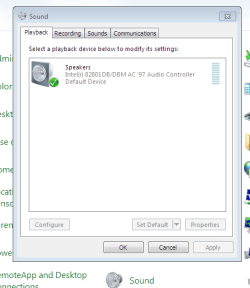
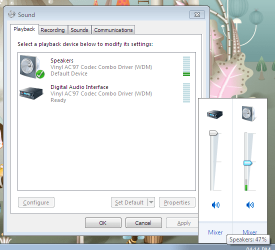
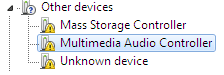
Below are the screenshots:


Thanks!!
 

Attachments

  • screenshot.png
    screenshot.png
    29.4 KB · Views: 6
  • old.png
    old.png
    2.4 KB · Views: 364

My Computer

OS
Laptop: BENQ Joybook S53
are these the drivers you are using? BenQ Europe - Service & Support the only drivers i have found for your laptop relate to xp is an old laptop if so you may have to run in compatility mode
 

My Computer

Computer type
PC/Desktop
Computer Manufacturer/Model Number
self build
OS
win 7 ultimate32bit, Win8.1pro wmc 32bit
CPU
amd phenom x4 9600
Motherboard
asus m2n32-sli deluxe
Memory
corsair twinxs 2x2gb
Graphics Card(s)
2x nvidia 1gb 8500gt
Sound Card
onboard
Monitor(s) Displays
23" PB Viseo 233d
Screen Resolution
1920x1080
Hard Drives
maxtor sata 500gb
maxtor sata 320gb
fujitsu sata200gb
PSU
oryxx tornado 750w
Case
thermaltake xaser lll
Cooling
artic freezer64 pro + 7 case fans
That 2nd image I believe is the key, can you repeat the steps in this tutorial: Driver selection for your Hardware devices. for each device with a yellow asterisk. Post back a screen snip for the hardware id's of each device
 

My Computer

OS
XP Pro/Vista Ultimate (64)/Windows 7 Ultimate Signature Edition(64)
CPU
Core 2 Duo E8500 @ stock
Motherboard
Gigabyte EP45-UD3R
Memory
8Gb (4 X 2Gb) Corsair Dominator 1066Mhz DDR2
Graphics Card(s)
XFX ATI Radeon 4870 1Gb
Sound Card
Onboard 7.1
Monitor(s) Displays
BenQ E2200Hd, Asus VW161D, HP L1506
Screen Resolution
1920 X 1080
Hard Drives
Seagate 7200.12 500Gb
2 X Hitachi 1Tb
PSU
CoolerMaster 650 EPD
Case
Thermaltake
Cooling
2 X Noctua 120mm's, Stock Intel
Keyboard
Logitech
Mouse
Logitech
Back
Top