Audio Driver

rftech

New member
Member
Local time
11:44 AM
Messages
43
Hi, I have a desktop computer, running Windows 7 Pro 64 bit. The motherboard is an ECS K8M890M-M, 4GB of ram, and I am using on board audio. My problem is that I can't find an audio driver for the board, I have looked at the ECS web site several times and also performed a search on Google, for an audio driver for Windows 7 64 bit with no good response. I opened device manager and found under, "other devices", a listing for multimedia audio controller, I double clicked on it, and that was when I found that it said "The driver for this device was not installed. I have spent a lot of time trying to get different audio drivers installed, after each installation I still have a red circle with a white X next to the speaker icon down in the bottom right hand corner of the task bar. Could someone please help me with this problem. Thank you.
 

My Computer

OS
Windows 7 pro
Hi, I have a desktop computer, running Windows 7 Pro 64 bit. The motherboard is an ECS K8M890M-M, 4GB of ram, and I am using on board audio. My problem is that I can't find an audio driver for the board, I have looked at the ECS web site several times and also performed a search on Google, for an audio driver for Windows 7 64 bit with no good response. I opened device manager and found under, "other devices", a listing for multimedia audio controller, I double clicked on it, and that was when I found that it said "The driver for this device was not installed. I have spent a lot of time trying to get different audio drivers installed, after each installation I still have a red circle with a white X next to the speaker icon down in the bottom right hand corner of the task bar. Could someone please help me with this problem. Thank you.

The X means the sound is off. Click the X and the sound controls will open. You will see another X. Click it and the sound will be turned on. You can adjust the volume at the same place.
 

My Computer

Computer type
PC/Desktop
Computer Manufacturer/Model Number
Custom Build
OS
Windows 7 Home Premium 32-Bit - Build 7600 SP1
CPU
Intel Core i3-2120 3.30Ghz
Motherboard
Asus P8Z68-V LX Intel Z68 Socket H2 ATX
Memory
Kingston 4 GB DDR3 1333 mhz
Graphics Card(s)
AMD Radeon HD6670
Sound Card
Sound Blaster Audigy SE 24-Bit
Monitor(s) Displays
Asus VE228
Screen Resolution
1440 X 900
Hard Drives
OCZ Vertex 3 120 GB Sata 3 SSD ==
Kingston SH103/S3 120 G Hyper X 120 GB SSD ==
Western Digital 500 GB Caviar Green 7200 RPM ==
PSU
Corsair CX600M == 600 Watt
Case
NZXT Apollo - Silver with Clear Side Panel
Cooling
Three 120 mm Fans
Keyboard
Microsoft Natural 4000
Mouse
Microsoft Custom Optical 3000
Internet Speed
AT&T Fiber Optic Wireless Network
Antivirus
Microsoft Security Essentials
Browser
Chrome
Other Info
120 mm Blue LED Fan -- Three Blue LED Lazer Light Sticks

My Computer

Computer type
PC/Desktop
Computer Manufacturer/Model Number
Lenovo IdeaCenter 450
OS
Windows 10 Pro X64
CPU
Intel Quad Core i7-4770 @ 3.4Ghz
Memory
16.0GB PC3-12800 DDR3 SDRAM 1600 MHz
Graphics Card(s)
Intel Integrated HD Graphics
Sound Card
Realtek HD Audio
Monitor(s) Displays
HP 22" LCD
Screen Resolution
1680 x 1050
Hard Drives
250GB Samsung EVO SATA-3 SSD
2TB Seagate ST2000DM001 SATA-2
1.5TB Seagate ST3150041AS SATA
Keyboard
Dell USB
Mouse
Lenovo USB
Internet Speed
Cable via Road Runner 3MB Upload, 30MB Download
Antivirus
Windows Defender, MBAM Pro, MBAE
Browser
Seamonkey
Other Info
UEFI/GPT
PLDS DVD-RW DH16AERSH

My Computer

Computer type
PC/Desktop
Computer Manufacturer/Model Number
Skylake Special #666
OS
Windows 10 Pro x64
CPU
Intel Core i7 6700K
Motherboard
Asus Sabertooth Z170 Mark 1
Memory
GSkill TridentZ RGB 16GB 3600 16-16-16-36
Graphics Card(s)
EVGA GTX 980 Ti SC x2
Sound Card
Realtek High Definition
Monitor(s) Displays
AOC G2460PG
Screen Resolution
1920 x 1080 144Hz
Hard Drives
Samsung 860 Pro 256GB, Seagate Barracuda 4TB x2
PSU
EVGA 1000 P2, EVGA White Custom Braided Cables
Case
Corsair Vengeance C70 Gunmetal Black
Cooling
Corsair H100i v2, Corsair ML120 x2, Thermal Grizzly Kryonaut
Keyboard
Logitech G910 Orion Spectrum
Mouse
Logitech G700s
Internet Speed
Verizon Fios Quantum Gateway 75/75
Antivirus
Windows Defender, Malwarebytes Free 3.8.3
Browser
Chrome
Other Info
Corsair SP120 x4, LG Blu-ray Drive, Durabrand HT-395 100 Watt Dolby Digital Amp, Corsair H2100 Wireless 7.1 Headset
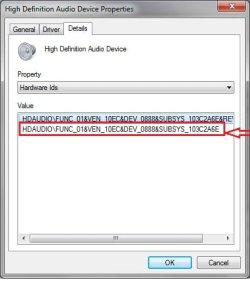
In device manager, right-click on the multimedia audio controller and select Properties. Then click on the Details tab and select Hardware Ids in the Property dropdown. Copy the hardware id and paste it into a Google search.

Device properties.jpg

That should identify the device and help you find the right driver.
 

My Computer

Computer type
PC/Desktop
Computer Manufacturer/Model Number
Dell, HP, Toshiba, Compaq
OS
Windows 7 Ultimate x86 and x64
Hi, bigmck. When I click on the speaker down at the bottom right corner of the task bar a window opens that says Detecting problems, also when I hover over the speaker with the cursor, a message comes up the says no audio out put device installed. I have my speakers plugged in to the out port at the back of the tower and they are turned on because the yellow light on the speakers in on.
 

My Computer

OS
Windows 7 pro
That is a very old motherboard (the motherboard supports Win 98 through Vista). I assume you upgraded from Windows XP. They do support Vista and the Vista drivers should work but there are no audio drivers listed by the motherboard vendor, which suggests the sound chip is not Vista compatible. If the sound chip is Windows 7 compatible, Windows would have installed the generic, basic function, "HD Audio Codec". Since it didn't, I would suspect the sound chip is not compatible and if this is the case you will have to install a separate Win 7 compatible sound card.
 

My Computer

Computer type
PC/Desktop
Computer Manufacturer/Model Number
My Own Build
OS
Windows 10 64 bit
CPU
Intel i7 6700K
Motherboard
ASUS ROG Maximus VIII Hero
Memory
16GB Corsair Dominator
Graphics Card(s)
Intel CPU Graphics
Sound Card
RealTek
Monitor(s) Displays
27" Dell S2719dgf
Screen Resolution
2560X1440
Hard Drives
1 TB Samsung 850 EVO SSD for Win 10 Pro
500GB Samsung 850 EVO SSD for Win 10 Insider
2 TB drive for backup
PSU
EVGA Supernova 750G2
Case
BeQuiet Silent Base 600
Cooling
Deepcool Captain 120EX
Keyboard
Microsoft Wireless 2000
Mouse
Microsoft wireless
Internet Speed
100 MB/sec (Cable)
Antivirus
Microsoft Defender and Malwarebytes
Browser
Edge/Firefox
Other Info
Cakewalk (Sonar) by BandLab and Studio One 4.1 Pro recording studio software. MOTU 896Mk3 Hybrid recording interface, Frontier Tranzport wireless control unit, Behringer X-Touch Control Surface.
Five USB connected optical drives for CD Audio production using Nero BurningROM
Hi, bigmck. When I click on the speaker down at the bottom right corner of the task bar a window opens that says Detecting problems, also when I hover over the speaker with the cursor, a message comes up the says no audio out put device installed. I have my speakers plugged in to the out port at the back of the tower and they are turned on because the yellow light on the speakers in on.

Sorry, I thought you had the sound turned off.
 

My Computer

Computer type
PC/Desktop
Computer Manufacturer/Model Number
Custom Build
OS
Windows 7 Home Premium 32-Bit - Build 7600 SP1
CPU
Intel Core i3-2120 3.30Ghz
Motherboard
Asus P8Z68-V LX Intel Z68 Socket H2 ATX
Memory
Kingston 4 GB DDR3 1333 mhz
Graphics Card(s)
AMD Radeon HD6670
Sound Card
Sound Blaster Audigy SE 24-Bit
Monitor(s) Displays
Asus VE228
Screen Resolution
1440 X 900
Hard Drives
OCZ Vertex 3 120 GB Sata 3 SSD ==
Kingston SH103/S3 120 G Hyper X 120 GB SSD ==
Western Digital 500 GB Caviar Green 7200 RPM ==
PSU
Corsair CX600M == 600 Watt
Case
NZXT Apollo - Silver with Clear Side Panel
Cooling
Three 120 mm Fans
Keyboard
Microsoft Natural 4000
Mouse
Microsoft Custom Optical 3000
Internet Speed
AT&T Fiber Optic Wireless Network
Antivirus
Microsoft Security Essentials
Browser
Chrome
Other Info
120 mm Blue LED Fan -- Three Blue LED Lazer Light Sticks
Hi, mrwhoopee. I did what you said to do, all that is in the window as far as ids is just multimedia audio controller, when I click on the down arrow at the right end of the property bar, a menu drops down, I then highlight hardware ids and click on it, four values show up in the value box. I right clicked on the top value and pasted below.

PCI\VEN_1106&DEV_3059&SUBSYS_18771019&REV_60
 

My Computer

OS
Windows 7 pro
Fireberd, I have had windows 7 installed before with the same motherboard and the speakers worked, so from that I would say that the chip is compatible with Vista and Windows 7. I had a software issue with windows 7 and I re installed windows 7 and this time no drivers loaded.
 

My Computer

OS
Windows 7 pro
The RealTek ALC655 (AC'97) are the correct drivers. They are linked to the RealTek site in one of the earlier posts on this thread.
 

My Computer

Computer type
PC/Desktop
Computer Manufacturer/Model Number
My Own Build
OS
Windows 10 64 bit
CPU
Intel i7 6700K
Motherboard
ASUS ROG Maximus VIII Hero
Memory
16GB Corsair Dominator
Graphics Card(s)
Intel CPU Graphics
Sound Card
RealTek
Monitor(s) Displays
27" Dell S2719dgf
Screen Resolution
2560X1440
Hard Drives
1 TB Samsung 850 EVO SSD for Win 10 Pro
500GB Samsung 850 EVO SSD for Win 10 Insider
2 TB drive for backup
PSU
EVGA Supernova 750G2
Case
BeQuiet Silent Base 600
Cooling
Deepcool Captain 120EX
Keyboard
Microsoft Wireless 2000
Mouse
Microsoft wireless
Internet Speed
100 MB/sec (Cable)
Antivirus
Microsoft Defender and Malwarebytes
Browser
Edge/Firefox
Other Info
Cakewalk (Sonar) by BandLab and Studio One 4.1 Pro recording studio software. MOTU 896Mk3 Hybrid recording interface, Frontier Tranzport wireless control unit, Behringer X-Touch Control Surface.
Five USB connected optical drives for CD Audio production using Nero BurningROM
Back
Top