
Solved Audio drivers

wicken

New member
Member
Local time
7:49 AM
Messages
74
Today when Golden posted on my previous topic about updating audio drivers i noticed that realtek audio drivers weren't installed, so now i have nvidia high definition audio drivers and realtek audio drivers. Am i supposed to have 2 different audio drivers or nvidia drivers weren't supposed to be here?
 
Last edited:

My Computer

Computer Manufacturer/Model Number
Acer Aspire 5737Z
OS
Windows 7 Home Premium 32bit
CPU
Intel Core 2Duo T6400 @2.00GHz
Memory
4,0GB
Graphics Card(s)
NVIDIA GeForce 9400M G
Sound Card
Realtek High Definition Audio
Screen Resolution
1366 x 768 x 59 hertz
Cooling
Notepal X-Lite
Mouse
Microsoft Wireless Notebook Optical Mouse 3000
I went to my manufacturer website, i searched for the drivers that my laptop was supposed to have and i only see Realtek drivers there.
 

My Computer

Computer Manufacturer/Model Number
Acer Aspire 5737Z
OS
Windows 7 Home Premium 32bit
CPU
Intel Core 2Duo T6400 @2.00GHz
Memory
4,0GB
Graphics Card(s)
NVIDIA GeForce 9400M G
Sound Card
Realtek High Definition Audio
Screen Resolution
1366 x 768 x 59 hertz
Cooling
Notepal X-Lite
Mouse
Microsoft Wireless Notebook Optical Mouse 3000
I have both VIA and NVidia High Definition audio listed on my PC. The NVidia drivers are there because my video card has HDMI support, which is an audio & video output. So in essence I have two sound cards. The NVidia sound driver is installed as part of the Video card drivers.
 

My Computer

Computer type
PC/Desktop
Computer Manufacturer/Model Number
Home Built
OS
Windows 10 Education 64 bit
CPU
AMD Phenom II X4 980 Black Edition Deneb 3.7GHz
Motherboard
Asus M4N68T-M V2 µATX Motherboard
Memory
8GB 4GBx2 Kingston PC10600 DDR3 1333 Memory
Graphics Card(s)
Zotac NVIDIA Geforce GT640 2 Gig DDR3 PCIe
Sound Card
VIA VT1708s High Definition Audio 8-channel Onboard
Monitor(s) Displays
22" LG E2242 1080p and 2 19" I-INC AG191D
Screen Resolution
1280x1024 - 1920x1080 - 1280x1024
Hard Drives
Crucial M100 256 GB SSD and 500 GB WD Blue SATA
PSU
Thermaltake TR 620
Case
Power Up Black ATX Mid-Tower Case
Cooling
Stock heatsink and fan
Keyboard
Logitech Wireless K350 Wave
Mouse
Logitech Wireless M570 Trackman Wheel
Internet Speed
80 Mbps Down 30 Mbps Up
Antivirus
Windows Defender
Browser
Internet Explorer 11
Other Info
HP DVD1040e Lightscribe - External USB2
I have both VIA and NVidia High Definition audio listed on my PC. The NVidia drivers are there because my video card has HDMI support, which is an audio & video output. So in essence I have two sound cards. The NVidia sound driver is installed as part of the Video card drivers.
Well the problem is that i don't connect my computer to the tv so i think that this drivers are useless. But i tried to remove them and windows installed the VGA again so i let them stay on my computer, but now should i continue to update them or not?
 

My Computer

Computer Manufacturer/Model Number
Acer Aspire 5737Z
OS
Windows 7 Home Premium 32bit
CPU
Intel Core 2Duo T6400 @2.00GHz
Memory
4,0GB
Graphics Card(s)
NVIDIA GeForce 9400M G
Sound Card
Realtek High Definition Audio
Screen Resolution
1366 x 768 x 59 hertz
Cooling
Notepal X-Lite
Mouse
Microsoft Wireless Notebook Optical Mouse 3000
Thats up to you, I update them when I manually update my Video card drivers. I don't update drivers though windows update, I have that option disabled.
 

My Computer

Computer type
PC/Desktop
Computer Manufacturer/Model Number
Home Built
OS
Windows 10 Education 64 bit
CPU
AMD Phenom II X4 980 Black Edition Deneb 3.7GHz
Motherboard
Asus M4N68T-M V2 µATX Motherboard
Memory
8GB 4GBx2 Kingston PC10600 DDR3 1333 Memory
Graphics Card(s)
Zotac NVIDIA Geforce GT640 2 Gig DDR3 PCIe
Sound Card
VIA VT1708s High Definition Audio 8-channel Onboard
Monitor(s) Displays
22" LG E2242 1080p and 2 19" I-INC AG191D
Screen Resolution
1280x1024 - 1920x1080 - 1280x1024
Hard Drives
Crucial M100 256 GB SSD and 500 GB WD Blue SATA
PSU
Thermaltake TR 620
Case
Power Up Black ATX Mid-Tower Case
Cooling
Stock heatsink and fan
Keyboard
Logitech Wireless K350 Wave
Mouse
Logitech Wireless M570 Trackman Wheel
Internet Speed
80 Mbps Down 30 Mbps Up
Antivirus
Windows Defender
Browser
Internet Explorer 11
Other Info
HP DVD1040e Lightscribe - External USB2
When you installed the video driver did you use the one from Acer or the one from Nvidia? If the one from Nvidia that is where the Nvidia audio driver came from, and from what I can see looking at the manual for that laptop it doesn't support audio over HDMI which if that is the case the audio driver shouldn't have installed.

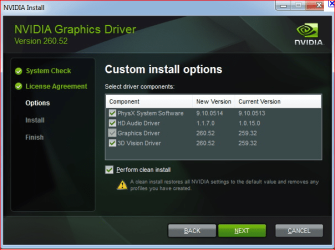
Also if it was the one from Nvidia it should have the option to do a custom install which will give options like this (will look different if an older driver),

nvidiainstall.PNG

which you can uncheck everything but the video drive if shown.

I don't update drivers though windows update

As should anyone with an AMD or Nvidia video card.
 

My Computer

Computer type
PC/Desktop
Computer Manufacturer/Model Number
Me
OS
Win 7 Ultimate x64
CPU
FX-8350 @ 4.6 GHz so far
Motherboard
Asus M5A97 EVO
Memory
ADATA XPG V1 Series Black 8GB DDR3 1600
Graphics Card(s)
Sapphire R9 270x Dual-X
Sound Card
Xonar DGX w/ Corsair Vengence 1300
Monitor(s) Displays
Acer S232HL Abid
Screen Resolution
1920x1080
Hard Drives
120 GB OCZ Vertex 3
500 GB Seagate 7200.12
PSU
Antec Earthwatts 650W Green
Case
Antec Three Hundred
Cooling
Cooler Master 212 EVO
Keyboard
Logitech G510
Mouse
Logitech G500s
Internet Speed
35000/3000
When you installed the video driver did you use the one from Acer or the one from Nvidia? If the one from Nvidia that is where the Nvidia audio driver came from, and from what I can see looking at the manual for that laptop it doesn't support audio over HDMI which if that is the case the audio driver shouldn't have installed.

Also if it was the one from Nvidia it should have the option to do a custom install which will give options like this (will look different if an older driver),

View attachment 162976

which you can uncheck everything but the video drive if shown.

I don't update drivers though windows update

As should anyone with an AMD or Nvidia video card.
I don't remember very well but I think I used the one from Acer but after i updated my video drivers the audio driver were also there so i think when the installation finished, the realtek audio driver disappeared because until today i didn't seen it on my control panel.
 

My Computer

Computer Manufacturer/Model Number
Acer Aspire 5737Z
OS
Windows 7 Home Premium 32bit
CPU
Intel Core 2Duo T6400 @2.00GHz
Memory
4,0GB
Graphics Card(s)
NVIDIA GeForce 9400M G
Sound Card
Realtek High Definition Audio
Screen Resolution
1366 x 768 x 59 hertz
Cooling
Notepal X-Lite
Mouse
Microsoft Wireless Notebook Optical Mouse 3000
Doubt its there, but double check the bios for the onboard audio and make sure it is set to enabled if present.
 

My Computer

Computer type
PC/Desktop
Computer Manufacturer/Model Number
Me
OS
Win 7 Ultimate x64
CPU
FX-8350 @ 4.6 GHz so far
Motherboard
Asus M5A97 EVO
Memory
ADATA XPG V1 Series Black 8GB DDR3 1600
Graphics Card(s)
Sapphire R9 270x Dual-X
Sound Card
Xonar DGX w/ Corsair Vengence 1300
Monitor(s) Displays
Acer S232HL Abid
Screen Resolution
1920x1080
Hard Drives
120 GB OCZ Vertex 3
500 GB Seagate 7200.12
PSU
Antec Earthwatts 650W Green
Case
Antec Three Hundred
Cooling
Cooler Master 212 EVO
Keyboard
Logitech G510
Mouse
Logitech G500s
Internet Speed
35000/3000
Doubt its there, but double check the bios for the onboard audio and make sure it is set to enabled if present.
Where can i do that?
 

My Computer

Computer Manufacturer/Model Number
Acer Aspire 5737Z
OS
Windows 7 Home Premium 32bit
CPU
Intel Core 2Duo T6400 @2.00GHz
Memory
4,0GB
Graphics Card(s)
NVIDIA GeForce 9400M G
Sound Card
Realtek High Definition Audio
Screen Resolution
1366 x 768 x 59 hertz
Cooling
Notepal X-Lite
Mouse
Microsoft Wireless Notebook Optical Mouse 3000
I check my BIOS for the onboard audio and i don't see any option to enable or disable the onboard audio.
This is what might have happened until today: "If your computer does not have an option within CMOS to disable the on-board audio it is likely that either the motherboard has a jumper that can be set to disable the on-board audio, or the on-board audio will disable automatically when the new sound card is installed into the computer."
 

My Computer

Computer Manufacturer/Model Number
Acer Aspire 5737Z
OS
Windows 7 Home Premium 32bit
CPU
Intel Core 2Duo T6400 @2.00GHz
Memory
4,0GB
Graphics Card(s)
NVIDIA GeForce 9400M G
Sound Card
Realtek High Definition Audio
Screen Resolution
1366 x 768 x 59 hertz
Cooling
Notepal X-Lite
Mouse
Microsoft Wireless Notebook Optical Mouse 3000
Anyone is going to help me with this or not?
 

My Computer

Computer Manufacturer/Model Number
Acer Aspire 5737Z
OS
Windows 7 Home Premium 32bit
CPU
Intel Core 2Duo T6400 @2.00GHz
Memory
4,0GB
Graphics Card(s)
NVIDIA GeForce 9400M G
Sound Card
Realtek High Definition Audio
Screen Resolution
1366 x 768 x 59 hertz
Cooling
Notepal X-Lite
Mouse
Microsoft Wireless Notebook Optical Mouse 3000

My Computer

Computer Manufacturer/Model Number
HP Pavilion Elite 495UK
OS
Windows 7 Ultimate SP1 64-Bit
CPU
Intel Core i7 870 @ 2.93GHz
Motherboard
MSI 2A9C (CPU1)
Memory
8Gb Dual-Channel DDR3 @ 664MHz
Graphics Card(s)
nVidia GeForce GTX 460 1024MB dedicated RAM
Sound Card
Realtek HD Audio
Monitor(s) Displays
HP2310i
Screen Resolution
1920 x 1080
Hard Drives
1x1954GB Hitachi HDS22020ALA 330 (RAID), 1x1954GB Hitachi External for backup and storage
PSU
460W
Case
HP Elite
Cooling
Air cooled
Keyboard
Logitech K750 solar-powered keyboard
Mouse
Logitech Wireless M180 mouse
Internet Speed
2Mb
Other Info
Pure Avanti Flow Internet Radio with iPod Dock, 64Gb iPod, HP USB Speakers, Sony MDR-V500 Headphones, Sony Vaio F-Series Laptop
Anyone is going to help me with this or not?

If you ask in that manner, obviously not.
i am not being rude, if nobody knows a solution for this i might aswell deactivate NVIDIA High Definition audio on the device manager.

EDIT: I deactivated NVIDIA High Definition audio on the device manager and now i only use Realtek high definition audio. Thanks for helping once again :cool:
 
Last edited:

My Computer

Computer Manufacturer/Model Number
Acer Aspire 5737Z
OS
Windows 7 Home Premium 32bit
CPU
Intel Core 2Duo T6400 @2.00GHz
Memory
4,0GB
Graphics Card(s)
NVIDIA GeForce 9400M G
Sound Card
Realtek High Definition Audio
Screen Resolution
1366 x 768 x 59 hertz
Cooling
Notepal X-Lite
Mouse
Microsoft Wireless Notebook Optical Mouse 3000
Back
Top