Audio help

pablo70

New member
Member
Local time
3:39 AM
Messages
62
hi there just installed windows 7 om my pc and i got this

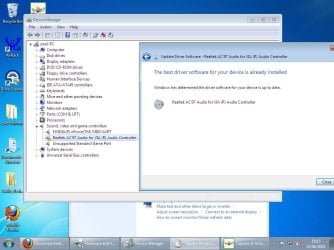
no audio output device is installed,

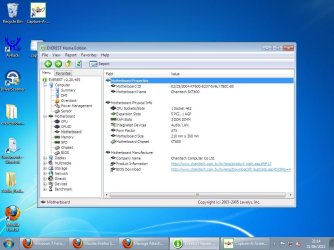
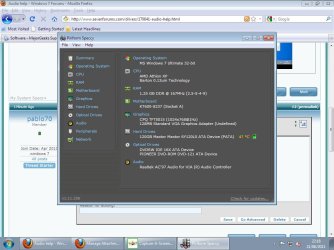
i have took a couple of pics to see if anybody can help thanks
 

Attachments

  • capture1.jpg
    capture1.jpg
    83.3 KB · Views: 8
  • capture2.jpg
    capture2.jpg
    91.1 KB · Views: 8

My Computer

OS
windows 7
also have took a snap shot of this
 

Attachments

  • capture2.jpg
    capture2.jpg
    87.9 KB · Views: 4

My Computer

OS
windows 7
I do not understand. What is the problem. Do you have speakers or headphones attached and cannot hear sound?
 

My Computer

Computer Manufacturer/Model Number
HP, Dell, Gateway, Toshiba - 4 laptops and 2 desktops
OS
Vista, Windows7, Mint Mate, Zorin, Windows 8
CPU
from 1.6GHz Duo to i7
Monitor(s) Displays
2x HP w2207
Hard Drives
5x HDD, 7x SSD, 12x Externals
Keyboard
with trackball - no mices
Mouse
Trackball mice
Internet Speed
DSL 6000
speakers plugged in but no sound
 

My Computer

OS
windows 7
You're missing more than just sound. You're missing the chipset drivers, the audio driver, video card driver and who knows what possibly else. Biggest problem is you have a 7-8 year old motherboard,

© AMDboard.com - Chaintech Summit SKT600 VIA KT600 Motherboard

that has zero Windows 7 support, and at best will have to make do with either XP or possibly Vista drivers (if available) to get things working properly. Let's start with the chipset drivers as without that nothing else really matters. That motherboard from the Speccy screen shot has the old Via KT600 chipset on it and for that there is a Vista driver available. Don't normally post direct download links but it is easier than explain how to find them. Start with downloading and installing this,

http://www.viaarena.com/Driver/VIA_HyperionPro_V524A.zip

It may take running it in compatibility mode,

http://www.sevenforums.com/tutorials/316-compatibility-mode.html

to get it to install. Next need to find out whether it is Realtek audio or Via audio. Open Device Manager, right click on the sound card and select Properties, then click on the Details tab and select Hardware IDs from the dropdown and post back a screen shot of what it shows.
 

My Computer

Computer type
PC/Desktop
Computer Manufacturer/Model Number
Me
OS
Win 7 Ultimate x64
CPU
FX-8350 @ 4.6 GHz so far
Motherboard
Asus M5A97 EVO
Memory
ADATA XPG V1 Series Black 8GB DDR3 1600
Graphics Card(s)
Sapphire R9 270x Dual-X
Sound Card
Xonar DGX w/ Corsair Vengence 1300
Monitor(s) Displays
Acer S232HL Abid
Screen Resolution
1920x1080
Hard Drives
120 GB OCZ Vertex 3
500 GB Seagate 7200.12
PSU
Antec Earthwatts 650W Green
Case
Antec Three Hundred
Cooling
Cooler Master 212 EVO
Keyboard
Logitech G510
Mouse
Logitech G500s
Internet Speed
35000/3000
Back
Top