Audio is lagging

ShArP

New member
Local time
4:14 PM
Messages
7
About a week ago all the sound that has been coming out of my computer has been lagging every few seconds if i am listening to anyone on iTunes, Youtube, Myspace, etc., I updated the sound drivers and it is still doing the same thing.

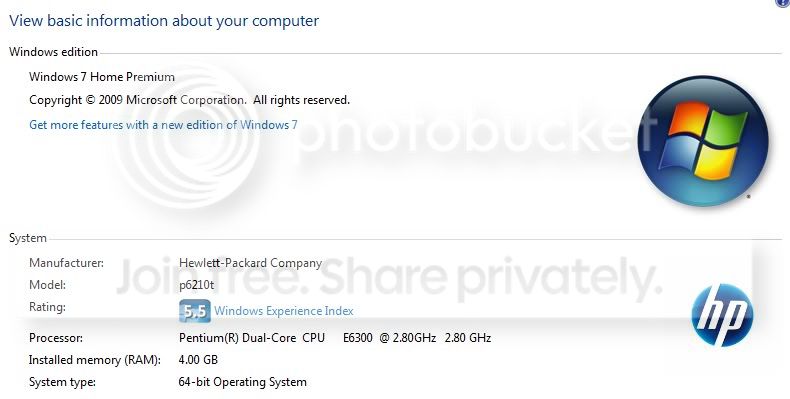
here is system specs:

Manufacturer: HP-Pavilion
Processor: Pentium(R) Dual-Core CPU E6300 @ 2.80GHz (2 CPUs)
Memory: 4096MB RAM
Hard Drive: 500 GB Total
Video Card: ATI Radeon HD 4650
Operating System: Windows 7 Home Premium 64-bit (6.1, Build 7600) (7600.win7_rtm.090713-1255)

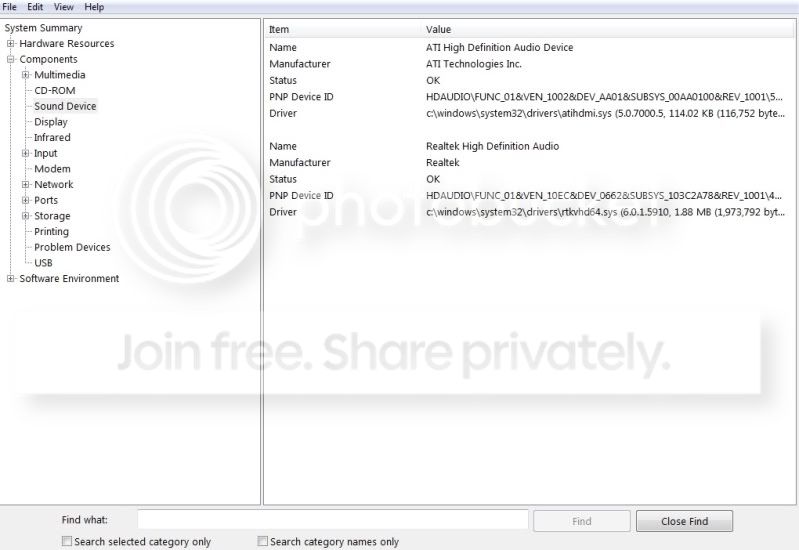
and i think this is what kind of sound drivers are on my computer:
Realtek High Definition Audio
ATI High Definition Audio Device

thanks in advanced
 

My Computer

OS
Windows 7
About a week ago all the sound that has been coming out of my computer has been lagging every few seconds if i am listening to anyone on iTunes, Youtube, Myspace, etc., I updated the sound drivers and it is still doing the same thing.

here is system specs:

Manufacturer: HP-Pavilion
Processor: Pentium(R) Dual-Core CPU E6300 @ 2.80GHz (2 CPUs)
Memory: 4096MB RAM
Hard Drive: 500 GB Total
Video Card: ATI Radeon HD 4650
Operating System: Windows 7 Home Premium 64-bit (6.1, Build 7600) (7600.win7_rtm.090713-1255)

and i think this is what kind of sound drivers are on my computer:
Realtek High Definition Audio
ATI High Definition Audio Device

thanks in advanced

So it worked before, and something happened, and now its not. What happened?
 

My Computer

Computer Manufacturer/Model Number
HP Pavillion dv-7 1005 Tx
OS
Win 8 Release candidate 8400
CPU
[email protected]
Memory
4 gigs
Graphics Card(s)
Nvidia 9600M
Sound Card
HD built-in
Monitor(s) Displays
17" Wxga
Screen Resolution
1440x900
Cooling
none
Internet Speed
45Mb down 5Mb up
Hi and welcome.
What type of speakers do you have setup? If you have setup Surround Sound speakers I'd suggest to try and setup to standard sterio 2 speakers setup. Also if it is Dolby 5.1 could also make this happen.
If you have it setup for 2 sterio speakers and that's all you have I'd still look into the sound icon in the control panel and look close at all the setting. Any changes I'd reboot to see if they changed anything.

My 2 cents and hope something helps.
 

My Computer

Computer type
PC/Desktop
Computer Manufacturer/Model Number
Self Built
OS
Windows 10 Pro
CPU
Intel i5
Motherboard
I have a fatherboard
Memory
I'm old and lost a few chips
Graphics Card(s)
Yup
Sound Card
Yup
Monitor(s) Displays
Samsung 32" UHD
Screen Resolution
3840 x 2160
Hard Drives
Samsung 860 EVO drives
PSU
450 Watt and some fans that blow
Case
Small tower
Cooling
Yes I am cool. lol
Keyboard
Who needs a keyboard?
Mouse
Logitech Laser G7 wireless
Internet Speed
Zippy fast UP and DOWN
Antivirus
I got a shot
Browser
The new Improved EDGE 2020
Hi and welcome.
What type of speakers do you have setup? If you have setup Surround Sound speakers I'd suggest to try and setup to standard sterio 2 speakers setup. Also if it is Dolby 5.1 could also make this happen.
If you have it setup for 2 sterio speakers and that's all you have I'd still look into the sound icon in the control panel and look close at all the setting. Any changes I'd reboot to see if they changed anything.

My 2 cents and hope something helps.

i got it setup for 2 stereo speakers and that is what i have, i am not sure what changes to even make because everything looks fine in the sound control panel
 

My Computer

OS
Windows 7
Are you running multiple applications when your sound lags?
Does it lag all of the time or does it only lag at certain points?
Do you know your exact model of sound card?
If not, do you know the exact model of your computer?

If you can't tell us what model of sound card you have, we can't point you towards the correct drivers. Since most sound related problems result from conflicting drivers, you may want to check to see exactly what kind of hardware you have so that you can uninstall the drivers you don't need and update the ones you do.
 

My Computer

Computer Manufacturer/Model Number
Apple Macbook Pro (April 2009)
OS
W7 Ult. x64 | OS X
CPU
Intel Mobile Core 2 Duo 2.93Ghz [T9800 Penryn]
Motherboard
NVIDIA nForce 730i Rev. B1 [Mac-F2268EC8 (U2E1)]
Memory
4096MB Samsung DDR3 Dual Channel [PC3-8500F 1066Mhz]
Graphics Card(s)
NVIDIA GeForce 9600M GT 512MB [G96M Rev. C1]
Sound Card
SB X-Fi Surround 5.1 USB | Onboard Realtek (Disabled)
Monitor(s) Displays
Acer x223wbd 22" | Apple Anti-Glare 17" (Disabled)
Screen Resolution
{Current} 1440x900 {Acer} 1680x1050 {Apple} 1920x1200
Hard Drives
{Internal}
Seagate Momentus 320GB 2.5" 7200RPM [ST9320421AS]

{Externals}
LaCie 320GB USB 2.0 HDD [301284UR]
LaCie 750GB USB 2.0 FW400 eSATA HDD [301314U]
LaCie 1TB USB 2.0 HDD [301304UR]
PSU
Magsafe
Case
Aluminum/Unibody (MBP52)
Cooling
2 x 6000 RPM Fans
Keyboard
Logitech G-15v2 [PN 920-000379]
Mouse
Logitech G-9 [PN 910-000338]
Internet Speed
12Mbps/2.5Mbps w/ 24Mbps Speed Boost [Comcast]
Other Info
Logitech X-540 Speakers [PN 970223-0122]
Sennheiser PC-151 Headset
Are you running multiple applications when your sound lags?
Does it lag all of the time or does it only lag at certain points?
Do you know your exact model of sound card?
If not, do you know the exact model of your computer?

If you can't tell us what model of sound card you have, we can't point you towards the correct drivers. Since most sound related problems result from conflicting drivers, you may want to check to see exactly what kind of hardware you have so that you can uninstall the drivers you don't need and update the ones you do.

well if i have iTunes up, and i open up my Firefox, when i am loading pages it does it and that is all that i have up and it does it, i can just be listening to something on Firefox with Firefox being the only program up and the sound still lags

and this is about the best i can do finding the model of my sound card, other than this i have no clue how to find more info on it:
soundcard.jpg


and the model of my computer:
basicinfoaboutcomputer.jpg


thanks to all who is trying to help
 

My Computer

OS
Windows 7
You already listed the model sound card, you have Realtek HD audio, there's only a single driver available for all of the HD audio chips so you're OK there.

The sound lagging is often because of too many background processes running... are you running virus/malware protection software? When Firefox is open and loading webpages your virus software is very active, depending on what you're using there may be processor spikes causing the lagging. Windows-7 does not have the most efficient audio subsystem (yet).

Ap
 

My Computer

Computer Manufacturer/Model Number
Assembled in my workshop
OS
Windows 7 Home Premium
CPU
Intel Core 2 Duo @ 3.00gHz
Motherboard
Gigabyte GA-P35-S3G
Memory
4 GB
Graphics Card(s)
ATI Radeon HD 2600 XT
Sound Card
RME 24/96 Card, Realtek Internal Audio PreSonus FireStudio
Monitor(s) Displays
Acer 1917 (x2)
Screen Resolution
1280 x 1024 on both monitors
Hard Drives
Three 250GB Seagate SATA Barracuda 7200rpm
PSU
Rosewill 500-watt
Case
Rosewill mid-tower
Cooling
Noctua NH-U9B (CPU), PwrSupply fan + single large case Fan
Keyboard
Macally w/2/USB ports.
Mouse
Trackman Wheel
Other Info
Event 20/20 bas studio monitors, Yamaha sub.
Rackmount Korg/Roland/Yamaha synthesizers,
Cubase MIDI/audio recording. Sony Soundforge audio/mastering software. CD Architect Mastering. RME & Presonus audio interfaces.
You already listed the model sound card, you have Realtek HD audio, there's only a single driver available for all of the HD audio chips so you're OK there.

The sound lagging is often because of too many background processes running... are you running virus/malware protection software? When Firefox is open and loading webpages your virus software is very active, depending on what you're using there may be processor spikes causing the lagging. Windows-7 does not have the most efficient audio subsystem (yet).

Ap

i did have Ad-Aware up, and i turned it off, and i also turned off my anti-viruses web page scanner to see how it works, seems to be working fine as of right now. Seemed like there are a lot of spikes in the web shield.

thanks
 

My Computer

OS
Windows 7
About a week ago all the sound that has been coming out of my computer has been lagging every few seconds if i am listening to anyone on iTunes, Youtube, Myspace, etc., I updated the sound drivers and it is still doing the same thing.

here is system specs:

Manufacturer: HP-Pavilion
Processor: Pentium(R) Dual-Core CPU E6300 @ 2.80GHz (2 CPUs)
Memory: 4096MB RAM
Hard Drive: 500 GB Total
Video Card: ATI Radeon HD 4650
Operating System: Windows 7 Home Premium 64-bit (6.1, Build 7600) (7600.win7_rtm.090713-1255)

and i think this is what kind of sound drivers are on my computer:
Realtek High Definition Audio
ATI High Definition Audio Device

thanks in advanced


WOW! I also see you are overclocking your CPU from 1.86 to 2.8Ghz
That is like 33% from default.
 

My Computer

Computer type
PC/Desktop
Computer Manufacturer/Model Number
Self Built
OS
Windows 10 Pro
CPU
Intel i5
Motherboard
I have a fatherboard
Memory
I'm old and lost a few chips
Graphics Card(s)
Yup
Sound Card
Yup
Monitor(s) Displays
Samsung 32" UHD
Screen Resolution
3840 x 2160
Hard Drives
Samsung 860 EVO drives
PSU
450 Watt and some fans that blow
Case
Small tower
Cooling
Yes I am cool. lol
Keyboard
Who needs a keyboard?
Mouse
Logitech Laser G7 wireless
Internet Speed
Zippy fast UP and DOWN
Antivirus
I got a shot
Browser
The new Improved EDGE 2020
yea, i am still getting some sound lag even after shutting off tons of programs i had running in the background and restarting my computer, any other suggestions?
 

My Computer

OS
Windows 7
yea, i am still getting some sound lag even after shutting off tons of programs i had running in the background and restarting my computer, any other suggestions?

Completely disabling or shutting off (quiting process) in task manager.
You understand quitting a process in task manager only kills the process temporarily and it restarts after a reboot.

Are you by any chance running a peer to peer network?
If there's a conflict with your Internet adapter you may have some problems.

Might want to take a look at any of the "Services" that relate to your video card, you can set them to manual and/or Stop the service to test.

Might want to look at this thread.

http://www.sevenforums.com/sound-audio/73543-dpc-latency.html

Ap
 

My Computer

Computer Manufacturer/Model Number
Assembled in my workshop
OS
Windows 7 Home Premium
CPU
Intel Core 2 Duo @ 3.00gHz
Motherboard
Gigabyte GA-P35-S3G
Memory
4 GB
Graphics Card(s)
ATI Radeon HD 2600 XT
Sound Card
RME 24/96 Card, Realtek Internal Audio PreSonus FireStudio
Monitor(s) Displays
Acer 1917 (x2)
Screen Resolution
1280 x 1024 on both monitors
Hard Drives
Three 250GB Seagate SATA Barracuda 7200rpm
PSU
Rosewill 500-watt
Case
Rosewill mid-tower
Cooling
Noctua NH-U9B (CPU), PwrSupply fan + single large case Fan
Keyboard
Macally w/2/USB ports.
Mouse
Trackman Wheel
Other Info
Event 20/20 bas studio monitors, Yamaha sub.
Rackmount Korg/Roland/Yamaha synthesizers,
Cubase MIDI/audio recording. Sony Soundforge audio/mastering software. CD Architect Mastering. RME & Presonus audio interfaces.
i am running that program and it is staying in the green constantly, and i think i fixed the problem. In my task manager there is 2 programs that keep on taking up the memory, and i have no clue or way to shut them off, looked for them in the the programs that start up and are currently running, so i figure that i will just keep shutting them off manually isn't the biggest deal in the world.

but thanks everyone for your help, if i have any more problems i shall be back
 

My Computer

OS
Windows 7
i am running that program and it is staying in the green constantly, and i think i fixed the problem. In my task manager there is 2 programs that keep on taking up the memory, and i have no clue or way to shut them off, looked for them in the the programs that start up and are currently running, so i figure that i will just keep shutting them off manually isn't the biggest deal in the world.

but thanks everyone for your help, if i have any more problems i shall be back


Wait, what programs? Dang you ShArP! :p

If you want to shut them off permanently open a "command prompt" or use the "run" selection and type msconfig go to the "startup" tab and you can see a list of background programs being run.

Ap
 

My Computer

Computer Manufacturer/Model Number
Assembled in my workshop
OS
Windows 7 Home Premium
CPU
Intel Core 2 Duo @ 3.00gHz
Motherboard
Gigabyte GA-P35-S3G
Memory
4 GB
Graphics Card(s)
ATI Radeon HD 2600 XT
Sound Card
RME 24/96 Card, Realtek Internal Audio PreSonus FireStudio
Monitor(s) Displays
Acer 1917 (x2)
Screen Resolution
1280 x 1024 on both monitors
Hard Drives
Three 250GB Seagate SATA Barracuda 7200rpm
PSU
Rosewill 500-watt
Case
Rosewill mid-tower
Cooling
Noctua NH-U9B (CPU), PwrSupply fan + single large case Fan
Keyboard
Macally w/2/USB ports.
Mouse
Trackman Wheel
Other Info
Event 20/20 bas studio monitors, Yamaha sub.
Rackmount Korg/Roland/Yamaha synthesizers,
Cubase MIDI/audio recording. Sony Soundforge audio/mastering software. CD Architect Mastering. RME & Presonus audio interfaces.
well i made sure that my Ad-Aware was not coming on, because i guess i had that auto turn on when my computer came on

Also i have had my anti-viruses web scanner turned off, but im gonna test it by turning it on and see if that is what it was causing the problem or not

and there is some windows program that i am not sure how to turn off, and it sometimes doesn't come on when I start my computer, but i shut it off through the task manager and it is normally taking up 20-30 CPU and 500+ MB or memory. It is called nkaqia.exe and i searched Google on it and didn't find anything. But since turning that off is when the audio stopped lagging.
 

My Computer

OS
Windows 7
and there is some windows program that i am not sure how to turn off, and it sometimes doesn't come on when I start my computer, but i shut it off through the task manager and it is normally taking up 20-30 CPU and 500+ MB or memory. It is called nkaqia.exe and i searched Google on it and didn't find anything. But since turning that off is when the audio stopped lagging.

I've never heard of that, the spelling is nkaqia ?

I would say using 20-30% CPU and 500MB memory is more than excessive for a background process/program.

Anyone here know what that is?

Ap
 

My Computer

Computer Manufacturer/Model Number
Assembled in my workshop
OS
Windows 7 Home Premium
CPU
Intel Core 2 Duo @ 3.00gHz
Motherboard
Gigabyte GA-P35-S3G
Memory
4 GB
Graphics Card(s)
ATI Radeon HD 2600 XT
Sound Card
RME 24/96 Card, Realtek Internal Audio PreSonus FireStudio
Monitor(s) Displays
Acer 1917 (x2)
Screen Resolution
1280 x 1024 on both monitors
Hard Drives
Three 250GB Seagate SATA Barracuda 7200rpm
PSU
Rosewill 500-watt
Case
Rosewill mid-tower
Cooling
Noctua NH-U9B (CPU), PwrSupply fan + single large case Fan
Keyboard
Macally w/2/USB ports.
Mouse
Trackman Wheel
Other Info
Event 20/20 bas studio monitors, Yamaha sub.
Rackmount Korg/Roland/Yamaha synthesizers,
Cubase MIDI/audio recording. Sony Soundforge audio/mastering software. CD Architect Mastering. RME & Presonus audio interfaces.
Hi,

I am having the exact same problem on my Sony VAIO VGN-NW21SF/T. It started around two months ago and at first I thought it was an issue with iTunes, but the problem also occurs in WinAmp, Windows Media Player, VLC Player and QuickTime. It goes for both audio and video.

DPC Latency Checker confirms that there is a problem about every 30 seconds or so, but I am not able to locate what causes this.

dpc_latency_checker.png


I have tried to disable/re-enable all the hardware to be found under Device Manger except the bottom three on the list below as I do not know what the consequences are. It has all been to no avail.

device_manager.png


I have also tried booting my Windows with signatured drivers only and that was no help either. Any suggestions for a fix?

Best regards,

/Glenn
 
Last edited:

My Computer

Computer Manufacturer/Model Number
Sony VAIO VGN-NW21SF/T
OS
Windows 10 x64
CPU
2,13 GHz Intel Core 2 Duo-Processor P7450
Motherboard
Mobil Intel® PM45 Express
Memory
DDR2 SDRAM (2 x 2 GB)
Graphics Card(s)
ATI Mobility™ Radeon® HD 4570
Sound Card
Realtek
Monitor(s) Displays
X-Black LCD
Screen Resolution
1366 x 768 (WXGA)
I realize this is late, but...
I was having the same problem, and fixed it with this:

click sound options in lower left corner(typically) --)
click the top speaker icon that comes up in a small popup --)
go to advanced setting and change the default format to cd quality.

Good luck
 

My Computer

OS
Windows 7 Professional x64
Back
Top