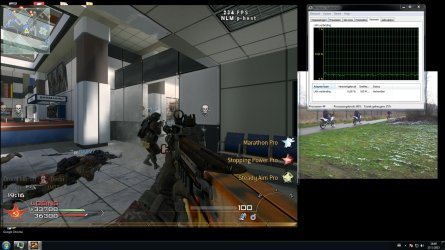
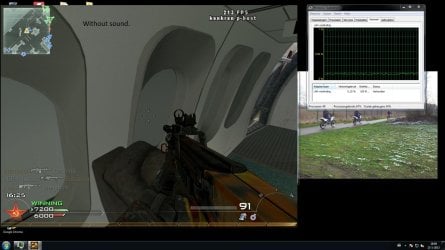
audio makes me game lagg.

to check my idea, place your network connection trend here, while using sound and while without sound.
you can see your net connection in task manager. try to have your task manager open, then run the game for some second play with (sound and lag) then play without sound for some sec. then show us your network trend...
this is the most probable issue
 

My Computer My Computer

OS
Windows 7 Ultimate x64
CPU
core i7.
Okay: modernwarfare 2 with and without sound.
 

Attachments

  • with sound.jpg
    with sound.jpg
    224.1 KB · Views: 16
  • without sound.jpg
    without sound.jpg
    173.6 KB · Views: 15

My Computer My Computer

OS
Windows 7 64 bit home premium
CPU
AMD FX-4170: 4X4.2Ghz
Motherboard
Asrock N68-VS3 FX
Memory
8GB DDR3-1600 (2X4GB)
Graphics Card(s)
AMD HD7770 Ghz-Edition 1GB GDDR5
Sound Card
Realtek audio
Monitor(s) Displays
Phillips 23"
Screen Resolution
1920x1080
Hard Drives
500 GB
PSU
420 Watt
Cooling
4 Fans
Keyboard
Medion
Mouse
Logitech
Internet Speed
50 MB
i also keep getting a blue screen error crash! i dont know how ? :(:(:((
 

My Computer My Computer

OS
Windows 7 64 bit home premium
CPU
AMD FX-4170: 4X4.2Ghz
Motherboard
Asrock N68-VS3 FX
Memory
8GB DDR3-1600 (2X4GB)
Graphics Card(s)
AMD HD7770 Ghz-Edition 1GB GDDR5
Sound Card
Realtek audio
Monitor(s) Displays
Phillips 23"
Screen Resolution
1920x1080
Hard Drives
500 GB
PSU
420 Watt
Cooling
4 Fans
Keyboard
Medion
Mouse
Logitech
Internet Speed
50 MB
Well, if you are online and playing with others then information could be coming through that is sound related. But without the sound on, that data is not needed, so it is not requested by your game client and would be lower bandwidth.

But you can now limit this down to specific instances. All games, but only when online and only when sound is enabled.

Glad you got help while I was out for the weekend. We are closer to limiting this down and fixing it...
 

My Computer My Computer

Computer type
Laptop
Computer Manufacturer/Model Number
ASUS G60-RBBX05
OS
Win7 Home Premium 64x
CPU
Intel Core 2 Duo P7450 / 2.13 GHz (2.29 with Extreme Turbo)
Memory
4 GB PC-6400 Hyundai (2X2) at 800Mhz
Graphics Card(s)
NVIDIA GeForce GTX 260M 1GB DDR3 VRAM
Monitor(s) Displays
16" LED Backlit
Screen Resolution
1366 x 768 on laptop 1600x1050 max res on 22" external mon
Hard Drives
OCZ Agility 3 60GB SSD / 320 GB - Serial ATA-150 - 7200 rpm
PSU
6-cell Lithium ion { lasts 1.5 hours }
Case
ASUS G60 Laptop
Keyboard
Chicklet type back-lit (white light) keyboard
Mouse
Logitech G9 Laser Mouse 3200dpi and 1000 reports per minute
Internet Speed
Comcast 8.60mb/s up - 3.11mb/s down
Antivirus
MSE
Browser
Firefox
Other Info
General mid-budget gaming Comp. Low batterylife - High FrameRates - currently overheating problems :(

2nd Rig: Case: Rosewill BLACKHAWK Gaming ATX Mid Tower Computer Case

Mobo: GIGABYTE GA-990FXA-UD3
CPU: AMD FX-6200 Zambezi 3.8GHz (4.1GHz Turbo)
Heatsink: COOLER MASTER V8 CPU Cooler
RAM: Patriot Viper 3 8GB (2 x 4GB) 240-Pin DDR3 SDRAM 1866 (PC3 15000)
GPU: SAPPHIRE Radeon HD 6850 1GB 2

My Computer My Computer

Computer type
Laptop
Computer Manufacturer/Model Number
ASUS G60-RBBX05
OS
Win7 Home Premium 64x
CPU
Intel Core 2 Duo P7450 / 2.13 GHz (2.29 with Extreme Turbo)
Memory
4 GB PC-6400 Hyundai (2X2) at 800Mhz
Graphics Card(s)
NVIDIA GeForce GTX 260M 1GB DDR3 VRAM
Monitor(s) Displays
16" LED Backlit
Screen Resolution
1366 x 768 on laptop 1600x1050 max res on 22" external mon
Hard Drives
OCZ Agility 3 60GB SSD / 320 GB - Serial ATA-150 - 7200 rpm
PSU
6-cell Lithium ion { lasts 1.5 hours }
Case
ASUS G60 Laptop
Keyboard
Chicklet type back-lit (white light) keyboard
Mouse
Logitech G9 Laser Mouse 3200dpi and 1000 reports per minute
Internet Speed
Comcast 8.60mb/s up - 3.11mb/s down
Antivirus
MSE
Browser
Firefox
Other Info
General mid-budget gaming Comp. Low batterylife - High FrameRates - currently overheating problems :(

2nd Rig: Case: Rosewill BLACKHAWK Gaming ATX Mid Tower Computer Case

Mobo: GIGABYTE GA-990FXA-UD3
CPU: AMD FX-6200 Zambezi 3.8GHz (4.1GHz Turbo)
Heatsink: COOLER MASTER V8 CPU Cooler
RAM: Patriot Viper 3 8GB (2 x 4GB) 240-Pin DDR3 SDRAM 1866 (PC3 15000)
GPU: SAPPHIRE Radeon HD 6850 1GB 2
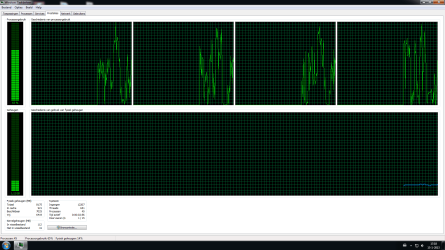
My pc started running realy realy slow out of nowhere, i dont get it! i cant even open games it will just freeze ths is what i discovered! im not even running anything :(
 

Attachments

  • Naamloos.png
    Naamloos.png
    25.9 KB · Views: 10

My Computer My Computer

OS
Windows 7 64 bit home premium
CPU
AMD FX-4170: 4X4.2Ghz
Motherboard
Asrock N68-VS3 FX
Memory
8GB DDR3-1600 (2X4GB)
Graphics Card(s)
AMD HD7770 Ghz-Edition 1GB GDDR5
Sound Card
Realtek audio
Monitor(s) Displays
Phillips 23"
Screen Resolution
1920x1080
Hard Drives
500 GB
PSU
420 Watt
Cooling
4 Fans
Keyboard
Medion
Mouse
Logitech
Internet Speed
50 MB
i got a strange problem.. blue screen error is gone, but now my pc keeps restarting? its realy annoying :(
 

My Computer My Computer

OS
Windows 7 64 bit home premium
CPU
AMD FX-4170: 4X4.2Ghz
Motherboard
Asrock N68-VS3 FX
Memory
8GB DDR3-1600 (2X4GB)
Graphics Card(s)
AMD HD7770 Ghz-Edition 1GB GDDR5
Sound Card
Realtek audio
Monitor(s) Displays
Phillips 23"
Screen Resolution
1920x1080
Hard Drives
500 GB
PSU
420 Watt
Cooling
4 Fans
Keyboard
Medion
Mouse
Logitech
Internet Speed
50 MB
You have to enable the dump file. In my post above with the tutorial, there are instructions on how to enable this. Without it enabled, the computer will just restart...
 

My Computer My Computer

Computer type
Laptop
Computer Manufacturer/Model Number
ASUS G60-RBBX05
OS
Win7 Home Premium 64x
CPU
Intel Core 2 Duo P7450 / 2.13 GHz (2.29 with Extreme Turbo)
Memory
4 GB PC-6400 Hyundai (2X2) at 800Mhz
Graphics Card(s)
NVIDIA GeForce GTX 260M 1GB DDR3 VRAM
Monitor(s) Displays
16" LED Backlit
Screen Resolution
1366 x 768 on laptop 1600x1050 max res on 22" external mon
Hard Drives
OCZ Agility 3 60GB SSD / 320 GB - Serial ATA-150 - 7200 rpm
PSU
6-cell Lithium ion { lasts 1.5 hours }
Case
ASUS G60 Laptop
Keyboard
Chicklet type back-lit (white light) keyboard
Mouse
Logitech G9 Laser Mouse 3200dpi and 1000 reports per minute
Internet Speed
Comcast 8.60mb/s up - 3.11mb/s down
Antivirus
MSE
Browser
Firefox
Other Info
General mid-budget gaming Comp. Low batterylife - High FrameRates - currently overheating problems :(

2nd Rig: Case: Rosewill BLACKHAWK Gaming ATX Mid Tower Computer Case

Mobo: GIGABYTE GA-990FXA-UD3
CPU: AMD FX-6200 Zambezi 3.8GHz (4.1GHz Turbo)
Heatsink: COOLER MASTER V8 CPU Cooler
RAM: Patriot Viper 3 8GB (2 x 4GB) 240-Pin DDR3 SDRAM 1866 (PC3 15000)
GPU: SAPPHIRE Radeon HD 6850 1GB 2
i dont get how to do it i just did the grab thingy
 

My Computer My Computer

OS
Windows 7 64 bit home premium
CPU
AMD FX-4170: 4X4.2Ghz
Motherboard
Asrock N68-VS3 FX
Memory
8GB DDR3-1600 (2X4GB)
Graphics Card(s)
AMD HD7770 Ghz-Edition 1GB GDDR5
Sound Card
Realtek audio
Monitor(s) Displays
Phillips 23"
Screen Resolution
1920x1080
Hard Drives
500 GB
PSU
420 Watt
Cooling
4 Fans
Keyboard
Medion
Mouse
Logitech
Internet Speed
50 MB
the instructions are here: http://www.sevenforums.com/tutorials/174459-dump-files-configure-windows-create-bsod.html

1. Open the Start Menu, copy and paste SystemPropertiesAdvanced.exe into the search box, and press Enter.

2. If prompted by UAC, then click on Yes (Windows 7) or Continue (Vista).

3. In the Advanced tab, click on the Settings button under Startup and Recovery. (see screenshot below)

4. Check both the Write an event to the system log and Automatically restart boxes. (see screenshots below)
 

My Computer My Computer

Computer type
Laptop
Computer Manufacturer/Model Number
ASUS G60-RBBX05
OS
Win7 Home Premium 64x
CPU
Intel Core 2 Duo P7450 / 2.13 GHz (2.29 with Extreme Turbo)
Memory
4 GB PC-6400 Hyundai (2X2) at 800Mhz
Graphics Card(s)
NVIDIA GeForce GTX 260M 1GB DDR3 VRAM
Monitor(s) Displays
16" LED Backlit
Screen Resolution
1366 x 768 on laptop 1600x1050 max res on 22" external mon
Hard Drives
OCZ Agility 3 60GB SSD / 320 GB - Serial ATA-150 - 7200 rpm
PSU
6-cell Lithium ion { lasts 1.5 hours }
Case
ASUS G60 Laptop
Keyboard
Chicklet type back-lit (white light) keyboard
Mouse
Logitech G9 Laser Mouse 3200dpi and 1000 reports per minute
Internet Speed
Comcast 8.60mb/s up - 3.11mb/s down
Antivirus
MSE
Browser
Firefox
Other Info
General mid-budget gaming Comp. Low batterylife - High FrameRates - currently overheating problems :(

2nd Rig: Case: Rosewill BLACKHAWK Gaming ATX Mid Tower Computer Case

Mobo: GIGABYTE GA-990FXA-UD3
CPU: AMD FX-6200 Zambezi 3.8GHz (4.1GHz Turbo)
Heatsink: COOLER MASTER V8 CPU Cooler
RAM: Patriot Viper 3 8GB (2 x 4GB) 240-Pin DDR3 SDRAM 1866 (PC3 15000)
GPU: SAPPHIRE Radeon HD 6850 1GB 2
I guess there is no fix to make my game run smooth with sound.......
i tried everything. .
 

My Computer My Computer

OS
Windows 7 64 bit home premium
CPU
AMD FX-4170: 4X4.2Ghz
Motherboard
Asrock N68-VS3 FX
Memory
8GB DDR3-1600 (2X4GB)
Graphics Card(s)
AMD HD7770 Ghz-Edition 1GB GDDR5
Sound Card
Realtek audio
Monitor(s) Displays
Phillips 23"
Screen Resolution
1920x1080
Hard Drives
500 GB
PSU
420 Watt
Cooling
4 Fans
Keyboard
Medion
Mouse
Logitech
Internet Speed
50 MB
i also still get the blue screen error.... but i discovered something .. when i try to download a windows update it says, Update failed
 

My Computer My Computer

OS
Windows 7 64 bit home premium
CPU
AMD FX-4170: 4X4.2Ghz
Motherboard
Asrock N68-VS3 FX
Memory
8GB DDR3-1600 (2X4GB)
Graphics Card(s)
AMD HD7770 Ghz-Edition 1GB GDDR5
Sound Card
Realtek audio
Monitor(s) Displays
Phillips 23"
Screen Resolution
1920x1080
Hard Drives
500 GB
PSU
420 Watt
Cooling
4 Fans
Keyboard
Medion
Mouse
Logitech
Internet Speed
50 MB
Sounds like you have more problems than expected. I don't know if the update issue is related...

If you are just running the updater, you could try going into it and selecting the updates individually and see which one is having the problem.

Also, post the BSoD stuff as the directions in the thread specified, that might be related.
 

My Computer My Computer

Computer type
Laptop
Computer Manufacturer/Model Number
ASUS G60-RBBX05
OS
Win7 Home Premium 64x
CPU
Intel Core 2 Duo P7450 / 2.13 GHz (2.29 with Extreme Turbo)
Memory
4 GB PC-6400 Hyundai (2X2) at 800Mhz
Graphics Card(s)
NVIDIA GeForce GTX 260M 1GB DDR3 VRAM
Monitor(s) Displays
16" LED Backlit
Screen Resolution
1366 x 768 on laptop 1600x1050 max res on 22" external mon
Hard Drives
OCZ Agility 3 60GB SSD / 320 GB - Serial ATA-150 - 7200 rpm
PSU
6-cell Lithium ion { lasts 1.5 hours }
Case
ASUS G60 Laptop
Keyboard
Chicklet type back-lit (white light) keyboard
Mouse
Logitech G9 Laser Mouse 3200dpi and 1000 reports per minute
Internet Speed
Comcast 8.60mb/s up - 3.11mb/s down
Antivirus
MSE
Browser
Firefox
Other Info
General mid-budget gaming Comp. Low batterylife - High FrameRates - currently overheating problems :(

2nd Rig: Case: Rosewill BLACKHAWK Gaming ATX Mid Tower Computer Case

Mobo: GIGABYTE GA-990FXA-UD3
CPU: AMD FX-6200 Zambezi 3.8GHz (4.1GHz Turbo)
Heatsink: COOLER MASTER V8 CPU Cooler
RAM: Patriot Viper 3 8GB (2 x 4GB) 240-Pin DDR3 SDRAM 1866 (PC3 15000)
GPU: SAPPHIRE Radeon HD 6850 1GB 2
the blue screen error is gone somehow, but i found something interesting, it seems like svchost.exe i using 99% PCU!
 

My Computer My Computer

OS
Windows 7 64 bit home premium
CPU
AMD FX-4170: 4X4.2Ghz
Motherboard
Asrock N68-VS3 FX
Memory
8GB DDR3-1600 (2X4GB)
Graphics Card(s)
AMD HD7770 Ghz-Edition 1GB GDDR5
Sound Card
Realtek audio
Monitor(s) Displays
Phillips 23"
Screen Resolution
1920x1080
Hard Drives
500 GB
PSU
420 Watt
Cooling
4 Fans
Keyboard
Medion
Mouse
Logitech
Internet Speed
50 MB
Anyone?! i realy need help with this, the most things are fixed!
 

My Computer My Computer

OS
Windows 7 64 bit home premium
CPU
AMD FX-4170: 4X4.2Ghz
Motherboard
Asrock N68-VS3 FX
Memory
8GB DDR3-1600 (2X4GB)
Graphics Card(s)
AMD HD7770 Ghz-Edition 1GB GDDR5
Sound Card
Realtek audio
Monitor(s) Displays
Phillips 23"
Screen Resolution
1920x1080
Hard Drives
500 GB
PSU
420 Watt
Cooling
4 Fans
Keyboard
Medion
Mouse
Logitech
Internet Speed
50 MB
So i though i finaly got rid of the Bios error, yesterday it happened again. so i decided to reinstall the pc, and after a while i got the error again :(
 

My Computer My Computer

OS
Windows 7 64 bit home premium
CPU
AMD FX-4170: 4X4.2Ghz
Motherboard
Asrock N68-VS3 FX
Memory
8GB DDR3-1600 (2X4GB)
Graphics Card(s)
AMD HD7770 Ghz-Edition 1GB GDDR5
Sound Card
Realtek audio
Monitor(s) Displays
Phillips 23"
Screen Resolution
1920x1080
Hard Drives
500 GB
PSU
420 Watt
Cooling
4 Fans
Keyboard
Medion
Mouse
Logitech
Internet Speed
50 MB
So i though i finaly got rid of the Bios error, yesterday it happened again. so i decided to reinstall the pc, and after a while i got the error again :(

Reinstalling windows isn't going to help if it didn't work the first time. Besides...formatting/reinstalling should be used as a last resort if nothing else works.
 

My Computer My Computer

Computer Manufacturer/Model Number
Custom
OS
Windows 7 Ultimate 32-Bit
CPU
Intel(R) Core(TM) i7 CPU 920 @ 2.67GHz
Motherboard
Gigabyte Technology Co., Ltd. EX58-UD3R
Memory
Corsair DDR3 4Gb
Graphics Card(s)
Nvidia Ge-Force GTS250
Sound Card
High Definition Audio Device
Monitor(s) Displays
Envision 19 inch
Screen Resolution
1280x1024
Hard Drives
2 physical hard drives (4 letter drives) that equal up to 626.3 gigs of space all together. I think both are Maxtors, but primary is a SATA drive, secondary is a SATA, too.
Case
"Elite" style case
Cooling
"Cooler Master"
Mouse
Microsoft Optical USB Mouse.
Internet Speed
Verizon DSL Internet
Back
Top