Audio not working: Windows 7 Ultimate x64

schnoid

New member
Local time
1:25 AM
Messages
11
I put my computer's stats in my details. My sound card is integrated on my motherboard. I've tried everything I've read on these forums. 1) installed audio drives (for win 7 x64) from my motherboard's website. 2) tried installing the latest Realtek drivers off their site. 3) tried installing both as administrator.

Not sure what I'm doing wrong, but I can't seem to figure it out. About to go back to Win XP cause of it. :(
 

My Computer My Computer

OS
Windows 7
CPU
Intel Core 2 Duo e6300
Motherboard
Gigabyte GA-965P-DS3 (rev. 3.3)
Memory
4GB
Sound Card
NVIDIA GeForce 7950 GX2
PSU
Corsair HX520W PSU
Case
Antec P180b
Click on Control panel, then click Troubleshooting, click view all (left side panel). Choose Playing Audio. See if anything gets resolved and let us know.
 

My Computer My Computer

Computer type
PC/Desktop
Computer Manufacturer/Model Number
Bruce ... somewhere in his 40's
OS
Windows 7 Ultimate 32bit SP1
CPU
Intel(R) Core(TM)2 Quad CPU @ 2.40GHz, 2400 MHz
Motherboard
INTEL/D975XBX2
Memory
4 GB
Graphics Card(s)
ATI Radeon HD 2600 Pro
Monitor(s) Displays
Samsung SyncMaster 914v
Screen Resolution
1280 x 1024
Hard Drives
2/500GB each ... ST3500630AS ATA Device.
One is not connected
PSU
Rocketfish 700 W
Case
G.Skill Gigabyte Chassis
Keyboard
Standard PS/2 Keyboard
Mouse
Microsoft PS/2 Mouse
Internet Speed
DSL
Antivirus
Avira Internet Security
Browser
IE 11
Other Info
ATI HDMI Audio
Click on Control panel, then click Troubleshooting, click view all (left side panel). Choose Playing Audio. See if anything gets resolved and let us know.

nope, not a thing unfortunately. :( Said it couldn't find anything wrong.
 

My Computer My Computer

OS
Windows 7
CPU
Intel Core 2 Duo e6300
Motherboard
Gigabyte GA-965P-DS3 (rev. 3.3)
Memory
4GB
Sound Card
NVIDIA GeForce 7950 GX2
PSU
Corsair HX520W PSU
Case
Antec P180b
How about when you play a file in Winamp or other software? Does the eq show it playing or does it give an error?

Could be you need to choose the correct output for playback devices. Especially if you recently installed a video card driver with HDMI capabilities.

Right click the speaker icon in the system tray. Choose playback devices. Right click on the correct one (Realtek Azalia or something like that) and choose it as default.

Yes, we know it's different coming from XP. heh heh
 

My Computer My Computer

Computer Manufacturer/Model Number
self built
OS
7600.20510 x86
CPU
P4 550 3.4 GHz HT running at 3.5 GHz
Motherboard
MSI PM8M3-V (MS-7211 v1.x) Micro-ATX mainboard
Memory
OCZ 2 GB(2x1GB) DDR400mHz running @ 414 mHz
Graphics Card(s)
HIS Radeon HD 3850 IceQ 3 Turbo HDMI Dual DL-DVI AGP
Sound Card
MOTU Traveler firewire studio interface 192 kHz 24 bit
Monitor(s) Displays
22" widescreen Acer X223W LCD, 17" Compaq P75 CRT
Screen Resolution
1680x1050 and 1280x1024
Hard Drives
SATA I x2 WD, 400 GB and 120 GB, SATA 2 WD Caviar Black 1 TB
PSU
350W generic
Case
Cybertronpc, it glows blue
Cooling
stock cpu fan, Ice-Q 3 gpu and system, many case fans
Keyboard
Logitch Classical Keyboard 200
Mouse
Logitech Mediaplay cordless
Internet Speed
1792/448 kbits/sec
Other Info
SATA II PCI fake RAID adapter, 1 GB Readyboost, original ATI Remote Wonder (even works with WMC perfectly), Logitech Rumblepad 2 game controller x2
Yes, when I play an audio file the eq does show that its playing. I've gone into the output device settings as you suggested and tried all combinations. "Realtek Digital Output" and ""Speakers" are the two options i have. I can use one or both. I've tried each and they didn't work. I just don't get how something as basic as audio doesn't work. I don't think I have any kind of strange setup or anything.

On a side note, I have logmein pro and can get audio to play perfectly through that, but listening to audio locally still doesn't work.
 

My Computer My Computer

OS
Windows 7
CPU
Intel Core 2 Duo e6300
Motherboard
Gigabyte GA-965P-DS3 (rev. 3.3)
Memory
4GB
Sound Card
NVIDIA GeForce 7950 GX2
PSU
Corsair HX520W PSU
Case
Antec P180b
If you have normal speakers plugged into the green 1/8" jack, then it should be "Speakers." I know it's rather basic but I just had this problem myself and it took me a second to figure out....is your volume slider up in the system tray?
 

My Computer My Computer

Computer Manufacturer/Model Number
self built
OS
7600.20510 x86
CPU
P4 550 3.4 GHz HT running at 3.5 GHz
Motherboard
MSI PM8M3-V (MS-7211 v1.x) Micro-ATX mainboard
Memory
OCZ 2 GB(2x1GB) DDR400mHz running @ 414 mHz
Graphics Card(s)
HIS Radeon HD 3850 IceQ 3 Turbo HDMI Dual DL-DVI AGP
Sound Card
MOTU Traveler firewire studio interface 192 kHz 24 bit
Monitor(s) Displays
22" widescreen Acer X223W LCD, 17" Compaq P75 CRT
Screen Resolution
1680x1050 and 1280x1024
Hard Drives
SATA I x2 WD, 400 GB and 120 GB, SATA 2 WD Caviar Black 1 TB
PSU
350W generic
Case
Cybertronpc, it glows blue
Cooling
stock cpu fan, Ice-Q 3 gpu and system, many case fans
Keyboard
Logitch Classical Keyboard 200
Mouse
Logitech Mediaplay cordless
Internet Speed
1792/448 kbits/sec
Other Info
SATA II PCI fake RAID adapter, 1 GB Readyboost, original ATI Remote Wonder (even works with WMC perfectly), Logitech Rumblepad 2 game controller x2
Believe it or not, audio while it seems simple really isn't simple at all. In fact the entire sound sublayer has been rebuilt in Win 7 so that an errant sound byte doesn't crash the entire system.

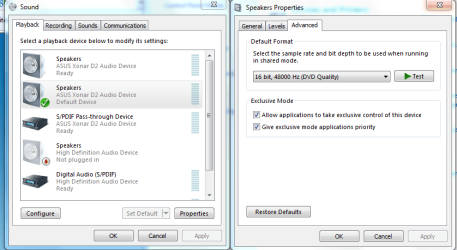
There is a chance that you aren't seeing all of your play back devices. If you go into the Windows audio sound panel right click and choose to show disabled devices. There may be some sound devices or analog speakers you don't have access too unless you do that first.

Also you may need to switch over to DVD playback at 48000, this has fixed quite few systems that had no sound. See picture.
 

Attachments

  • 48000 DVD quality.PNG
    48000 DVD quality.PNG
    31.3 KB · Views: 304

My Computer My Computer

Computer type
PC/Desktop
Computer Manufacturer/Model Number
Home built
OS
Windows 7 Ult, Windows 8.1 Pro,
CPU
Q9650-4.275GHz, E8600 4.5GHz, E6750-3.8GHz
Motherboard
Evga 780i FTW
Memory
G.Skill PC2 9600 1200Mhz 5 5 5 15 2T
Graphics Card(s)
GTX480
Sound Card
Asus Xonar D2
Monitor(s) Displays
HannsG
Screen Resolution
1680X1050
Hard Drives
GSkill Phoenix Pro 120GB SSD
PSU
ThermalTake Toughpower 1000Watt modular
Case
ThermalTake XaserV
Cooling
Xigmatek S1283
Keyboard
Logitech G15
Mouse
Logitech G9
Internet Speed
T1
wow. I have no idea what happened, but apparently I moved around some of my speaker jacks and amazingly it worked! I don't understand why it was working in XP when it was plugged in with a different configuration, but it works, so I'm not gonna question it. Now onto fixing my other problems!!! Thank you so much everyone for your help.

(If anyone knows why Logmein runs so laggy as a server in Win 7, please let me know)
 

My Computer My Computer

OS
Windows 7
CPU
Intel Core 2 Duo e6300
Motherboard
Gigabyte GA-965P-DS3 (rev. 3.3)
Memory
4GB
Sound Card
NVIDIA GeForce 7950 GX2
PSU
Corsair HX520W PSU
Case
Antec P180b
Glad you got it working again.
 

My Computer My Computer

Computer type
PC/Desktop
Computer Manufacturer/Model Number
Home built
OS
Windows 7 Ult, Windows 8.1 Pro,
CPU
Q9650-4.275GHz, E8600 4.5GHz, E6750-3.8GHz
Motherboard
Evga 780i FTW
Memory
G.Skill PC2 9600 1200Mhz 5 5 5 15 2T
Graphics Card(s)
GTX480
Sound Card
Asus Xonar D2
Monitor(s) Displays
HannsG
Screen Resolution
1680X1050
Hard Drives
GSkill Phoenix Pro 120GB SSD
PSU
ThermalTake Toughpower 1000Watt modular
Case
ThermalTake XaserV
Cooling
Xigmatek S1283
Keyboard
Logitech G15
Mouse
Logitech G9
Internet Speed
T1
Back
Top