Solved Audio Service is not running Error Message

Duchess

New member
Member
Local time
8:14 AM
Messages
70
Location
New Jersey
There is a red x on my speaker icon, when ticked it displays the message in the thread title. I still have all of my selected wav sounds, so what does the error mean and how can it be fixed?

All help will be appreciated.

Duchess
 

My Computer My Computer

Computer Manufacturer/Model Number
Dell Inspiron 400
OS
Windows 7 Home Premium 64-bit
CPU
AMD Athlon
Motherboard
Dell 03D1TV
Memory
3.00 GB
Graphics Card(s)
ATI Radeon HD3200
Sound Card
ATI High Definition
Monitor(s) Displays
Samsung SyncMaster
Hard Drives
527 GB
PSU
unknown
Case
unknown
Cooling
unknown
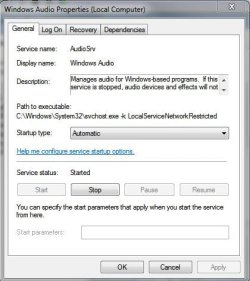
Go to the run command line and type in services.msc the services management console will arrive. Look down the list and find that service, according to that message it should say, stopped.
Right click that line and select properties, you should get this.
services.JPG

You want to click the start button and then ensure the start up type is automatic, there is a n arrow at the end of the long bar, you can select the option you want, such as manual, automatic etc.
I would be happy if you tried this and let us know the results.

:geek:
 

My Computer My Computer

Computer Manufacturer/Model Number
DIY
OS
Windows 7 home premium x64
CPU
AMD FX-4100 AM3+ 3.6GHz 12MB Black Edition
Motherboard
Asus M5A97 Pro
Memory
Crsair vengeance 12Gb DDR3 1600MHz CL9
Graphics Card(s)
Asus GTX 560 1GB
Sound Card
Realtek onboard
Monitor(s) Displays
Hanns G 1680x1050 native
Hard Drives
OCZ 128Gb Petrol ssd
2x500 Gb Samsung
PSU
OCZ StealthXstream II 500W
Internet Speed
8Mb or better
Based on what you've posted about your system specs, the ATI High Definition is NOT your sound device, it is the sound device for HDMI audio.

Also, there is no Inspiron 400 listed in the Inspiron Laptop Models. Please confirm the Model number. I do a lot of user support on the Dell users forum, maybe I can get it straightened out for you, but I need the correct model number.
 

My Computer My Computer

Computer type
PC/Desktop
Computer Manufacturer/Model Number
My Own Build
OS
Windows 10 64 bit
CPU
Intel i7 6700K
Motherboard
ASUS ROG Maximus VIII Hero
Memory
16GB Corsair Dominator
Graphics Card(s)
Intel CPU Graphics
Sound Card
RealTek
Monitor(s) Displays
27" Dell S2719dgf
Screen Resolution
2560X1440
Hard Drives
1 TB Samsung 850 EVO SSD for Win 10 Pro
500GB Samsung 850 EVO SSD for Win 10 Insider
2 TB drive for backup
PSU
EVGA Supernova 750G2
Case
BeQuiet Silent Base 600
Cooling
Deepcool Captain 120EX
Keyboard
Microsoft Wireless 2000
Mouse
Microsoft wireless
Internet Speed
100 MB/sec (Cable)
Antivirus
Microsoft Defender and Malwarebytes
Browser
Edge/Firefox
Other Info
Cakewalk (Sonar) by BandLab and Studio One 4.1 Pro recording studio software. MOTU 896Mk3 Hybrid recording interface, Frontier Tranzport wireless control unit, Behringer X-Touch Control Surface.
Five USB connected optical drives for CD Audio production using Nero BurningROM
Go to the run command line and type in services.msc the services management console will arrive. Look down the list and find that service, according to that message it should say, stopped.
Right click that line and select properties, you should get this.
View attachment 206928

You want to click the start button and then ensure the start up type is automatic, there is a n arrow at the end of the long bar, you can select the option you want, such as manual, automatic etc.
I would be happy if you tried this and let us know the results.

:geek:

There is no Audio Service listed in Services. Any further suggestions, I surely hope so.
 

My Computer My Computer

Computer Manufacturer/Model Number
Dell Inspiron 400
OS
Windows 7 Home Premium 64-bit
CPU
AMD Athlon
Motherboard
Dell 03D1TV
Memory
3.00 GB
Graphics Card(s)
ATI Radeon HD3200
Sound Card
ATI High Definition
Monitor(s) Displays
Samsung SyncMaster
Hard Drives
527 GB
PSU
unknown
Case
unknown
Cooling
unknown
Based on what you've posted about your system specs, the ATI High Definition is NOT your sound device, it is the sound device for HDMI audio.

Also, there is no Inspiron 400 listed in the Inspiron Laptop Models. Please confirm the Model number. I do a lot of user support on the Dell users forum, maybe I can get it straightened out for you, but I need the correct model number.
I think it may a HTPC. Maybe this one?
Dell Inspiron Zino HD HTPC - Home Theater Media Center PC | Dell
 

My Computer My Computer

Computer type
PC/Desktop
Computer Manufacturer/Model Number
Built 2/11/2011
OS
Windows 7 Pro-x64
CPU
i7-2600 3.4GHz - 3.8GHz Turbo
Motherboard
Intel DH67BL-B3
Memory
8Gb - 2x4GB, Muskin 991770 PC3-1333
Graphics Card(s)
Integrated Intel HD 2000
Sound Card
Integrated Intel 10.1 HD, RealTek ALC892
Monitor(s) Displays
Asus LCD VH222H, Haier HL24XSL2a
Screen Resolution
1920x1080, 1920x1080
Hard Drives
Crucial SSD C300-128Gb,
Western Digital WD5002AALX - 500Gb,
Western Digital WD7501AALS - 750Gb
PSU
Seasonic 650W 80+ Gold Modular
Case
Rosewill Defender
Cooling
Stock CPU, Four 120mm case fans, PCH fan added
Keyboard
Logitech EX100 Y-RBH94 Wireless
Mouse
Logitech EX100 M-RCE95 Wireless
Internet Speed
3.0/1.5 Mbs
Antivirus
Microsoft Security Essentials
Browser
Microsoft Internet Explorer 11
Other Info
Antec Veris Premier-Multimedia IR Station,
Cyber Accoustics-3602 Speakers,
AFT XM-5U Card Reader,
Hauppauge TV-HVR-2250,
Sony LX300 USB Turntable
click on the volume icon in the systems tray and slide the volume up or down ,this will rid you of the red x ,
i get it most times i boot ,i think its a bug, lots of people have this issue despite the audio service running
 

My Computer My Computer

Computer Manufacturer/Model Number
Hewlett packard/p6512uk
OS
Microsoft Windows 7 Home Premium 64-bit 7600
CPU
IIx4 amd athelon 635 processor
Motherboard
FOXCONN 2AA9
Memory
2x2gb
Graphics Card(s)
ati radeon HD 5450
Sound Card
(1) Realtek High Definition Audio (2) AMD High Definition
Monitor(s) Displays
samsung lcd tv 32"
Screen Resolution
1360x 768
Hard Drives
(1) WDC WD10 01FAES-60Z2A0 SATA Disk Device (2) Maxtor OneTouch USB Device (3) ST310003 33AS USB Device (4) WD My Book 1111 USB Device
PSU
?
Cooling
air!
Keyboard
wireless hp
Mouse
wireless Hp,optical
Internet Speed
1.10mb/s
Antivirus
MSE
Browser
Firefox
As above (boohbah you absolute SOB, I had forgotten about that hypnotising and terrifying children's show), this is a common problem. Upon logon the audio service icon displays as not running as you said Duchess, but is in fact working perfectly. Is this the case with you?

If so, a simple logoff/on clears it up and will also fix the "No network (but network still works)" problem if you have that.
I can't say that just adjusting the volume slider has ever reset the icon for me. It seems a lot of these minor glitches are luck of the draw.
 

My Computer My Computer

Computer Manufacturer/Model Number
Custom
OS
Windows 7 Ultimate 64-bit
CPU
AMD Phenom II X4 955 Black OC'ed 4.0GHz
Motherboard
Asus M5A88-V EVO
Memory
8GB Mushkin Enhanced Silverline (2x4GB) 1333
Graphics Card(s)
XFX Radeon HD6870 1024MB GDDR5 OC'ed 945MHz; 1151MHz
Sound Card
Soundblaster X-Fi Xtreme PCIe
Monitor(s) Displays
32" Hannspree SE32LMNB
Screen Resolution
1920 x 1080
Hard Drives
250GB Hitachi Deskstar (OS); 2TB Western Digital Elements
PSU
650W XFX XXX Edition 80PLUS Bronze Modular
Case
Cougar 6GR1 Evolution
Cooling
Corsair H60 p/p 120mm; Zalman VF3000A; x4 120mm; x1 140mm
Keyboard
Logitech G510
Mouse
CM Storm Sentinel Advance Zero-G
Internet Speed
Not fast enough :I
Other Info
No matter what your specs, my PC is better.
Very odd, if there is none listed, how can it give the message you posted ?
 

My Computer My Computer

Computer Manufacturer/Model Number
DIY
OS
Windows 7 home premium x64
CPU
AMD FX-4100 AM3+ 3.6GHz 12MB Black Edition
Motherboard
Asus M5A97 Pro
Memory
Crsair vengeance 12Gb DDR3 1600MHz CL9
Graphics Card(s)
Asus GTX 560 1GB
Sound Card
Realtek onboard
Monitor(s) Displays
Hanns G 1680x1050 native
Hard Drives
OCZ 128Gb Petrol ssd
2x500 Gb Samsung
PSU
OCZ StealthXstream II 500W
Internet Speed
8Mb or better
This Zino 400 has a Conexant sound chip. HERE is the Dell sound driver. Reinstall this driver and then check the Control Panel/Hardware and Sound and finally the Sound panel/playback. Your "speakers" should be set as the default audio playback device (if you are not using the HDMI output).
 

My Computer My Computer

Computer type
PC/Desktop
Computer Manufacturer/Model Number
My Own Build
OS
Windows 10 64 bit
CPU
Intel i7 6700K
Motherboard
ASUS ROG Maximus VIII Hero
Memory
16GB Corsair Dominator
Graphics Card(s)
Intel CPU Graphics
Sound Card
RealTek
Monitor(s) Displays
27" Dell S2719dgf
Screen Resolution
2560X1440
Hard Drives
1 TB Samsung 850 EVO SSD for Win 10 Pro
500GB Samsung 850 EVO SSD for Win 10 Insider
2 TB drive for backup
PSU
EVGA Supernova 750G2
Case
BeQuiet Silent Base 600
Cooling
Deepcool Captain 120EX
Keyboard
Microsoft Wireless 2000
Mouse
Microsoft wireless
Internet Speed
100 MB/sec (Cable)
Antivirus
Microsoft Defender and Malwarebytes
Browser
Edge/Firefox
Other Info
Cakewalk (Sonar) by BandLab and Studio One 4.1 Pro recording studio software. MOTU 896Mk3 Hybrid recording interface, Frontier Tranzport wireless control unit, Behringer X-Touch Control Surface.
Five USB connected optical drives for CD Audio production using Nero BurningROM
This Zino 400 has a Conexant sound chip. HERE is the Dell sound driver. Reinstall this driver and then check the Control Panel/Hardware and Sound and finally the Sound panel/playback. Your "speakers" should be set as the default audio playback device (if you are not using the HDMI output).

Thank you fireberd for the link, but the problem has disappeared. On start up this morning the error mark attached o the speaker icon is gone. Perhaps all that was required was a reboot.
 

My Computer My Computer

Computer Manufacturer/Model Number
Dell Inspiron 400
OS
Windows 7 Home Premium 64-bit
CPU
AMD Athlon
Motherboard
Dell 03D1TV
Memory
3.00 GB
Graphics Card(s)
ATI Radeon HD3200
Sound Card
ATI High Definition
Monitor(s) Displays
Samsung SyncMaster
Hard Drives
527 GB
PSU
unknown
Case
unknown
Cooling
unknown
Reboots fix a lot of flakey problems. If it comes back, reinstall the Dell driver and see if that helps.

Thanks for the feedback, we usually do not get that.
 

My Computer My Computer

Computer type
PC/Desktop
Computer Manufacturer/Model Number
My Own Build
OS
Windows 10 64 bit
CPU
Intel i7 6700K
Motherboard
ASUS ROG Maximus VIII Hero
Memory
16GB Corsair Dominator
Graphics Card(s)
Intel CPU Graphics
Sound Card
RealTek
Monitor(s) Displays
27" Dell S2719dgf
Screen Resolution
2560X1440
Hard Drives
1 TB Samsung 850 EVO SSD for Win 10 Pro
500GB Samsung 850 EVO SSD for Win 10 Insider
2 TB drive for backup
PSU
EVGA Supernova 750G2
Case
BeQuiet Silent Base 600
Cooling
Deepcool Captain 120EX
Keyboard
Microsoft Wireless 2000
Mouse
Microsoft wireless
Internet Speed
100 MB/sec (Cable)
Antivirus
Microsoft Defender and Malwarebytes
Browser
Edge/Firefox
Other Info
Cakewalk (Sonar) by BandLab and Studio One 4.1 Pro recording studio software. MOTU 896Mk3 Hybrid recording interface, Frontier Tranzport wireless control unit, Behringer X-Touch Control Surface.
Five USB connected optical drives for CD Audio production using Nero BurningROM
click on the volume icon in the systems tray and slide the volume up or down ,this will rid you of the red x ,
i get it most times i boot ,i think its a bug, lots of people have this issue despite the audio service running

Thank You! so much boohbah.. this has been giving me a headache tried loads of things to no avail and simply moving the slider up & down worked for me.. cheers!:D
 

My Computer My Computer

Computer type
Laptop
Computer Manufacturer/Model Number
acer
OS
windows 7 starter 32 bit
CPU
Intel Atom 1.66 GHz
Memory
2 GB
Hard Drives
250GB
Antivirus
microsoft security essentials
Browser
google chrome
click on the volume icon in the systems tray and slide the volume up or down ,this will rid you of the red x ,
i get it most times i boot ,i think its a bug, lots of people have this issue despite the audio service running

Worked for me. Thanks.
 

My Computer My Computer

Computer type
PC/Desktop
OS
Windows 7 home64 bit
Back
Top